
Phone with Twilio
Give your chatbot a phone number by pointing a number you already own at one webhook URL.
The phone channel lets a caller ask your chatbot a question out loud. Twilio runs the call — it answers the number, turns speech into text, and speaks the reply — and asks your chatbot for the words to say. Every call lands in Chat logs with a Phone label, beside your website and email conversations.
The whole setup is one URL pasted into a number you already own. Denser never holds your Twilio credentials, and the number never leaves your account: your carrier, your bill, your console.
Twilio is one of two options
The dashboard also offers Vapi, which buys or brings its own number and adds call transfers and a number pool. Twilio suits teams who already own the number they want to use. Pick one — a number can only ring one of them.
Before you start
You need a Twilio account and a phone number on it with Voice capability. On the number's row in Phone Numbers → Manage → Active numbers, Voice shows as enabled without a "Registration required" note beside it.
The registration prompts Twilio shows for SMS and MMS — A2P, SHAKEN/STIR, CNAM, Branded Calling — do not apply here. They govern outbound calls and text messages; this channel only receives calls.
Connect your number
Create the webhook URL. Open your chatbot, go to Deploy → Phone, and select the Twilio tab. Click Create a webhook URL.
Denser generates one URL for this chatbot. The token in it is the credential — there is nowhere in Twilio's console to add a header, so the URL itself is what proves the call is yours. Treat it like a key, and regenerate it if it leaks.
Open the number's voice configuration. In the Twilio console, go to Phone Numbers → Manage → Active numbers and click the number. Under Voice Configuration, set A call comes in to Webhook.
Paste the URL.
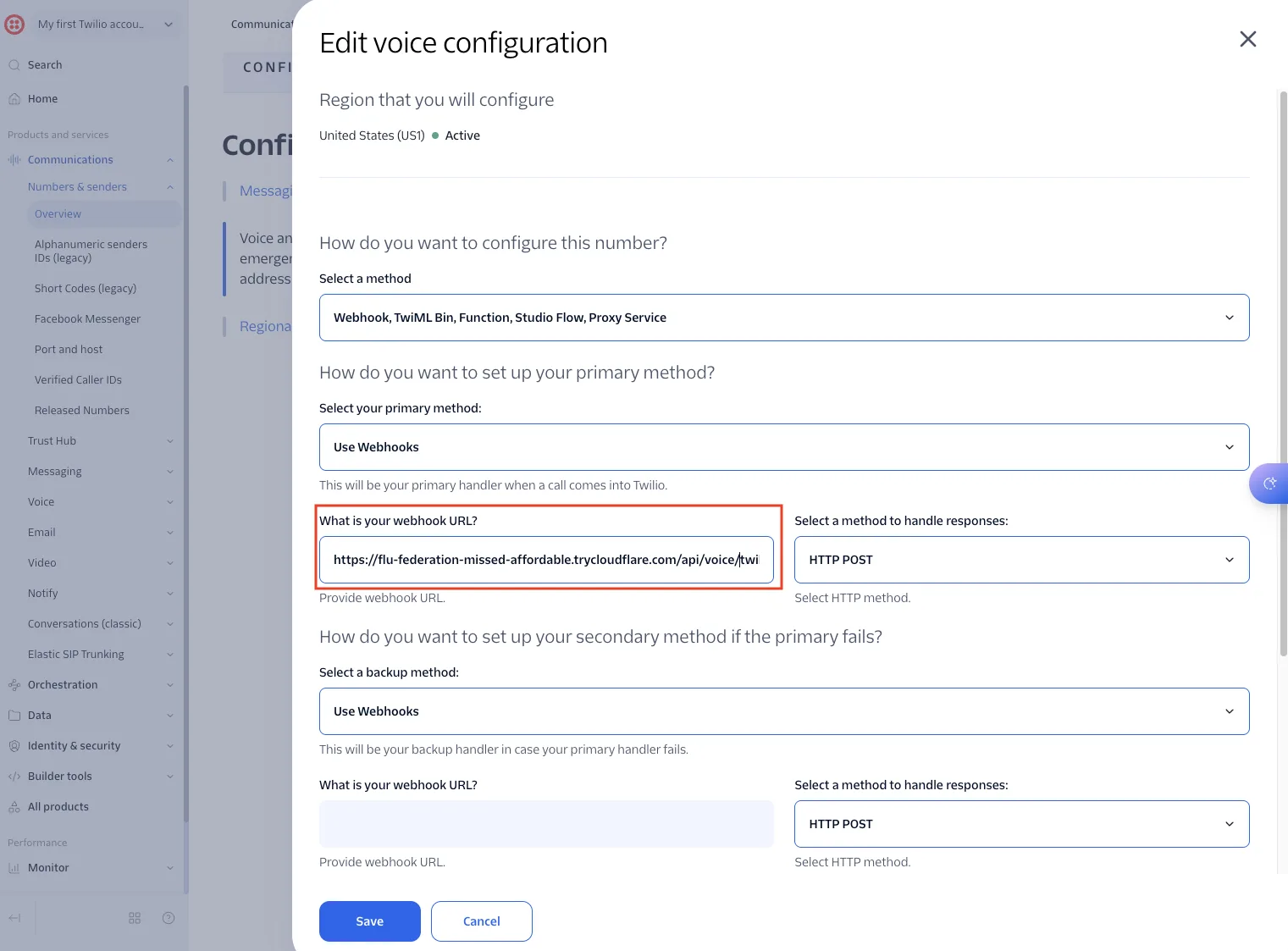
Paste the URL from the Twilio tab into What is your webhook URL? and save. HTTP POST is the usual choice, but either method works — we accept both, because picking the wrong one is otherwise a silent failure with nothing in the console to explain it.
Leave the secondary handler empty unless you have your own fallback in mind.
Set a greeting. On the Twilio tab, write the first thing a caller hears. Twilio speaks it while the connection opens, which hides most of the wait before the first answer.
Call it. The conversation should appear in Chat logs labelled Phone, and in the Helpdesk as a ticket carrying the caller's number.
What each field maps to
| In Twilio | What to put there |
|---|---|
| A call comes in | Webhook, with the URL from the Twilio tab. |
| HTTP method | POST or GET. Both are accepted. |
| Primary handler fails | Optional. Leave empty unless you run your own fallback. |
| Messaging configuration | Not used. This channel is voice only. |
Everything about the conversation itself — the greeting, the voice, the language, and the instructions that apply to spoken answers — lives on the Phone card in Denser rather than in Twilio.
Where calls appear
- Helpdesk — one ticket per call, with the number to ring back. A call has no live take-over, because nothing in the queue can answer a ringing phone.
- Chat logs — the transcript, labelled Phone.
Troubleshooting
The caller hears the carrier's message and hangs up. Three different causes produce this identical result, deliberately — an attacker probing URLs learns nothing from it. In order of likelihood: the phone channel is switched off on the chatbot; the URL was pasted with a character missing or an extra space; or the URL belongs to a different chatbot. Re-copy it from the Twilio tab.
The call connects, then silence. Twilio reached us but could not open the socket back. The socket address is derived from the address Twilio called, so this is almost always an intermediary — a proxy or tunnel in front of Denser that terminates the connection or rewrites the host. Twilio's Monitor → Logs → Errors shows the failure.
Answers are right but slow to start. The first turn of a call includes retrieval against your data sources, and a caller notices a pause in a way a chat visitor does not. The greeting exists to cover it; a longer greeting covers more of it.
The transcript has the wrong words. Speech recognition, not the answer. Product names and unusual vocabulary are what generic speech models get wrong most often — check the transcript in Chat logs against what you actually said before adjusting the chatbot's prompt, because the two failures look identical from the caller's side.