
Plans and Billing
Manage your workspace's plans and billing information
Plans & Billing helps you scale on your terms--upgrade when you're ready, add seats or credits on demand, and keep finance in the loop with clear invoices.
Navigate to Plans & Billing
In the workspace sidebar, click Plans to manage subscriptions and add-ons, or Billing to review payment details and invoices.
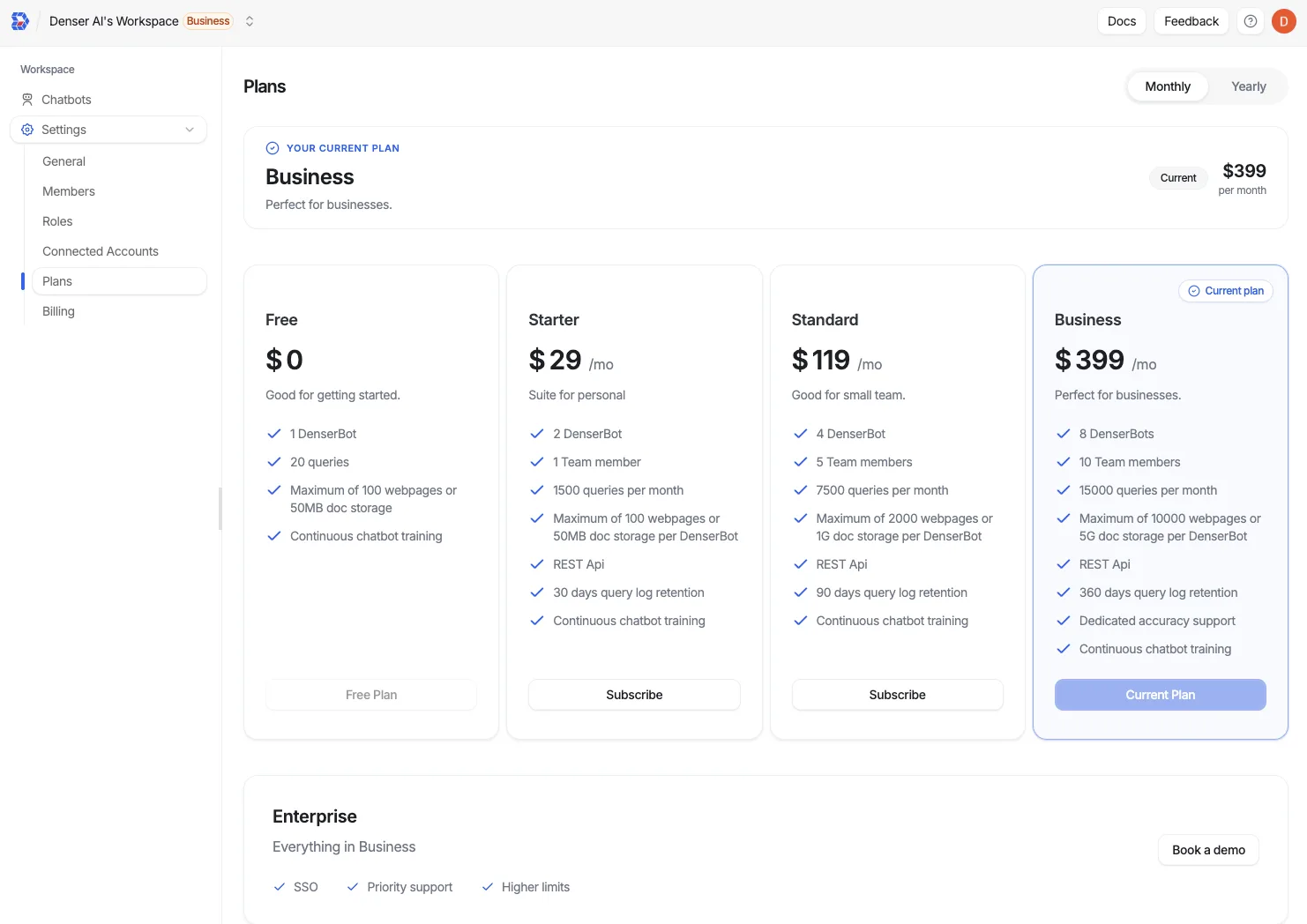
Review available plans
Compare the Free Trial, Starter, Standard, and Business tiers. Each card highlights included features and limits, such as your storage quota and crawl quota (the number of website links you can crawl). Helpdesk — the ticket queue, the Talk to a person hand-off, and third-party ticket actions — starts on Standard.
Select billing cadence
Toggle Monthly/Yearly to see pricing. Annual subscriptions include a 20% discount.
Upgrade instantly
Click Subscribe on the plan you want. Changes take effect right away across your workspace.
Need more workspace members? Buy Team Member Seat add-ons here--see Team Management for per-plan seat limits.
Need help deciding?
Reach out to support@denser.ai for plan recommendations tailored to your usage.