

RAG vs MCP: What's the Difference, and Why the Best Setups Use Both

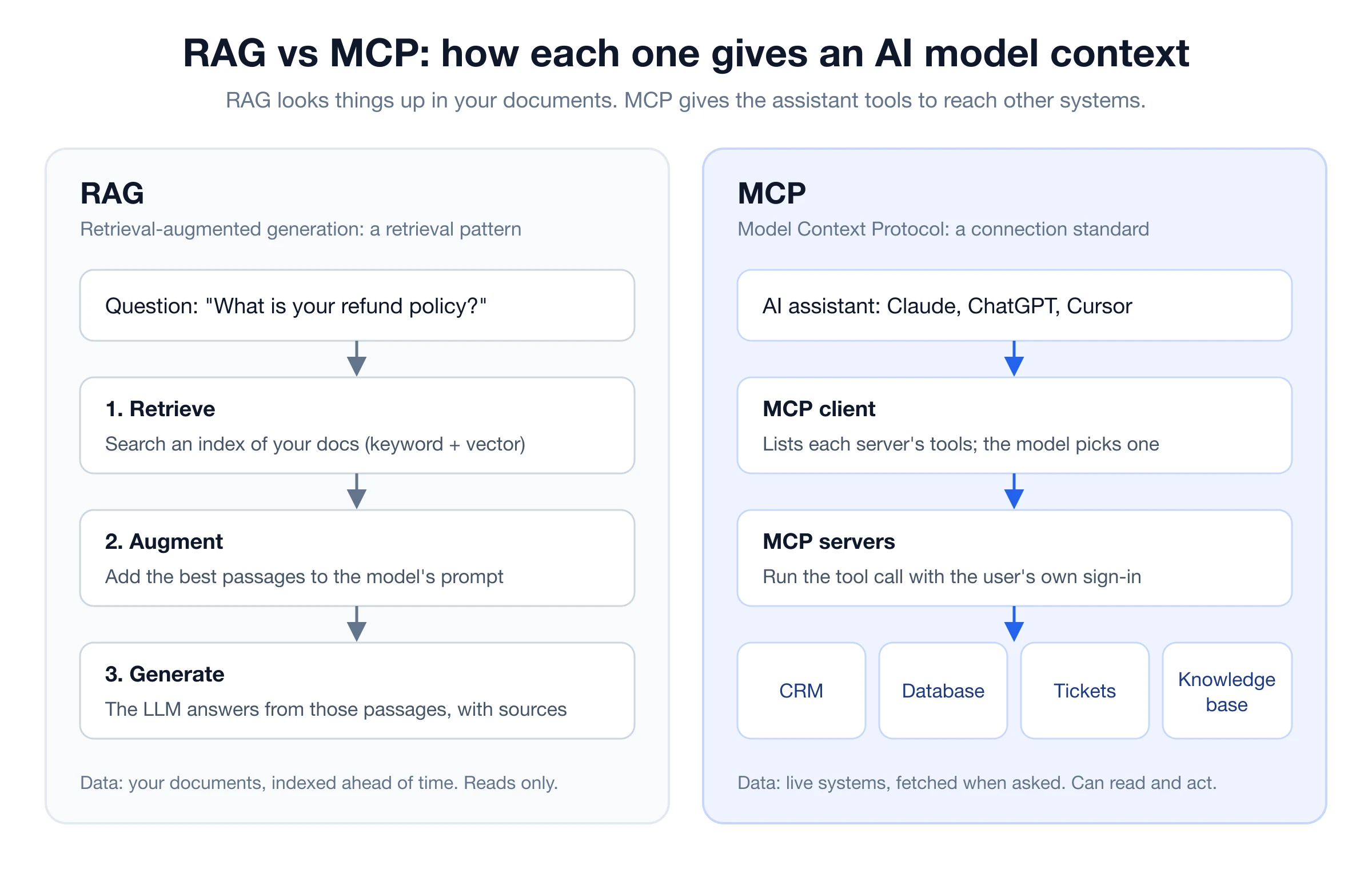
RAG and MCP are not competitors. RAG (retrieval-augmented generation) is a technique: search your documents, put the best passages in front of the model, and let it answer from them. MCP (Model Context Protocol) is a standard: a common way for an AI assistant such as Claude or ChatGPT to discover and call tools that live outside it. RAG decides what knowledge the model sees. MCP decides how the assistant reaches a system, whether that system is a CRM, a database, or a RAG pipeline.
| RAG | MCP | |
|---|---|---|
| What it is | A retrieval pattern | An open protocol for tools and data |
| Main job | Ground answers in your documents | Connect an assistant to external systems |
| Data | Unstructured text, indexed ahead of time | Live systems, queried when the model asks |
| Reads or acts? | Reads | Reads and, with permission, acts |
| Who chooses the source? | The retriever, by relevance | The model, by picking a tool |
| Typical output | An answer with citations | A tool result the model reasons over |
| Best for | Policies, docs, help centers, product knowledge | Tickets, orders, CRM records, live status |
| Works with the other? | Yes: expose retrieval as an MCP tool | Yes: call a RAG system as one of its tools |
If you remember one line: use RAG to find the right words in your documents, use MCP to let Claude, ChatGPT or Cursor reach that knowledge, and everything else, from where people already work.
What RAG does#
Retrieval-augmented generation gives a language model an open book. When a question comes in, a retriever searches an index of your content (web pages, PDFs, help-center articles, Q&A pairs), picks the passages most likely to contain the answer, and adds them to the prompt. The model then writes its answer from those passages and can cite them.
Three things make RAG work well in practice:
- Good retrieval. Most wrong RAG answers are retrieval misses, not model mistakes. Combining keyword and vector search, then reranking the results, catches far more of the right passages than either alone. We cover the details in hybrid search for RAG.
- Sensible chunking. Passages need to be small enough to be precise and large enough to make sense on their own. See RAG chunking strategies.
- A fresh index. RAG only knows what you indexed. When a policy changes, the index has to change with it.
RAG's limits follow from its design. It reads; it does not act. It works best on text that changes slowly. And it answers from whatever it retrieved, so it cannot tell you today's order status unless someone indexed it a minute ago.
What MCP does#
The Model Context Protocol is an open standard, introduced by Anthropic in November 2024 and since adopted across the industry, including by OpenAI. It defines how an AI application (the client) talks to an external service (the server).
An MCP server publishes a list of tools, each with a name, a description and typed inputs. The assistant reads that list, decides which tool fits the user's request, and calls it. The server runs the call, usually as the signed-in user via OAuth, and returns the result for the model to use.
That gives MCP a few properties RAG doesn't have:
- Live data. The server fetches what is true right now: a ticket's status, a customer's plan, last week's analytics.
- Actions. Tools can create, update or send things, with the assistant asking the user before it does.
- Write once, use everywhere. One MCP server works in Claude, ChatGPT, Cursor and any other client that speaks the protocol, instead of one custom integration per assistant.
- Per-user permissions. Each person signs in and grants scopes, so the assistant sees what that person is allowed to see.
What MCP does not do is decide how good the content is. If a tool returns the wrong passage, the model reasons over the wrong passage. MCP is the plumbing; the quality of the water depends on what is behind it.
RAG vs MCP: the differences that matter#
The two are often compared as if they were alternatives. The useful comparison is about where each one sits in your system.
1. Pattern vs protocol#
RAG is a way of building an answer. MCP is a way of connecting software. You can implement RAG without MCP (most website chatbots do), and you can use MCP without RAG (a GitHub or Stripe server has nothing to retrieve). Asking "RAG or MCP?" is a bit like asking "search engine or HTTP?"
2. Who picks the context#
In RAG, the retriever chooses what the model sees, by relevance score, before the model starts writing. With MCP, the model chooses which tool to call and with what arguments. That makes MCP more flexible (the model can ask a follow-up query, or call a different system) and also less predictable: a model that picks the wrong tool, or never calls one, gets no grounding at all.
3. Static knowledge vs live state#
RAG shines on content that is written once and read many times: policies, product docs, onboarding guides, pricing pages. MCP shines on state that changes by the minute: open tickets, inventory, a user's account. Most support questions mix both. "Can I return this?" needs the return policy (RAG) and the order date (MCP).
4. Reading vs acting#
RAG only reads. MCP tools can also write, which is why MCP clients ask for approval before running a tool, and why good servers mark which tools only read and which change something.
5. Context cost#
RAG sends the model a handful of relevant passages. An MCP tool that returns a whole document, or a long list of records, can fill the context window with text the model doesn't need. The best MCP servers return focused, sized results, which is exactly what a retriever is good at.
When to use RAG, MCP, or both#
Use RAG alone when the questions are about your content and the answers live in documents: a website support bot answering policy and product questions, an internal help desk over your wiki, a docs assistant. You want citations, consistent answers and low cost per question.
Use MCP alone when the task is about live systems or actions and there is little unstructured text to search: creating a Jira issue, looking up a Stripe customer, querying a database, posting to Slack.
Use both when people want your knowledge inside the tools they already use. Your support team works in Claude or ChatGPT all day; your developers live in Cursor. Rather than copying documents into each assistant, or building a separate integration for each, you keep one well-tuned RAG index and expose it to every assistant through MCP. That is the pattern most teams end up with, and it's the one worth looking at in detail.
Using both: serve RAG over MCP#
The cleanest way to combine the two is to make retrieval itself an MCP tool. The assistant doesn't need to know about embeddings, chunk sizes or rerankers. It calls a tool such as "search the knowledge base" and gets back the best passages, with their sources.
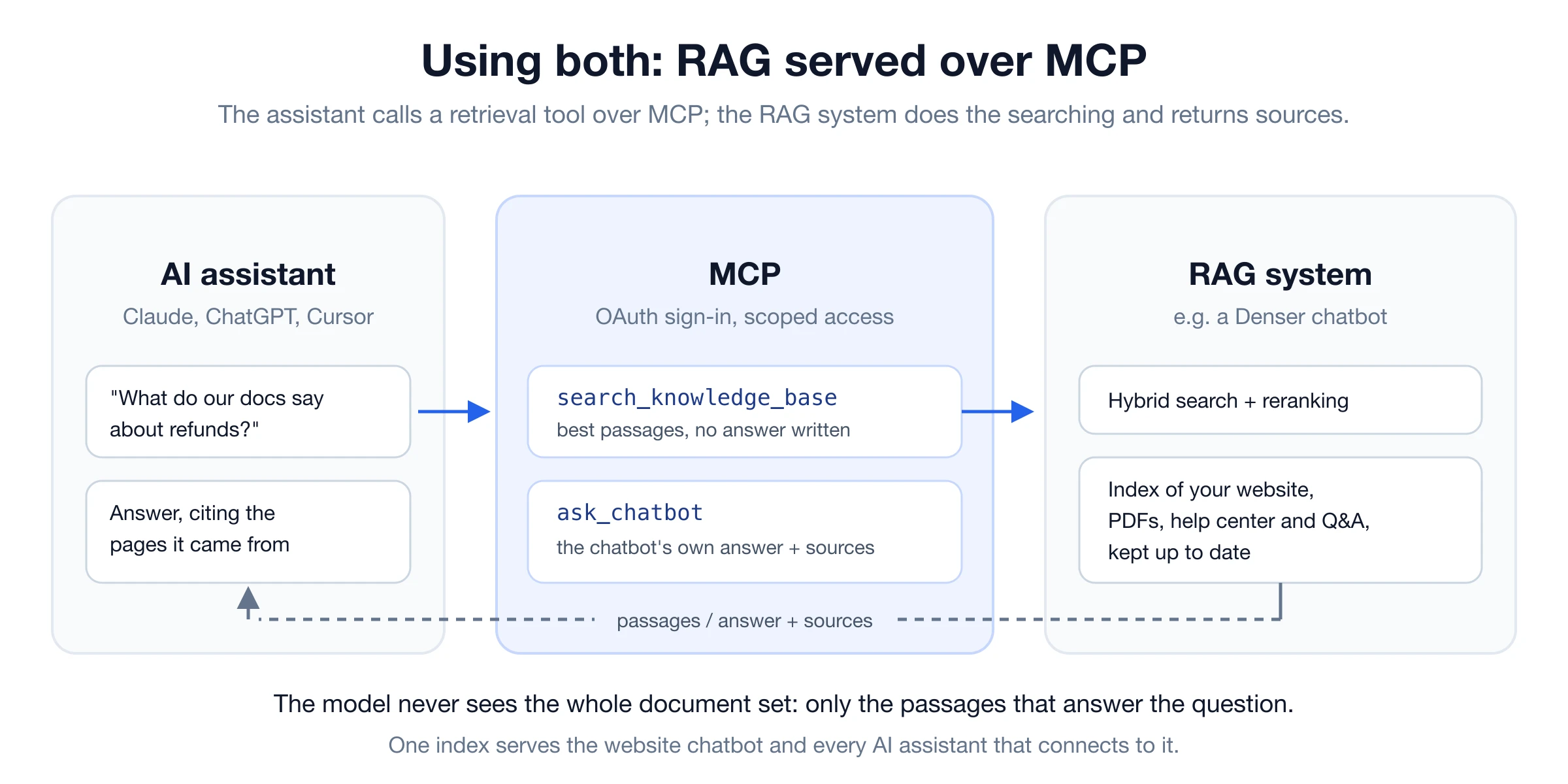
There are two useful shapes for that tool:
- Retrieval only. The tool returns the top passages with their titles and URLs, and the assistant writes the answer itself. This is best when the assistant is combining your knowledge with other context, for example drafting a reply to a customer in the user's own words.
- Answer with sources. The tool runs your full RAG pipeline, including your instructions and tone, and returns a finished answer plus citations. This is best when you want the same answer your website chatbot would give, for example checking how the bot handles a tricky question before a customer asks it.
Serving RAG over MCP fixes the weak spots of each approach:
- MCP gets grounded answers. The model doesn't guess at your refund policy; it retrieves it.
- RAG gets reach. One index serves your website widget, your help desk, and every MCP client your team uses.
- Context stays small. The assistant receives a few relevant passages, not your entire document set.
- Permissions stay central. Each person signs in with their own account, and the RAG system only returns what that workspace can see.
What it looks like in practice#
Denser runs this pattern in production. Every Denser chatbot is a RAG system over the content you give it: a crawled website, uploaded PDFs, help-center articles and Q&A pairs, searched with hybrid retrieval and reranking. The Denser MCP server exposes those chatbots to Claude, ChatGPT and other AI assistants. Two of its tools map directly onto the shapes above:
| MCP tool | What it returns |
|---|---|
| search_knowledge_base | The best-matching passages from a chatbot's knowledge base, without writing an answer |
| ask_chatbot | The chatbot's own answer, with the sources it cited |
Other tools cover the rest of the job: listing knowledge sources and their indexing status, reviewing recent conversations and their ratings, reading analytics, and pulling captured leads. Here is Claude answering a question from a chatbot's knowledge base, with the source pages it used:
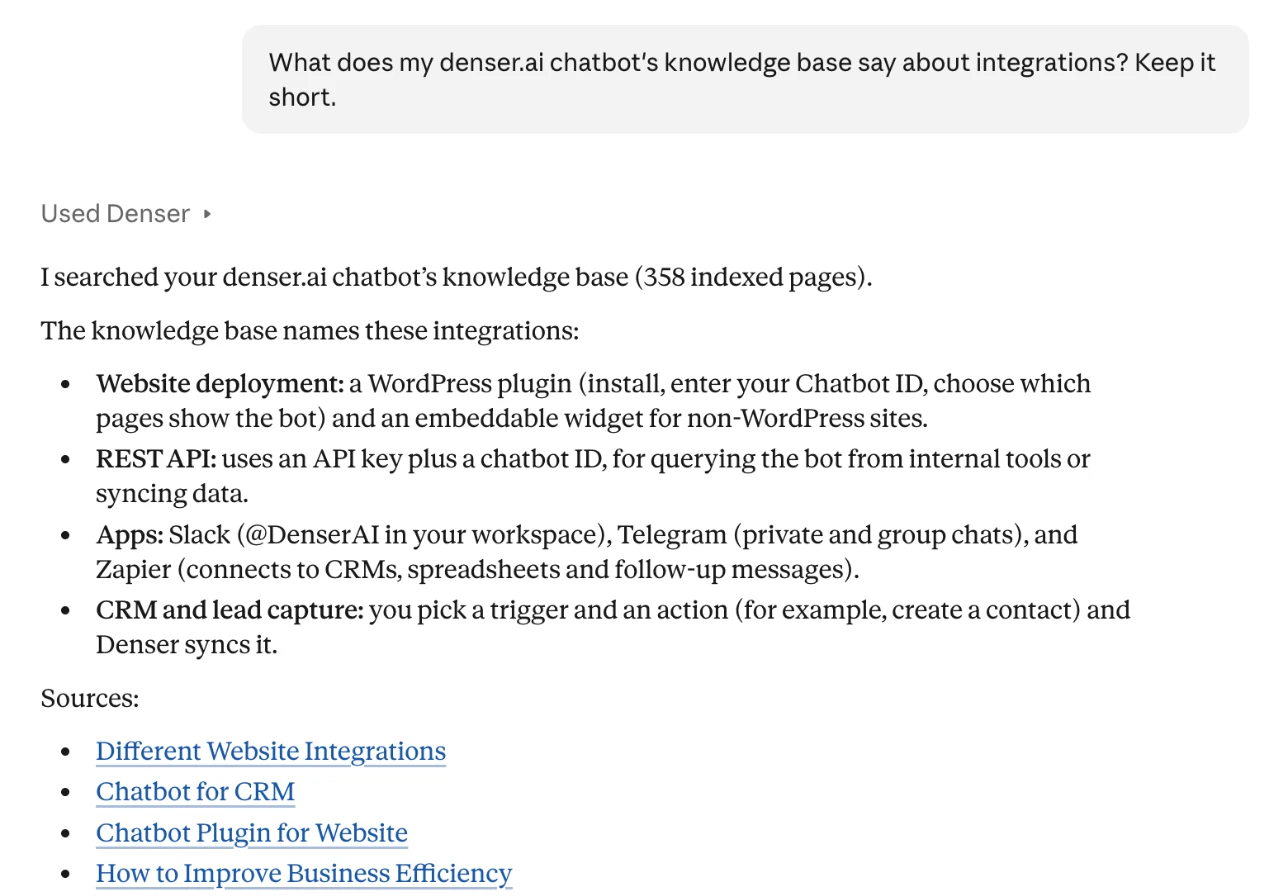
Claude never saw the 358 indexed pages behind that chatbot. It called a tool, the retriever found the relevant passages, and Claude wrote a short answer with links back to them. That's RAG and MCP each doing the part it is good at.
How to connect a RAG knowledge base to Claude or ChatGPT#
If your knowledge base already lives in a RAG system with an MCP server, connecting it takes a couple of minutes. With Denser, for example:
- Build the knowledge base. Create a chatbot and add your sources: your website, PDFs, help-center articles or Q&A. Denser indexes them for hybrid search. (If you're starting from scratch, see how a RAG chatbot works.)
- Add the MCP server to your assistant.
- Claude: open Customize → Connectors, choose Add custom connector, and enter https://mcp.denser.ai/mcp. Denser is also listed in the Claude connectors directory.
- ChatGPT: add a custom MCP server with the same URL (available on paid ChatGPT plans).
- Cursor and Claude Code: add it as a remote HTTP server. The setup guide has the exact commands.
- Sign in and choose access. You sign in with your Denser account over OAuth, pick the workspace, and decide what the assistant may do, such as reading conversations or leads. There is no API key to copy.
- Ask a question. "What does our help center say about refunds?" or "Which questions did visitors rate badly this week?" The assistant picks the right tool and cites its sources.
The MCP server works on every Denser plan, including Free. Searching the knowledge base and reading data don't use chat queries; asking the chatbot for an answer uses one, just as a visitor's question would.
What to look for in an MCP server for RAG#
Plenty of MCP servers can "search documents". A few things separate the ones you'd trust with customer-facing answers:
- Retrieval quality. Hybrid search plus reranking, not keyword-only or vector-only lookups. Ask how it handles exact terms like SKUs and error codes.
- Sources on every result. Each passage should come back with its title and URL, so the assistant can cite it and a person can check it.
- Sized results. A few focused passages per call, not whole documents that crowd the context window.
- Fresh content. Scheduled re-crawls or sync, and a way to see each source's indexing status.
- OAuth and scopes. Per-user sign-in, workspace selection and clear permissions, rather than a shared key pasted into a config file.
- Read-only by default. Tools that only read should be marked that way, so clients can run them without extra prompts.
- Hosted, or easy to host. A remote server (Streamable HTTP) works in Claude, ChatGPT and other web clients; a local-only server limits you to desktop tools.
Is MCP replacing RAG?#
No. MCP replaces the custom integrations teams used to write for each assistant; it doesn't replace retrieval. An MCP tool still has to find the right passage in thousands of pages, and doing that well is RAG's job: indexing, hybrid search, reranking, chunking, keeping content fresh. What is changing is where RAG lives. Instead of sitting inside one chatbot, a good RAG index increasingly sits behind an MCP server, where any assistant can use it.
Long context windows don't remove the need either. Pasting a whole help center into every prompt is slow and expensive, and models still miss details buried in long inputs. Retrieval keeps the prompt short and the answer traceable.
FAQs#
What is the difference between RAG and MCP?#
RAG is a technique that retrieves relevant passages from your documents and gives them to a language model so it can answer accurately with citations. MCP is an open protocol that lets AI assistants like Claude and ChatGPT discover and call external tools and data sources. RAG is about finding the right knowledge; MCP is about connecting the assistant to systems, which can include a RAG system.
Are RAG and MCP related?#
Yes, and they combine well. A RAG pipeline can be exposed as an MCP tool, so any MCP-compatible assistant can search your knowledge base. In that setup, MCP handles the connection, sign-in and tool calls, and RAG handles retrieval and grounding.
Is MCP a part of RAG?#
No. MCP isn't a step in the RAG pipeline (retrieve, augment, generate). It's a transport the assistant can use to reach a retriever, among many other kinds of tools. You can build RAG without MCP, and many MCP servers have nothing to do with retrieval.
Do RAG systems use MCP?#
Increasingly, yes, as a way to be reached. Teams that already run a RAG knowledge base add an MCP server so that Claude, ChatGPT, Cursor and other clients can query it without a custom integration for each one.
Is RAG being replaced by MCP?#
No. MCP standardizes how assistants call tools; it doesn't decide which passages answer a question. Retrieval quality still depends on indexing, hybrid search and reranking. MCP makes a good RAG system available in more places.
Is RAG still relevant with long-context models?#
Yes. Long context lets a model read more at once, but sending entire document sets with every question is slow and costly, and accuracy drops on details buried in long inputs. RAG sends only the passages that matter and keeps a citation for each one.
Is ChatGPT a RAG system?#
Not by default. ChatGPT answers from what the model learned in training, plus anything you add to the conversation. It uses retrieval when you turn on features such as web search or file search, or when you connect it to an MCP server that does the retrieving.
Should I build RAG or MCP first?#
Build RAG first if your goal is accurate answers from your own content; that is the hard part to get right. Add an MCP server once people want to use that knowledge from Claude, ChatGPT or other tools. If your knowledge already lives in a product with an MCP server, you can skip building either and connect it directly.
Explore more resources#
- What Is RAG? Complete guide: how retrieval-augmented generation works
- RAG vs fine-tuning: the other comparison worth getting right
- Hybrid search for RAG: why keyword plus vector search beats either alone
- RAG chunking strategies: splitting documents so retrieval finds the right passage
- AI agent vs chatbot: where tools and actions fit in a support setup
- Denser MCP server setup guide: connect Claude, ChatGPT, Cursor and Claude Code to your Denser chatbots