






DenserAI Logo

Actions

AI agent actions: your support agent does the next step.

Most requests need more than an answer. With actions, your AI support agent checks the order, books the meeting, reads the invoice, tells your team, or hands the chat to a person, inside the conversation and with the customer's yes before anything changes.

Free to start. No credit card.

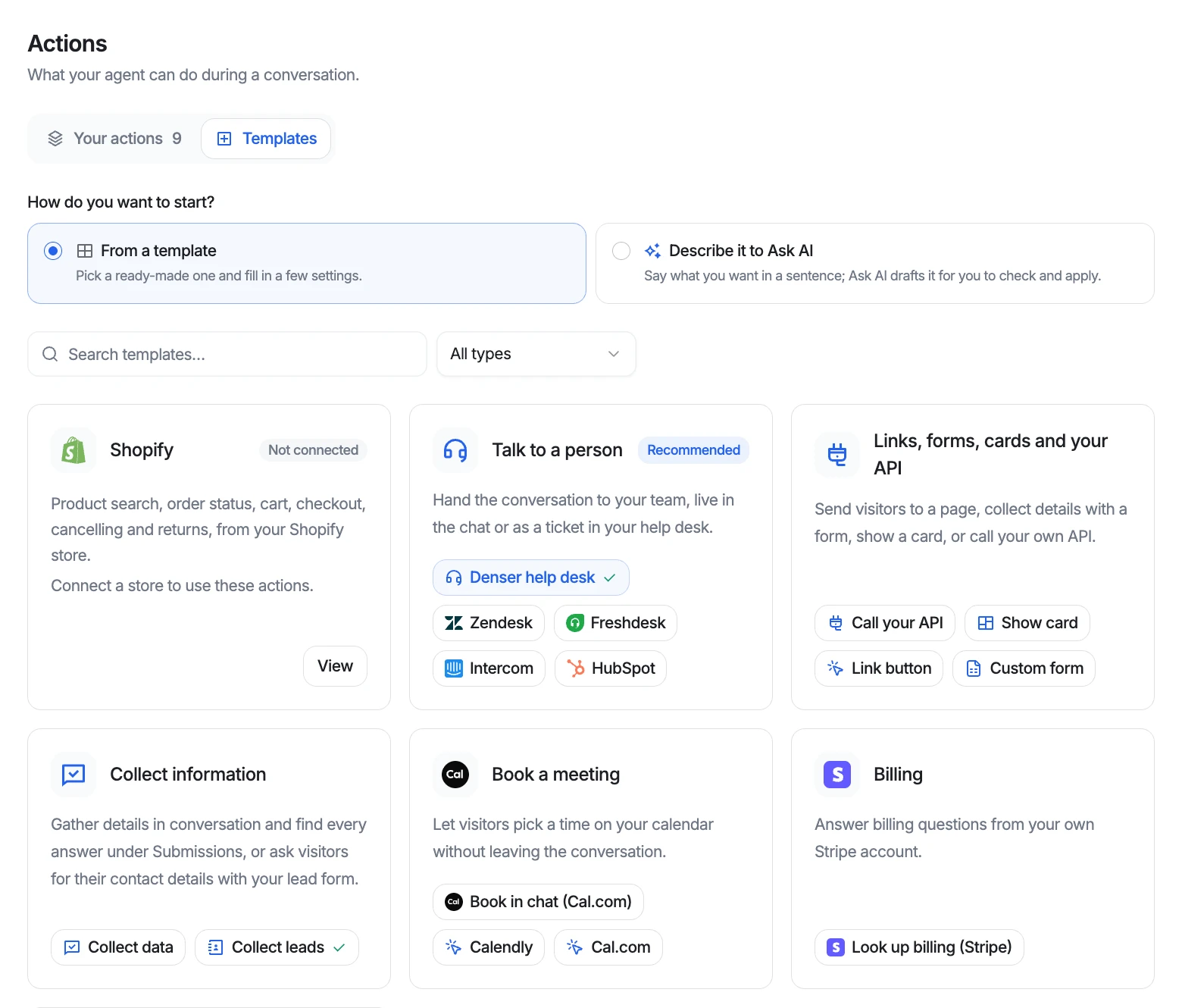
The Actions templates page in Denser, grouped into Shopify; Talk to a person; Links, forms, cards and your API; Collect information; Book a meeting; and Billing.

Customer proof

Trusted by businesses worldwide

2k+

active teams

24/7

support coverage

50%

fewer tickets

City of San JoséCity of San José
Bridgelux
Onondaga CountyOnondaga County
EOS AustraliaEOS Australia
LenderDock
PortfolioboxPortfoliobox
UpsiideUpsiide
Valk WeldingValk Welding

Every action

Sixteen templates, plus your whole Shopify store.

Pick a template and fill in what is yours, or describe the action to Ask AI in a sentence. Each one says in plain words when the agent should use it.

ShopifyShopify store

Built in once your store is connected. Doesn't count toward your plan.

  • Search products
  • Order status
  • Order lookup form
  • My orders
  • View cart
  • Add to cart
  • Checkout
  • Cancel order
  • Confirm cancel
  • Request a return
  • Confirm return
The Shopify AI chatbot

Call your API

Answers from your own systems, in three steps.

  1. 01

    Describe

    Name the action, say when to use it with two or three example messages, and choose where it runs.

  2. 02

    Connect

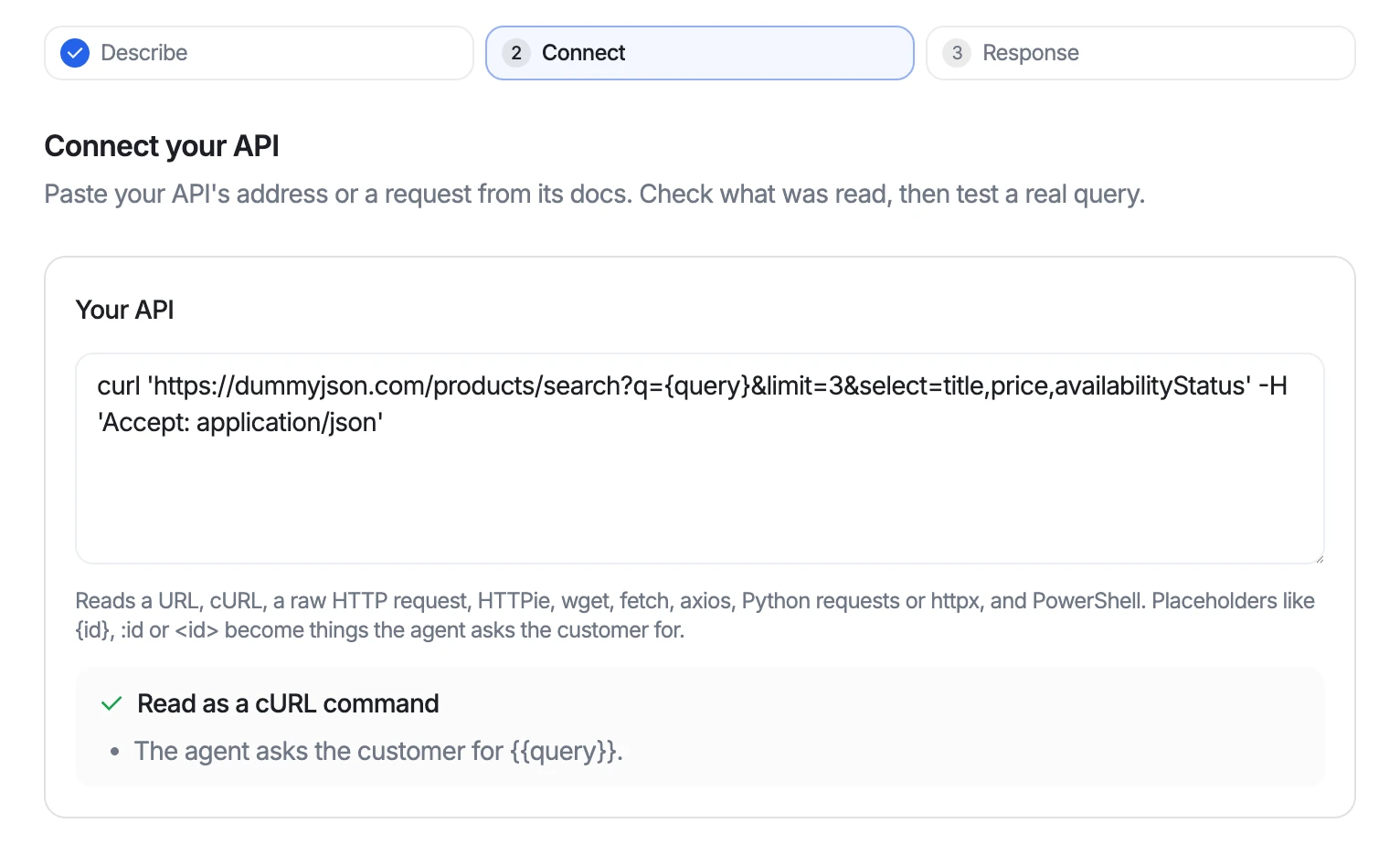
    Paste a URL, a cURL command, or a JavaScript, Python, or PowerShell snippet from your API docs. Denser reads the request, and anything the customer must provide becomes an input the agent asks for. Then test a real query.

  3. 03

    Response

    Tick the fields the agent may read. Nothing else in the response reaches it. Optionally show the answer as a card.

The Connect step of Call your API: a pasted cURL command, 'Read as a cURL command', and a note that the agent asks the customer for the query.
Paste what your API docs give you. Denser reads it as a request.
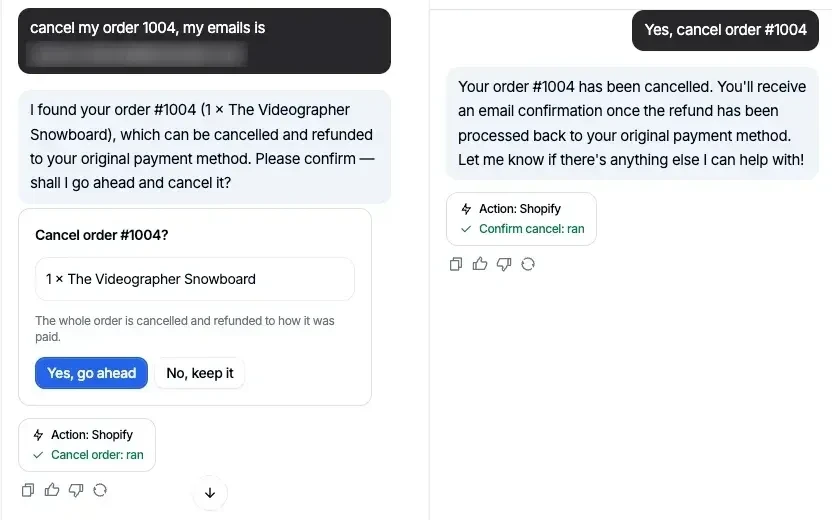
The cancel flow in the test chat: the agent shows a 'Cancel order #1004?' card with 'Yes, go ahead' and 'No, keep it', then cancels the order after the shopper confirms.
Shown first, done only after the shopper says yes.

Shopify

Orders, cancellations, and returns, done in the chat.

Connect your store and the agent searches products, checks orders, manages the cart, and cancels an unshipped order or requests a return. The order email must match before anything is shown, and nothing changes until the shopper confirms.

Billing, booking, and your team

The routine requests that used to need a person.

Look up billing in Stripe

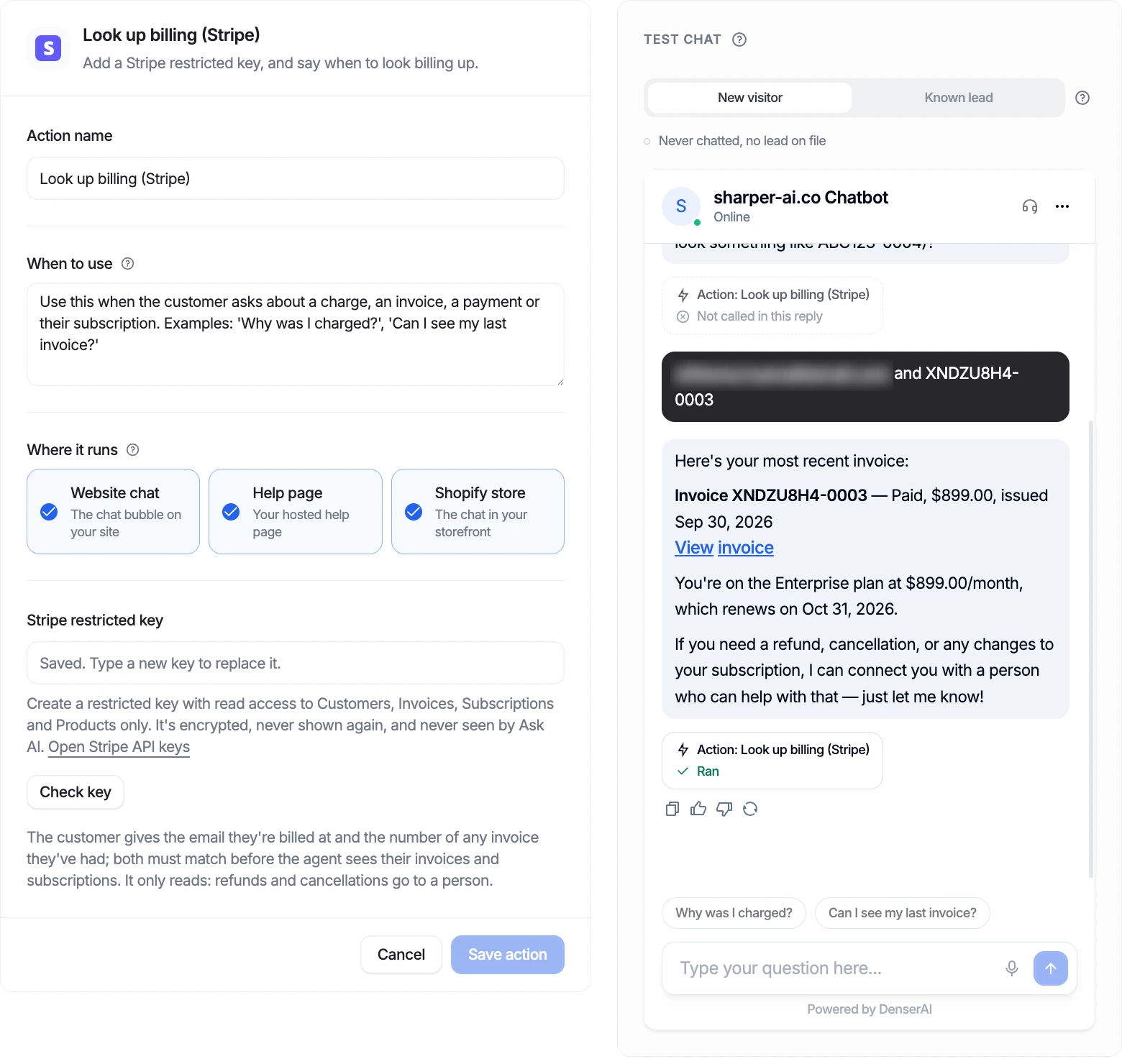
“Can I see my last invoice?” answered from your own Stripe account. The agent asks for the billing email and an invoice number, and both must match the same customer before anything is shown. Refunds and plan changes go to your team.

The Look up billing (Stripe) action with its test chat: after the customer gives their billing email and invoice number, the agent shows invoice XNDZU8H4-0003 as paid and the Enterprise plan's renewal date.
Stripe test data. The customer's email is blurred.

Book meetings in the chat

Open times from your Cal.com calendar, booked with the visitor's name and email. Cal.com sends the invite.

Appointment booking
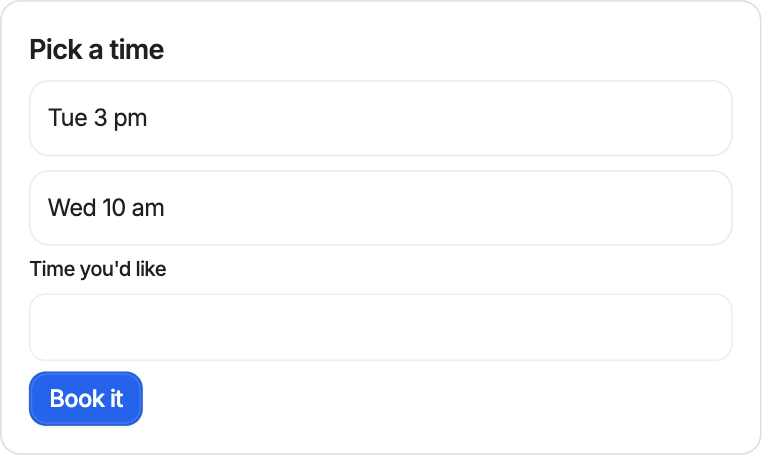
A visitor asks “Can I book a demo?” and the agent replies with a Pick a time card listing open slots for Tuesday, October 20.

Tell your team in Slack

A call-back request, written by the agent from the conversation, posted to the channel you pick with a link to the chat. Customers never see the post.

A Slack message from the DenserAI app: “Customer requests a callback to discuss a website chatbot. Phone: 408 555 5555.” with a View the chat link.

Cards

Results people can scan, not a wall of text.

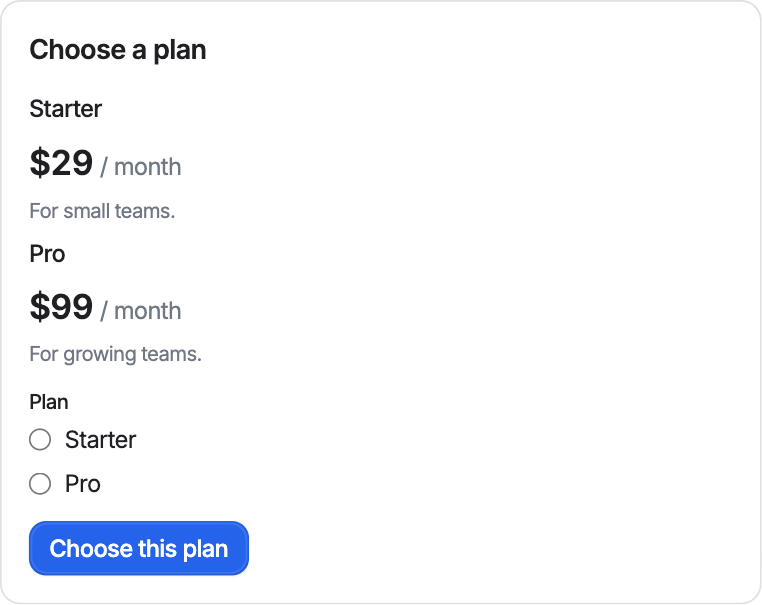
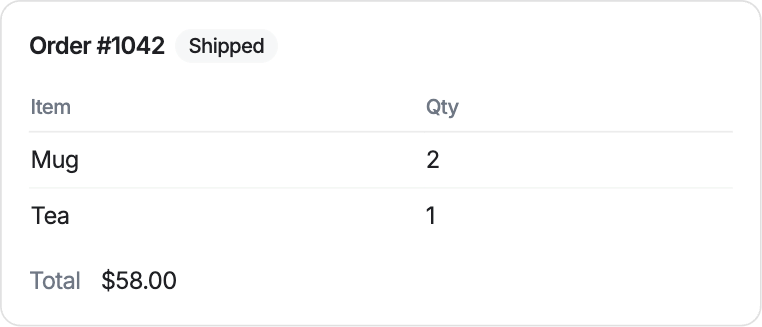
A card is a small layout the agent shows in the chat: a product list, an order summary, a plan picker, a short form. Design it once from titles, tables, prices, buttons, and inputs, and your actions fill it in.

  • Start from 8 templates or describe the card to Ask AI
  • Buttons can send a message, run an action, or open a link
  • Channels that can't draw cards get a text version

Real renders of three card templates. See all eight

Built to be safe

Powerful enough to act. Careful about how.

Every action has a test chat beside its settings, and a trace under each reply says which actions ran. To string actions into a procedure, such as a return that checks your policy first, use a playbook.

Confirmation before changes
Cancelling an order or requesting a return shows the shopper what would happen, and runs only after they say yes in a later message.
Identity checks
Orders need the checkout email, billing needs the billing email and an invoice number, and a wrong detail gets the same answer as a wrong number.
Least access
Stripe takes only restricted, read-only keys. API keys and tokens are stored encrypted, never shown again, and never seen by Ask AI.
Only the fields you allow
For your own API, the agent reads only the response fields you tick. IDs, paging, and anything else stay out of the conversation.

Questions

What are AI agent actions?+

Actions are things your AI support agent can do during a conversation, not just say: look up an order, call your own API, book a meeting, read billing, post to Slack, or hand the chat to a person. You describe when each action should run, and the agent runs it for real and answers from what came back.

Can I connect the chatbot to my own API?+

Yes. The Call your API action reads a URL, a cURL command, or a code snippet from your API docs, lets you test it with a real query, and asks you which response fields the agent may read. Keys go in headers marked secret and are stored encrypted. Requests that change something ask before a test sends them.

Which calendars, help desks, and tools are supported?+

Booking in the chat works with Cal.com, and Calendly or Cal.com links can be shown as buttons. Tickets can go to Denser's own helpdesk, Zendesk, Freshdesk, Intercom, or HubSpot. Billing lookups read Stripe, notifications go to Slack, and Shopify stores get 11 built-in actions. Anything else with an API connects through Call your API.

How do I make sure an action does the right thing?+

Every action has a test chat beside its settings that works like the real widget, and a trace under each reply says which actions ran. The test chat runs actions for real, so test with a test channel, a test calendar event, or a test order.

What are cards?+

Cards are small layouts the agent shows in the chat, such as a product list, an order summary, or a plan picker. You design a card once in a visual editor, and the action that shows it fills it in from your API's answer or the conversation.

How many actions can I have?+

Actions, cards, and playbooks share one allowance per chatbot: 1 on Free, 5 on Starter, 10 on Standard, and 20 on Business and Enterprise. Collect leads and the Shopify actions don't count toward it.

Get started

A chatbot worth shipping, live in minutes.

Point Denser at your website, docs, and PDFs. It answers in minutes, every reply cited to its exact source.

No code. Free to start. Cancel anytime.