
Also from DenserSharper AI
Sharper AI
NewThe AI office assistant built on your knowledge. Research, draft, and build slides and spreadsheets from your own sources.
A sister product from the team behind Denser Chat.
Internal knowledge base chatbot
An internal AI chatbot trained on your handbooks, policies, SOPs and Google Drive. Employees ask in plain words and get answers that cite the exact page.
Free to start. No credit card. Live in minutes.
4.2 Startup Calibration
Before startup, operators must verify torque wrench calibration, run one dry-cycle check, and record QC sign-off.Answers from your own documents. Your team asks a question, and gets the answer from your own documents, with the exact passage to prove it. Here's how it works with Denser. Upload, ask, and check.
Upload your documents and keep it private. First, upload the documents your team already has: handbooks, policies, guides. Keep the chatbot private, so only your team can ask it. Create it, and a moment later, it's ready to answer.
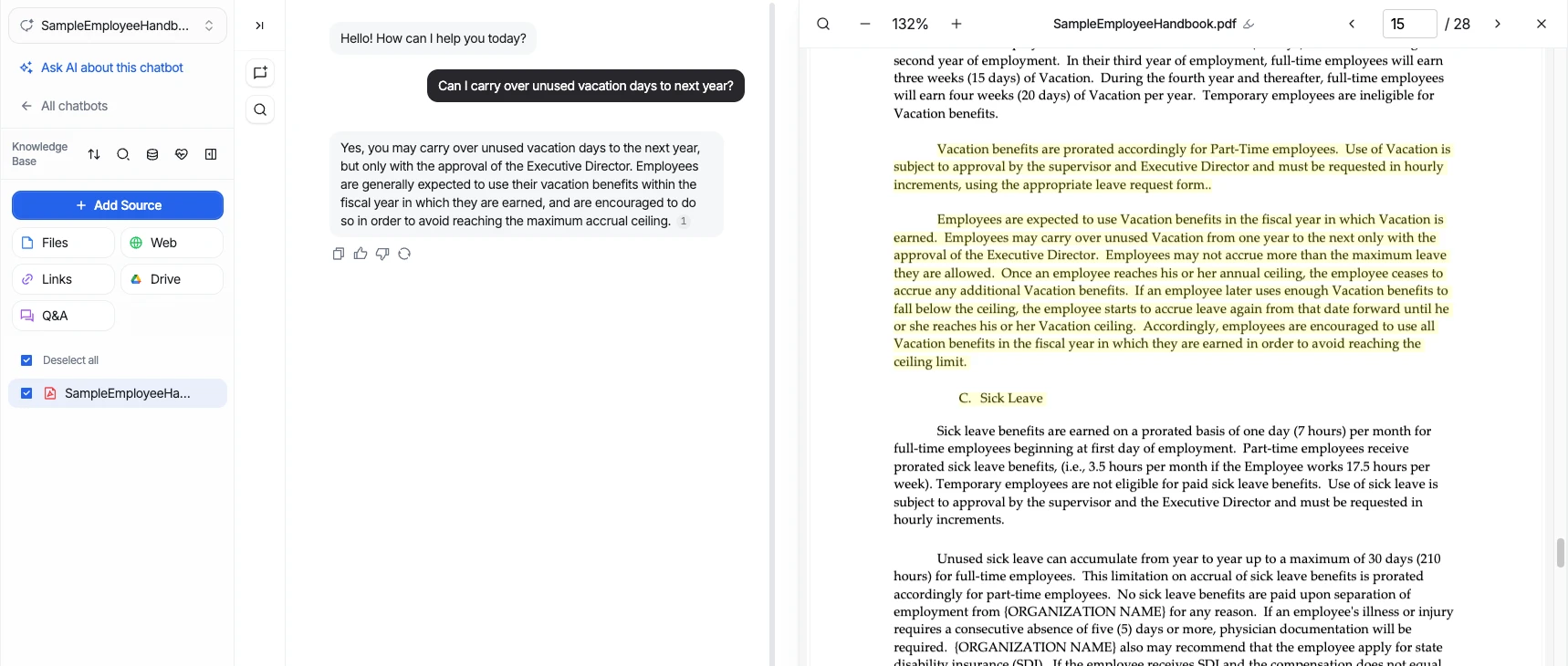
Ask, and check the highlighted source. Ask in plain words, and get a direct answer. Every answer cites its source. Click it, and the document opens on the right page, with the passage highlighted. Ask about something else, and it finds the right document. And when your documents don't cover something, it tells you, instead of guessing.
What your team gets. Less time searching folders, and answers your team can trust. Build yours free at denser.ai.
Customer proof
2k+
active teams
24/7
support coverage
50%
fewer tickets
 City of San José
 Onondaga County
 EOS Australia
 Portfoliobox
 Upsiide
 Valk WeldingCity of San JoséOnondaga CountyEOS AustraliaPortfolioboxUpsiideValk Welding
The basics
A knowledge base chatbot is an AI assistant that answers questions from your organization's own documents. It finds the relevant passage in your files and pages, writes a direct answer, and cites the source so anyone can check it. An internal knowledge base chatbot does this privately, for your employees.
A knowledge base stores the answers; the chatbot finds them. Instead of searching folders, scanning long documents or asking a coworker the same question again, people ask in plain language and get an answer grounded in your current documents.
How it works
Bring the documents you already have. Denser handles the indexing, the access and the cited answers, without code. Or tell Ask AI “Make an internal HR assistant from our handbook” and it does the setup for you.
Add sources
Upload PDF, DOCX, TXT, Excel, and PowerPoint files, connect Google Drive, crawl a website, or write Q&A directly. Denser Chat indexes the content so it is ready to answer questions.
Start with your knowledge
Add at least one source to get started.
Website
RecommendedOther sources
Added sources
Your knowledge. Ready to answer.
Denser connects every approved source to one private, searchable assistant.
How many vacation days do new employees receive?
Full-time employees earn 10 days during their first year after the initial 90-day period.
Employee handbook · p. 15
Set access
Keep the chatbot private, so only teammates you invite can ask it. Internal policies, onboarding guides and company documents stay inside your team.
Who is your chatbot for?
Choose who can ask questions from this knowledge.
Public
For your customers
Private
For you and your team
Private knowledge base
Only you and invited teammates can chat. Manage access in Members.
A private chat over approved company documents.
Start asking
Ask in plain English and get a direct answer with the supporting document and passage beside it. Your team can verify policy, onboarding, and operational answers without hunting through folders.
Use cases
HR, IT, operations, sales and support teams, each asking the same up-to-date documents instead of each other.
Give new hires one place to ask about tools, benefits, processes, and their first weeks on the job.
Answer questions about PTO, expenses, remote work, benefits, and workplace policies from approved documents.
Help teams find the correct procedure, checklist, or safety requirement while work is in progress.
Search policies, reports, and reference material while keeping every answer tied to its original source.
Agents find the right answer in manuals, past fixes and troubleshooting guides before they reply.
Make product details, pricing rules, battlecards, and approved answers searchable before customer calls.
Want customers to ask your documents directly? See the customer support chatbot.
Sources and access points
KB Health
A one-click read-through of everything your chatbot knows. You get a plain-English summary of the topics it covers and a list of any contradictions between documents.
KB Health report
Topics covered
Contradictions found
Vacation days conflict: Handbook says 10, Benefits 2026 says 12.
Alex's Workspace
Security and access
A private chatbot lives in your workspace and answers only the teammates you invite. Everyone asks the same up-to-date documents, and you maintain them in one place.
Denser cut our research time from about 50 minutes to just a few, a huge boost to our team's productivity.
A knowledge base chatbot is an AI assistant that answers questions from your organization's own documents. It finds the relevant passage in your files and pages, writes a direct answer, and cites the source so anyone can check it. An internal knowledge base chatbot does this privately, for your employees.
A knowledge base stores the answers; people still have to search folders and read long documents to find them. A knowledge base chatbot reads those documents for them and answers a plain-language question in a few sentences, with a link to the exact page it used.
Create a private chatbot, then upload your files, connect Google Drive, add websites or write Q&A. Denser indexes them in minutes. You can also ask Ask AI, for example “Make an internal HR assistant from our handbook and policies”, and it sets the chatbot up for you. No code is needed.
Websites, PDFs, Word files, PowerPoint presentations, TXT files, Excel spreadsheets, Google Drive, and written Q&A. Combine as many sources as you need into one knowledge base.
The chatbot says it doesn't know instead of guessing. Denser answers only from the passages it finds in your sources, and every answer links to them. Answer Quality then shows the questions your documents didn't cover, so you know what to add.
Yes. A private chatbot is available only to people you invite to your workspace, and owner, editor and viewer roles decide who can change its sources and settings. A private chatbot can't be embedded on a public website.
Yes. Denser has an MCP server, the open standard Claude, ChatGPT, Cursor and Claude Code use to connect to outside tools. Add https://mcp.denser.ai/mcp to your assistant and sign in with your Denser account, and it can search the knowledge base and answer with links to the source pages. Each person sees only what their own Denser access allows, and it works on every plan, including Free.
No. Your documents are never used to train shared or foundation AI models. They are used only to answer your team's questions.
Denser is SOC 2 Type II certified. Data is encrypted in transit and at rest, and private chatbots are available only to members of your workspace.
Yes. HR, operations and support teams build their own knowledge base chatbots by uploading the documents they already maintain, or by describing what they want to Ask AI and clicking Apply on each change it proposes.
A single Denser chatbot indexes hundreds of thousands of pages and up to 50GB of documents, with three-layer retrieval (keyword, vector and ML reranking) that stays accurate at that scale.
A one-click read-through of everything your chatbot knows. You get a plain-English summary of the topics it covers and a list of any contradictions between documents, so you can fix conflicts before your team hits them.
Still working out how these systems fit together? Read the full guide to how an AI knowledge base works, from retrieval and reranking to measuring answer quality.
Point Denser at your website, docs, and PDFs. It answers in minutes, every reply cited to its exact source.
No code. Free to start. Cancel anytime.