

RAG Chunking Strategies 2026: 8 Methods Compared with Code Examples
Your RAG system is failing, and it's not the LLM's fault. It's the chunks.
Three weeks after shipping an internal knowledge base, a compliance team gets a confident, well-structured answer that describes the general policy but leaves out the exception clause for contractors in regulated projects. The exception was in the document. The retriever never surfaced it because the chunk containing that exception was split right at the paragraph boundary where the general rule ended and the qualification began.
This scenario plays out in every organization running RAG. The chunking strategy — how you split documents before embedding — determines whether your retrieval system finds the right passage or misses it by one paragraph break. Weaviate's 2025 benchmark puts a number on it: the wrong chunking approach can open a gap of up to 9% in recall between the best and worst methods on the same corpus, with the same retriever, the same embedding model.
And yet, most teams spend days choosing an embedding model and seconds choosing a chunking strategy. This guide reverses that priority. We compare eight chunking strategies with working code, real benchmark data, and a decision framework that tells you exactly which strategy to use for your document type.
TL;DR:
| Strategy | Recall | Speed | Cost | Best For |
|---|---|---|---|---|
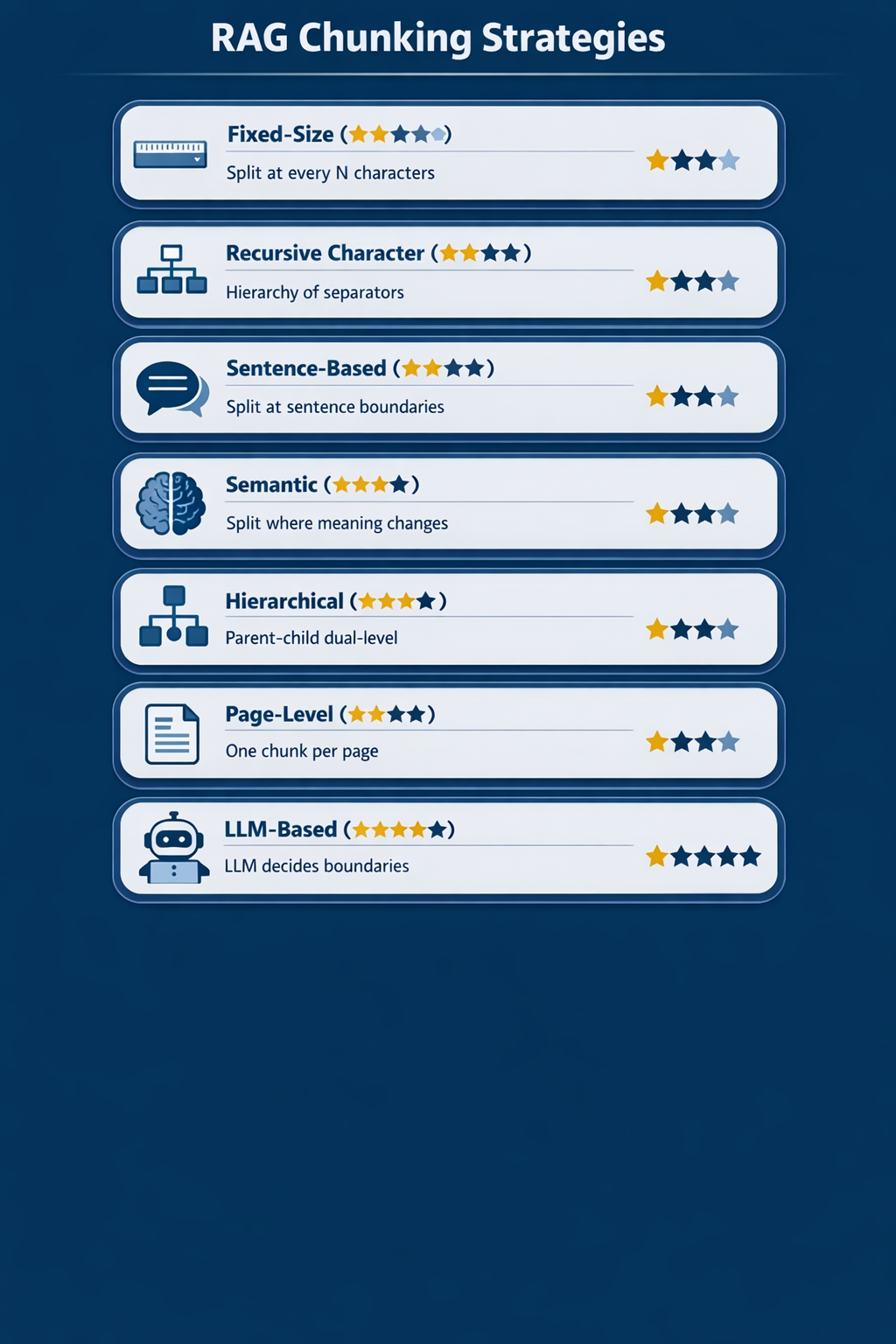
| Fixed-Size | ★★☆ | ★★★ | ★★★ | Quick prototypes, uniform documents |
| Recursive Character | ★★★ | ★★★ | ★★★ | Default choice for most production RAG |
| Sentence-Based | ★★★ | ★★★ | ★★★ | Short documents, Q&A pairs |
| Semantic | ★★★★ | ★★☆ | ★★☆ | Mixed-topic documents, when recall matters |
| Hierarchical (Parent-Child) | ★★★★ | ★★☆ | ★★☆ | Large docs, multi-level retrieval |
| Page-Level | ★★★ | ★★★ | ★★★ | PDFs with visual structure |
| LLM-Based (Agentic) | ★★★★★ | ★☆☆ | ★☆☆ | Highest quality, small corpora |
| Late Chunking | ★★★★ | ★★☆ | ★★☆ | Long documents with cross-references |
For the broader RAG architecture that chunking fits into, see our guide: What Is RAG? (Retrieval-Augmented Generation Explained).
Why Chunking Matters More Than Your Embedding Model#
The RAG pipeline is a chain: chunk → embed → index → retrieve → rerank → generate. Every step depends on the one before it. If chunking produces incoherent fragments, no embedding model, vector database, or reranker can recover the lost context.
Here's the math: a chunk saying "revenue grew 3% last quarter" is useless without knowing which company, which quarter, or which document it came from. The embedding model faithfully encodes "revenue grew 3% last quarter" as a vector — accurately representing the fragment but missing the context that makes it meaningful. When a user asks "What was Acme Corp's Q2 2023 revenue growth?", the retriever may not find this chunk because the embedding has no signal for "Acme Corp" or "Q2 2023."
Anthropic's contextual retrieval research demonstrated this: adding context to chunks before embedding reduces retrieval failures by 49%, and by 67% when combined with reranking. That's a bigger improvement than switching from a cheap embedding model to an expensive one.
The Chunk Size Trade-Off#
| Chunk Size | Retrieval Precision | Context Completeness | LLM Token Cost |
|---|---|---|---|
| Too small (50–100 tokens) | High (exact match) | Low (fragments, missing context) | Low |
| Sweet spot (256–512 tokens) | Good balance | Good balance | Moderate |
| Too large (1,000+ tokens) | Low (diluted signal) | High (everything is there) | High |
Small chunks are precise but incomplete. Large chunks are complete but imprecise — the embedding averages over too many topics, and the LLM wastes tokens on irrelevant context. The right chunking strategy finds the sweet spot for your document type.
Strategy 1: Fixed-Size Chunking#
Split text at every N characters or tokens, with optional overlap.
Fixed-size chunking is the simplest strategy: count characters or tokens, cut at the boundary, repeat. It's what most RAG tutorials use as a starting point.
How It Works#
Document: "The quick brown fox jumps over the lazy dog. The dog barked."

Fixed-size (chunk_size=30):
  Chunk 1: "The quick brown fox jumps ove"
  Chunk 2: "r the lazy dog. The dog barke"
  Chunk 3: "d."
Notice the problem: chunks cut mid-word and mid-sentence. This destroys semantic coherence. Adding overlap (repeating N characters at boundaries) partially mitigates this but doesn't solve it.
Code Example (LangChain)#
from langchain.text_splitter import CharacterTextSplitter

splitter = CharacterTextSplitter(
    separator="\n\n",          # Try to split at paragraph breaks first
    chunk_size=1000,           # Target 1000 characters per chunk
    chunk_overlap=200,         # Repeat 200 characters at boundaries
    length_function=len
)

chunks = splitter.split_text(document)
print(f"Produced {len(chunks)} chunks")
The Overlap Question#
A January 2026 systematic analysis using SPLADE retrieval and Mistral-8B found that overlap provided no measurable benefit and only increased indexing cost. This challenges the common advice to always add overlap. If you're using SPLADE or similar sparse retrievers, overlap may be wasted compute. If you're using dense-only retrieval, small overlap (50–100 tokens) still helps catch concepts that span boundaries.
When to Use#
- Prototyping. Fixed-size is the fastest to implement and debug.
- Uniform documents. If all your documents have similar structure and length (e.g., product descriptions, short Q&A pairs), fixed-size works fine.
When to Avoid#
- Documents with natural structure (headings, sections, lists). You're ignoring free semantic boundaries.
- Long, multi-topic documents. Fixed-size will split mid-topic and combine unrelated topics.
Strategy 2: Recursive Character Splitting#
Split text using a hierarchy of separators, from most meaningful to least.
Recursive character splitting is LangChain's recommended default and the strategy most production RAG systems should start with. Instead of blindly cutting at N characters, it tries to split at the most natural boundary first (paragraphs), then falls back to less natural boundaries (lines, sentences, words) only when chunks are still too large.
How It Works#
Separator hierarchy: ["\n\n", "\n", ". ", " ", ""]

1. Try to split by "\n\n" (paragraph breaks)
2. If a chunk is still too large, split by "\n" (line breaks)
3. If still too large, split by ". " (sentences)
4. If still too large, split by " " (words)
5. Last resort: split by "" (individual characters)
This respects document structure at every level. A 2,000-character paragraph gets split at sentence boundaries, not mid-word. Two short paragraphs that together fit within chunk_size stay together.
Code Example (LangChain)#
from langchain.text_splitter import RecursiveCharacterTextSplitter

splitter = RecursiveCharacterTextSplitter(
    separators=["\n\n", "\n", ". ", " ", ""],
    chunk_size=512,
    chunk_overlap=50,
    length_function=len,
    is_separator_regex=False
)

chunks = splitter.split_text(document)

# Inspect the results
for i, chunk in enumerate(chunks):
    print(f"Chunk {i}: {len(chunk)} chars")
    print(f"  First 80: {chunk[:80]}...")
    print()
Recursive vs. Fixed-Size: Benchmark Data#
The Vecta/FloTorch end-to-end benchmark compared chunking strategies on real retrieval tasks :
| Strategy | End-to-End Accuracy | Retrieval Recall |
|---|---|---|
| Recursive splitting (512 tokens) | 69% | 88% |
| Fixed-size (512 tokens) | 58% | 76% |
| Semantic chunking | 54% | 92% |
Recursive splitting wins on end-to-end accuracy (69% vs. 58%) despite slightly lower retrieval recall than semantic chunking. Why? Because recursive chunks are more coherent — the LLM can actually use the retrieved text, whereas semantic chunking sometimes produces chunks that retrieved well but lacked enough context for the LLM to generate accurate answers.
This is a critical insight: retrieval recall and end-to-end accuracy are different metrics. Optimizing for recall alone can hurt the generation step.
When to Use#
- Default starting point. Recursive splitting should be your baseline for any production RAG system.
- Mixed document types. The separator hierarchy adapts well to different document structures.
- When you want 80% of the quality with 20% of the effort. It's hard to beat on the quality-to-complexity ratio.
When to Avoid#
- Documents with strong hierarchical structure (legal contracts, technical docs with numbered sections). Hierarchical chunking preserves that structure better.
- Documents with heavy cross-references. Recursive splitting can't preserve relationships between distant sections.
Strategy 3: Sentence-Based Splitting#
Split text at sentence boundaries, then combine sentences up to the target chunk size.
Sentence-based splitting respects the most fundamental unit of meaning in text: the sentence. It splits at sentence boundaries (using NLP libraries or simple heuristics) and groups sentences together until the chunk reaches the target size.
How It Works#
1. Split document into individual sentences using NLP
2. Combine sentences until chunk_size is reached
3. Start a new chunk at the next sentence boundary
Code Example (LangChain + NLTK)#
from langchain.text_splitter import NLTKTextSplitter

splitter = NLTKTextSplitter(
    chunk_size=1000,
    chunk_overlap=100
)

chunks = splitter.split_text(document)
Code Example (LlamaIndex)#
from llama_index.core.node_parser import SentenceSplitter

parser = SentenceSplitter(
    chunk_size=1024,
    chunk_overlap=20
)

nodes = parser.get_nodes_from_documents([document])
for node in nodes:
    print(f"Node: {len(node.text)} chars")
When to Use#
- Short documents. FAQs, support articles, short-form content where sentences are the natural unit.
- Q&A datasets. When each chunk should contain one complete answer.
- As a building block. Sentence boundaries are the first step in both semantic and hierarchical strategies.
When to Avoid#
- Long paragraphs that should stay together. Sentence splitting can break a coherent argument across chunks.
- Documents where paragraph structure matters more than sentence structure. Recursive splitting handles this better.
Strategy 4: Semantic Chunking#
Split text where the meaning changes, not where the characters happen to fall.
Semantic chunking uses embedding similarity to detect topic boundaries. It embeds each sentence (or small unit), compares adjacent embeddings, and creates a new chunk whenever the similarity drops below a threshold — indicating a topic shift.
How It Works#
1. Split document into sentences
2. Embed each sentence
3. Compute cosine similarity between adjacent sentences
4. Split where similarity drops below threshold (e.g., 0.5)
5. Combine sentences within each "similarity group" into chunks
This produces chunks that are semantically coherent — every sentence in a chunk relates to the same topic. The trade-off is computational cost (you're embedding every sentence first) and variable chunk sizes that can be too small or too large.
Code Example (LangChain)#
from langchain_experimental.text_splitter import SemanticChunker
from langchain_openai import OpenAIEmbeddings

# Initialize with OpenAI embeddings
embeddings = OpenAIEmbeddings(model="text-embedding-3-small")

splitter = SemanticChunker(
    embeddings=embeddings,
    breakpoint_threshold_type="percentile",  # Options: percentile, standard_deviation, interquartile
    breakpoint_threshold_amount=75            # 75th percentile = split at top 25% of similarity drops
)

chunks = splitter.split_text(document)
print(f"Semantic chunking produced {len(chunks)} chunks")

# Inspect chunk sizes — they'll vary more than fixed-size
for i, chunk in enumerate(chunks):
    print(f"Chunk {i}: {len(chunk)} chars")
The Semantic Chunking Paradox#
Here's the counterintuitive finding from 2026 benchmarks: semantic chunking achieves the highest retrieval recall (91.9% in Chroma's evaluation) but lower end-to-end accuracy (54%) than recursive splitting (69%).
Why? Semantic chunking produces topic-pure chunks that retrieve well but sometimes lack the broader context the LLM needs to generate a complete answer. A chunk about "hiring process step 3" retrieves perfectly for "what is step 3 of hiring?" but can't answer "how does step 3 connect to step 4?"
The lesson: semantic chunking is excellent for precision retrieval (finding exactly the right passage) but may need to be paired with context expansion or parent-child retrieval to give the LLM enough surrounding context.
When to Use#
- Mixed-topic documents where topic shifts are the natural boundaries (meeting transcripts, research papers, multi-subject articles).
- When retrieval recall is your bottleneck. If your retriever is finding the wrong passages, semantic chunking improves precision.
- With a minimum chunk floor (200+ tokens) to avoid fragments that are too small for the LLM to work with.
When to Avoid#
- As a default. The computational cost (embedding every sentence) and variable chunk sizes make it harder to debug and tune than recursive splitting.
- When your documents have clear structural boundaries (headings, sections). Structure-based splitting is cheaper and often equally effective.
Strategy 5: Hierarchical (Parent-Child) Chunking#
Create chunks at two levels: small child chunks for precise retrieval, large parent chunks for LLM context.
Hierarchical chunking solves the precision vs. completeness trade-off by maintaining two representations of each document. Small "child" chunks (128–256 tokens) are indexed for retrieval — they're precise and match specific queries well. When a child chunk is retrieved, the system returns its "parent" chunk (512–1,024 tokens) to the LLM — providing the surrounding context the LLM needs to generate a complete answer.
How It Works#
Document
├── Parent Chunk 1 (1024 tokens)
│   ├── Child Chunk 1a (256 tokens)
│   ├── Child Chunk 1b (256 tokens)
│   └── Child Chunk 1c (256 tokens)
├── Parent Chunk 2 (1024 tokens)
│   ├── Child Chunk 2a (256 tokens)
│   ├── Child Chunk 2b (256 tokens)
│   └── Child Chunk 2c (256 tokens)
Retrieval: Search against child chunks (precise matching) Generation: Return parent chunks to the LLM (full context)
This is the approach that replaced Graph RAG in one production system: "Graph RAG was too slow for production, so we switched to parent-child chunking. It gets the precision of a small chunk search with the context of a large one".
Code Example (LangChain ParentDocumentRetriever)#
from langchain.retrievers import ParentDocumentRetriever
from langchain.storage import InMemoryStore
from langchain_text_splitters import RecursiveCharacterTextSplitter
from langchain_openai import OpenAIEmbeddings
from langchain_community.vectorstores import Chroma

# Parent splitter — large chunks for LLM context
parent_splitter = RecursiveCharacterTextSplitter(chunk_size=2000)

# Child splitter — small chunks for precise retrieval
child_splitter = RecursiveCharacterTextSplitter(chunk_size=400)

# Vector store for child chunk embeddings
vectorstore = Chroma(embedding_function=OpenAIEmbeddings())

# Document store for parent chunks (retrieved by child's parent_id)
docstore = InMemoryStore()

retriever = ParentDocumentRetriever(
    vectorstore=vectorstore,
    docstore=docstore,
    child_splitter=child_splitter,
    parent_splitter=parent_splitter,
)

# Index documents — creates both parent and child chunks
retriever.add_documents(documents)

# Query — retrieves child chunks, returns parent chunks
results = retriever.invoke("What are the contractor exceptions in the compliance policy?")
for doc in results:
    print(f"Parent chunk ({len(doc.page_content)} chars): {doc.page_content[:200]}...")
When to Use#
- Large documents where context matters. Legal contracts, technical documentation, regulatory filings — any document where a retrieved passage needs its surrounding context to be useful.
- When you're hitting the "precise but incomplete" problem. If small chunks retrieve well but the LLM can't generate complete answers, hierarchical chunking is the fix.
- As an alternative to Graph RAG. Parent-child is simpler, faster, and often equally effective.
When to Avoid#
- Small documents. If your documents fit in a single chunk, there's no hierarchy to exploit.
- When storage cost is a concern. You're indexing and storing both parent and child chunks, roughly doubling your vector count.
Strategy 6: Page-Level Chunking#
Treat each page as a chunk. Simple, effective, and underused.
Page-level chunking splits documents at page boundaries. Each page becomes one chunk, preserving the visual and structural context the author intended. For PDFs, presentations, and scanned documents, page-level chunking is often the best first strategy because it respects the most natural boundary the document already provides.
How It Works#
1. Extract text from each page of the PDF
2. Each page = one chunk
3. Attach page number, source filename as metadata
4. If a page exceeds your max chunk size, fall back to recursive splitting within that page
Code Example (PyPDF2 + LangChain)#
from langchain_community.document_loaders import PyPDFLoader
from langchain_text_splitters import RecursiveCharacterTextSplitter

# Load PDF — one Document per page
loader = PyPDFLoader("compliance_policy.pdf")
pages = loader.load()

# Most pages fit within a single chunk — use them as-is
# For unusually long pages, fall back to recursive splitting
splitter = RecursiveCharacterTextSplitter(chunk_size=1500, chunk_overlap=100)

chunks = []
for page in pages:
    if len(page.page_content) <= 1500:
        chunks.append(page)
    else:
        # Page is too long — split it recursively
        sub_chunks = splitter.split_text(page.page_content)
        for sub in sub_chunks:
            chunks.append(Document(
                page_content=sub,
                metadata={**page.metadata, "sub_chunk": True}
            ))

print(f"Total chunks: {len(chunks)}")
When to Use#
- PDFs with visual structure. Reports, manuals, presentations — any document where the author deliberately organized content across pages.
- Documents with tables and figures. A table that spans one page should stay in one chunk; page-level chunking naturally preserves this.
- When your users think in pages. "Go to page 47" is a natural navigation pattern — your chunks should match it.
When to Avoid#
- Long-form text documents. A 50-page white paper might have a single argument spanning 5 pages — page-level chunking breaks it.
- Documents with very short pages. Slides with 2–3 bullet points per page produce chunks that are too small for meaningful retrieval.
Strategy 7: LLM-Based (Agentic) Chunking#
Let an LLM decide where to split. Highest quality, highest cost.
LLM-based chunking (also called agentic chunking) uses a language model to analyze document content and decide where natural boundaries fall. Instead of relying on character counts or similarity thresholds, the LLM reads the text and answers: "Does this sentence belong to the current chunk, or should I start a new one?"
How It Works#
1. Send the document (or a window) to an LLM
2. Ask: "Group the following text into semantically coherent sections"
3. The LLM returns chunk boundaries based on meaning, not structure
4. Optional: ask the LLM to generate a title/summary for each chunk
IBM defines agentic chunking as: "the use of AI to segment lengthy text inputs into smaller, semantically coherent blocks known as chunks. While many traditional chunking strategies tend to use fixed-size chunks when splitting text, agentic chunking dynamically segments text based on context".
Code Example (LangChain with GPT-4)#
from langchain_openai import ChatOpenAI
from langchain_core.prompts import ChatPromptTemplate
from langchain_core.output_parsers import JsonOutputParser

llm = ChatOpenAI(model="gpt-4o-mini", temperature=0)

chunking_prompt = ChatPromptTemplate.from_template("""
You are a document chunking agent. Your job is to split the following text
into semantically coherent chunks.

Rules:
- Each chunk should cover ONE coherent topic or argument
- Preserve complete sentences — never split mid-sentence
- Target 300-500 tokens per chunk
- Return a JSON array of objects with "content" and "title" fields

Text to chunk:
{text}
""")

parser = JsonOutputParser()
chain = chunking_prompt | llm | parser

# Process document in windows (for very long docs)
result = chain.invoke({"text": document_text})

for chunk in result:
    print(f"Title: {chunk['title']}")
    print(f"Length: {len(chunk['content'])} chars")
    print(f"Preview: {chunk['content'][:100]}...")
    print()
The Cost Reality#
LLM-based chunking requires one API call per document (or per window for long documents). At GPT-4o-mini pricing ($0.15/1M input tokens), chunking 1,000 documents of 5,000 tokens each costs approximately $0.75 — affordable for indexing. At GPT-4o pricing ($2.50/1M input tokens), the same batch costs ~$12.50.
The real cost is latency. If you're re-chunking a corpus in real-time (e.g., user uploads a new document), the 1–3 second LLM call adds noticeable delay to the ingestion pipeline.
When to Use#
- Small, high-value corpora. Legal contracts, medical documents, regulatory filings where chunk quality directly impacts answer accuracy.
- Documents with no clear structure. Transcripts, meeting notes, free-form text where no separator hierarchy or heading structure exists.
- When you need chunk titles/summaries for metadata. The LLM can generate these as a byproduct of the chunking process.
When to Avoid#
- Large corpora (10,000+ documents). The LLM API cost and latency make this impractical at scale.
- Real-time ingestion pipelines. The LLM call adds 1–3 seconds per document — too slow for user-facing upload flows.
- As a default. One developer on r/Rag put it bluntly: "LLM-based chunking is an overkill for now". Start with recursive splitting; upgrade to LLM-based only when retrieval metrics justify the cost.
Strategy 8: Late Chunking#
Embed the whole document first, then chunk. Preserve long-range context in every embedding.
Late chunking inverts the standard pipeline. Instead of chunking first and then embedding each chunk independently, you embed the entire document through a long-context embedding model, then carve out chunk representations from the full-document token embeddings.
This solves the core problem of traditional chunking: when you embed a chunk independently, phrases like "its" and "the city" have no connection to "Berlin" mentioned earlier in the document. Late chunking preserves those connections because the embedding model "sees" the whole document before any chunks are created.
How It Works#
Traditional:  Chunk → Embed each chunk independently
Late Chunking: Embed entire document → Extract chunk embeddings from token embeddings
Jina AI introduced late chunking with their long-context embedding models (jina-embeddings-v2/v3). The key insight: "If we split a long article into sentence-length chunks, a RAG system might struggle to answer a query like 'What is the population of Berlin?' because the city name and the population never appear together in a single chunk".
Code Example (Jina AI + Python)#
import requests
import numpy as np

EMBEDDING_API_ENDPOINT = "your-embedding-api-endpoint"
JINA_API_KEY = "your-api-key"

def late_chunk(document_text, chunk_boundaries):
    """
    Embed the entire document, then extract chunk embeddings.

    Args:
        document_text: Full document string
        chunk_boundaries: List of (start_char, end_char) tuples defining chunks
    """
    # Step 1: Get token-level embeddings for the entire document
    response = requests.post(
        EMBEDDING_API_ENDPOINT,
        headers={"Authorization": f"Bearer {JINA_API_KEY}"},
        json={
            "model": "jina-embeddings-v3",
            "input": [document_text],
            "task": "retrieval.passage",
            "dimensions": 1024,
            "late_chunking": True  # Enable late chunking mode
        }
    )

    token_embeddings = response.json()["data"][0]["embeddings"]

    # Step 2: For each chunk boundary, mean-pool the token embeddings in that range
    chunk_embeddings = []
    for start, end in chunk_boundaries:
        # Map character boundaries to token boundaries
        token_start = len(document_text[:start].split())  # Approximate
        token_end = len(document_text[:end].split())

        chunk_token_embs = token_embeddings[token_start:token_end]
        chunk_emb = np.mean(chunk_token_embs, axis=0)
        chunk_embeddings.append(chunk_emb)

    return chunk_embeddings

# Example usage
document = """Berlin is the capital and largest city of Germany.
It has a population of 3.7 million inhabitants. The city is known
for its cultural heritage and vibrant arts scene."""

# Define chunk boundaries (character indices)
boundaries = [(0, 55), (55, 120), (120, len(document))]

chunk_embs = late_chunk(document, boundaries)
print(f"Produced {len(chunk_embs)} contextual chunk embeddings")
Late Chunking vs. Contextual Retrieval#
Late chunking and Anthropic's contextual retrieval solve the same problem (lost context across chunk boundaries) with different approaches:
| Approach | How It Preserves Context | Cost | Requires LLM? |
|---|---|---|---|
| Late Chunking | Embeds whole document, extracts chunk embeddings | Embedding model cost only | No (uses embedding model) |
| Contextual Retrieval | Prepends LLM-generated context to each chunk | LLM cost + embedding cost | Yes (Claude Haiku recommended) |
Both outperform traditional chunk-then-embed. A 2025 arXiv paper comparing them found that the results depend heavily on the embedding model used — with Jina-V3, fixed-window chunking and semantic chunking "do not differ much in terms of performance" when late chunking is applied, because the full-document context already captures the cross-references.
When to Use#
- Long documents with cross-references. Technical docs, research papers, legal documents where entities are introduced once and referenced throughout.
- When you want context preservation without LLM cost. Late chunking uses the embedding model only — cheaper than contextual retrieval's LLM + embedding pipeline.
- With Jina embeddings v3. Native late chunking support makes implementation straightforward.
When to Avoid#
- Documents that exceed the embedding model's context window. Jina v3 supports 8K tokens; longer documents need windowing, which re-introduces the context loss problem.
- When you need chunk-level metadata or titles. Late chunking produces embeddings, not structured chunks — you'll need a separate step for metadata.
- With embedding models that don't support long context. Standard 512-token models can't do late chunking.
Comparison Matrix#
| Strategy | Recall | End-to-End Accuracy | Indexing Speed | Indexing Cost | Chunk Size Consistency | Implementation Complexity |
|---|---|---|---|---|---|---|
| Fixed-Size | Low–Medium | Low | ★★★ Fastest | ★★★ Cheapest | ★★★ Consistent | ★★★ Simplest |
| Recursive Character | High | Highest (69%) | ★★★ Fast | ★★★ Cheap | ★★★ Mostly consistent | ★★★ Simple |
| Sentence-Based | Medium | Medium | ★★★ Fast | ★★★ Cheap | ★★☆ Variable | ★★★ Simple |
| Semantic | Highest (92%) | Medium (54%) | ★★☆ Slow | ★★☆ Moderate | ★☆☆ Highly variable | ★★☆ Moderate |
| Hierarchical | High | High | ★★☆ Moderate | ★★☆ 2x vectors | ★★★ Consistent | ★★☆ Moderate |
| Page-Level | Medium | Medium | ★★★ Fast | ★★★ Cheap | ★★☆ Variable | ★★★ Simple |
| LLM-Based | High | High | ★☆☆ Slowest | ★☆☆ Expensive | ★☆☆ Variable | ★★☆ Moderate |
| Late Chunking | High | High | ★★☆ Moderate | ★★☆ Moderate | ★★☆ Depends on boundaries | ★★☆ Moderate |
The Decision Framework#
Step 1: Start with Recursive Character Splitting#
This is your baseline. Set chunk_size=512, chunk_overlap=50, separators=["\n\n", "\n", ". ", " ", ""]. Measure retrieval recall and end-to-end accuracy. Do not optimize further until you have baseline metrics.
from langchain.text_splitter import RecursiveCharacterTextSplitter

splitter = RecursiveCharacterTextSplitter(
    separators=["\n\n", "\n", ". ", " ", ""],
    chunk_size=512,
    chunk_overlap=50
)
Step 2: Upgrade Based on Your Problem#
| Your Problem | Upgrade To | Why |
|---|---|---|
| Retrieval finds wrong passages (low precision) | Semantic chunking | Topic-pure chunks reduce false positives |
| Retrieved passages are too short (LLM lacks context) | Hierarchical (parent-child) | Small chunks for retrieval, large chunks for generation |
| Cross-document references break (pronouns, "the company") | Late chunking or contextual retrieval | Preserve full-document context in embeddings |
| PDFs with page-level structure | Page-level chunking | Respect the document's natural boundaries |
| No document structure at all (transcripts, notes) | LLM-based chunking | The LLM creates structure where none exists |
| End-to-end accuracy is good enough | Stay with recursive | Don't over-engineer |
Step 3: Combine Strategies for Production#
Most production systems use hybrid chunking — routing documents to different strategies based on type:
def chunk_document(document):
    """Route documents to the best chunking strategy by type."""

    if document.metadata.get("file_type") == "pdf":
        # PDFs: page-level with recursive fallback for long pages
        return page_level_chunk(document, max_chunk=1500, fallback_splitter=recursive_splitter)

    elif document.metadata.get("file_type") == "html":
        # HTML: recursive splitting respects paragraph structure
        return recursive_chunk(document, chunk_size=512)

    elif document.metadata.get("file_type") == "code":
        # Code: AST-aware splitting respects function/class boundaries
        return code_aware_chunk(document, language=document.metadata.get("language"))

    elif document.metadata.get("domain") == "legal":
        # Legal: hierarchical for context preservation
        return hierarchical_chunk(document, parent_size=2000, child_size=400)

    else:
        # Default: recursive splitting
        return recursive_chunk(document, chunk_size=512)
Firecrawl's 2026 guide confirms this pattern: "Many production systems use hybrid approaches: route PDFs to page-level chunking, web pages to recursive splitting, and code to code-aware separators based on file type or content analysis".
The Overlap Question: Settle It With Data#
The January 2026 study found overlap provides no measurable benefit with SPLADE retrieval. But many teams still report overlap helping with dense retrieval. Here's our recommendation:
| Retrieval Method | Use Overlap? | Reason |
|---|---|---|
| Dense-only (vector similarity) | Yes, 50–100 tokens | Catches concepts that span chunk boundaries |
| Sparse-only (BM25/SPLADE) | No | No measurable benefit; wastes indexing cost |
| Hybrid (dense + sparse) | Yes, 50 tokens | Benefits the dense component without harming sparse |
| With reranker | Yes, 50 tokens | Reranker needs some redundant context to score well |
Bottom line: 50-token overlap is a safe default. It costs almost nothing and may help. If you're benchmarking, test with and without overlap — the answer depends on your specific data and retriever.
How Denser Chat Handles Chunking#
If you're reading this and thinking "I just want my chatbot to work without becoming a chunking expert," that's the problem Denser Chat solves.
Chunking in Denser Chat: Production-Grade Hybrid#
Denser Chat doesn't use a single chunking strategy — it uses a document-type-aware pipeline that routes each document to the optimal strategy:
- PDFs and documents → Page-level chunking with recursive fallback for long pages, plus section header metadata extraction
- Web pages and knowledge bases → Recursive character splitting with separator hierarchy tuned for HTML structure
- All document types → Context enrichment via the hybrid retrieval pipeline (dense + sparse + reranker)
The key difference from a manual chunking setup: Denser Chat's chunking is integrated with its retrieval and reranking pipeline. The chunk size, overlap, and strategy are tuned to work with the hybrid dense + sparse retrieval and XGBoost reranker — not just the embedding model in isolation.
Why This Matters#
The chunking research in this article points to one conclusion: chunking strategy and retrieval method must be co-optimized. Recursive splitting works best with hybrid retrieval. Semantic chunking pairs better with dense-only retrieval. Late chunking requires long-context embedding models. If you change your retriever, you may need to re-chunk.
Denser Chat eliminates this coupling by co-tuning the entire pipeline: chunking → embedding → hybrid retrieval → XGBoost reranking → citation generation. When you upload a document, Denser Chat:
- Parses the document and identifies its structure (headings, sections, pages)
- Applies the optimal chunking strategy for that document type
- Embeds chunks with both dense and sparse representations
- Indexes chunks in the vector store with metadata for citation
- Makes chunks immediately searchable via the chat widget
No configuration. No chunk size tuning. No overlap guessing. The pipeline is already optimized for the retrieval architecture.
When to Build Your Own vs. Use Denser Chat#
| If You Need... | Build Your Own | Use Denser Chat |
|---|---|---|
| Custom chunking strategy for a specific document type | ✅ | ❌ |
| Billion-scale corpus with specialized infrastructure | ✅ | ❌ |
| A working chatbot on your website this week | ❌ | ✅ |
| Chunking co-optimized with retrieval and reranking | ✅ (weeks of work) | ✅ (built in) |
| Source citations on every answer | ✅ (build it yourself) | ✅ (built in) |
| No chunk size tuning required | ❌ | ✅ |
Denser Retriever, the open-source engine behind Denser Chat, also implements hybrid chunking. To see the same retrieval approach in action, visit Denser.ai or read the Denser Retriever guide.
Frequently Asked Questions#
What is the best chunking strategy for RAG?#
Recursive character splitting is the best default chunking strategy for most RAG systems. It achieves the highest end-to-end accuracy (69%) in benchmarks, is fast, cheap, and handles mixed document types well. Upgrade to semantic chunking if retrieval precision is your bottleneck, hierarchical chunking if the LLM lacks context, or late chunking if cross-references are breaking.
What chunk size should I use for RAG?#
512 tokens is the best starting chunk size for most RAG systems. This balances retrieval precision (small enough to match specific queries) with context completeness (large enough for the LLM to generate useful answers). At 128 tokens, chunks are too fragmented. At 1,000+ tokens, the embedding signal is diluted. Adjust based on your document type: 256 tokens for short Q&A, 1,024 for long-form legal/technical documents.
Does chunk overlap help in RAG?#
It depends on your retrieval method. A January 2026 study found overlap provides no measurable benefit with SPLADE (sparse) retrieval. However, overlap (50–100 tokens) helps with dense vector retrieval by catching concepts that span chunk boundaries. For hybrid retrieval (dense + sparse), use 50-token overlap as a safe default. Always benchmark with and without overlap for your specific data.
What is the difference between semantic chunking and recursive chunking?#
Semantic chunking splits text where embedding similarity drops between adjacent sentences, creating topic-pure chunks. It achieves the highest retrieval recall (92%) but lower end-to-end accuracy (54%) because chunks sometimes lack context. Recursive chunking splits text using a hierarchy of separators (paragraphs, lines, sentences), creating structurally coherent chunks. It achieves the highest end-to-end accuracy (69%) because chunks are more balanced for both retrieval and generation.
What is late chunking in RAG?#
Late chunking embeds the entire document through a long-context embedding model first, then extracts chunk embeddings from the token-level representations. This preserves long-range context (pronouns, cross-references) that traditional chunk-then-embed loses. It was introduced by Jina AI and works with their jina-embeddings-v2/v3 models (8K token context). Late chunking is particularly effective for long documents with cross-references.
What is hierarchical chunking (parent-child)?#
Hierarchical chunking creates two levels of chunks: small "child" chunks (128–256 tokens) for precise retrieval and large "parent" chunks (512–1,024 tokens) for LLM context. When a child chunk is retrieved, the system returns its parent chunk to the LLM. This solves the precision vs. completeness trade-off: retrieval is precise (small chunks match specific queries) while generation has full context (large chunks provide surrounding information).
How does Denser Chat handle chunking?#
Denser Chat uses a document-type-aware pipeline that automatically routes each document to the optimal chunking strategy — page-level for PDFs, recursive for web pages, with context enrichment via hybrid retrieval. The chunking is co-optimized with the retrieval and reranking pipeline (dense + sparse + XGBoost reranker), eliminating the need to manually tune chunk sizes, overlap, or strategy.
Explore More Resources#
- What Is RAG? (Retrieval-Augmented Generation Explained) — The complete guide to RAG architecture
- RAG vs Fine-Tuning: Which Approach to Choose? — Decision guide for RAG vs fine-tuning
- Semantic Search Implementation — Practical search architecture for production RAG
- Semantic Search vs Keyword Search — Why hybrid retrieval outperforms either alone
- Elasticsearch Alternatives — Search infrastructure comparison
- Pinecone Alternatives — Detailed Pinecone alternatives
- Denser Retriever — Open-source hybrid retrieval engine
- Build a RAG Knowledge Base with Claude Code — Step-by-step RAG tutorial
- Denser Chat — AI Chatbot for Your Website — Production chatbot with optimized chunking