

AI Agent vs Chatbot: What's the Difference, and Which Do You Need?

Quick answer: A chatbot answers questions. An AI agent also does things: it looks up an order, books a meeting, requests a return or hands the conversation to a person, and it follows a set procedure to get there. If your customers mostly ask questions your website already answers, a chatbot is enough. If they ask you to check, change or arrange something, you need an agent, with controls on what it can do.
The terms get used loosely, and plenty of products called "AI agents" are chatbots with a new label. This guide uses one practical test: does it only reply, or does it act? Below you'll find a comparison table, a worked example of an agent handling a support request step by step, when each one is the right choice, and the controls an agent needs before it touches real systems.
What Is a Chatbot?#
A chatbot is software that holds a conversation and replies. There are two broad kinds:
- Rule-based chatbots follow predefined flows, buttons and keywords. They are predictable but can't handle anything outside the script.
- AI chatbots use a large language model and, usually, your own content (help articles, product pages, PDFs) to write answers in plain language. A good one cites the page it answered from and says when it doesn't know.
What both kinds share is the output: text. A chatbot can tell a customer your return policy. It can't tell them whether their order qualifies, and it can't start the return. For an overview of the different designs, see types of chatbots.
Chatbots are still valuable. They answer the high volume of repeat questions (hours, pricing, how-to steps, policies) at any time of day, and they are quick to set up because they mostly need your content.
What Is an AI Agent?#
An AI agent is an AI system that can take actions toward a goal, not just produce a reply. In customer support, that means three things a chatbot doesn't do:
- It uses tools. It calls your systems (a store, a billing account, a calendar, your own API) mid-conversation and answers from what comes back.
- It follows procedures. For situations where order matters, it works through steps: ask for the order number, look it up, check it against the policy, then act. Vendors call these procedures, playbooks, AOPs (agent operating procedures) or journeys.
- It changes things, carefully. It can cancel an unshipped order, request a return, post to your team's Slack or book a meeting, ideally only after the customer confirms.
It still answers questions from your content. The agent is a chatbot plus the ability to act. Built on generative AI, it writes its replies in its own words rather than from a script, but the steps and the actions it may take are set by you.
AI Agent vs Chatbot: Comparison Table#
| Chatbot | AI agent | |
|---|---|---|
| Main output | An answer in text | An answer, plus actions in other systems |
| Typical question | "What's your return policy?" | "Can I return the jacket from order 1042?" |
| Data it uses | Your website, docs, FAQs | Your content, plus live data from your store, billing, calendar or API |
| Order of steps | Answers each message on its own | Follows a procedure across several messages |
| Changes data? | No | Yes, within limits you set (ideally with customer confirmation) |
| Identity checks | Rarely needed | Needed before it shows or changes account data |
| When it can't help | Says so, or offers a link | Hands off to a person with a summary of what was tried |
| Setup effort | Add your content | Add your content, connect tools, write procedures, test |
| Main risk | A wrong or made-up answer | A wrong action, on the wrong account |
| How to check it | Read the answers and their sources | Read the answers and a trace of what it did, step by step |
The last row matters more than it looks. With a chatbot, you can judge quality by reading replies. With an agent, a reply that says "Done, your return is requested" is only good if the return was actually requested. You need a way to see what ran.
A Worked Example: The Same Request, Two Ways#
Take a common support message: "The chat widget doesn't show on my website."
A chatbot finds the relevant help article and replies with the setup checklist. If the customer says "still not working", it can repeat itself, offer the article again, or show a contact link. The customer starts over with a person, who asks the same questions again.
An AI agent with a procedure handles it the way you'd brief a new team member. In Denser, this is the Troubleshoot, then hand off playbook template:
- Say / ask: Ask what they're trying to do, what happens instead, and on which product, plan or device.
- Say / ask: Suggest one fix at a time from the knowledge base, most likely first, and check whether it worked before the next.
- If it's fixed, ask if there's anything else. Otherwise, sum up what was tried and do Talk to a person.
The agent follows these steps in its own words. If nobody's fix works, the conversation goes to the team's helpdesk with a summary of what was tried, live in the same chat if someone is available, or as a ticket if nobody is. The person who picks it up doesn't start from zero.
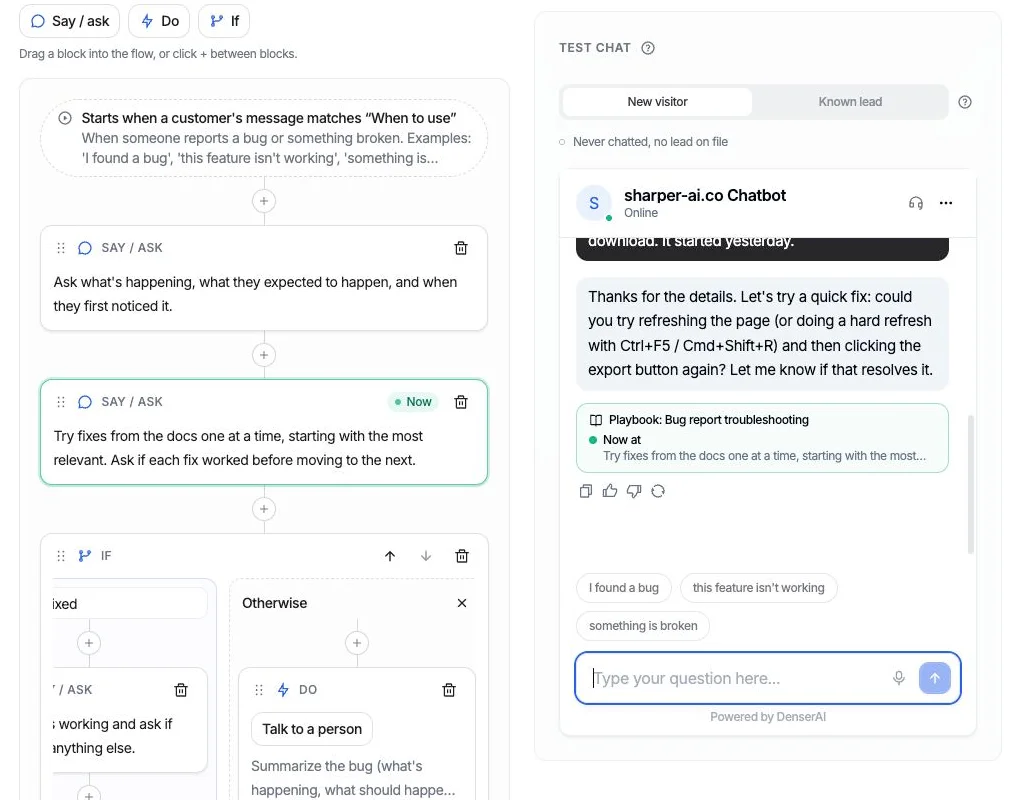
A playbook test run in Denser. Under the reply, the trace names the step the agent is on, and the same step is highlighted in the flow.
This is where an agent is easier to trust than it sounds. In Denser's test chat, under each reply, a trace names the playbook, the step the agent is on ("Now at: ..."), the path it took at each If, and the actions that ran. If a reply promises something that didn't happen, such as "I'll connect you with a teammate" with no hand-off run, the trace says so. You can see what the agent did, not just what it said.
The same structure covers requests that change data. A Return request playbook for a Shopify store asks for the order number and checkout email, looks the order up, checks the delivery date against a 30-day window you can change, lists what can be returned, and requests the return only after the shopper confirms in a later message. The store then approves it in Shopify. A chatbot can only quote the policy.
The Building Blocks: Actions and Playbooks#
Most support agents are built from two pieces. The names vary by vendor; here they are as Denser uses them.
Actions are the things the agent can do. Each has a "When to use" description that tells the agent when to run it. Examples:
- Talk to a person: hand the conversation to your team, live or as a ticket.
- Call your API: paste a URL, cURL command or code snippet, test it with a real query, and tick the fields the agent may read.
- Book in chat (Cal.com): offer open times from your Cal.com link and book the one the customer picks.
- Look up billing (Stripe): read invoices, payment status and plan details, after the customer proves who they are. It is read only.
- Slack message: post a call-back request to your team's channel with a link to the chat.
- Shopify: search products, check order status, request a return or cancel an unshipped order (both after the shopper confirms).
Results can show as cards, small layouts in the chat such as an order summary or a list of products, instead of a wall of text.
Playbooks are the procedures. A playbook has a name, a "When to use" with two or three example messages, and up to 15 steps made from three blocks: Say / ask, Do (run an action) and If (branch, with an Otherwise). While a playbook is on, the actions it uses run only inside it, so every matching request follows the steps. Talk to a person stays available everywhere.
A single action covers a one-step job, such as "show me my cart". A playbook is for jobs where order or a rule matters: check before you change, try fixes before you hand off.
When a Chatbot Is Enough#
Choose a chatbot (or keep the agent's actions off) when:
- Most questions are informational. Pricing, features, hours, how-to steps, policies. If the answer is on your website or in your docs, an AI chatbot that cites its sources handles it.
- Nothing needs to be checked against a customer record. No orders, accounts or bookings.
- Your team is small and wants to start simple. Answering well from your content is the first step anyway; an agent built on bad answers just acts on them.
- The risk of a wrong action is high and the volume is low. If a handful of requests a week touch money or contracts, a person may be the better path.
Plenty of businesses get most of the value here. See our guide to AI chatbot solutions for how to pick one.
When You Need an AI Agent#
You need an agent when the customer's real question is about their situation:
- "Where is my order?" The answer is in your store, not on your website.
- "Can I return this?" It depends on the delivery date and your policy.
- "Why was I charged?" The answer is in your billing system.
- "Can I book a demo?" A booking link often ends the conversation; booking in the chat finishes it.
- "It still doesn't work." The customer needs a person, and the person needs to know what was tried.
A useful sign: if your team's replies to a type of question always start with "let me check", that question needs an agent.
An AI support agent usually does both jobs. It answers from your content most of the time, and runs actions and playbooks for the requests that need them. You don't have to choose one tool for the whole inbox.
Risks of AI Agents, and the Controls That Matter#
An agent that can act can act wrongly. Before you switch on any action that reads private data or changes something, check these controls.
Confirmation before changes#
Anything that changes data should be shown first and done only after the customer says yes. In Denser, Shopify's Cancel order and Request a return each take two steps: the agent shows what would happen and acts only after the shopper confirms in a later message. Both ship switched off, so you decide whether to offer them. For your own API, a request that changes something (POST, PUT, PATCH, DELETE) asks before even a test sends it.
Read-only access where possible#
Give the agent the narrowest access that answers the question. Denser's Stripe lookup accepts only a restricted key with read access to Customers, Invoices, Subscriptions and Products, and refuses a full secret key. Refunds, cancellations and plan changes go to a person. For Call your API, the agent reads only the response fields you tick; nothing else in the response reaches it. Keys go in headers marked secret, stored encrypted and never shown again.
Identity checks#
Before an agent shows an order or an invoice, the customer should prove it's theirs with something only they have. Denser's Shopify Order status shows an order only when the checkout email matches, and its Stripe lookup needs the billing email plus the number of any invoice, both matching the same customer. In both, a wrong email gets the same answer as a wrong number, so nobody can test which emails are customers.
A clear path to a person#
Customers should always be able to reach someone. In Denser, Talk to a person stays available even while playbooks are on, and it opens a ticket when nobody is free to answer live. More in our guide to chatbot to human handoff.
Testing that shows what ran#
Test every path before customers see it, and test with real actions where that's safe. Denser's test chat is the real widget, and actions run for real there (a Slack test posts, a Cal.com test books), so test with a channel or calendar where that's fine. The step trace shows which step produced each reply and flags promises that didn't happen. After launch, each playbook reports how its conversations ended over the last 30 days: completed, escalated or abandoned.
How to Move From a Chatbot to an Agent#
You don't need to rebuild. A sensible order:
- Get the answers right first. Train on your website and docs, and fix gaps the chat logs show.
- Add a hand-off. It's the safety net for everything that follows.
- Add one read-only action for your most common "let me check" question, such as order status or billing lookup.
- Wrap it in a playbook when order matters, starting from a template.
- Test in the test chat, read the traces, then switch it on.
- Review outcomes weekly and adjust the steps.
For more on where agents fit in a support stack, see our list of the best AI agents and these AI automation examples. If you want a broader look at benefits, read the benefits of AI in customer service.
Beyond Customer Support#
The chatbot vs AI agent distinction applies inside companies too. An internal assistant that answers HR or IT questions from your documents is a chatbot; one that also files the ticket or resets the access is an agent. The same controls apply. See internal AI chatbots, how AI is used in fintech and AI agents for healthcare for sector examples, and retail AI chatbots for stores.
Try It With Denser#
Denser is an AI support agent for your website chat, help page, email, Shopify store and more. It answers from your own content with source citations, runs actions and follows playbooks, and hands off to a built-in helpdesk. It also works for lead generation and for a website chat widget that answers before your team is online.
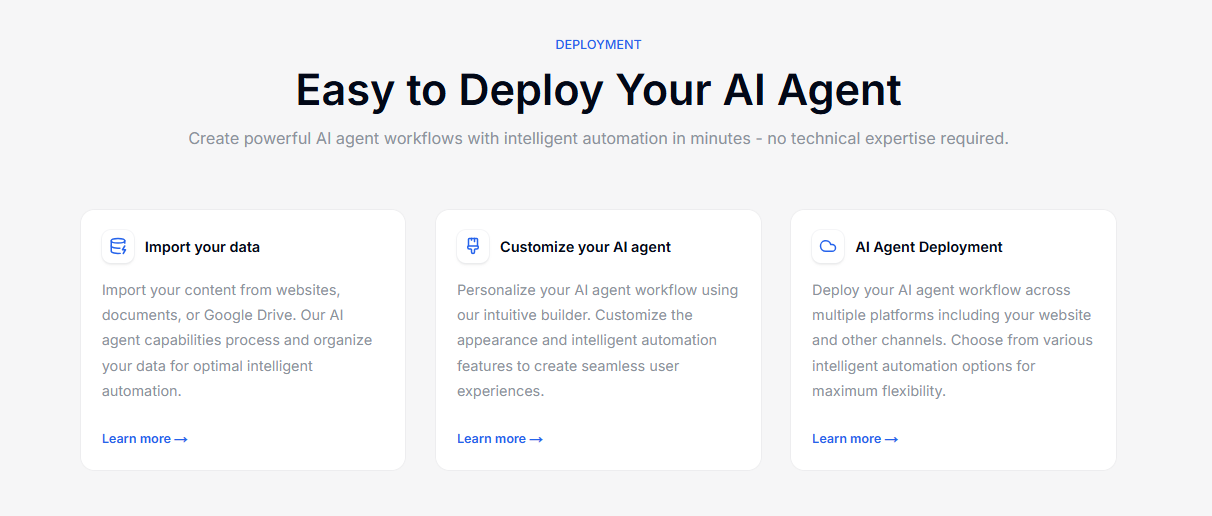
Plans are flat monthly tiers, not priced per resolution, and the Free plan includes one action or playbook to try. Sign up for a free trial or schedule a demo.
FAQs About AI Agents and Chatbots#
What is the main difference between an AI agent and a chatbot?#
A chatbot replies with text. An AI agent can also take actions in other systems, such as looking up an order, booking a meeting or handing the conversation to a person, and it follows procedures across several messages to get there.
Is ChatGPT a chatbot or an AI agent?#
In its basic chat form, it's a chatbot: it answers in text. When it's connected to tools that let it browse, run code or act in other apps, it behaves as an agent. The difference is the tools, not the model.
Are AI agents safe to use with customer data?#
They can be, with the right controls: read-only access where possible, identity checks before showing account data, customer confirmation before any change, a path to a person, and testing that shows exactly which actions ran.
Do I need to replace my chatbot to get an AI agent?#
Usually not. Most AI support agents start as an AI chatbot that answers from your content. You add actions and procedures for the requests that need them, one at a time.
What's the difference between AI and AI agents?#
Artificial intelligence is the broad field. An AI agent is one application of it: software that uses AI to decide which steps to take and which tools to use to reach a goal, within the limits it's given.
What is the difference between an AI assistant and a chatbot?#
The terms overlap. "AI assistant" usually describes a tool that helps one person with tasks (drafting, scheduling, research), while "chatbot" usually describes a tool that answers many customers. Either becomes an agent once it can act in other systems.