

8 Best AI Chatbot Solutions Compared for 2026


AI chatbot solutions help businesses answer customer questions, reduce support tickets, qualify leads, and make company knowledge easier to access. The best AI chatbot solution depends on the job: customer support, lead capture, knowledge-base answers, ecommerce assistance, or internal search.
If you need an AI chatbot for customer service that answers from your own website and help content with source citations, Denser.ai is the strongest fit. If your team already runs support inside Intercom, Intercom Fin may fit with less workflow change. If you want visual lead-generation flows, Landbot or ManyChat may be better. Teams focused on a customer-facing website chatbot should prioritize grounded answers, citations, and a safe escalation path.
Quick answer: The best AI chatbot solution for most businesses is the one that matches the workflow you need to automate. Choose Denser.ai for source-cited answers from your website, PDFs, and knowledge base; Intercom Fin for support teams already using Intercom; Landbot for visual lead flows; ManyChat for social commerce; and Crisp for small teams that want live chat, inbox, and lightweight AI in one tool.
Use this guide to choose a category before comparing feature lists. Teams specifically buying support automation can use the narrower customer service AI agent comparison.
Key takeaways#
- Match the solution to the use case, not to a "best overall" badge. Customer service, sales, SaaS, and internal IT support have different winners.
- Modern AI chatbots retrieve answers from your own data (RAG) rather than relying on scripted flows. See our RAG chatbot guide for the architecture behind this shift.
- Trust now depends on transparency, citations, and clean human handoff. A chatbot that cannot show sources or preserve context during escalation creates more risk than value.
- Pricing ranges from free tiers to six-figure enterprise contracts. Budget by deployment model, not by hype. See our AI chatbot pricing breakdown.
- Ask whether it can act, not just answer. The strongest solutions now call your systems, book meetings, and follow step-by-step procedures, and they let you see each step before customers do. See AI agent vs chatbot for the difference.
- If you need answers grounded in your documents with citations, Denser is built exactly for that.
Which AI Chatbot Solution Should You Choose?#
Start with the workflow, not the vendor list.
| If you need... | Start with | Why it fits |
|---|---|---|
| Customer support from your own content | Denser.ai, Intercom Fin, Zendesk AI | Answers repetitive questions and hands exceptions to people |
| A website chatbot with cited answers | Denser.ai, Botsonic, Intercom Fin | Retrieves from approved pages and knowledge sources |
| Guided lead qualification | Landbot, ManyChat, HubSpot | Uses forms, branching questions, scheduling, and CRM routing |
| Social messaging automation | ManyChat | Built around Instagram, Messenger, and WhatsApp workflows |
| An internal employee assistant | Microsoft Copilot, ChatGPT Enterprise | Works across private workspace content and productivity tools |
| A deeply custom application | OpenAI API, Claude API, Vertex AI, Bedrock | Gives developers control over models, tools, and infrastructure |
For customer support, test the complete failure path before choosing. Ask each platform an answerable question, an ambiguous question, an account-specific question, and a question missing from the knowledge base. The useful product is the one that answers the first, asks for clarification on the second, uses an authorized integration for the third, and refuses or hands off the fourth.
A Practical Evaluation Scorecard#
Score each platform from 1 to 5, multiply by the weight, and test with the same 50 real customer questions. A polished demo is not evidence of production answer quality.
| Criterion | Weight | What to verify |
|---|---|---|
| Grounded answer quality | 25% | Correct answer, correct source, and a safe response when content lacks it |
| Human handoff | 15% | Transcript, customer context, owner, and status survive escalation |
| Actions and procedures | 15% | It can call your systems and follow a multi-step procedure, with confirmation before changes |
| Testing and visibility | 10% | You can see which step and action produced each reply before customers do |
| Knowledge maintenance | 10% | Re-crawling, stale-content controls, contradiction detection |
| Deployment and integrations | 10% | Required channels, CRM/helpdesk actions, API and authentication |
| Reporting and improvement | 5% | Resolution quality, failed questions, topics, and customer feedback |
| Total cost at expected volume | 10% | Seats, conversations, resolutions, overages, setup, and admin time |
Do not buy a chatbot platform when the underlying problem is missing documentation, a policy that requires human judgment, or a workflow that cannot expose the required account data securely. Fixing those inputs creates more value than adding a conversational layer.
Best AI Chatbot Solutions at a Glance#
| Solution | Best For | Why Choose It |
|---|---|---|
| Denser.ai | Accurate answers from your own content | RAG chatbot with source citations, website crawling, file uploads |
| Intercom Fin | Support teams already using Intercom | AI support agent inside Intercom's inbox |
| Botsonic | Quick document-trained chatbot | Fast no-code setup for simple use cases |
| Landbot | Lead forms and guided flows | Visual drag-and-drop builder |
| ManyChat | Social and ecommerce messaging | Instagram, Messenger, and WhatsApp automation |
| Crisp | Small business sales and support | Shared inbox plus lightweight chatbot |
| LiveChat | Human live chat with AI help | Live chat product with AI assistant features |
| Chatbot.com | Rule-based flows with AI | Visual builder for scripted and AI conversations |
AI Chatbot Solutions by Use Case#
Top-ranking buyer guides make one point very clearly: there is no single "best chatbot" for every business. AI chatbots now cover support, sales, internal productivity, workflow automation, and research. Pick the category first, then compare vendors.
| Use Case | Best Fit | What to Prioritize |
|---|---|---|
| Website support chatbot | Denser.ai, Intercom, Tidio | Accurate answers, source citations, handoff, analytics |
| Knowledge base chatbot | Denser.ai, Botsonic, Intercom Fin | RAG quality, file types, citation depth, re-indexing |
| Lead generation chatbot | Landbot, ManyChat, Drift-style tools | Forms, branching flows, CRM sync, routing |
| Social commerce chatbot | ManyChat, Instagram/WhatsApp tools | Channel support, campaign automation, ecommerce triggers |
| Internal employee assistant | Microsoft Copilot, ChatGPT Enterprise, Notion AI | Workspace permissions, SSO, data governance |
| Enterprise AI agent platform | Salesforce Agentforce, Copilot Studio, IBM watsonx | Governance, audit logs, identity, deep integrations |
| Custom developer build | OpenAI API, Claude API, Vertex AI, Bedrock | Engineering control, model choice, custom workflows |
If your goal is a customer-facing website chatbot trained on your own content, a RAG-first platform is usually a better starting point than a general-purpose AI assistant. If your goal is employee productivity across email, documents, and meetings, a workspace assistant may be the better fit. For a support-specific evaluation, compare the best customer service AI agents or see how Denser's customer support chatbot handles cited answers and escalation.
What Is an AI Chatbot Solution?#
An AI chatbot solution is a platform that deploys an AI assistant trained on your own content, which answers customer questions in natural language, deflects support tickets, and captures leads without a human agent. The best ones ground every answer in your documentation and cite the source passage, so the response can be verified rather than trusted.
Three things separate a solution from a plain chatbot: it retrieves from your own knowledge base rather than a general model, it deploys across your website and support channels, and it reports on what it could not answer so you can close the gaps.
For large deployments with security and scale requirements, see enterprise chatbot solutions. If you are comparing vendors and services rather than products, the provider types below set out what each charges.
Types of AI Chatbot Solutions#
By how they work, there are four types of chatbots: rule-based chatbots that follow scripted flows, AI chatbots that understand open-ended questions with natural language processing, knowledge (RAG) chatbots that answer from your own content with citations, and hybrid chatbots that combine flows, AI answers, and human handoff.
By product category, the phrase "AI chatbot solutions" now covers several different kinds of tools:
General-purpose AI assistants such as ChatGPT Enterprise, Claude Enterprise, Gemini, and Microsoft Copilot help employees draft, summarize, analyze, and search work content. They are strong productivity tools, but they are not always the best website support chatbot.
Customer service AI agents such as Intercom Fin, Zendesk AI, and helpdesk-native bots fit teams that already manage support tickets in a shared inbox. They are strongest when your support workflow lives in that system.
RAG knowledge chatbots such as Denser.ai focus on answering from your website, PDFs, help center, and internal documents with citations. They are best when accuracy and source verification matter. If you are comparing this category specifically, review the RAG chatbot architecture and build process before choosing a platform.
Flow builders such as Landbot and Chatbot.com are useful when the conversation is mostly a guided form: collect a lead, route a request, book a meeting, or qualify a visitor.
Messaging automation tools such as ManyChat are strongest on Instagram, Messenger, WhatsApp, and ecommerce campaigns.
Developer platforms such as OpenAI API, Amazon Bedrock, Google Vertex AI, and Azure AI Foundry are best when your team wants to build a custom chatbot with deep integrations and full control.
Chatbot Solution Providers: Platform, Agency or Integrator?#
Searching for a chatbot vendor returns two different kinds of company: those that sell software you configure yourself, and those that sell a project. They are priced an order of magnitude apart.
| Provider type | What you get | Setup | Ongoing | Time to live |
|---|---|---|---|---|
| Self-serve platform | Software you point at your content and deploy, such as Denser, Chatbase or Botsonic | None | $40 to $900/mo | Hours |
| Managed platform | The same software plus a person who configures and tunes it | $2,000 to $10,000 | $500 to $3,000/mo | 2 to 4 weeks |
| Development agency | A custom bot built on a platform or an LLM API | $15,000 to $150,000 | Retainer, often 15 to 20% | 2 to 6 months |
| Systems integrator | An enterprise stack (Salesforce, Zendesk, Microsoft) as part of a wider program | $100,000+ | Enterprise contract | 3 to 12 months |
Agencies are worth it for unusual workflows and deep integration with proprietary systems. For example, AY Automate handles custom chatbot development with integrations into CRMs, help desks and internal tools, and hands over the code. For ordinary question answering, a project fee buys what a platform does out of the box.
A simple test: if your knowledge is already written down, the bot mostly answers questions, and someone can own it for an hour a week, a self-serve platform will serve you. If nobody can own it, look at a managed platform. If the bot must write to your ERP or run multi-step transactions in other systems, that is the real case for custom development.
Whichever type you talk to, ask how the bot decides which passage to answer from, and whether every answer cites it. Strong providers describe retrieval; weak ones only name the model.
What changed in AI chatbot solutions in 2026#
In 2026, the buying question has shifted from "Can this chatbot answer questions?" to "Can we trust it in real customer workflows?" Gartner reported that 91% of customer service leaders feel executive pressure to implement AI, but the same research points to knowledge management as a major blocker: accurate, current content is now part of the AI deployment plan, not a side project.
That is why the strongest chatbot solutions now combine four things: grounded retrieval from approved content, visible source citations, analytics for unanswered or weak answers, and a clean handoff to humans when the issue needs judgment. Five9's 2026 CX research also found that while AI adoption is widespread, customer trust still depends on transparency, choice, and seamless human handoffs. Use this as your filter when comparing vendors: the best platform is not just the most automated one; it is the one your team can monitor, correct, and trust.
The second shift is from answering to acting. Customers rarely want only information: they want the order checked, the meeting booked, the subscription explained. Support platforms now let the AI call business systems and follow written procedures (Intercom and Zendesk call these procedures, Decagon calls them agent operating procedures, and Ada and Denser call them playbooks). When you evaluate one, ask three questions. Which systems can it act on? Does it ask the customer before changing anything? And can you watch a test run step by step, so you know why it said what it said?
Why businesses are adopting AI chatbot solutions#
Before comparing platforms, it helps to understand why adoption is accelerating. Salesforce's 2026 service trends report says 79% of service leaders view AI agent investment as critical, and teams expect AI agents to reduce service expenses and resolution times while improving customer satisfaction. The shift is not hype; it is economics:
- Support deflection. A grounded chatbot answers recurring questions (refund policy, shipping, setup) without a human, deflecting a large share of tickets.
- 24/7 coverage. Chatbots answer outside business hours, capturing leads and resolving simple issues overnight.
- Consistency. A RAG chatbot answers the same question the same way every time, from your approved content — no agent-to-agent variance.
- Internal knowledge access. The same retrieval pattern powers internal assistants so employees find policies and docs faster. See our internal knowledge base tools guide.
How AI chatbot solutions work#
Before evaluating platforms, it helps to understand what actually powers a modern AI chatbot. The quality of answers depends on four layers working together: language understanding, retrieval, generation, and integration.
Natural Language Understanding (NLU). The chatbot parses what the user typed, detecting intent, entities, and context. A user who types "where is my order" and one who types "hasn't my package shipped yet" are asking the same thing. Strong NLU handles that without requiring the user to use specific wording.
Retrieval (RAG) layer. Instead of generating answers from general training data, modern chatbot solutions retrieve the most relevant passages from your actual content. The retrieval layer matters more than the language model itself, because a weak retriever produces weak answers even with GPT-4. Learn the broad pattern in our retrieval-augmented generation (RAG) guide or the chatbot-specific workflow in our RAG chatbot guide.
Generation layer. A large language model (GPT-4o, Claude, Gemini, or a proprietary model) reads the retrieved context and generates a natural-language response. The best platforms include source citations so users can verify the answer.
Integration layer. APIs and webhooks connect the chatbot to your CRM, helpdesk, database, and messaging platforms. Without this, the chatbot is a sandbox; with it, the chatbot becomes part of your real workflow.
AI chatbot deployment channels#
A chatbot solution is only useful where your customers actually are, and most platforms are narrower than their marketing suggests. Many are a website widget with an API bolted on.
Five channels cover the majority of real support volume:
- Website chat. The embedded widget. Table stakes, and where most vendors stop.
- A hosted help page. A standalone, linkable page people can be sent to from an email signature, a receipt, or a support macro — without embedding anything.
- Email. Inbound mail answered automatically, with the thread preserved.
- Phone. Calls captured into the same queue, with a configurable auto-reply so the customer is acknowledged before anyone picks it up. This is a ticket channel, not a voice agent answering live calls.
- REST API. For in-product help, a mobile app, or any surface you built yourself.
Denser supports all five, and also deploys to WhatsApp, Slack, and Telegram. Website chat, help page, email, phone, the API, and WhatsApp all feed one shared queue rather than five separate inboxes. That last part matters more than the channel count: a customer who tries chat, gives up, and emails you has asked one question twice, and if those live in different systems you will answer it twice.
When you evaluate a vendor, ask which channels are native versus which require an integration you have to build and maintain.
Chatbot and helpdesk: what happens when the bot cannot answer#
Most chatbot comparisons stop at answer quality. The more revealing question is what the platform does with the conversations it cannot finish, because that is where customers are actually lost.
A chatbot without somewhere for failures to land produces silent abandonment: the visitor gets stuck, leaves, and nothing in your system records that it happened. Deflection metrics look excellent precisely because the customer gave up.
The stronger pattern is a helpdesk sitting behind the chatbot. Denser escalates on three explicit conditions rather than a tunable confidence score — the visitor asks for a person, the AI has failed repeatedly and stops guessing, or the AI detects frustration — and anything that fires becomes a ticket in a shared queue with the full transcript attached. An agent can take over the live chat mid-conversation, so the customer never re-explains the problem.
That pairing is the difference between a chatbot and a support system. It is also a genuine dividing line between vendors: some are answer-only tools by design, which is fine if you already own a helpdesk, and expensive if you do not.
Denser's ticket queue, escalation, and third-party ticket creation are included on every plan, including Free. See helpdesk automation for where the line between the two should sit.
How we evaluated these AI chatbot solutions#
We assessed each platform on six criteria that predict real outcomes:
- Answer grounding — does it answer from your own data with citations, or hallucinate from training memory?
- Ease of deployment — no-code/embeddable vs. heavy custom build.
- Use-case fit — customer service, sales, SaaS, IT support, healthcare.
- Pricing transparency — published tiers vs. "contact sales" only.
- Enterprise readiness — security, data residency, SSO, audit logs.
- Action and procedure control — can it act on your systems, follow a written procedure, and show you each step it took?
We also separated business chatbot platforms from general AI assistants. A tool like ChatGPT Enterprise or Microsoft Copilot may be excellent for employee productivity, but the buyer need is different from a public website chatbot that must answer from approved content, cite sources, collect leads, and hand off to a human.
Feature and pricing details were checked against vendors' published product and pricing pages on September 23, 2026. Because plans change, use the figures below to compare billing models, then confirm the current total with each vendor before buying.
1. Denser.ai: Best for Answers From Your Own Data#
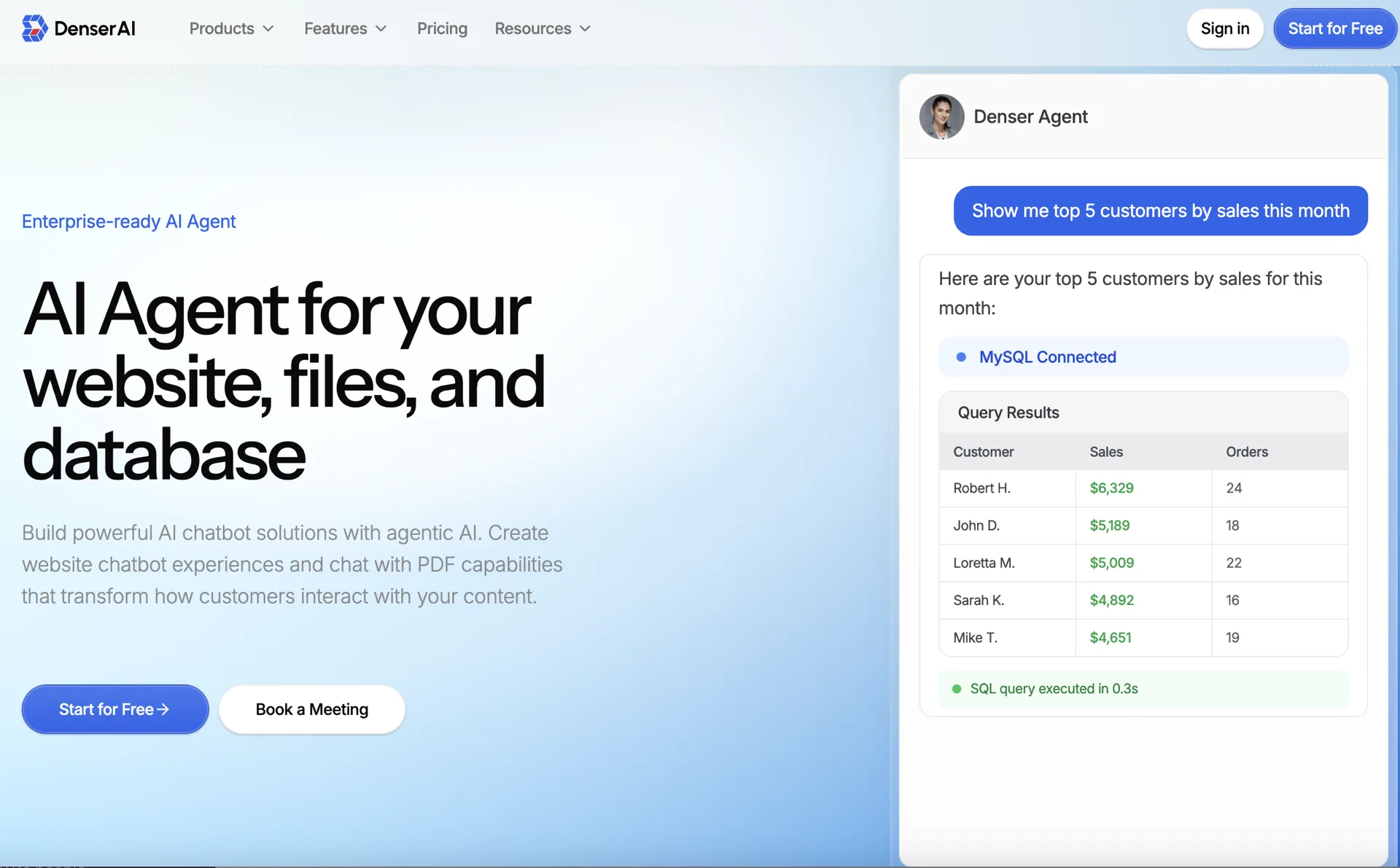
Denser.ai is built for businesses that need a chatbot to answer from their own website, PDFs, documents, and knowledge base content.
The main advantage is trust. Denser can show source citations, so users can see where an answer came from. That matters for customer support, internal knowledge bases, product documentation, and any workflow where a wrong answer creates risk.
Best for: website chatbots, customer support, internal knowledge bases, PDF chatbots, documentation search.
Why choose it:
- Crawls websites and indexes documents
- Answers with source citations
- Deploys across website chat, a hosted help page, email, phone, and REST API
- Escalates to a built-in helpdesk queue with the transcript attached
- Takes actions: calls your own API, books meetings on your Cal.com calendar, reads Stripe billing after an identity check, posts to Slack, and runs Shopify product search, order status, cancellations, and returns, with the customer's confirmation before any change
- Shows results as cards (product lists, orders, plans) instead of long text
- Follows playbooks, step-by-step procedures built from Say, Do and If blocks, with a trace that shows which step produced each reply in the test chat
- Builds the chatbot for you: describe what you want to Ask AI, Denser's AI chatbot builder, and apply each change it proposes
- Sells on Shopify: the Shopify AI chatbot searches the live catalog, fills the native cart, and checks orders
- Works well for large knowledge bases
- Offers free tools for testing, including a free website chatbot tool and free Chat with PDF tool
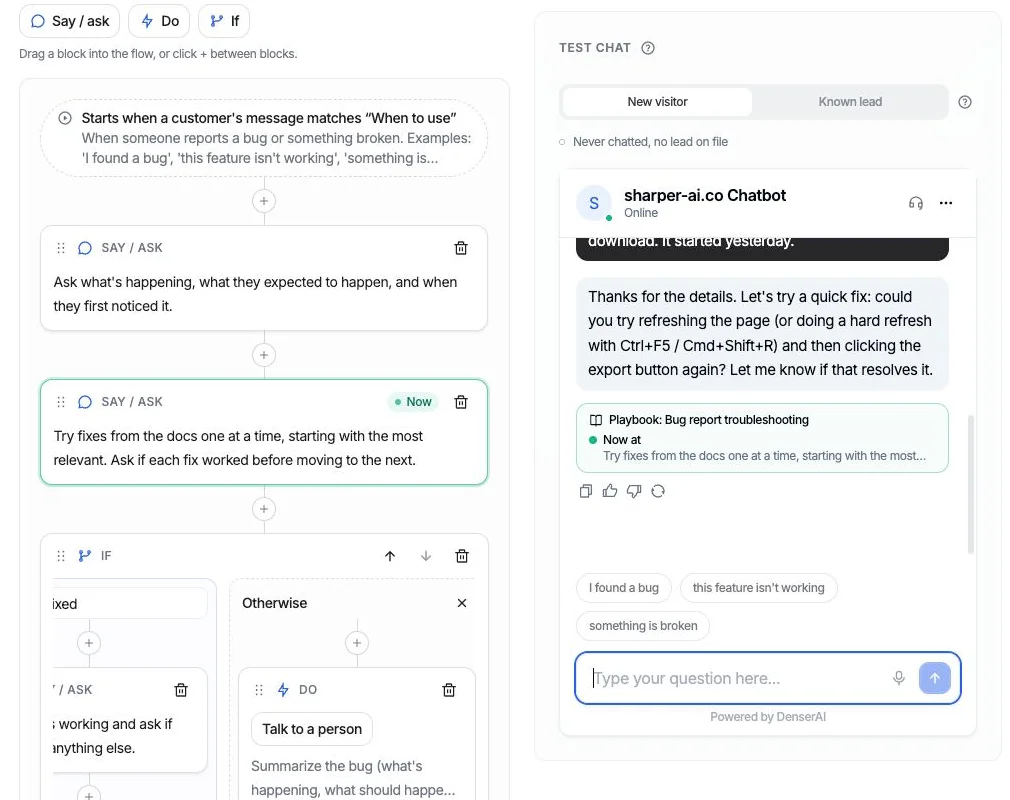
A playbook test run: the trace under the reply and the highlighted block in the flow point to the same step.
2. Intercom Fin: Best for Intercom Support Teams#
Intercom Fin is a good option if your support team already uses Intercom. It fits naturally into the Intercom inbox, help center, and ticketing workflow, and Fin Procedures let it follow multi-step processes written in natural language.
Best for: teams already committed to Intercom.
Watch out for: pricing can grow with resolution volume, and the workflow is tied to the Intercom ecosystem.
3. Botsonic: Best for Fast Prototypes#
Botsonic lets you upload documents and create a simple AI chatbot quickly. It is useful when you want to test a "chat with my docs" experience without much setup.
Best for: prototypes and small document-trained bots.
Watch out for: it may be less suitable for larger knowledge bases or teams that need deep answer verification.
4. Landbot: Best for No-Code Lead Flows#
Landbot is a visual chatbot builder. It works well when you want guided conversations, lead forms, and branching flows.
Best for: marketing teams, lead qualification, surveys, and form-like chat experiences.
Watch out for: it is more of a flow builder than a source-cited knowledge chatbot.
5. ManyChat: Best for Social and Ecommerce#
ManyChat is strong for Instagram, Messenger, and WhatsApp automation. Ecommerce brands use it for product recommendations, campaigns, and abandoned-cart messages.
Best for: social commerce and creator-led businesses.
Watch out for: it is not designed primarily for large document retrieval.
6. Crisp: Best for Small Teams That Want One Inbox#
Crisp combines live chat, a shared inbox, and lightweight chatbot automation in one tool. It suits small teams that answer customers themselves most of the time and want some automation on top.
Best for: small business sales and support teams that want live chat and an inbox in one place.
Watch out for: its chatbot automation is lighter than a dedicated RAG platform, so it is a weaker fit when most questions should be answered from your documentation.
7. LiveChat: Best When People Still Answer Most Chats#
LiveChat is a live chat product with AI assistant features. It fits teams where human agents remain the main way customers get help, and AI helps those agents work faster.
Best for: support teams built around human live chat.
Watch out for: the AI mainly assists agents rather than resolving conversations on its own, so it does less to reduce ticket volume than an AI-first chatbot.
8. Chatbot.com: Best for Predictable Rule-Based Flows#
Chatbot.com offers a visual builder for scripted conversations with some AI support. It works well when you want each conversation to follow a path you designed in advance.
Best for: teams that want predictable, rule-based flows with some AI.
Watch out for: scripted flows need updating by hand as your products and policies change, and they do not answer open-ended questions from your content the way a retrieval-based chatbot does.
AI Chatbot Solution Pricing in 2026#
Most comparison articles skip pricing because vendors bury it. The number that matters is not the headline tier, it is what a month costs at your actual volume, and the four billing models below produce very different answers.
Per query. One customer question costs one unit, whatever model answers it. Denser works this way: free to start, then $39/mo for 1,500 questions, $119 for 7,500, $399 for 15,000, and $899 for 50,000. The bill does not move when you switch to a stronger model.
Per credit. A reply consumes credits at a rate set by the model, so identical conversation volume can cost different amounts month to month. Compare how each platform charges for model usage, actions, and overages rather than relying only on the headline credit allowance.
Per resolution. You pay only when the bot resolves something, which is a fair meter until volume grows. Intercom Fin charges $0.99 per resolved outcome on top of seats at $29 to $132 per seat per month, so 3,000 resolutions is $2,970 in usage alone. Zendesk bundles 5 to 15 automated resolutions per agent and meters the rest at a rate it does not publish.
Per seat, with AI as an add-on. Tidio sells live chat by seat and prices Lyro separately, at roughly $39/mo for 50 to 100 AI conversations, bundled only from the $749 tier.
| Billing model | Predictable? | Cheapest at high volume | Watch for |
|---|---|---|---|
| Per query | Yes | Yes | Tier ceilings |
| Per credit | No | No | Premium models burning 2 to 25× |
| Per resolution | No | No | Cost scales with success |
| Per seat + add-on | Partly | No | Paying twice for one conversation |
Three add-ons account for most surprise invoices: removing vendor branding ($39 to $99/mo depending on the platform), API access (a $49/mo add-on on some plans until you reach the top tier), and extra chatbots or seats billed individually. Ask for the all-in figure at your volume before comparing headline prices.
How to Choose the Right Chatbot Solution#
Ask five simple questions:
- What should the chatbot answer from? If the answer is your website, documents, PDFs, or help center, choose a RAG-based chatbot like Denser.
- Where will users talk to it? Website, support inbox, social messaging, Slack, or inside your app?
- Do you need source citations? If users must verify answers, citations are important.
- Do you need human handoff? Some questions still need a person.
- How will pricing scale? Compare per-seat, per-message, per-resolution, and plan-based pricing. For more detail, see our chatbot pricing guide.
Buyer Checklist#
Before you pick a vendor, ask these questions:
| Requirement | What to Ask |
|---|---|
| Accuracy | Does the bot retrieve from approved content, or answer from general model knowledge? |
| Citations | Can users and agents see the exact source behind each answer? |
| Data freshness | How do you update content: file replacement, scheduled crawl, API sync, or manual retraining? |
| Handoff | Can the bot pass full context to a human when it is uncertain? |
| Security | Does the platform support SSO, RBAC, audit logs, and clear data retention policies? |
| Channels | Which channels are native — website, help page, email, phone, API — and which need building? |
| Integrations | Does it connect to your website, CRM, helpdesk, Slack, Shopify, or database? |
| Actions | Can it call your API, book meetings, or change an order, and does it confirm before changes? |
| Procedures | Can you write a step-by-step procedure the AI follows, without building a decision tree? |
| Testing | Can you watch a test run step by step and see which action produced each reply? |
| Reporting | Can you see unanswered questions, weak answers, top topics, and conversion events? |
| Pricing risk | Are you paying per seat, query, credit, resolution, or add-on? |
For a support or knowledge-base chatbot, prioritize accuracy, citations, and content maintenance before extra channels. For a sales or marketing chatbot, prioritize forms, routing, CRM integration, and conversion tracking.
Implementation Plan#
Use a short pilot before rolling out an AI chatbot broadly:
- Choose one workflow. Start with product FAQs, support docs, pricing questions, onboarding, or lead qualification.
- Prepare the source content. Remove outdated policies, duplicate pages, and conflicting answers.
- Build the chatbot. Upload files, crawl the website, or connect the knowledge base.
- Test real questions. Include common questions, edge cases, and questions the bot should refuse.
- Define handoff rules. Decide when the bot should ask for contact info or route to a person.
- Launch on one channel. Start with your website or support dashboard before adding social or app channels.
- Review analytics weekly. Add missing content and fix unclear answers before expanding.
This keeps the project measurable. A chatbot should not be judged by whether it sounds impressive in a demo; judge it by whether it resolves real questions accurately and safely.
Common Mistakes#
Avoid these when choosing a chatbot solution:
- Choosing a scripted flow builder when you need answers from a knowledge base
- Ignoring source citations
- Treating a general AI assistant and a website support chatbot as the same category
- Forgetting to test real customer questions before launch
- Underestimating usage-based pricing
- Launching without a clear human handoff path
- Uploading outdated or conflicting content and blaming the chatbot for bad answers
Which Solution Should You Pick?#
Choose Denser.ai if you want an AI agent that answers from your own website, PDFs, and documents with citations, and that can act on your systems and follow your procedures.
Choose Intercom Fin if you already use Intercom and want AI inside your support inbox.
Choose Landbot if you want guided lead-generation flows.
Choose ManyChat if your main channel is Instagram, Messenger, or WhatsApp.
For most businesses that want a chatbot trained on their own content, Denser is the simplest place to start.
Create a free Denser account or test the workflow with the free website chatbot tool.
FAQs About AI Chatbot Solutions#
What are the top 5 AI chatbots?#
For business use, the top 5 AI chatbot solutions are Denser.ai (answers from your own content with citations), Intercom Fin (support teams already on Intercom), Botsonic (fast document-trained prototypes), Landbot (no-code lead flows), and ManyChat (social and ecommerce messaging).
For general-purpose assistants rather than business deployments, ChatGPT, Claude, and Gemini lead, but they are chat interfaces, not chatbot solutions you can deploy on your site with your own data behind them. The distinction in the "Is a chatbot the same as ChatGPT?" answer below is the one that matters most when comparing them.
What are the top 10 AI chatbots?#
For business use, the top 10 AI chatbot solutions are:
- Denser.ai for source-cited answers from your own website and documents
- Intercom Fin for teams already using Intercom
- Botsonic for fast document-trained prototypes
- Landbot for no-code lead flows
- ManyChat for Instagram, Messenger, and WhatsApp automation
- Crisp for small teams that want live chat and an inbox in one tool
- LiveChat for teams where people still answer most chats
- Chatbot.com for predictable rule-based flows
- Zendesk AI for support teams already working in Zendesk
- Tidio for small stores that want live chat with an AI add-on
What are the four types of chatbots?#
The four types of chatbots are rule-based chatbots that follow scripted flows, AI chatbots that understand open-ended questions, knowledge (RAG) chatbots that answer from your own content with citations, and hybrid chatbots that combine flows, AI answers, and human handoff. Most modern AI chatbot solutions for customer support are hybrid: they answer from your knowledge base and hand off to a person when they cannot help.
Is a chatbot the same as ChatGPT?#
No. ChatGPT is a general-purpose assistant that answers from what its model learned during training. A business chatbot solution answers from your content — your help center, product docs, and policies — by retrieving the relevant passages first and generating from those.
The practical difference is what happens on a question your content does not cover. ChatGPT will produce a confident, plausible answer regardless. A retrieval-based chatbot finds nothing to retrieve, and a well-built one escalates instead of guessing. That is why you can leave the second answering customers unattended and not the first.
You can use ChatGPT's underlying models inside a chatbot solution; the model is not the product.
What are AI chatbot solutions?#
AI chatbot solutions are platforms that help businesses create and deploy AI assistants. They can answer questions, capture leads, support customers, and help employees search company knowledge.
What is the best AI chatbot solution for business?#
It depends on the use case. Denser is best for source-cited answers from your own content. Intercom is strong for support teams. Landbot is good for visual flows. ManyChat is best for social messaging.
What is the difference between a chatbot and a chatbot solution?#
A chatbot is the assistant users interact with. A chatbot solution is the full platform used to build, train, deploy, monitor, and improve that assistant.
Can an AI chatbot answer from our own company data?#
Yes. RAG-based chatbot solutions can answer from your website pages, PDFs, help docs, and internal knowledge base content. Denser adds source citations so users can verify the answer.
How much do AI chatbot solutions cost?#
Costs vary. Some tools offer free tiers, while enterprise tools may require custom contracts. Pricing can be based on seats, conversations, resolutions, messages, or usage limits.
Can an AI chatbot take actions, not just answer questions?#
Yes, if the platform supports actions. An AI agent can call your API to check an order, book a meeting on your calendar, look up an invoice, or hand the chat to a person, and a well-built one asks the customer before changing anything. In Denser, actions are configured per chatbot, combined into step-by-step playbooks, and tested in a test chat that shows which step and action produced each reply.