

Helpdesk Automation in 2026: What to Automate and What to Leave to Humans

Helpdesk automation is the use of software — increasingly an AI support agent — to handle work that would otherwise need a person: answering repeat questions, creating and routing tickets, acknowledging requests, and updating status as an issue moves.
The interesting part in 2026 is no longer whether to automate. It is where to stop. Every vendor will sell you an AI agent. Almost none will tell you which conversations it should never finish on its own, and that boundary is what separates automation that reduces work from automation that quietly creates more of it.
First, Two Different Things Share This Name#
Search "help desk automation" and you will get two products described in the same words.
Customer helpdesk automation handles the people who buy from you. The work is inbound questions across chat, email and phone: where is my order, what is your refund window, how do I change my plan. Success means the customer got a correct answer.
IT service desk automation handles your own employees. The work is password resets, access requests, laptop provisioning, VPN issues — usually inside a ticketing system like ServiceNow or Jira Service Management, driven by workflows and approval chains. Success means the request was fulfilled.
The tooling barely overlaps. Moveworks, SysAid and ManageEngine are strong at the second and largely irrelevant to the first. A customer support platform will not provision a laptop.
This guide is about customer helpdesk automation. If you are automating internal IT, the principles below still apply — decide what to automate by whether the answer can be verified — but the vendors will be different ones.
What Helpdesk Automation Actually Covers#
It is not one feature. It is four layers, and most teams buy the first and forget the rest.
1. Answer automation#
An AI agent answers the question directly. This is the layer with the most leverage, because repetitive questions are the bulk of most queues, and it is also the layer where things go wrong — see the next section.
2. Ticket creation and capture#
Anything the AI cannot finish becomes a ticket automatically, with the conversation attached. This is the layer teams most often skip, and skipping it is what turns "deflection" into abandonment: the customer gets stuck, gives up, and nothing in your system records that it happened.
Capture should span every channel you actually run — website chat, a help page, email, phone, WhatsApp, and any custom surface you built through an API — landing in one queue rather than several.
3. Routing, assignment and status#
Tickets reach the right person, carry an owner, and move through states everyone can see. Automated routing is unglamorous and it is where most of the recovered hours actually come from, because triage is pure overhead.
4. Acknowledgement and follow-up#
Auto-replies on email and phone so a customer knows they were heard before anyone picks it up, and status updates as the issue moves. Cheap to configure, disproportionately effective on satisfaction scores.
Helpdesk automation examples at a glance#
| Support task | Safe automation | Keep a person involved when |
|---|---|---|
| Common product and policy questions | Retrieve an approved answer and cite the source | Sources are missing, stale, or contradictory |
| Ticket intake | Capture the request, transcript, customer details, and channel | The request contains sensitive or regulated information |
| Classification and routing | Apply tags, priority suggestions, and assignment rules | Priority depends on business judgment or customer risk |
| Order and account questions | Read authorized live data and explain the result | The customer requests an exception, refund, or account change |
| Status updates | Send acknowledgements and workflow notifications | A promised deadline or resolution has changed |
| Conversation summaries | Summarize the transcript for the receiving agent | The summary will be used for a consequential decision |
The safest pattern is progressive automation: start with retrieval and capture, measure the result, and add actions only when the allowed inputs, outputs, and failure path are explicit.
What to Automate#
Automate work where a correct answer already exists somewhere in your content, and where being wrong is recoverable.
- Questions your help center answers. Shipping windows, refund policy, plan limits, how-to steps. If an article covers it, an AI should be answering it.
- Order and account lookups, where the system can read the real record rather than guess.
- Ticket creation, tagging and routing. No judgment required, pure overhead removed.
- Acknowledgement. Nobody needs a human to say "we got this."
- Triage and prioritisation, as a suggestion the team can override.
What to Leave to Humans#
Leave anything where being confidently wrong is expensive.
- Money and commitments. Refunds outside policy, credits, contractual promises.
- Anything legal, medical, safety-related or regulated.
- Angry or escalating customers. A frustrated person does not want a faster bot.
- Questions your content does not answer. This is the important one, and the hardest to get right.
- Anything where a wrong answer cannot be walked back.
That last category is where most AI support deployments fail. Not because the AI is bad at answering — because it does not know when to stop.
The Real Failure Mode: Confident Wrong Answers#
A support AI that generates from a general language model will always produce something. Ask it about a refund window your site never documented and it will not say "I don't know." It will produce a plausible number, in your brand voice, to a customer who has no way to tell.
That is one bad answer. The expensive part is what it does to the team: once anyone has seen it happen, nobody trusts the AI unattended, so a human reviews every reply — which is precisely the work the automation was bought to remove. You end up paying for the tool and still doing the job.
Retrieval is what fixes it#
Retrieval-augmented generation (RAG) changes the order of operations. Instead of asking a model what your refund policy probably says, the system retrieves the actual passages from your help center first, then writes the answer from those passages and cites them.
The model is reading rather than recalling, so it has nothing to invent from. And when your content genuinely does not cover the question, retrieval comes back with nothing — which is the signal to escalate rather than improvise.
The citation matters as much as the answer. A customer can check it. An agent reviewing a bad reply can see which article misled the bot and fix that article, so the same question stops going wrong. Without that link, a wrong answer is untraceable and the fix is guesswork.
This is why "where does the answer come from" is the only question worth asking a vendor. Everything else is degrees of polish.
Where the Line Sits: Escalation Triggers#
"Leave hard things to humans" is useless as a specification. The system needs explicit conditions.
Denser escalates on three, rather than a confidence score you have to tune:
- The visitor asks for a person. An explicit request is never overridden. Nothing damages trust faster than a bot that will not let go.
- The AI has failed repeatedly. After a few unsuccessful attempts it stops guessing and hands over, instead of looping.
- The AI detects frustration. Escalation happens before the conversation sours further, not after.
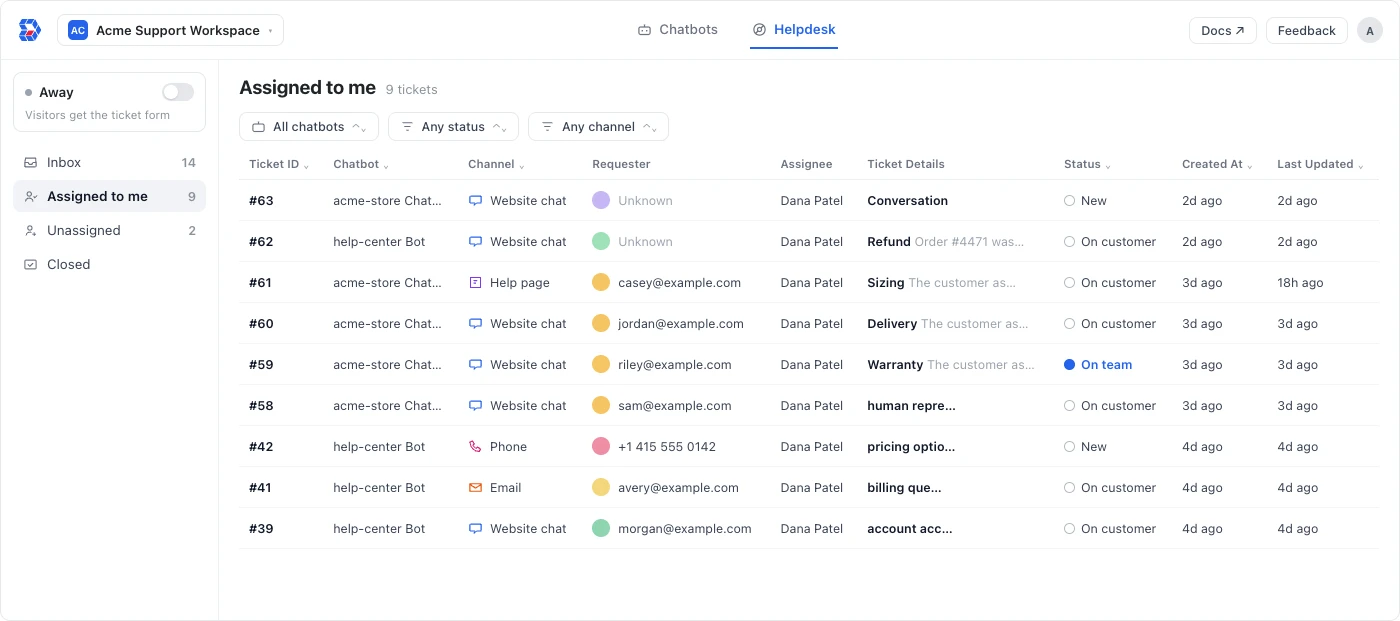
When any of these fires, the conversation becomes a ticket in the queue with the full transcript attached, and an agent can take over the live chat mid-conversation with everything the AI already discussed. The customer does not start again.
That handoff is the whole point. Automation you can trust is automation that knows its own boundary.
What This Looks Like in Practice#
Three examples of the whole loop, rather than the answering layer alone.
"Where is my order?" — the highest-volume question in ecommerce. The AI reads the order record and answers with the real status and date. No ticket is created, because nothing needs a human. Automatable end to end.
"Your site says 30 days but support told me 14 — which is it?" — the AI retrieves both passages and finds they disagree. It does not pick one. It escalates with both sources attached so the agent can answer authoritatively, and the contradiction is flagged so someone fixes the article. One conversation, two problems solved.
"This is the third time I've asked about my refund." — frustration detected on the first message. No answer attempt, immediate handoff, ticket created at higher priority with the previous two conversations attached. The agent opens it already knowing the history.
The pattern across all three: the AI decides what kind of conversation it is before deciding whether to answer.
How to Measure It#
Most helpdesk automation reporting flatters itself, because the default metric counts the wrong thing.
Deflection counts conversations that ended. A customer who gave up in frustration is indistinguishable from one whose question was answered. Optimise for deflection and you will eventually optimise for abandonment — our guide to ticket deflection covers the formula and how to correct for it.
Resolution counts questions that got answered. It is harder to measure and it is the only number worth acting on.
Practical instrumentation:
- Reopen rate. A "resolved" conversation that produces a new ticket within 48 hours was not resolved. This is the cheapest lie-detector you have.
- Escalation rate, split by trigger. A rising "asked for a person" rate means the AI is not trusted. A rising "repeated failure" rate means your content has gaps.
- Answer coverage. Which questions had nothing to retrieve. Denser's answer quality insights surface unresolved questions and contradictions across your sources, so gaps show up before customers find them.
- First contact resolution, measured by whether the customer came back, not by whether the ticket was closed.
- Time to first response, which auto-acknowledgement should push near zero.
Common Mistakes#
Automating before the content exists. An AI grounded in a thin help center has nothing to ground in. Fix the ten most-asked questions first; the automation gets dramatically better for free.
Hiding the human option. Burying the escalation path increases anger and produces worse outcomes than having no bot.
Treating it as a launch instead of a loop. The gaps only reveal themselves in real conversations. Read the escalations weekly for the first month.
Automating the queue but not the answer, or the answer but not the queue. Routing tickets faster still leaves every question answered by a person. Answering questions with nowhere for failures to land leaves customers stranded. You need both halves.
Buying on resolution-rate claims. Every vendor quotes a percentage. Ask instead where the answers come from and whether the customer can see the source.
How to Set Up Helpdesk Automation#
Treat implementation as a support-operations project, not a switch you turn on.
- Map the request types. Export a representative month of conversations and group them by intent, volume, risk, and current handling time.
- Choose a narrow first scope. Start with high-volume questions that have an approved, stable answer. Do not begin with exceptions or account-changing actions.
- Prepare the source content. Remove contradictions, add missing conditions, and assign an owner to every policy or procedure the AI may cite.
- Define the workflow. Specify what gets answered, what creates a ticket, how priority is assigned, and who receives each escalation.
- Test the failure cases. Include incomplete questions, frustrated customers, unsupported requests, conflicting sources, and explicit requests for a person.
- Launch with review. Sample resolved and escalated conversations every week, then expand only after the resolution and reopen data support it.
Before launch, confirm that the system preserves the transcript during human handoff, exposes the source behind automated answers, and records unanswered questions as content gaps. Those controls matter more than the number of workflows a vendor advertises.
Frequently Asked Questions#
What is helpdesk automation?#
Helpdesk automation is software that handles support work a person would otherwise do: answering repeat questions, creating and routing tickets, acknowledging requests, and updating status. Modern implementations use AI for the answering layer and rules or workflows for routing and follow-up.
Will AI replace the IT help desk?#
No, and the pattern is consistent across both customer and IT support. AI absorbs the high-volume, well-documented tier — password resets, access requests, how-to questions — which is a large share of ticket volume but the least demanding part of the work.
What does not transfer is judgment: exceptions, angry people, anything where a confident wrong answer is expensive, and anything undocumented. The roles that change most are the ones spending the day on repetitive tickets; the work that remains is harder and more valuable. Teams that automate well tend to redeploy people rather than remove them.
What is the difference between helpdesk and service desk automation?#
A helpdesk handles customers; a service desk usually handles employees and internal IT, often with formal workflows, approvals and asset management. Service desk automation lives in ITSM tools like ServiceNow or Jira Service Management. Customer helpdesk automation lives in support platforms. The terms are used interchangeably in marketing, but the products are not interchangeable.
Can ChatGPT automate my help desk?#
Not on its own. ChatGPT can draft replies and summarise conversations, but a general model does not know your policies, cannot see your order records, has no ticket queue, and — critically — will answer confidently when it does not know. Using it unattended on customer questions is how wrong answers get sent.
What works is the same model grounded in your own content through retrieval, wired to a ticket queue with explicit escalation rules. That is the difference between a chat interface and a support system.
How much of my ticket volume can realistically be automated?#
It depends almost entirely on how well documented your product is, not on the vendor. Teams with a mature help center and mostly repetitive questions automate a large majority of first-touch volume. Teams with thin documentation or highly bespoke support automate much less, and the fastest improvement available to them is writing the missing articles rather than switching tools.
Be sceptical of headline resolution rates. They are measured on someone else's ticket mix.
What is the best helpdesk software for automation?#
It depends on what you are replacing. If the problem is repetitive questions, prioritise how the AI produces answers and whether it cites sources. If it is process — routing, SLAs, approvals — prioritise workflow depth. We compare ten platforms on exactly this in our guides to Zendesk competitors and alternatives and Intercom alternatives.
Getting Started#
A sequence that works, in order:
- Read last month's tickets and count the top ten repeated questions. This is your automation scope, and it is usually a bigger share of volume than anyone expects.
- Write or fix those ten articles. Automation quality is mostly content quality.
- Turn on answer automation for that scope, grounded in those articles, with citations visible.
- Wire up capture and escalation before you launch, not after. Every conversation the AI cannot finish needs a ticket and an owner.
- Read the escalations weekly and fix the content gaps they expose.
- Then automate routing and acknowledgement, which are safe and immediately useful.
Denser is built for this shape of work: Chatbots that retrieve from your own content and cite every answer, and a Helpdesk that catches what they should not finish — chat logs from every channel becoming tickets automatically, with assignment, status tracking and live takeover.
The helpdesk queue, escalation and third-party ticket creation are included on every plan, including Free. Start free, see answer quality, or book a demo.