

Zendesk Competitors and Alternatives in 2026: 10 Options Compared

Zendesk has been the default help desk for nearly two decades. What changed in 2026 is what a support platform is expected to do on its own.
Every vendor now sells an AI agent. The one that matters is the one whose answers you can actually send to a customer unattended — and that comes down to where the answer comes from. An AI that generates from a general model will occasionally invent a refund window or a policy detail that has never existed. An AI that retrieves the passage from your own help center first, then answers from it, cannot.
That distinction decides whether a ticket is genuinely resolved or merely closed and reopened two days later. This guide compares ten platforms on it, alongside setup effort and what each one charges for AI.
Pricing verified September 2026; confirm before you sign, since every vendor here changes it at least annually.
The 10 Best Zendesk Competitors at a Glance#
| Tool | Best for | How the AI answers | Cited sources | From |
|---|---|---|---|---|
| Denser.ai | AI answers + queue | RAG over your content | Yes | Free; $39/mo |
| Intercom | Conversation-first | Retrieval + generation | Partial | $39/seat/mo |
| eesel AI | AI in your existing helpdesk | Past tickets and connected help docs | Source references; verify in your chosen channel | $0.40/ticket or chat session; $50 free usage |
| Freshdesk | Cheaper ticketing | Add-on agent, metered | Partial | Free; $15/agent |
| Zoho Desk | Cheapest helpdesk | Bundled agent builder | Partial | Free; $7/user |
| Help Scout | Email-first teams | Answers from your Docs | Partial | Free; $25/user |
| Gorgias | Shopify, ecommerce | Agent + order actions | Partial | $10/mo |
| Front | Shared inbox | Assistive, agent-facing | No | $25/seat/mo |
| Tidio | Small stores | Add-on agent (Lyro) | Partial | Free; $29/mo |
| HubSpot Service Hub | HubSpot CRM users | Credits per conversation | Partial | Free; $20/seat |
Best Zendesk Competitor by Use Case#
Most lists rank tools in the abstract. The honest answer depends on which Zendesk problem you're escaping.
| If your problem is… | Look at |
|---|---|
| Too many repetitive tickets | Denser.ai |
| Seat costs scaling with headcount | Gorgias, Denser.ai |
| AI costing more than seats | Zoho Desk, Denser.ai |
| Setup complexity and admin overhead | Help Scout |
| Wanting a ticketing suite | Freshdesk |
| Selling on Shopify or WooCommerce | Gorgias, Tidio |
| Wanting conversations, not tickets | Intercom, Front |
| Data already in HubSpot | HubSpot Service Hub |
| Only needing a website FAQ bot | Denser.ai |
Why Teams Leave Zendesk#
The AI was added later, and behaves like it. Zendesk was built as a ticketing system in 2007. Answer Bot, Advanced AI, and Copilot operate on the ticket object rather than on a semantic index of your knowledge base. They summarize, route, and suggest macros well. Grounding every answer in a specific, retrievable passage is a different architecture, and it isn't the one Zendesk started from.
Answers you can't verify are answers you can't send. This is the practical consequence. If the AI cannot show which article produced a response, nobody can tell a correct answer from a confident invention until a customer acts on it. Teams respond by putting a human in front of every reply, which is exactly the cost the AI was bought to remove. The whole value of automation depends on trusting the output enough to send it unattended.
Setup is a project. Triggers, automations, views, macros, and routing rules take weeks to tune. Large teams end up with a dedicated Zendesk admin — hidden headcount. Small teams use a fifth of what they pay for.
And the bill is hard to forecast. The advertised $19/agent entry point is the bare Support Team plan — email ticketing only, no chat, no help center, no AI. Real support means Suite Team ($55) through Enterprise ($169) per agent, and Copilot adds $50/agent on top. The issue isn't the number so much as the fact that plan tier, add-on mix, and AI volume all move independently.
What Zendesk's AI Actually Costs#
"Zendesk chatbot pricing" and "Zendesk Answer Bot pricing" are among the most common searches that lead people to look for alternatives at all. The short answer: the AI is not included in your seat price, and it bills on more than one axis.
| Component | What it does | Cost |
|---|---|---|
| Suite seat | The help desk itself | $55–$169/agent/mo |
| Copilot | Agent-side AI: summaries, suggested replies | +$50/agent/mo |
| AI agents | Customer-facing automated resolutions | Metered per resolution |
Answer Bot, the original deflection feature, has been folded into the AI agents line. The practical consequence is that deflection moved from a feature you had to a resource you meter.
For a 10-agent team on Suite Professional: $1,150 in seats plus $500 for Copilot — $1,650/month before any customer-facing AI resolution is billed.
That splits the alternatives into three camps: metered on top of seats (Intercom, Help Scout, Gorgias, Freshdesk, Tidio, HubSpot), bundled into the plan (Zoho Desk), or AI as the product itself (Denser.ai).
1. Denser.ai — Grounded Answers, Then a Queue for the Rest#
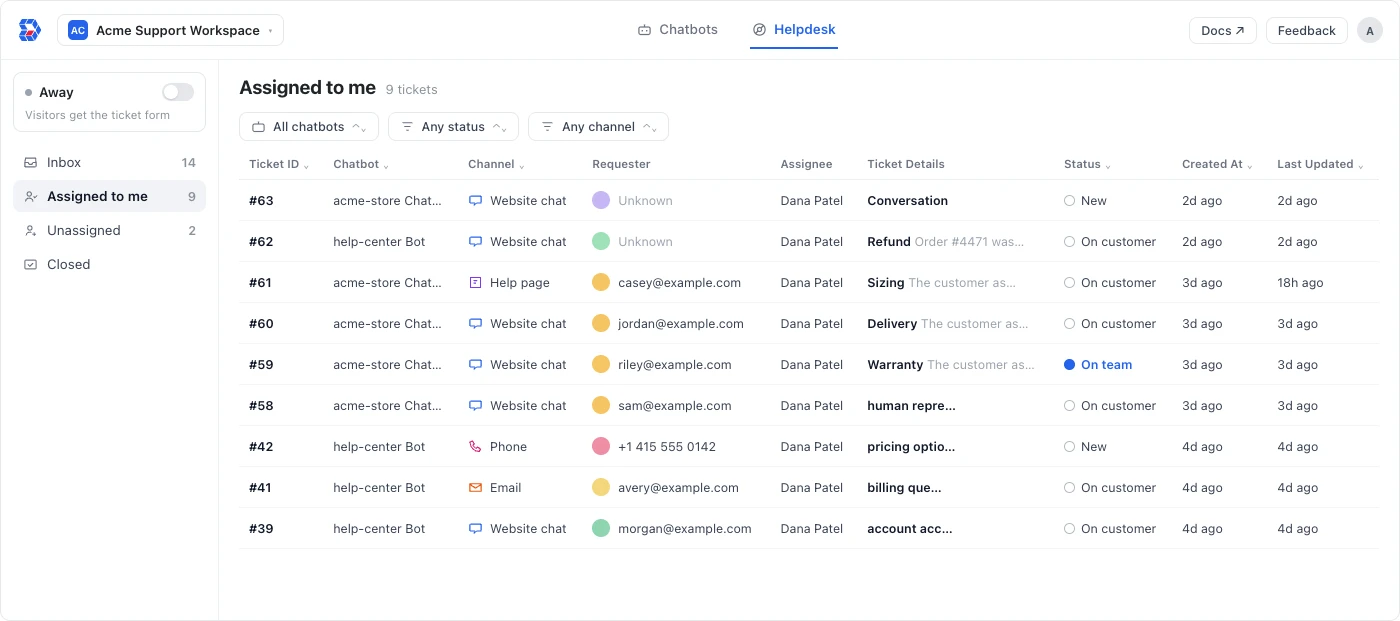
Denser is built in two halves that share one system: Chatbots that answer only from your own content, and a Helpdesk that catches what the AI shouldn't finish alone.
Why RAG is the whole argument#
Most support AI generates an answer from a general language model and consults your help center as a hint. Retrieval-augmented generation inverts that. Denser retrieves the relevant passages from your documents, pages and help-center articles first, then writes the answer from those passages — and links each response back to the exact passage it used.
That ordering is what prevents hallucination. The model isn't recalling what a refund policy usually says; it is reading yours. When your content doesn't cover the question, there is nothing to retrieve, so the system escalates instead of improvising — which is the failure mode that makes teams stop trusting AI support altogether.
The citation matters as much as the answer. A customer can check it. An agent reviewing a bad reply can see which article misled the bot and fix the article, so the same question stops going wrong. Without that link, a wrong answer is untraceable and the fix is guesswork.
Resolution, not deflection#
Deflection counts conversations that ended. Resolution counts questions that got answered. Grounded answers are what turn one into the other: a reply the customer can verify and act on closes the issue, where a plausible-sounding invention produces a second ticket and a worse mood.
Denser is built around that distinction:
- Answer quality insights flag unresolved questions and contradictions across your sources, so you find the gaps before customers do rather than after they complain.
- Escalation runs on three explicit triggers rather than a confidence score you have to tune: the visitor asks for a person, the AI has failed repeatedly and stops guessing, or the AI detects frustration. A bot that knows when to stop is what makes the rest of its answers trustworthy.
- Anything it can't finish becomes a ticket — from website chat, help page, email, REST API, phone or WhatsApp, all into one queue, with assignment, status tracking and live agent takeover mid-conversation, full transcript attached, so the customer never repeats themselves.
That pairing is the difference from a pure chatbot tool. Deflection alone leaves open the question of what happens to the conversations the bot can't close.
Plans#
The chatbot starts free and paid plans begin at $39/mo. The helpdesk half — the ticket queue, escalation, and third-party ticket creation — starts on Standard at $119/mo; Free and Starter are chatbot-only. If the queue is what you're replacing Zendesk for, Standard is your entry point. Team members are included in the plan rather than billed per seat, so the cost doesn't move when you hire.
Best for: teams who want AI answers they can send unattended, and a queue for everything else. Watch out for: no outbound voice or call-center dialer — phone is a ticket channel with auto-reply, not a contact-center product. Smaller integration marketplace than Zendesk's.
See the helpdesk feature page, answer quality, pricing, or book a demo.
2. Intercom#
The closest thing to a modern Zendesk: a full suite built around a messaging-first widget and the Fin AI agent. Intercom reports Fin resolves up to 59% of queries without a human — but it's billed at $0.99 per resolution on top of seats, so cost scales precisely with how well it works.
Pricing runs Essential $39, Advanced $99, and Expert $139 per seat per month on annual billing. The well-documented catch is that the entry plan lacks automation, so a large share of Essential buyers upgrade within months.
Best for: SaaS and product-led companies wanting support, onboarding, and engagement in one platform. Watch out for: seats plus per-resolution plus add-ons make the bill hard to forecast.
See Intercom vs Zendesk, Denser vs Intercom Fin, or our guide to Intercom alternatives.
3. eesel AI#
eesel AI adds AI support to an existing helpdesk, including Zendesk, Freshdesk, Intercom, and Help Scout. It uses past tickets and help documentation to draft replies, triage requests, and handle routine questions. For teams comparing support automation tools, it automates replies and ticket triage while keeping the current ticket queue.
Teams can review drafts, test responses against historical tickets, and set escalation rules before enabling automatic replies. eesel supports 80+ languages. Pricing is pay-as-you-go at $0.40 per support ticket or chat session, covering the whole conversation, with $50 in free usage to start.
The eesel CLI connects help documentation and other knowledge sources, sets up a website chat bubble, manages automations, and lets teams review actions awaiting approval from the terminal. It uses the same agent as the dashboard, and its JSON output lets coding agents such as Codex, Claude Code, and Cursor help with setup.
Best for: teams that want AI replies and ticket triage in their existing helpdesk. Watch out for: eesel does not replace your helpdesk subscription, and usage costs depend on the volume routed to AI.
4. Freshdesk#
The most direct Zendesk analog: per-agent ticketing with email, chat, phone, and a knowledge base. Freddy AI is an add-on exactly like Zendesk's — $29/agent/month for Copilot, and $100 per 1,000 sessions for the AI Agent with no rollover.
Free covers up to 10 agents; Growth is $15/agent, Pro $49–$69, Enterprise $109.
Best for: budget-conscious teams wanting the least-disruptive possible swap. Watch out for: aggressive feature gating between tiers, and omnichannel requiring the separate Freshdesk Omni line.
5. Zoho Desk#
The value pick, and the answer to the "Zoho or Zendesk?" question Google surfaces on this search. A complete helpdesk — tickets, multichannel, knowledge base, automation — at roughly a fifth of Zendesk's per-seat price.
This is where Zoho quietly beats most of this list: AI is bundled into the paid tiers, not sold as a per-agent add-on. Basic AI drafting and a customer-facing agent builder are included from the entry plan up.
Free covers 3 users. Paid annual pricing: Express $7, Standard $14, Professional $23, Enterprise $40 per user per month. Monthly billing costs 29–56% more depending on tier.
Best for: cost-sensitive teams who'd rather have adequate AI included than excellent AI metered. Watch out for: a dated interface, and value that compounds mainly if you adopt more Zoho products.
6. Help Scout#
The anti-Zendesk on philosophy: a clean shared inbox, a knowledge base, and a lightweight chat widget, with the admin complexity stripped out. AI Answers is a per-resolution add-on at $0.75 per resolution.
Free covers 5 users; Standard is $25/user, Plus $45, Pro $75.
Best for: small, email-first teams whose Zendesk complaint is "it's too complicated." Watch out for: lighter automation and omnichannel, and a 10-user minimum on Pro.
7. Gorgias#
The ecommerce specialist, with the most structurally different pricing here: you pay per ticket, not per agent. Agents are unlimited. For a store with seasonal support headcount, that inverts the cost equation. It also pulls order data, issues refunds, and edits orders natively in Shopify.
Plans run Starter $10 (50 tickets), Basic $60 (300), Pro $360 (2,000), and Advanced $900 (5,000), with overage at $0.36–$0.40 per ticket. The AI Agent bills $1.00 per resolution ($0.90 annually) — and note that a conversation the AI fully resolves can be billed twice, once as a ticket and once as a resolution.
Best for: Shopify stores, especially with seasonal staffing. Watch out for: ecommerce-only, and steep jumps between tiers.
See Zendesk vs Gorgias.
8. Front#
Between Help Scout's simplicity and Zendesk's power: a collaborative shared inbox where teammates comment internally on a message before replying, with real multichannel behind it. Front collapsed to three tiers in 2026 — Starter $25, Professional $65, Enterprise $105 per seat on annual billing.
AI stays an add-on on the lower two tiers: +$20/seat for Copilot and Smart QA. Enterprise bundles the assistive AI. Same "AI as surcharge" pattern as Zendesk, at a lower base.
Best for: teams where the useful unit is a thread several people weigh in on, not a ticket one person owns. Watch out for: Starter caps at 10 seats and one channel type.
9. Tidio#
Live chat, visual chatbot Flows, and the Lyro AI agent in one widget aimed at small ecommerce. Free covers 50 conversations; Starter is $29/seat, Growth $49–$59, Plus $749. Lyro is a separate add-on from $39/month.
Tidio runs three separate billing quotas — billable conversations, Lyro conversations, and Flow triggers — which is what makes real costs hard to predict. A realistic Growth setup with Lyro lands around $105–$150/month.
Best for: small online stores wanting a chat-and-bot widget live today. Watch out for: the three quotas, and the jump from $59 to $749.
See Tidio vs Zendesk.
10. HubSpot Service Hub#
Worth it for one audience: teams already in HubSpot. If your customer data lives there, you get a help desk with CRM context that Zendesk can only approximate via integration. Breeze Customer Agent costs 50 credits per conversation — metered on top of seats.
Free covers 2 users; Starter $20/seat, Professional ~$100/seat plus a $1,500 one-time onboarding fee.
Best for: existing HubSpot customers. Watch out for: as a standalone help desk it's overkill and overpriced next to the rest of this list.
Zendesk vs Freshdesk vs Zoho Desk#
These are the two head-to-head comparisons people ask about most.
Zendesk vs Freshdesk. Structurally the same product, so it comes down to price and configuration burden. Freshdesk Growth is $15/agent against Zendesk Suite Team at $55, and Freshdesk has a free tier for 10 agents where Zendesk has none. Zendesk pulls ahead at scale on routing sophistication, app marketplace, and enterprise reporting. Both meter AI separately. Pick Freshdesk for Zendesk's model at a lower price; pick Zendesk if you have complex routing and the budget to configure it.
Zendesk vs Zoho Desk. Zoho Desk Professional is $23/user with Zia AI included. The comparable Zendesk configuration — Suite Professional at $115 plus $50 Copilot — is $165/agent: roughly seven times the cost for a better-designed but not seven-times-better product. Zendesk's advantages are real — a more modern interface, a deeper marketplace, better handling of very large support organizations. Pick Zoho if budget is the binding constraint; pick Zendesk if depth and ecosystem outweigh per-seat cost.
Migrating Off Zendesk#
Switching is usually faster than the original Zendesk setup was — most teams finish in 2–4 weeks.
Export tickets and users via the API, help-center articles from Guide, and document macros manually — most platforms won't import Zendesk triggers. Then pilot on a free plan for 7–14 days against a slice of traffic while Zendesk stays the system of record. Measure resolution accuracy and CSAT, not just deflection count: a conversation the bot ended is not the same as a question it answered.
Migrate only open and recently-closed tickets. Freshdesk, Zoho Desk, and Help Scout have direct migration paths; if you're going AI-first you may not need ticket history at all. Keep Zendesk read-only for 30–60 days after cutover, and time the cancellation carefully — annual contracts auto-renew if you miss the window.
Frequently Asked Questions#
What is the best free Zendesk alternative?#
Zoho Desk (free for 3 users, full helpdesk), Freshdesk (free for 10 agents), Help Scout (5 users), Denser.ai (1 chatbot, 20 queries/month), Tidio (50 conversations), and HubSpot (2 users). Zoho's free tier is the most complete helpdesk; Denser's is the fastest way to test AI answers on your own content.
Does Zendesk have a free plan?#
No. Zendesk has no free plan in 2026. The cheapest option is Support Team at $19/agent/month for email ticketing only, and the full Suite starts at $55/agent/month.
How much does Zendesk's chatbot cost?#
Zendesk's customer-facing AI is billed separately from seats. Agent-side Copilot is $50 per agent per month on top of a $55–$169 Suite seat, and customer-facing AI resolutions are metered. Answer Bot has been folded into the AI agents line. For a 10-agent team on Suite Professional that's $1,650/month before any AI resolution is billed.
What is the best open source ticketing system?#
Zammad, FreeScout, and osTicket. Zammad is the most modern and closest to a Zendesk-style workflow; FreeScout is the lightest; osTicket is the most basic but very stable. The tradeoff is identical in each case: you drop per-seat licensing and take on hosting, updates, security patching, and integration work. For most small teams the engineering time costs more than the seats saved. Open source makes sense when you already have infrastructure staff, or when data residency rules out SaaS.
Can an AI chatbot really replace Zendesk?#
Partly, and it depends on your ticket mix. If volume is dominated by repetitive, knowledge-base-answerable questions, an AI-first platform handles the majority without a human. What a chatbot alone won't replace is the queue — somewhere for the conversations the AI shouldn't finish. That's why the useful question isn't chatbot versus helpdesk, but whether one platform gives you both. See our guide to helpdesk automation for where the line sits.
How does RAG stop an AI from hallucinating answers?#
Retrieval-augmented generation changes the order of operations. Instead of asking a language model what your refund policy probably says, the system first retrieves the actual passages from your help center, then writes the answer from those passages and cites them.
The model is reading rather than recalling, so it has nothing to invent from. And when your content genuinely doesn't cover a question, retrieval comes back empty and a well-built system escalates rather than guessing. That is the difference between an AI you can leave answering customers unattended and one that needs a human checking every reply — which defeats the point.
Which Zendesk competitor is best for small businesses?#
Zoho Desk at $7/user if you need a full helpdesk on the tightest budget. Denser.ai if repetitive tickets are the problem and you want AI answers plus a queue in one place. Help Scout if you mainly need a shared inbox running this afternoon. Gorgias if you sell on Shopify, since per-ticket pricing means unlimited agents.
Choosing Between Them#
Two questions settle most of these decisions.
Would you send the AI's answers without reading them? If not, you haven't bought automation — you've bought a draft generator plus a reviewer. Ask any vendor where an answer comes from and whether the customer can see the source. Grounded, cited answers are the only ones that survive being sent unattended.
Do you need answers, a queue, or both? A chatbot alone leaves the conversations it can't close unhandled; a helpdesk alone leaves the repetitive volume unautomated. Be honest about which half you're missing before you buy.
Denser was built around both — Chatbots that retrieve from your own content and cite every answer, and a Helpdesk that catches what they shouldn't finish. Start free, see pricing, or book a demo.
Related: Zendesk AI vs Denser, Intercom vs Zendesk, Zendesk vs Gorgias, and how much a chatbot costs.