How to Create a Chatbot for a Website in 2026

Creating a chatbot for a website is more than just knowing how to add a chat widget. The real challenge is building one that gives accurate answers and helps visitors take the next step.
Many teams add a chat widget too early, only to find it cannot answer questions clearly or creates more work for support teams.
This guide shows you how to create website chatbots in a few steps. You'll learn how to choose the right type of chatbot and train it on the right content. It also covers how to launch it in a way that actually helps your website perform.
TL;DR#
- Start with one clear chatbot use case to avoid weak answers and poor performance.
- For most websites, AI-first or hybrid chatbots are more useful than rigid rule-based flows.
- Strong chatbot answers depend more on clean source content than on the platform itself.
- Train on product, pricing, FAQ, and support pages before expanding to broader content.
- A quality chatbot setup includes prompts, fallback paths, testing, and human handoff when needed.
- After launch, improve performance using real questions and failed replies.
- Denser AI helps you deliver more accurate answers by grounding your chatbot in your content.
What Is a Website Chatbot?#
A website chatbot is a chat interface built into a webpage that can answer questions and guide visitors. It can also help them complete a task without waiting for a human reply. Depending on the platform, the chatbot may follow a fixed set of rules or use an AI model. Some combine both.
Modern customer service chatbots use natural language processing along with retrieval methods to understand intent and pull from knowledge sources. Some also rely on machine learning to return accurate answers in real time.
Imagine someone landing on your pricing page late at night. They want to know which plan fits a small team and whether a feature is included. They may also want to know how to contact sales.
Instead of leaving the page or filling out a generic form, they open the chat, ask a few questions in plain language, and get quick answers with links to the right resources.
If the question becomes more specific, the conversational AI can collect contact details or route the conversation to human agents. That is what makes a website chatbot useful. It turns passive site visits into guided interactions that support both the user and the business.
What Type of Website Chatbot Should You Build?#
The best chatbot for your site depends on the questions visitors typically ask and the complexity of the conversation. It also depends on what action you want them to take next.
In most cases, businesses either use a rule-based AI agent or an AI bot. Some choose a hybrid chatbot that combines both.
Rule-Based Chatbots#
Rule-based agents follow predefined paths. A user clicks a button and moves to the next step in the workflow by choosing from a set of options. That makes them a practical choice when the task is narrow and predictable.
They work well for:
- Appointment booking
- Lead generation
- Collecting contact details
- Support routing
- Fixed FAQ flows
These chatbots are useful for repetitive tasks, but they are limited. Once a visitor asks something outside the scripted path, the chatbot usually cannot answer in a helpful way.
AI Chatbots#
AI-powered chatbots answer questions in natural language based on the knowledge you give them.
Instead of relying only on buttons and scripts, they use generative AI together with natural language processing and retrieval methods. That helps them interpret intent and generate responses from website pages, help docs, PDFs, policy pages, and other knowledge sources.
This makes them a better fit for:
- Product and services questions
- Customer support
- Quick answers on high-intent pages
- Real-time assistance
- Onboarding help
For most businesses, this is the more useful AI model because visitors want to type a message in their own language, not follow a rigid menu. Strong natural language understanding matters here, especially when conversations become multi-turn or messy.
Some enterprise platforms are built for more complex state-based flows, while others are used to interpret user intent within broader chatbot systems. The key point is simple: the better the platform understands natural language, the better the user experience.
Hybrid Chatbots#
These types combine both approaches. They can answer open-ended questions and then guide the conversation along a structured path when the user is ready to book a demo or request support. They can also collect contact details at the right moment.
This usually leads to better experiences because real conversations are mixed. A visitor might ask about pricing, compare services, request access to resources, and then want a quick path to sales. A hybrid chatbot can handle those interactions without feeling stiff or overly scripted.
How to Create a Website Chatbot: A Step-by-Step Guide#
The easiest way to build a strong website chatbot is to follow the same order in which the setup works.
Start with one use case, connect the right content, test the answers inside the dashboard, then push it live. That keeps the first version useful instead of turning it into a bloated bot that tries to do everything.
Step #1: Define What the Chatbot Should Do#
Start with one primary use case. Many teams want a single chatbot to serve as a homepage guide, pricing assistant, support rep, and lead-capture tool. That usually weakens the answers.
Different pages usually need different chatbots:
- Homepage chatbot: Answers broad business questions and helps visitors find the right page
- Pricing-page chatbot: Answers objections, explains plan differences, and supports lead capture
- Help-center chatbot: Handles repetitive support questions and routes more complex issues when needed
Once the use case is clear, define one success metric. That might be more leads, fewer support tickets, stronger resolution rates, or faster handoff to a human agent. A chatbot is much easier to improve when the team knows what success looks like.
Step #2: Create the Chatbot With Denser#
Your platform affects setup speed, answer quality, and how easy it is to manage the bot after launch. If you want a no-code workflow, Denser is the perfect choice.
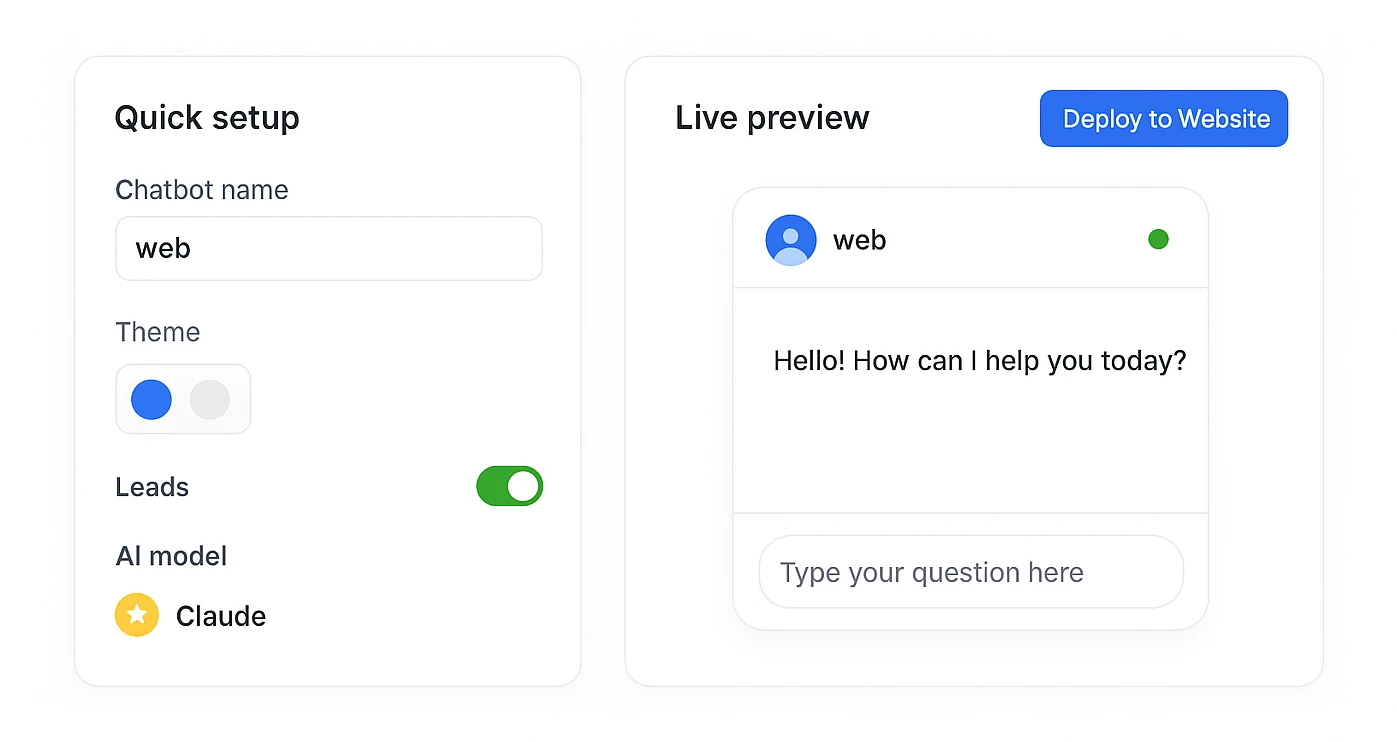
After you sign up, you can create a new chatbot from the dashboard by selecting Website Chatbot. At that point, keep the setup narrow. Name the bot after its function, such as Pricing Assistant, Product Support, or Demo Qualification Bot.
That sounds minor, but it matters. A purpose-based setup gives you a tighter scope, cleaner testing, and fewer weak answers later.
Book a demo with Denser and learn more about its chatbot capabilities.
Step #3: Add Your Website Content and Other Sources#
This is the step that determines whether the chatbot will actually be useful. In Denser, you can paste your website URL and let the platform crawl your site, or point it to your sitemap if that gives you better control.
Start with the pages that influence decisions most:
- Product or service pages
- Pricing pages
- FAQ pages
- Help center resources
- Demo or contact pages
- Core support documents
Once those are in place, expand the knowledge base with content that helps answer more specific questions. That may include PDFs, onboarding documents, policy pages, feature docs, or connected business data.
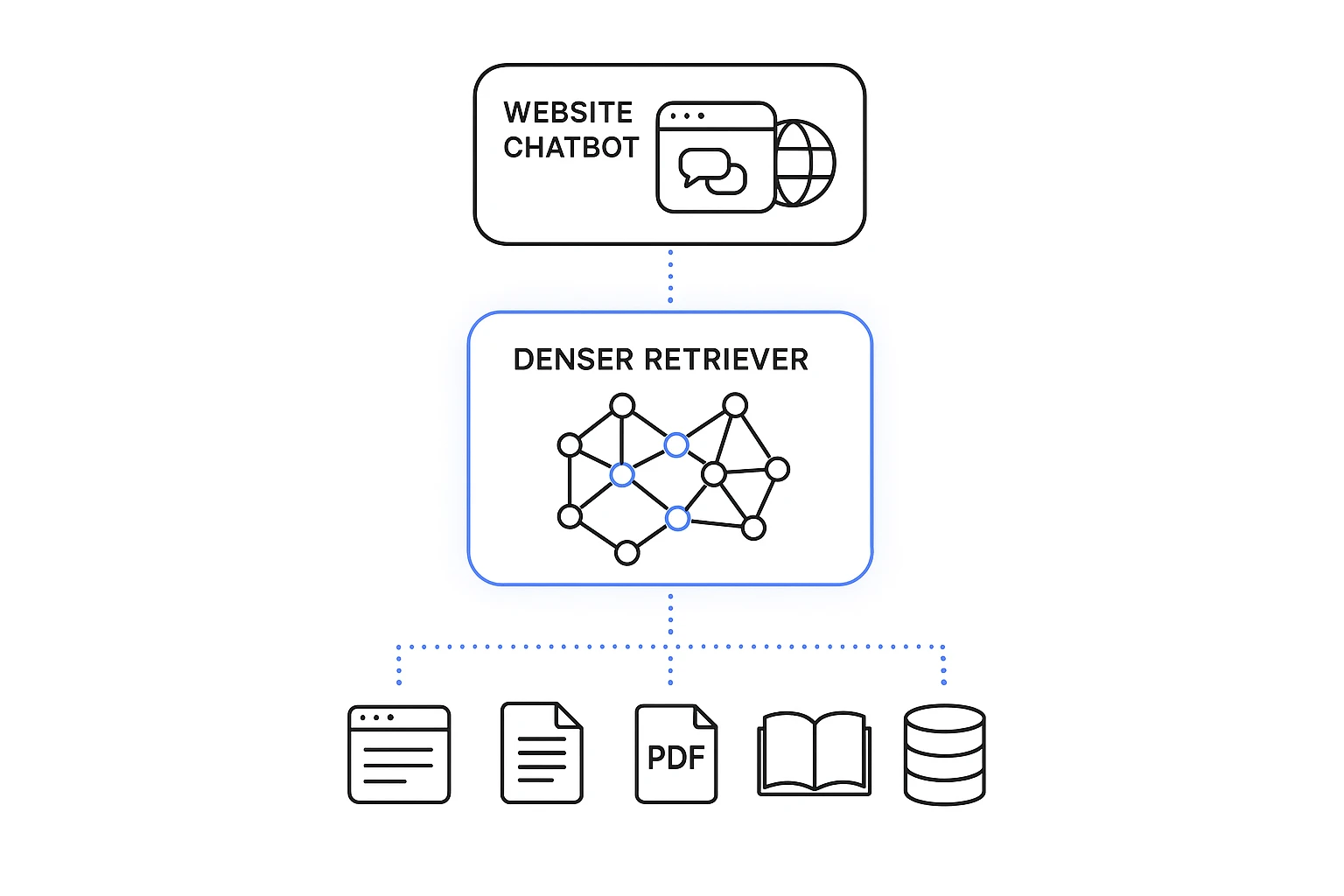
This is where retrieval-augmented generation (RAG) becomes useful. Instead of relying on general training data, the chatbot retrieves from your content first, then answers from that material.
It is also why AI-powered search and website chatbots now overlap so much. The same retrieval layer that improves search also improves chatbot answers.
Keep the source set clean. Brief blog posts, outdated pricing, duplicate pages, and expired announcements should stay out. A smaller knowledge base with better content usually performs better than a bloated one.
Step #4: Test the Answers and Shape the Conversation#
Before you publish anything, test the chatbot inside the dashboard.
Ask the kinds of questions visitors will actually ask, especially the messy ones. Try short, vague prompts. Test with phrases that support and sales teams hear every week. Then, check whether the chatbot gives an accurate answer, cites the right page, and stays within the role you gave it.
You should also check whether it pulls from the right knowledge sources. If the answer is weak, fix the source content or narrow the scope. Don't expect the bot to sort itself out.
This is also the stage where you shape the conversation flow. Set the greeting, suggested questions, and fallback behavior based on page context. For example, a pricing-page chatbot might open with prompts like:
- What plan fits a small team?
- What is the difference between the plans?
- Do you offer a free trial?
- How can I contact sales?
The fallback matters too. If the chatbot cannot help, it should say so clearly, point the visitor to the best next resource, or route the conversation to a person.
Step #5: Customize the Chatbot and Add It to Your Website#
Once the answers are solid, make the chatbot feel native to the site instead of bolted on.
Denser lets you adjust branding, chatbot name, greetings, suggested questions, AI behavior, lead capture, and other settings from the same dashboard. That matters because the chatbot should match the page it lives on.
- Product pages should focus on features and buying questions
- Pricing pages should support plan selection and lead capture
- Support pages should prioritize quick answers and clean escalation
After that, go to the deploy settings, copy the embed snippet, and add it to your website. This is usually the point where the chatbot goes from a draft to a live website assistant.
Before launch, test every important path on desktop and mobile. That includes forms, demo requests, support routing, sales handoffs, and any integrations with customer relationship management (CRM) systems or helpdesk software tied to the chatbot.
Step #6: Monitor What the Chatbot Misses and Improve It#
Launch is where the real learning starts.
Once the chatbot is live, review chat logs and analytics closely. Look for repeated questions, weak responses, drop-off points, missed lead opportunities, and cases that still need a human handoff. Those patterns show you what the first setup missed.
Use them to improve the chatbot over time:
- Add missing pages or documents
- Remove weak sources
- Adjust greetings and suggested questions
- Tighten the chatbot's scope
- Refine fallbacks and handoff paths
This is where performance improves fastest. The first version gets the bot live. The next rounds make it reliable.
Benefits of Website Chatbots#
When it is trained on the right sources of data and used in the right places, a website chatbot can improve customer experiences and reduce friction. It can also support growth across sales and customer support.
- Better customer experience: A chatbot provides visitors with a fast way to get answers and find resources. It also helps them move forward without waiting for email or phone support. It can reduce human error by pulling from approved knowledge sources.
- Always-on availability: Unlike human teams, a chatbot can provide real-time assistance 24/7. That helps users get quick answers after hours and across time zones, even during spikes in demand.
- Broader reach: Chatbots can live on a website, but many platforms also support multiple channels like Teams or Slack. That makes it easier to reach users where they already work or communicate.
- Useful insights: Chatbot interactions can reveal what users ask most, where they drop off, how often human agents take over, and where the knowledge base needs work. That helps teams monitor usage and improve performance over time.
- Stronger lead generation: A chatbot can capture contact details and support early qualification while a visitor is already engaged in a conversation. That makes it easier to generate and nurture more leads.
The point is not that every chatbot creates these results automatically. It is possible that a well-trained chatbot can support both customer satisfaction and business goals when it is built around real user needs.
Common Mistakes That Make Website Chatbots Fail#
Most chatbot problems come from setup choices, not from the idea of using AI in customer conversations.
Here are the mistakes that cause the most trouble:
- Trying to do everything at once: A chatbot with too many goals usually performs poorly. Start with one solution, prove it works, then expand.
- Training it on poor or outdated information: The AI chatbot can only answer based on what you give it. If the data is stale, incomplete, or simply inconsistent, the responses will reflect that.
- Not controlling what the chatbot can answer: Approved sources and access controls matter. Without them, the chatbot may pull the wrong answer or respond outside the limits your business wants.
- Making the widget hard to find or use: Poor placement hurts adoption. So does a weak mobile design. If users cannot find the chat or do not understand what it can do, the platform becomes decoration.
- Skipping testing before launch: This leads to weak answers and missed leads. The first version should always be tested with realistic prompts.
- Overlooking privacy and compliance: Website AI chatbots often process user messages and contact details. In some cases, they also handle support information. That means privacy and data handling need to be part of the design from the start. Relevant regulations do too.
Put Your Website Chatbot to Work With Denser#

Building a chatbot is one thing. Getting it to answer accurately and stay grounded in your content is the harder part. Launching it without a long setup matters too.
Denser can help you build a website chatbot trained on your own data, including website pages, PDFs, databases, and documents. It uses RAG, which searches your content before generating an answer. That makes responses more accurate and easier to trust.
It also includes source citations on every answer, so users can verify where the information came from instead of treating the chatbot like a black box. That matters most on pages where accuracy affects decisions, such as product and support content, including pricing pages.
For teams that want to move quickly, Denser keeps the setup simple. It's a no-code platform built for fast launch, with the ability to get a chatbot live in under 30 minutes. Get started today for free.
FAQs About How to Create a Chatbot for a Website#
Can I create a chatbot for my website without code?#
Yes. Most businesses can build a chatbot without coding by using a platform that trains on website content and documents, along with support resources. The main thing to check is whether the tool gives you strong knowledge controls and clean embedding. Easy updates matter too.
What is the best type of chatbot for a small business website?#
For most small business websites, an AI chatbot or hybrid bot is the best option. It can answer questions in natural language while still guiding users toward bookings, forms, support, or sales.
How do I train a chatbot on my website content?#
Start with your highest-value pages, including product, pricing, FAQ, and support content. Then add helpful documents and other data sources. After that, remove outdated pages and test whether the AI chatbot is pulling accurate answers from the right knowledge.
How long does it take to build a website chatbot?#
It depends on the platform and the quality of your content. A no-code tool can help you launch the first version quickly, but the work does not stop there. Testing, training, and later improvement still take time if you want strong chatbot performance.