

AI Voice Agent: How to Automate Customer Support Calls

An AI voice agent answers a phone call, understands what the caller says, finds the right information, and responds in a natural conversation. For customer support teams, that means routine calls can be resolved immediately while the requests that need judgment still reach a person.
The voice is only the surface, though. A pleasant-sounding agent with the wrong information is still a bad support experience. The useful question is not simply, “How human does it sound?” It is: What does the agent know, where does that knowledge come from, and what happens when it cannot finish the call?
That is the difference between a voice demo and a support channel you can trust.
This guide explains how AI voice agents work, which calls they should handle, how to deploy one, and why the simplest operating model is one knowledge base shared across voice, website chat, a help page, email, and API.
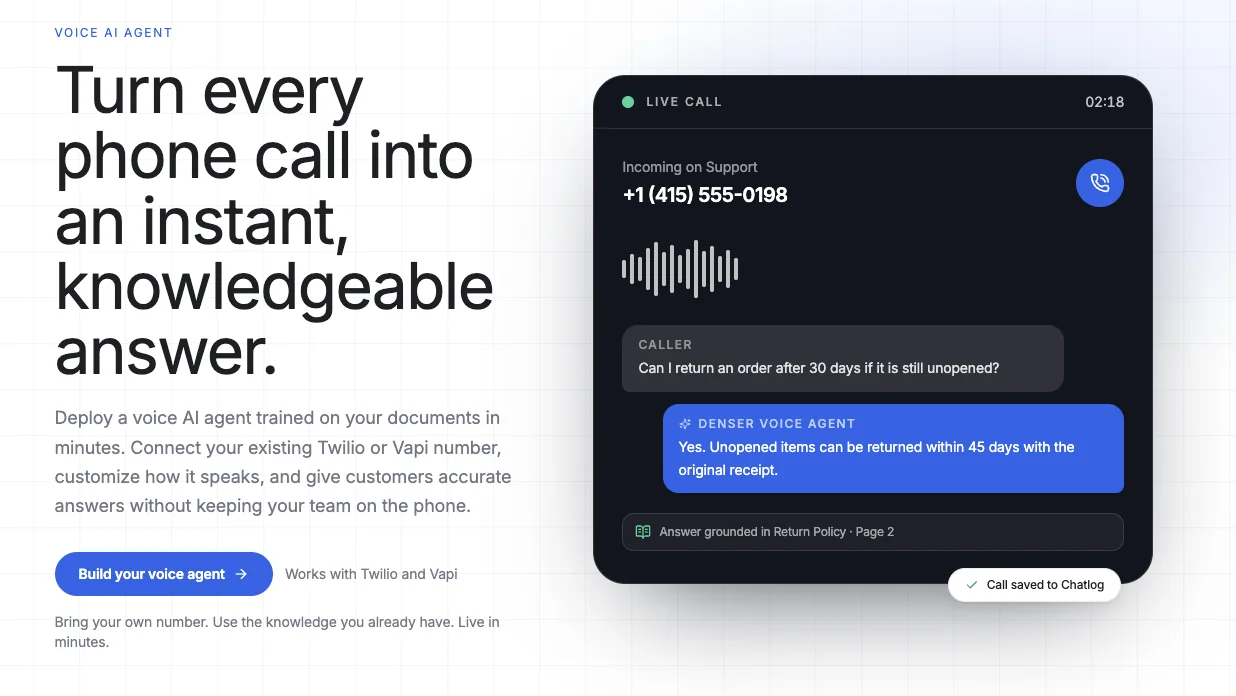
What Is an AI Voice Agent?#
An AI voice agent is software that holds a spoken conversation over the phone without requiring a human on the other end. It listens to the caller, interprets the request, generates a response, and speaks that response back in real time.
Modern voice agents can handle a caller who says, “The tracking page has not changed in three days. When will my order arrive?” They do not need the person to navigate a fixed menu or use an exact phrase. The agent retains context, can ask a clarifying question, and can retrieve information from business systems or an approved knowledge base.
That separates an AI voice agent from traditional interactive voice response (IVR):
| Traditional IVR | AI voice agent |
|---|---|
| “Press 1 for sales” | “Tell me what you need help with” |
| Follows a fixed decision tree | Interprets natural language |
| Breaks when the request does not fit | Asks follow-up questions |
| Routes most calls to a person | Can answer documented questions directly |
| Usually stores little conversational context | Preserves the call transcript and intent |
The OpenAI guide to voice agents describes two common technical architectures: speech-to-speech systems that process audio directly, and chained systems that convert speech to text, send the text through an AI model, and convert the answer back into speech. A business buying a voice AI product does not need to build either pipeline from scratch, but it should understand what sits behind the experience.
How an AI Voice Agent Works#
A customer hears one continuous conversation. Behind it, several components work together:
- Telephony receives the call. A provider such as Twilio or Vapi connects the phone number to the agent.
- Speech recognition interprets the caller. Spoken audio becomes language the agent can reason over.
- The agent identifies the request. It determines whether the caller is asking about a return, troubleshooting a product, changing an appointment, or something else.
- Retrieval finds relevant business information. The system searches approved documents, website content, policies, and help articles.
- The model generates a grounded response. It answers from the retrieved material rather than relying on general model knowledge.
- Text-to-speech returns the answer. The response is spoken to the caller in the configured voice and style.
- The conversation is recorded for follow-up. A transcript, summary, and ticket give the support team a usable record after the call.
Latency and voice quality matter because pauses and interruptions affect whether a call feels natural. But reliable customer support requires more than low latency. Microsoft’s guide to building production voice agents emphasizes grounding generative responses in business data and testing the system against realistic scenarios. A fast wrong answer is not an improvement.
Which Customer Calls Should You Automate?#
AI voice agents work best when a correct answer already exists and the request follows a repeatable pattern.
Good candidates include:
- Product features, compatibility, and availability
- Shipping times and delivery policies
- Return, exchange, and warranty questions
- Business hours, locations, and appointment information
- Common setup and troubleshooting steps
- After-hours questions that would otherwise reach voicemail
- Initial lead qualification
- Ticket creation and call summarization
These calls consume time because they happen repeatedly, not because each one is difficult. If the same answer appears in a help article, product guide, or policy document, an AI agent can retrieve and explain it without making a support representative search for it again.
The calls that should remain human are different:
- Exceptions that require judgment or approval
- Disputed charges and unusual refunds
- Legal, medical, safety, or regulated decisions
- Account changes that require secure verification
- Angry or distressed callers
- Questions the company has not documented
The correct goal is not to prevent every call from reaching a person. It is to resolve documented, repeatable questions and create a clean handoff for everything else. Our guide to helpdesk automation explains how to set that boundary across all support channels.
The Knowledge Problem Matters More Than the Voice#
Many voice AI comparisons concentrate on accents, voice libraries, response speed, and call volume. Those are easy to demonstrate. Knowledge quality is harder to see, but it determines whether the agent is useful after the demo.
Suppose a caller asks whether an unopened product can be returned after 30 days. A general-purpose language model can produce a plausible policy. It cannot know your policy unless the relevant information is supplied at the time of the call.
Retrieval-augmented generation, or RAG, changes that process. The system first searches the company’s approved content, retrieves the most relevant passages, and then generates an answer from those passages. The same approach powers a trustworthy customer support chatbot.
This gives the voice agent three important boundaries:
- It knows which sources it is allowed to use.
- It can respond when the answer exists in those sources.
- It can stop and create a follow-up task when the answer does not exist.
The third boundary is the one that prevents confident invention. An AI voice agent should be able to say, “I do not have enough information to confirm that. I’ll create a ticket for the support team,” instead of filling the silence with a guess.
One Knowledge Base, Every Customer Channel#
Voice should not become another content system your team has to maintain.
A common implementation creates a separate script for the phone agent, another collection of chatbot answers, a different email macro library, and still more documentation for the API. A policy change then has to be copied into every channel. Some copies get missed, and customers receive different answers depending on where they ask.
Denser uses a simpler model: connect the source material once, then deploy the same knowledge to multiple channels.
| Channel | Customer experience |
|---|---|
| Website chat | Ask from any page through an embedded agent |
| Hosted help page | Open a dedicated self-service support destination |
| Send a support question and receive a grounded response | |
| REST API | Add the same answer system to a custom product or workflow |
| Voice AI | Call a phone number and ask the question naturally |
The delivery format changes, but the source of truth does not. Update a return policy in the knowledge base and the next website visitor, email sender, API request, and phone caller can all receive the updated answer.
This is the practical value of omnichannel support: not merely being present in several places, but giving a consistent answer in every one of them. See how Denser deploys the same content through its website chatbot and Voice AI Agent.
How to Build an AI Voice Agent With Denser#
You do not need to assemble speech recognition, an LLM, retrieval, text-to-speech, telephony, and logging as separate projects. If your knowledge and phone number already exist, a Denser voice agent can be configured in a few steps.
1. Connect your business knowledge#
Start with the content customers should be allowed to rely on:
- Website and help-center pages
- PDF manuals and policy documents
- Word documents and presentations
- Plain-text instructions
- An existing Denser knowledge base
Use the same sources that already power your website agent. If your support material is mostly stored in PDFs, chat with PDF uses the same document-grounded retrieval model.
Before deployment, ask the agent real questions from recent support conversations. Check not only whether it sounds good, but whether it retrieves the right source and refuses questions that the content does not answer.
2. Connect Twilio or Vapi#
Denser supports two paths:
Twilio: Generate the endpoint for your Denser agent and point the phone number’s incoming-call webhook to it. The number remains in your own Twilio account.
Vapi: Add Denser’s endpoint to a Vapi assistant. You can use a number purchased through Vapi or bring your own number over SIP.
In both cases, the voice provider runs the call while Denser supplies the knowledge-grounded answer. This separation means you can keep the telephony provider and number you already use instead of migrating your support line into a closed system.
3. Set the greeting and instructions#
The opening should tell callers where they are and what the agent can do. For example:
Thanks for calling Northstar support. I’m the virtual support assistant. I can answer product, shipping, and return questions. How can I help?
Then define the operating instructions:
- How concise should answers be?
- Which tone matches your brand?
- When should the agent ask a clarifying question?
- Which topics must create a ticket?
- What should it say when information is unavailable?
- How should it respond when someone asks for a person?
A custom prompt should define behavior, not duplicate the entire knowledge base. Policies belong in maintained source documents. The prompt tells the agent how to use them.
4. Test the edge cases#
Test more than the happy path. Try callers who:
- Interrupt the answer
- Ask two questions at once
- Change topics midway through the call
- Use an unexpected product name
- Ask for information absent from the knowledge base
- Request a human
- Provide account details that should not be repeated aloud
A production test set should include the questions your team answers every day and the cases it would never allow an AI to decide. This is also where you confirm that the agent’s greeting, pacing, and response length work over the phone rather than only in a text preview.
5. Deploy and review the conversations#
After deployment, every voice conversation appears in Denser Chatlog. Calls are converted into customer tickets so an owner can review the request, assign it, and follow up offline.
That record matters. A caller should not have to repeat a three-minute conversation because the AI reached its boundary. The ticket should already show what the customer asked, what the agent answered, and why follow-up is needed.
Denser Helpdesk keeps phone tickets alongside website chat, help-page, email, and API requests. The support team gets one queue instead of separate call notes and inboxes.
How Voice AI Fits With Human Support#
An AI voice agent is most useful as the first available layer of support, not as a locked door between the customer and the company.
A sensible operating model looks like this:
- The AI answers questions covered by approved documentation.
- It asks a clarifying question when the request is ambiguous.
- It avoids making commitments or changing sensitive records without the required controls.
- It creates a ticket when the source material does not contain an answer.
- It preserves the transcript so a person can continue from the same context.
This reduces human hours without pretending every support call is automatable. The repetitive work disappears first. The team keeps the conversations where judgment, empathy, authorization, or investigation actually matter.
How to Evaluate an AI Voice Agent Platform#
Natural speech is table stakes. Evaluate platforms with questions that expose what happens after the demo call.
Can it use your existing phone number?#
Replacing a published number creates unnecessary migration work. Check whether the platform connects to your current Twilio account, supports SIP, or requires a new number.
Where do answers come from?#
Ask the agent a question with a precise answer in your documentation, then ask one your documents do not cover. A trustworthy system should answer the first and recognize the boundary on the second.
Do you maintain knowledge once or once per channel?#
If website chat, email, and voice each require separate content, every update becomes a consistency problem. Prefer a shared knowledge layer that can serve every customer-facing channel.
What happens after the call?#
Look for transcripts, tickets, ownership, status tracking, and a clear follow-up path. A call summary with nowhere to go is a record, not a workflow.
Can you control its brand behavior?#
The greeting, tone, allowed topics, fallback language, and escalation behavior should be configurable. Voice is personal; a generic prompt is more noticeable on a call than in a chat bubble.
Can you test it before sending traffic?#
You need a safe way to call the agent, inspect what it retrieved, and adjust instructions before attaching a public support number.
Measuring Whether Voice AI Is Working#
Do not judge an AI voice agent only by the number of calls it answered. A caller who hangs up after a wrong response still counts as an answered call.
Track outcomes instead:
- Resolved without follow-up: The customer received a complete, correct answer and did not contact support again about the same issue.
- Ticket creation rate: How often calls require offline work, split by topic.
- Repeat-call rate: Whether callers return within a defined window for the same question.
- Unknown-answer rate: How often the knowledge base contains no adequate source.
- Average human handling time after escalation: A complete transcript should reduce the time needed to understand the case.
- Human-request rate: A rising rate can indicate that callers do not trust the agent or cannot reach the right outcome.
Review early calls closely. The first weeks reveal missing articles, unclear prompts, and questions customers phrase differently from your documentation. Fix the source content rather than teaching each channel a new answer.
Frequently Asked Questions#
What does an AI voice agent do?#
An AI voice agent is software that answers phone calls, understands natural spoken requests, and responds in a real-time conversation. For customer support, it can retrieve answers from company documents, ask follow-up questions, and create a ticket when a person needs to continue the work.
How is an AI voice agent different from a chatbot?#
The interaction channel is different: a voice agent listens and speaks over a phone call, while a chatbot usually reads and writes through a website or messaging interface. Both can use the same AI and knowledge base. Our AI agent vs. chatbot guide explains the broader differences in behavior and autonomy.
How do you build a voice AI agent?#
You need a phone provider, speech processing, an AI model, instructions, access to business knowledge, and a way to store or escalate conversations. Denser packages the knowledge and support workflow: connect your sources, attach an existing Twilio number or a Vapi assistant, customize the prompt and greeting, test, and deploy.
Can I use my existing phone number?#
Yes. With Twilio, your number stays in your Twilio account and routes incoming calls to the Denser agent through a webhook. With Vapi, you can use a Vapi number or bring your own over SIP.
Can one AI agent support voice, chat, and email?#
Yes. Denser uses one knowledge base across website chat, a hosted help page, email, REST API, and voice. The channel changes how the question arrives and how the answer is delivered; the approved source material remains the same.
Are AI voice calls saved?#
Denser stores voice conversations in Chatlog and converts calls into customer tickets. The transcript and request context remain available for assignment and offline follow-up.
What happens when the voice agent does not know the answer?#
It should not guess. A well-configured agent explains that it cannot confirm the answer and creates a ticket with the conversation attached so a person can follow up.
Add Voice Without Building Another Support Silo#
The fastest way to deploy voice AI is not to create another agent with another script. It is to give a new channel access to the knowledge and support workflow you already maintain.
With Denser, the same source material can answer customers through website chat, a help page, email, API, and phone. Connect Twilio or Vapi, bring your own number, set the greeting and instructions, and test the agent before it takes a live call. Every conversation is saved, and every follow-up becomes a ticket rather than a forgotten call note.
Build a Denser Voice AI Agent and deploy it from your existing knowledge base.