

Customer Service Playbook: How to Script an AI Agent's Procedures

Quick answer: A customer service playbook is a written, step-by-step procedure for one recurring situation, such as a return request or a billing question. It says when it applies, what to ask, what to check, which action to take, and when to bring in a person. Written clearly, the same playbook can train a new teammate and guide an AI support agent.
Most support teams already have playbooks; they just live in a senior agent's head or a doc nobody has opened since onboarding. This guide covers which situations to write down, how to structure each one so an AI agent can follow it, and how to test and measure it. It ends with five worked examples and a template you can copy.
What Is a Customer Service Playbook?#
A customer service playbook (also called a customer support playbook) is the documented way your team handles a specific kind of request. A good one answers four questions:
- When does this apply? The situation, in the words customers actually use.
- What do we do, in what order? Questions to ask, things to check, actions to take.
- What changes the path? The decisions, such as "delivered more than 30 days ago" or "the fix didn't work".
- When does a person take over? The hand-off rule, and what that person should receive.
For a human team, a playbook is training material. For an AI agent, it is the operating instruction. Vendors use different names for the same idea: Intercom and Zendesk call them procedures, Decagon calls them agent operating procedures (AOPs), and many support teams just say SOPs. The structure is the same.
Playbook, flow, or prompt?#
| Approach | How you build it | What happens when the customer says something unexpected |
|---|---|---|
| Decision-tree flow | A node for every message and every button | The bot falls back or breaks, because nobody drew that path |
| One long prompt | A block of instructions the model reads at once | It handles the wording, but may skip steps or take actions out of order |
| Playbook (steps, plain words) | Short steps with decisions and actions | The agent answers in its own words, and the steps still decide what's next |
Traditional chatbot conversation flow design scripts every turn. A playbook scripts the procedure and lets the agent handle the wording. That is the main shift in conversation design for AI agents: you stop writing dialogue and start writing operations.
Which Situations Deserve a Playbook?#
Most questions are answered well from your help content alone. A playbook earns its place when the order matters: several things must happen in sequence, a rule decides what happens next, or there are fixes to try before a hand-off.
Score your common request types on two axes:
- Frequency: how often it comes up. Pull a month of tickets or chat logs and group them by topic.
- Risk: what goes wrong if it's handled badly. Money, account access, private data and anything you can't undo are high risk.
| Frequency / risk | Low risk | High risk |
|---|---|---|
| High volume | Write a playbook first (order status, demo requests) | Write a playbook, with an identity check and a hand-off (returns, billing) |
| Low volume | Let the agent answer from your content | Route straight to a person |
Two more filters: if it's a single step ("show me my cart"), it's an action, not a playbook. And if two senior agents would handle it differently, settle the policy first.
Anatomy of a Good Playbook#
Every playbook in this guide uses the same six parts.
1. Name and trigger#
Give it a plain name ("Return request", not "RMA flow v2"). Then write when to use it, with two or three example messages in the customer's words: "I want to send this back", "how do I return an item", "this doesn't fit".
2. Steps written as things to do#
Each step is one instruction: ask something, check something, or do something. Keep them short and in order.
3. Decisions#
Where the conversation can split, write the condition and what happens on each side, plus an "otherwise" for everything else. "If it was delivered more than 30 days ago, explain the return window. Otherwise, ask which items and why."
4. Actions#
Name the system action each step depends on: look up the order, read the invoice, post to Slack, book the meeting, open the ticket. If a step says "check the order" but nothing can actually check it, the agent will guess.
5. Hand-off rule#
Say exactly when a person takes over and what they should receive. "Sum up what was tried and connect them with a person" is a rule. "Escalate if needed" is not. Our chatbot to human handoff guide covers triggers and the context that should travel with the conversation.
6. Outcome#
Define what "done" means: a return requested, a meeting booked, a question answered with a link.
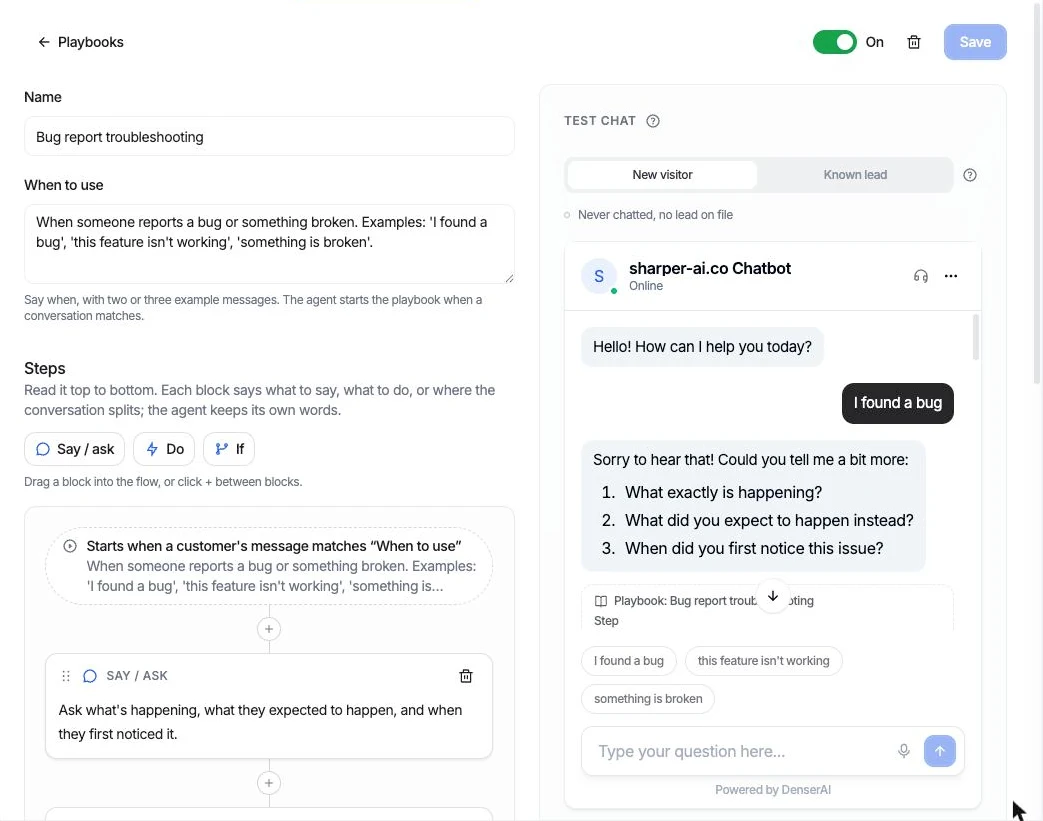 A playbook in Denser's editor: a name, When to use with example messages, steps below, and a test chat beside it.
Writing Rules That Make Playbooks Work#
Write steps as actions, not offers. "Connect them with a person" gets a hand-off. "Offer to connect them with a person" gets a question ("Would you like me to connect you?"), and the customer has to say yes before anything happens.
One fix at a time. In troubleshooting, ask the agent to suggest the most likely fix first and check whether it worked before moving on.
Never promise what the agent can't deliver. If refunds are decided by your billing team, the playbook should say "write it down for the billing team" and "never promise a refund". The same goes for delivery dates, exceptions, and credits.
Ask before changing anything. For anything hard to undo (canceling an order, requesting a return), show the customer what will happen and wait for a yes in a later message.
Check identity before showing private data. Ask for two details only the customer has, such as the order number and checkout email, and give the same answer whether the email or the number is wrong.
Keep the policy in the wording. Write "30 days" in the step, not "the return window". When the policy changes, you change one line.
Keep it short. If a playbook needs more than about a dozen steps, it's probably two playbooks. In Denser, a playbook has up to 15 steps.
Five Worked Customer Service Playbooks#
These are adapted from the playbook templates Denser ships, written as step lists you can reuse with any team or tool.
Return request#
When to use: "I want to return this", "how do I send something back", "this doesn't fit".
- Ask for the order number and the email used at checkout.
- Look the order up and check when it was delivered.
- If the order isn't found: ask them to check the number and email.
- If it was delivered more than 30 days ago: explain the return window.
- Otherwise: list what can be returned, ask which items and why, show the return for the customer to confirm, and request it once they say yes.
Outcome: a return requested, for the store to approve. In Denser this uses the Shopify store's own actions, and the return is never requested in the same message it's shown. Change the 30 days to your policy.
Troubleshoot, then hand off#
When to use: "I found a bug", "this feature isn't working", "something is broken".
- Ask what they're trying to do, what happens instead, and on which product, plan or device.
- Suggest one fix at a time from the knowledge base, most likely first, and check whether it worked before the next.
- If it's fixed: check it's working and ask if there's anything else.
- Otherwise: sum up what was tried and connect them with a person.
Outcome: fixed in chat, or handed off with a summary so nobody starts from zero. In Denser the hand-off goes to the built-in helpdesk: live in the same chat when someone is available, or a ticket answered by email when nobody is.
Billing questions#
When to use: "why was I charged?", "did my payment go through?", "when does my plan renew?".
- Ask for the email they're billed at and the number of any invoice they've had.
- Look up their billing and answer from what it finds: the charge, payment status, invoice link, plan, price and renewal date.
- If they want a refund, a cancellation or a plan change: write it down for the billing team. Never promise a refund.
Outcome: the question answered, or a written request for the billing team. In Denser the lookup reads Stripe with a restricted, read-only key, and the email and invoice number must belong to the same customer before anything is shown.
Call-back request to Slack#
When to use: "can someone call me?", "I'd rather talk on the phone".
- Ask what it's about, the best number to call, and a good time.
- Post the request to the team's call-backs channel in Slack, then tell them the team will call.
Outcome: a Slack post with the topic, the number, the time and a link to the chat. The customer never sees the post. If the post fails, the agent should say so rather than promise a call.
Collect a lead and book a meeting#
When to use: "can I see a demo?", "I'd like to talk to sales".
- Ask briefly what they'd like to discuss.
- Ask them to leave their details in the lead form.
- Offer open times and book the one they pick, in the chat.
Outcome: a lead and a booked meeting from one conversation. A visitor who already left their details skips the form. In Denser, the booking runs through a Cal.com link, so Cal.com's own availability rules apply.
Each one ends in something real, and each says what happens when the main path fails.
Turning a Playbook Into Something an AI Agent Runs#
In Denser, playbooks are built from three kinds of block:
- Say / ask: what to say or ask, in plain words. The agent keeps its own phrasing.
- Do: run an action, such as an order lookup, a call to your API, a Slack message, a Cal.com booking or Talk to a person, with an optional note on what to do after it.
- If: where the conversation splits, with each path side by side and an Otherwise.
You can start from a template, start blank, or describe the procedure to Ask AI in a sentence ("when someone reports a bug, try fixes from our docs and hand off if it isn't fixed"). Ask AI drafts the playbook, and any action it needs, as proposals you review and apply one at a time. A new playbook starts switched off.
While a playbook is on, the actions it uses run only inside it, so every return question goes through the return steps. Talk to a person stays available everywhere, so customers can always reach your team. If you want to see these customer service workflows in context, the customer support chatbot page shows how playbooks sit alongside answers, actions and the helpdesk.
Test Every Path Before Customers Do#
A playbook with three decisions has at least four paths, and the one you didn't test is the one that breaks. Write one test conversation per path: the happy path, each If branch, and the Otherwise.
In Denser's editor, the test chat is the real widget. Its starter buttons are your When to use examples, and the playbook runs from the first message. Under each reply, a trace names the playbook, the step the agent is on, the path taken at an If, and the actions that ran. The same step is highlighted in the flow and marked Now, and the highlight moves as the conversation goes on.
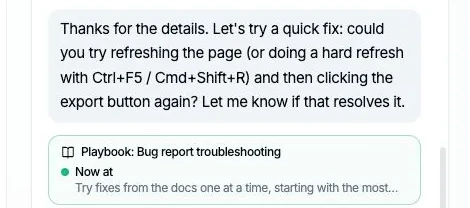 The trace under a reply names the playbook and the step that produced it.
Things to check on every run:
- Did it start? If a realistic message doesn't trigger the playbook, add it to When to use.
- Did it skip or reorder steps? Often a sign two steps should be merged or reworded.
- Did the action run at the right step? The trace lists what ran.
- Did it promise something that didn't happen? If a reply says "I'll connect you with a teammate" and no hand-off ran, the trace flags it. The usual fix is rewriting an offer-style step as an action.
- New visitor vs Known lead: test both, so you see the lead form for a stranger and the skip for someone already on file.
Actions in the test chat run for real. A Slack message is posted and a Cal.com booking is made, so test against a test channel, a test event type, and a test order.
Measure Outcomes, Not Just Conversations#
A playbook is working when conversations end where they should. For each playbook, Denser shows how its conversations ended over the last 30 days:
- Completed: the run got where it was going, such as a return actually requested or a meeting actually booked.
- Escalated: handed to a person.
- Abandoned: the customer left the playbook before the end.
A high escalation rate on "Troubleshoot, then hand off" may mean your docs are missing fixes, not that the playbook is wrong. A high abandonment rate on the return playbook may mean the identity check is confusing, or the return window is surprising people. Open the conversations behind the numbers in Chat logs, fix the step or the content, and test again.
Review each playbook whenever the underlying policy changes.
A Customer Service Playbook Template You Can Copy#
Paste this into a doc, fill one in per situation, and you have both a team SOP and a draft your AI agent can follow.
PLAYBOOK: [Name, e.g. Return request]
OWNER: [Who keeps it up to date]
LAST REVIEWED: [Date]

WHEN TO USE
Situation: [One sentence]
Example messages:
- "[Customer wording 1]"
- "[Customer wording 2]"
- "[Customer wording 3]"
Not for: [Similar requests that belong elsewhere]

BEFORE YOU START
Identity check: [Two details only the customer has, or "none needed"]
Systems needed: [Order lookup, billing lookup, booking, helpdesk...]

STEPS
1. Ask: [What to ask for]
2. Do: [Action to run] -> then [what to say about the result]
3. If [condition]: [what to do]
   If [condition]: [what to do]
   Otherwise: [what to do]
4. ...

ASK BEFORE CHANGING ANYTHING
[Which steps need an explicit yes from the customer first]

NEVER
- [e.g. Promise a refund]
- [e.g. Share details before the identity check passes]

HAND-OFF RULE
Hand off when: [Conditions]
Pass on: [Summary of what was tried, order or account reference, reason]

OUTCOME
Done when: [The real thing that must have happened]
Track: completed / escalated / abandoned
FAQs About Customer Service Playbooks#
What is the difference between a customer service playbook and an SOP?#
They're close. An SOP often covers a whole process across teams. A customer service playbook usually covers one customer-facing situation from first message to outcome, with the questions, decisions and hand-off spelled out. A playbook written this way works as an SOP for that situation.
How many playbooks should a support team start with?#
Start with two or three: the high-volume, multi-step situations from your ticket data, such as returns, billing questions and troubleshooting. Get those completing reliably before adding more. Many questions don't need a playbook at all, because the agent can answer them from your help content.
Can an AI agent follow a playbook word for word?#
It follows the steps, not a script. The agent words each reply itself, so the conversation doesn't sound canned, while the steps decide what it asks, which action it runs, and when it hands off.
What is a customer service workflow vs a playbook?#
A customer service workflow is the sequence of steps used to resolve a kind of request. A playbook is that workflow written down for one situation, including the trigger, the decisions and the hand-off rule, so a person or an AI agent can follow it the same way every time.
How do I know if a playbook is working?#
Track how its conversations end: completed, escalated or abandoned. Then read a sample of each. Rising escalations or abandonment usually point to a missing fix in your docs, a confusing step, or a policy that changed.