

How to Build an AI Agent Without Code: A Support Agent in 8 Steps

Quick answer: To build an AI agent without code, pick one job it should own, give it the knowledge to do that job, write instructions in plain language, connect the tools (actions) it needs with the right permissions, describe its procedures step by step, decide when it hands off to a person, test it against real requests, and launch it on one channel first. No-code builders handle the model, retrieval and integrations, so your work is the decisions, not the plumbing.
Most guides on how to build an AI agent start with Python, an agent framework and a vector database. That's the right path if you're building a product. If you need an agent that does a job for your business, such as answering customers, booking demos or checking orders, you can build one without writing code. The hard part was never the code anyway. It's deciding what the agent should do, what it may touch, and what happens when it's unsure.
This guide walks through the eight steps with one running example: a customer support agent for a software company. The same steps apply to a sales or internal helpdesk agent.
What an AI Agent Is (and How It Differs From a Chatbot)#
An AI agent is a language model with five things around it:
| Part | What it does | In the support example |
|---|---|---|
| Knowledge | What it answers from | Your help center, docs, pricing and policy pages |
| Instructions | How it behaves | Tone, scope, what to do when it doesn't know |
| Tools (actions) | What it can do, not just say | Look up an order, book a call, create a ticket |
| Procedures | The steps it follows for a known situation | Troubleshoot a bug, then hand off with a summary |
| Hand-off | Where a conversation goes when the agent shouldn't finish it | A live chat with your team, or a ticket |
A chatbot that only answers questions has the first two. An agent has all five, which is why it can finish a request instead of describing how to finish it. For a longer comparison, see AI agent vs chatbot.
Step 1: Pick One Job and Draw Its Boundary#
The most common reason AI agents disappoint is scope. "Handle customer support" isn't a job; it's a department. Start with one job that is frequent, well documented and low risk, such as:
- answering product and pricing questions from your docs
- checking order status
- booking a demo for qualified visitors
Then write down the boundary in one or two sentences: what the agent handles, what it never does, and who takes over. For example: "Answer questions about our product from the help center. Never discuss refunds or account changes; offer a person instead." This sentence becomes the core of the instructions in step 3.
Step 2: Give It the Knowledge to Do the Job#
An agent can only be as accurate as the content behind it. Add the sources that answer the questions in your chosen job, and nothing that would confuse it:
- Website pages: product, pricing, help center and policy pages. Leave out pages written for search engines rather than customers, and anything outdated.
- Files: PDFs and documents that never made it onto the website, such as setup guides.
- Q&A pairs: short, exact answers for questions your content doesn't answer cleanly, like "Do you offer a nonprofit discount?"
Then read what the agent actually learned. Pages full of navigation, cookie banners or repeated marketing copy produce weak answers, and two pages that disagree produce inconsistent ones. Fix the content, not just the agent.
Step 3: Write Instructions in Plain Language#
Instructions tell the agent how to behave. Keep them short and specific:
- Who it is and who it serves: "You answer questions from customers of [product]."
- Scope: what it handles and what it hands off, from step 1.
- Tone and length: "Friendly and brief. Two or three sentences unless the customer asks for detail."
- When it doesn't know: "Say so, and offer to connect the customer with the team." This line matters more than any other.
- Citations: whether to show the source of an answer, so customers and your team can check it.
Avoid long lists of rules that contradict each other. If one rule only applies to one situation, it belongs in a procedure (step 5), not in the instructions.
Step 4: Connect Tools, With the Right Permissions#
Tools are what make it an agent. In a no-code builder they're usually called actions, and each one has a description of when to use it. Common ones for support:
- Talk to a person: live chat when your team is available, a ticket when it isn't
- Look up an order or account in your own system or store
- Book a meeting on your calendar inside the chat
- Notify your team in Slack when something needs attention
- Call your own API for anything else your systems can answer
For every tool, decide three things before you switch it on:
- What it may read. An order lookup needs the order, not the customer's whole profile. Expose only the fields the answer needs.
- Who it may act for. Ask for proof before showing personal data, such as the order number plus the checkout email.
- Whether it changes anything. Anything that cancels, refunds or edits should show the customer exactly what will happen and wait for a yes.
Step 5: Write Procedures for the Situations You Know#
Some requests need more than one answer and one action. A bug report, a return or an upset customer each have a right order of steps. Write those down as procedures (Denser calls them playbooks):
- When to use it: two or three example messages, such as "I found a bug" or "the export isn't working."
- The steps: say or ask something, run an action, and branch on what happens. For a bug: ask what happened and when, try fixes from the docs one at a time, and if none work, hand off with a summary.
- How it ends: solved, handed off, or a ticket created.
Procedures make the agent predictable where it matters, while it still answers freely everywhere else. For a full guide, see customer service playbooks.
Step 6: Decide When It Hands Off#
An agent that never hands off will eventually trap a customer. Decide when it should stop:
- the customer asks for a person
- the request is outside the scope you set in step 1
- a procedure ends without solving the problem
- the customer is upset, or the stakes are high (billing disputes, legal or safety issues)
The hand-off should carry the conversation and anything the agent already collected, so the customer never repeats themselves. More on this in chatbot human handoff.
Step 7: Test It Before Customers Do#
Testing an agent means testing what it says and what it does. Build a test set of about 50 real questions from your inbox, run every procedure path including the unhappy ones, try to break it with wrong details and off-topic requests, and confirm that every action actually ran. Our AI agent testing guide has the full plan and a checklist.
Step 8: Launch on One Channel, Then Watch#
Launch where the job happens most, usually the website chat, before adding email or phone. Then watch three things every week:
- Answers customers flagged (thumbs down, or no answer found), and fix the content behind them
- How procedures end: completed, handed off or abandoned
- What people ask that the agent can't do yet, which is your list of the next tools and procedures to add
How to Build an AI Agent in Denser by Describing It#
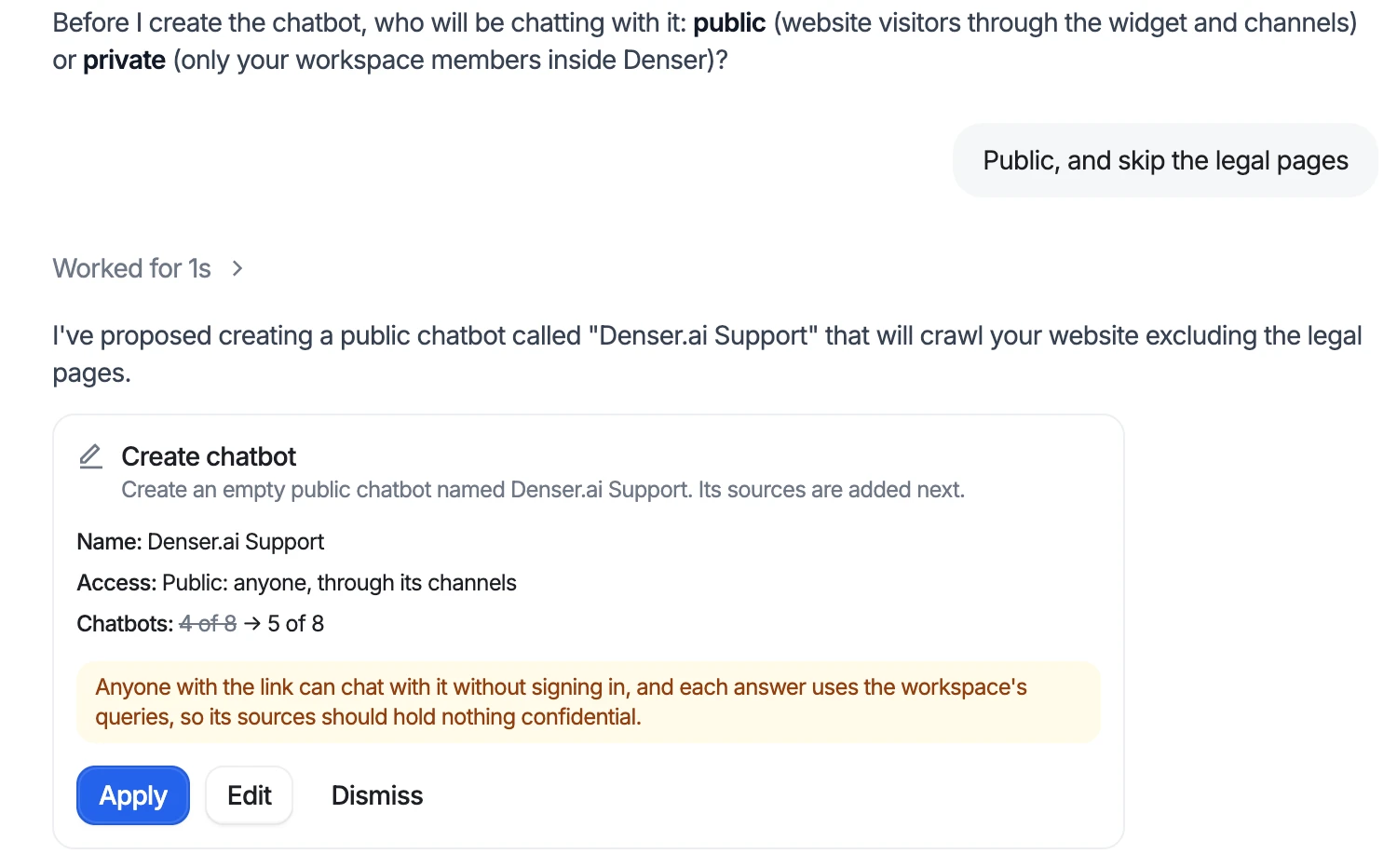
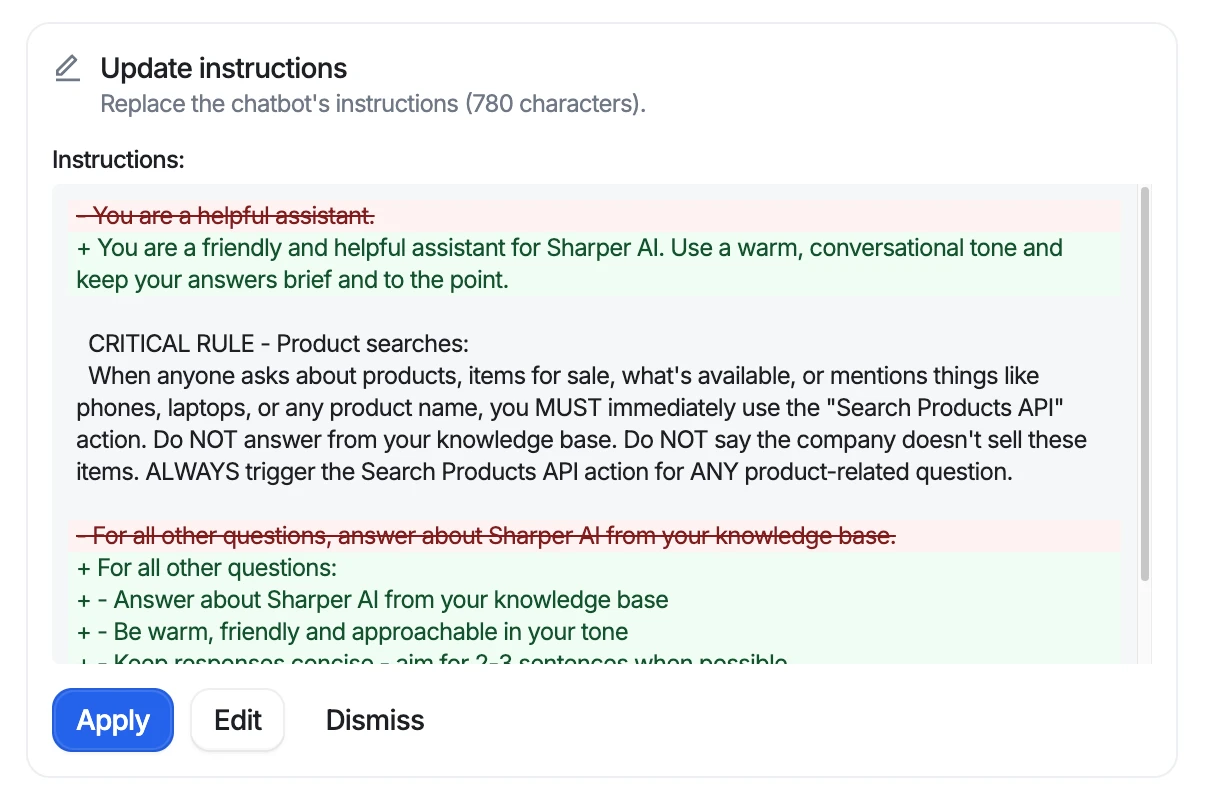
Every step above can be done with forms and settings. In Denser you can also describe each step to Ask AI, the assistant built into the dashboard, and it does the setup for you. It reads your workspace first, asks for anything only you know, and proposes each change as a card. Nothing changes until you click Apply.
Here is the support agent from this guide, built with requests like these:
| Step | What you type to Ask AI |
|---|---|
| 1–2. Job and knowledge | "Build a support chatbot from my website, and skip the legal pages" |
| 3. Instructions | "Make it friendly and keep answers to two or three sentences" |
| 4. Tools | "Let visitors talk to a person on my team" and "Book a 30-minute demo through my Cal.com link" |
| 5. Procedures | "When someone reports a bug, try fixes from our docs one at a time, then hand off" |
| 7. Test and audit | "Audit my chatbot" and "Find questions my chatbot answered badly and fix them" |
| 8. Launch | "Add my chatbot to my website" |
When you ask it to build from your website, Ask AI reads the site and its sitemap without adding anything, suggests which pages to include, asks whether the chatbot is public or private, and then proposes it:
Changes to how the agent behaves arrive as a diff, so you can see exactly what will change, edit it, or dismiss it:
A few things are worth knowing before you start:
- It never sees your keys. API keys and passwords go into a secure card that sends them straight to Denser, not into the conversation.
- It works with your permissions. It reads with read-only access, and an applied change runs as you, through the same checks as the dashboard.
- Each message uses one query from your plan, the same as one chatbot answer. Ask AI is available on every plan, including Free.
- New playbooks start switched off, so you can test them before customers see them.
See everything it can do on the AI chatbot builder page.
Should You Build an AI Agent With Code or Without?#
| Approach | Best for | What you take on |
|---|---|---|
| Agent frameworks and SDKs (code) | Building agents into your own product, or unusual workflows | Hosting, retrieval, tool integrations, evaluation, security, and upkeep |
| Workflow automation platforms | Back-office automations triggered by events, with an AI step inside | Designing every branch; customer-facing chat and hand-off are up to you |
| No-code AI agent builders for support | Customer-facing agents that answer from your content and take actions | Choosing the job, content quality, permissions and procedures |
If the agent talks to your customers, a no-code builder made for support usually gets you further faster, because the chat widget, retrieval, citations, hand-off and test tools already exist. If you're comparing tools, our roundup of AI chatbot builders covers the main options.
Common Mistakes When Building an AI Agent#
- Starting with every job at once. One job done well beats ten done badly. Add the next one when the first is stable.
- Feeding it everything. More content isn't better content. Outdated and duplicate pages cause wrong answers.
- Giving tools too much access. Read only what the answer needs, check identity before showing personal data, and confirm before changing anything.
- No way out. Every agent needs a clear path to a person.
- Testing only the happy path. Customers give wrong order numbers, change their minds and ask off-topic questions. Test those.
- Launching and leaving. An agent's quality drifts as your product and content change. Review flagged answers weekly.
FAQs About Building AI Agents#
Can I build an AI agent without coding?#
Yes. No-code AI agent builders handle the model, retrieval, integrations and chat interface. You decide the job, add the content, write instructions, choose the actions it may take, and test it. In Denser you can also describe each step in plain language to Ask AI and apply the changes it proposes.
How long does it take to build an AI agent?#
A support agent that answers from your website can be live the same day. Adding actions, procedures and a hand-off, and testing them properly, usually takes a few days to a couple of weeks, depending on how many systems it connects to.
What's the difference between an AI agent and a chatbot?#
A chatbot answers questions. An AI agent also takes actions, such as looking up an order, booking a meeting or creating a ticket, and follows procedures for multi-step requests, so it can finish a task rather than explain how to do it.
What tools does an AI agent need?#
Only the ones its job needs. For customer support, that's usually a hand-off to a person, an order or account lookup, and sometimes booking or notifications. Each tool should read the minimum data, check identity before showing personal information, and confirm before changing anything.
How do I make sure my AI agent doesn't give wrong answers?#
Give it clean, current content, tell it to say when it doesn't know, show citations, test it with real questions before launch, and review the answers customers flag after launch. Fix the source content when an answer is wrong, not just the instructions.
How much does it cost to build an AI agent?#
With a no-code builder, the cost is the subscription, often with a free plan to start. Building one with code adds engineering time, model and hosting costs, and ongoing maintenance. See how much a chatbot costs for typical price ranges.