

AI Email Agent: Automate Customer Support Without Losing Control

An AI email agent reads an incoming support message, finds the relevant information in your approved content, and prepares a useful reply. Depending on how much control your team wants, it can send that answer automatically or hold a complete draft for a person to review.
That sounds simple. But reliable email support involves more than generating a polite paragraph.
The agent needs to understand the full question, use the correct policy, preserve the email thread, write in your brand voice, reply from an address customers trust, and know when a person should take over. If it cannot do those things, it is only a writing assistant—not a support system.
This guide explains how AI email agents work, which messages they should handle, how to introduce automation safely, and why one shared knowledge base is easier to maintain than separate answers for email, website chat, help pages, API, and voice.
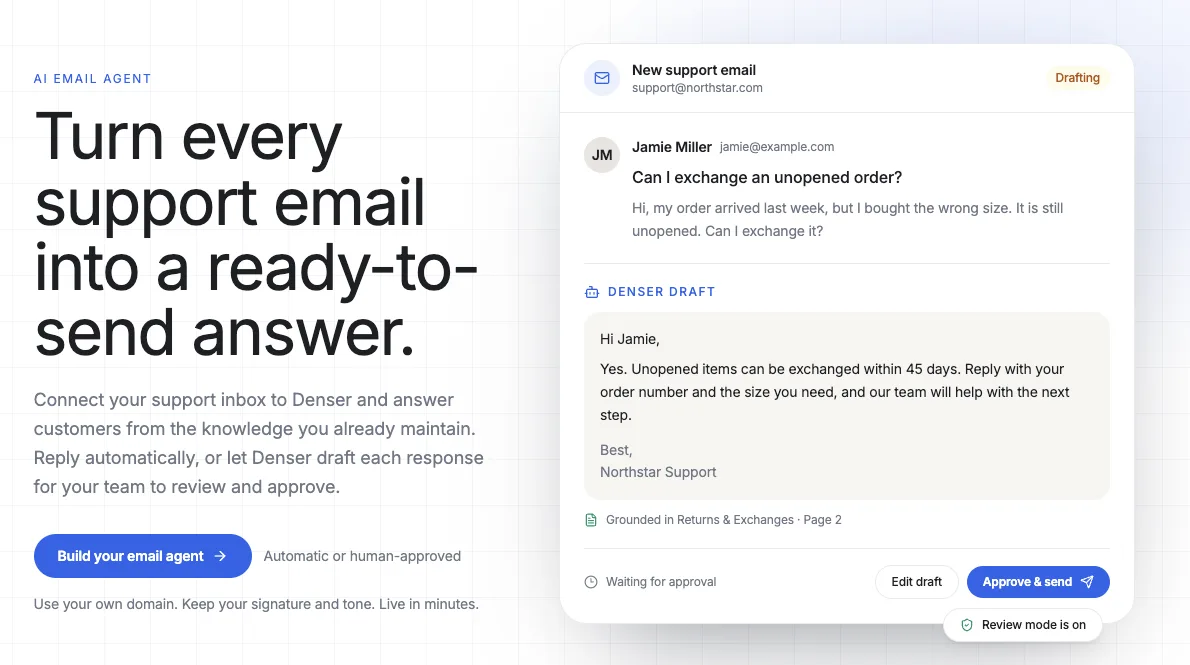
What Is an AI Email Agent?#
An AI email agent is software that receives an email, understands what the sender needs, retrieves relevant business information, and generates a response. A support-focused agent can also preserve conversation history, apply brand instructions, route exceptions, and turn unresolved requests into tickets.
This is different from a general AI email assistant. A personal assistant might rewrite a sentence, summarize a long thread, or suggest a subject line. A customer-support email agent operates as part of a service workflow.
| AI email assistant | AI email agent for support |
|---|---|
| Helps one person write faster | Handles incoming customer conversations |
| Often relies on the prompt and current email | Retrieves answers from approved company content |
| Produces text on demand | Can draft, send, store, route, and escalate |
| Usually works inside a personal inbox | Connects to a shared support address and helpdesk |
| Leaves follow-up to the user | Creates an organized ticket when work remains |
The distinction matters because fluent writing is not the same as a correct support answer. Customers do not need a beautifully phrased guess. They need the right return window, setup step, warranty condition, or account policy.
How an AI Email Agent Works#
The customer sees an ordinary email exchange. Behind the reply, the agent follows a sequence:
- The message reaches your support address. You keep the address customers already know and forward incoming mail to the agent.
- The agent reads the request and thread. It identifies the question, relevant context, and whether the message appears to require a reply.
- Retrieval searches your approved sources. The system finds useful passages in your website, help articles, documents, policies, or product guides.
- The model prepares a grounded response. It writes from the retrieved information and follows your instructions for tone, length, and behavior.
- Your sending policy decides what happens next. The answer is either sent automatically or saved as a draft for review.
- The conversation is stored for follow-up. If the request needs judgment or offline work, the thread becomes a ticket instead of disappearing into an inbox.
The retrieval step is essential. Without it, an AI model can generate an answer that sounds reasonable but does not reflect your actual business. A retrieval-augmented generation system gives the model the relevant company content before it writes the reply.
Automatic Replies or Human Approval: You Need Both#
Email automation is often presented as a choice between two extremes: let AI send everything or keep a person in every loop. A practical rollout uses both modes.
Draft replies for human approval#
In approval mode, the AI prepares the response but does not send it. A teammate can read, edit, approve, or replace the draft.
This is the right starting point when:
- Your team is testing the agent against real customer language
- Policies contain exceptions or require careful interpretation
- A message involves a refund, billing issue, or account change
- Brand voice is important and still being tuned
- The cost of a wrong answer is higher than the cost of review
Approval mode removes the blank page without removing human judgment. The reviewer begins with the customer’s question, relevant knowledge, and a ready-to-send response instead of researching and composing from scratch.
Automatic replies for documented questions#
Automatic mode sends the generated answer without waiting for a person. It works best for questions with stable, clearly documented answers:
- Shipping times and delivery regions
- Return and exchange policies
- Product compatibility and specifications
- Business hours and locations
- Common setup instructions
- Basic troubleshooting steps
The safest progression is to start with approval, review the drafts, improve missing content, and then automate the topics that consistently produce correct answers. Control should be a channel setting—not an all-or-nothing commitment.
Denser’s AI Email Agent supports both approaches. You can let it answer automatically or hold every response in Helpdesk until your team approves it.
The Best Email Automation Starts With Better Knowledge#
Suppose a customer writes:
I bought the wrong size last week, but the package is unopened. Can I exchange it?
A generic model knows how stores often handle returns. It does not know whether your exchange window is 14, 30, or 45 days. It does not know whether sale items are excluded or whether the customer must include an order number.
A knowledge-grounded agent searches your approved return policy, retrieves the relevant section, and writes from that source. If the documents do not answer the question, the correct behavior is to stop and request human review.
This produces three useful boundaries:
- The agent knows which sources it may use.
- It answers when those sources contain sufficient information.
- It creates a follow-up when the answer requires knowledge or authority it does not have.
These boundaries reduce invented answers, but they also expose weaknesses in the knowledge base. If reviewers repeatedly correct the same topic, the durable fix is often a clearer help article—not another email macro.
One Knowledge Base Across Every Customer Channel#
Email should not become another collection of answers your team has to maintain.
Many businesses accumulate a separate chatbot script, email template library, help-center copy, call-center notes, and API documentation. When a policy changes, someone must remember to update every version. Miss one, and customers receive different answers depending on how they contact you.
Denser uses one source of truth across channels:
| Channel | How customers use the same knowledge |
|---|---|
| AI Chat Agent | Ask questions from any page of your website |
| Help page | Search and ask from a dedicated self-service destination |
| AI Email Agent | Send a normal support email and receive a grounded reply |
| REST API | Add the answer system to a custom product or workflow |
| AI Voice Agent | Call a phone number and ask the question naturally |
The delivery format changes, but the approved information does not. Update a policy once and the next website visitor, email sender, API request, and phone caller can all receive the revised answer.
See how the same knowledge powers Denser’s AI Chat Agent and AI Voice Agent. This is what makes omnichannel support manageable: not merely adding more channels, but avoiding a separate content operation for each one.
How to Set Up an AI Email Agent With Denser#
You do not need to replace your public support address or ask customers to learn a new workflow. Denser connects the inbox they already use to the knowledge and controls you configure.
1. Connect your customer-facing knowledge#
Start with the sources your support team trusts:
- Website and help-center pages
- PDF manuals and policy documents
- Word documents and presentations
- Product guides and troubleshooting instructions
- An existing Denser knowledge base
Use content that is accurate, current, and written for the questions customers actually ask. Remove obsolete policy copies and identify topics where the source itself is ambiguous.
If the same knowledge already powers your website agent, you do not need to upload or maintain it again.
2. Keep your existing support address#
Customers can continue emailing an address such as support@yourcompany.com. Add the forwarding rule Denser provides, then verify the sender identity that should appear on outgoing replies.
This keeps the customer experience familiar. They write an ordinary email, receive a threaded response from your company, and can continue the conversation without entering a portal.
Using a verified sender also protects brand continuity. The reply should look like it came from your support operation, not from an unrelated automation address.
3. Choose review or automatic mode#
Start with the level of oversight appropriate for the inbox.
Review mode creates a complete draft in Helpdesk. A teammate approves or edits it before sending.
Automatic mode sends grounded replies immediately using the configured sender and brand settings.
A new deployment should usually begin in review mode. Once the team sees reliable performance for repeatable topics, it can automate those conversations with greater confidence.
4. Match the reply to your brand#
Configure the details customers notice:
- Sender display name
- Verified company-domain address
- Reply tone and behavioral instructions
- Email signature
- Optional AI composition disclosure
- Rules for when the agent should defer to a person
Instructions should describe how the agent behaves, not duplicate every fact it needs to know. Keep policies and product information in maintained source documents. Use the prompt for tone, boundaries, and escalation behavior.
5. Test real questions before going live#
Use messages from your actual support history. Test routine questions, vague requests, multiple questions in one email, follow-ups that depend on the earlier thread, and topics absent from the knowledge base.
Check more than grammar:
- Did the agent retrieve the right policy?
- Did it preserve important details from the thread?
- Did it avoid making an unauthorized promise?
- Did it use the expected sender, tone, disclaimer, and signature?
- Did it create a ticket when a person needed to continue?
Testing should verify the operating boundary, not merely prove that the agent can write.
Which Support Emails Should You Automate?#
The best candidates are frequent questions with stable answers. They consume human hours because of repetition, not complexity.
Strong automation candidates#
- Product features, compatibility, and availability
- Shipping policies and delivery expectations
- Returns, exchanges, and warranty basics
- Setup instructions and common troubleshooting
- Business hours, locations, and service areas
- Links to forms, guides, or account resources
- After-hours acknowledgment for documented requests
Keep a person involved#
- Refund approval and disputed charges
- Policy exceptions
- Sensitive account changes
- Legal, medical, safety, or regulated decisions
- Angry or distressed customers
- Questions without adequate source material
- Requests that require investigation in another system
Automation does not have to resolve every email to create value. A correct draft, relevant source, complete thread, and clear ticket can shorten the work even when a person makes the final decision.
Denser Helpdesk keeps email conversations and follow-up tickets alongside requests from other channels, so exceptions arrive with context rather than as disconnected notes.
Keep the Brand, Not the Repetition#
Support email carries more brand detail than a short chat response. Customers see the sender name, address, greeting, sentence rhythm, sign-off, signature, and any disclosure attached to the reply.
An AI email agent should let you control all of them.
Good brand instructions are specific enough to guide a reply without turning every email into a template. For example:
Write in a warm, concise, and practical tone. Use short paragraphs. Address the customer by first name when available. Never promise an exception to a published policy. If the source does not answer the question, say that the team will follow up.
Then use your signature to preserve the information customers expect:
Northstar Support
Helpful answers from the people who make your gear.
The aim is consistency, not artificial sameness. The content should respond to the actual message while staying within recognizable brand boundaries.
What Happens When AI Should Not Send?#
An unresolved email should become organized work, not a silent failure.
With Denser, the email conversation is stored in Chatlog and available as a customer ticket. The owner can see what the customer asked, review the conversation, edit the prepared response, assign the work, and follow up offline.
This handoff matters for two reasons:
- The customer does not have to repeat the request in another channel.
- The support team begins with context rather than reconstructing the issue.
The same principle applies across AI support. A good agent needs a clear success path and an equally clear stopping path. Our guide to helpdesk automation explains how to automate repetitive work while preserving ownership for exceptions.
How to Evaluate an AI Email Agent#
Most products can generate an impressive sample reply. Evaluate what happens around that paragraph.
Does it answer from your content?#
Ask a question with a precise answer in your documentation, then ask one the documents do not cover. The agent should retrieve the first and recognize its boundary on the second.
Can you approve replies before they leave?#
Human review is essential during rollout and for high-risk topics. Confirm that drafts are actually held—not merely shown after the message has already been sent.
Can it use your existing address and domain?#
Changing a published support address creates avoidable friction. Look for forwarding and verified-sender support so customers can keep using the contact they know.
Does it preserve threads and follow-up work?#
The original message, subsequent replies, AI draft, ownership, and status should remain connected. Otherwise, automation creates another place your team has to check.
Can you maintain one answer across channels?#
If email, chat, voice, and self-service each require separate content, every policy update becomes a consistency problem. A shared knowledge layer is easier to govern and test.
Can you control its brand behavior?#
Look for sender identity, prompt instructions, reply tone, signature, disclosure, and escalation rules. The automation should adapt to your operation rather than forcing every company into the same voice.
Measuring AI Email Support#
Do not measure success by the number of generated replies alone. A fast wrong answer is still support work—often more of it.
Track outcomes such as:
- Time to first useful response: How quickly does the customer receive a relevant answer or acknowledgment?
- Approval rate: What percentage of drafts are approved without substantial editing?
- Automated resolution rate: How often does a grounded automatic reply finish the conversation?
- Reopen or repeat-contact rate: Do customers return because the response missed the question?
- Human handling time: How much time does a draft and complete thread save when a person takes over?
- Unknown-answer rate: Which topics repeatedly lack adequate source content?
- Escalation quality: Do tickets include enough context for the owner to continue immediately?
Review edited drafts for patterns. Frequent corrections may indicate unclear instructions, but they can also reveal missing or contradictory documentation. Improve the source of truth, and every connected channel benefits.
Frequently Asked Questions#
What does an AI email agent do?#
An AI email agent reads incoming messages, identifies what the sender needs, retrieves relevant information, and generates a reply. A customer-support agent can send the answer automatically or save it for human approval, while preserving the conversation for later follow-up.
Is an AI email agent different from an AI email assistant?#
Yes. An AI email assistant usually helps an individual write, rewrite, or summarize messages. An AI email agent can operate a support workflow: receive customer emails, search approved business knowledge, draft or send replies, preserve threads, and create tickets.
Can AI reply to customer emails automatically?#
Yes. Automatic replies work best for repeatable questions with clear answers in maintained documentation. Teams should keep human approval for exceptions, sensitive decisions, and topics the knowledge base does not adequately cover.
Can a person approve the reply before it is sent?#
Yes. Denser can create a complete draft and hold it in Helpdesk. A teammate can review, edit, approve, or replace the response before the customer receives it.
Can I keep my existing support email address?#
Yes. Customers can continue writing to the address they already know. You forward incoming messages to Denser and verify the company-domain sender identity used for replies.
Can I customize the tone and email signature?#
Yes. You can configure the sender display name, reply instructions, tone, signature, and an optional disclosure that AI composed the response.
What happens when the agent does not know the answer?#
It should not guess. The conversation remains available as a ticket so a person can review the request, use the full thread, and follow up offline.
Can one knowledge base support email, chat, and voice?#
Yes. Denser uses the same knowledge base across website chat, a hosted help page, email, REST API, and voice. Update the source once and each channel can retrieve the new information.
Turn Your Support Inbox Into a Ready-to-Send Queue#
The fastest way to add AI to email support is not to replace the inbox or build another library of canned responses. It is to connect the address customers already use to the knowledge and workflow your team already maintains.
With Denser, you can start with approval-ready drafts, automate documented questions when you are comfortable, send from your own domain, and keep every exception organized in Helpdesk. The same source material can also answer customers through website chat, a help page, API, and voice.
Build a Denser AI Email Agent and prepare your first grounded support reply in minutes.