

How to Use a Secure AI PDF Reader for Business Documents

Business PDFs often contain contracts, financial reports, policies, manuals, compliance files, research papers, and internal knowledge that people need to review quickly.
A secure AI PDF reader for business documents should do more than summarize content or help you open a file. It should let you ask questions, extract key details, verify AI responses, and protect confidential documents while your team works.
In this guide, we'll explain what a secure AI PDF reader is, which security features matter, how PDF chat works, and how Denser helps you turn business documents into cited answers your team can reuse.
TL;DR#
-
A secure AI PDF reader helps you review PDF documents with natural language questions, cited answers, and controls for sensitive data.
-
Business PDFs need stronger protection because contracts, HR files, balance sheets, and compliance documents often contain confidential information.
-
PDF chat works best when it can retrieve relevant passages, show exact citations, and help you verify answers before you act.
-
Denser helps you chat with PDFs, analyze multiple documents, and turn internal files into a searchable AI knowledge base.
What Is a Secure AI PDF Reader?#
A secure AI PDF reader is a PDF tool that uses artificial intelligence to help you search, ask questions, summarize, and verify information inside business files while protecting sensitive information.
A normal PDF reader helps you open, view, print, edit, or annotate a document. Tools such as Adobe Acrobat, Adobe Reader, Foxit PDF Editor, Acrobat AI assistant, and other PDF editors can support document creation, form filling, adding watermarks, editable text, and standard PDF tasks.
A basic AI PDF summarizer gives you instant summaries or one-click summaries from a file. A secure AI PDF reader goes further by adding source citations, access controls, encryption, and a safer document workflow for decisions.
Why Business Documents Need a Secure AI PDF Reader#
Business PDFs often contain sensitive data that shouldn't move through unclear AI tools. Contracts, financial reports, employee handbooks, customer records, compliance files, and legal documents need document processing that keeps uploaded files protected.
Manual review is slow because key information may be buried deep within clauses, tables, exhibits, scanned documents, or appendices. A secure AI PDF reader helps you pull data, extract text, and find key points without reading every page.
Generic AI-powered tools may provide helpful summaries, but many lack sufficient source traceability for business workflows. When an answer affects a legal, finance, HR, or customer decision, you need to know which page supports it.
Repeated document questions also waste time. Support, operations, HR, legal, and finance teams often answer the same questions about policies, manuals, contracts, and reports because the knowledge is locked away in long PDF documents.
A secure workflow gives your team instant answers they can verify. It helps people stay focused on decisions instead of searching through folders, reopening old files, or asking another person to confirm details.
Core Security Features to Look For#
A secure AI PDF reader for business documents should protect uploaded files, return answers you can verify, and make trusted document knowledge reusable.
The key features should cover encryption, private file handling, source citations, access controls, and knowledge base support.
Document Encryption#
Business PDF documents often include contracts, financial reports, customer records, HR policies, compliance files, and internal procedures.
Denser uses bank-level encryption to help keep uploaded files and document workflows protected while the AI reads, indexes, and retrieves content.
This matters when you use AI PDF tools with confidential documents. Your team can analyze complex PDFs, extract insights, and review key information without moving sensitive data into an unclear workflow.
No AI Training on Your Documents#
A secure AI PDF workflow should clearly outline how uploaded files are handled. Business documents should remain private and not be used to train external AI models.
Your PDFs are not used for AI training with Denser. This gives your team a safer way to use it with contracts, SOPs, manuals, balance sheets, research papers, and other sensitive business files.
Source Citations#
Source citations are one of the most important trust features in a secure AI PDF reader. Denser includes exact page citations with AI responses, so your team can check the original PDF before using an answer.
This helps with legal review, finance summaries, compliance checks, and support replies. When an answer links back to the source document, users can verify key details rather than rely on an unsupported summary.
Private Knowledge Base Support#
Business teams often need more than a one-time PDF chat. Policies, SOPs, employee handbooks, product manuals, and training files should become reusable knowledge that employees can search again later.
Denser turns PDF files and other documents into a private knowledge base. Your team can ask questions in natural language and get source-backed answers from approved business documents.
Multi-Document Analysis#
Business questions often depend on multiple documents. A contract review may need two versions, a finance check may need several quarterly reports, and a compliance review may need policies, checklists, and supporting records.
Denser supports multi-file chat with PDFs, DOCX, PPTX, and Google Drive content. This lets your team compare multiple PDFs, identify duplicate risks, extract data from multiple files, and analyze document collections from a single workflow.
Advanced Document Intelligence#
A secure AI PDF reader should do more than summarize content. It should understand document structure, retrieve relevant passages, and support advanced document intelligence for complex business files.
Denser uses retrieval technology to find the right source passages from large document collections. This helps with document analysis, data extraction, AI-powered chat, and questions that need context from several pages or files.
Structured and Unstructured Data Support#
Business knowledge often includes both structured data and unstructured content. Tables, balance sheets, reports, clauses, manuals, and policy text all need different types of document processing.
Denser helps your team search and analyze PDF documents with natural language questions. When users need key terms, key points, metrics, or specific clauses, the system can retrieve the relevant content and connect it to a cited answer.
Access Controls#
A secure PDF workflow should protect sensitive information based on the user's role. Legal contracts, HR files, customer records, finance documents, and compliance materials often need different access rules.
The Denser knowledge base workflow can support controlled team access when PDF chat becomes part of a wider internal search. This helps keep documents secure while still providing authorized users with instant access to trusted files.
Audit and Verification#
Business users need a clear way to confirm the source of each answer. This matters for renewal dates, legal clauses, financial figures, policy rules, risk notes, and technical procedures.
Cited answers create a verification path from the AI response back to the source PDF. Your team can review the original page, check the context, and use the answer with more confidence.
Enterprise Grade Security and Scale#
Enterprise-grade security matters when your team works with large document collections and sensitive business files. The setup should protect documents, support trusted access, and scale beyond a few uploaded files.
Denser can support thousands of PDFs and query a full knowledge base at once. Its advanced features make it practical for teams that need secure PDF chat, reusable internal knowledge, and verified answers from multiple documents.
How to Use a Secure PDF Chat for Business Documents#
A secure PDF chat lets you turn business documents into a question-and-answer workflow with cited answers.
With Denser, you can move from uploading files to asking questions in minutes, while the system handles indexing, retrieval, citations, and document management in the background.
1. Sign Up for Free With Denser#
You can start by signing up for free and testing the PDF chat without a credit card required. This gives small teams a low-risk way to test AI features on real business files before rolling out the workflow to more people.
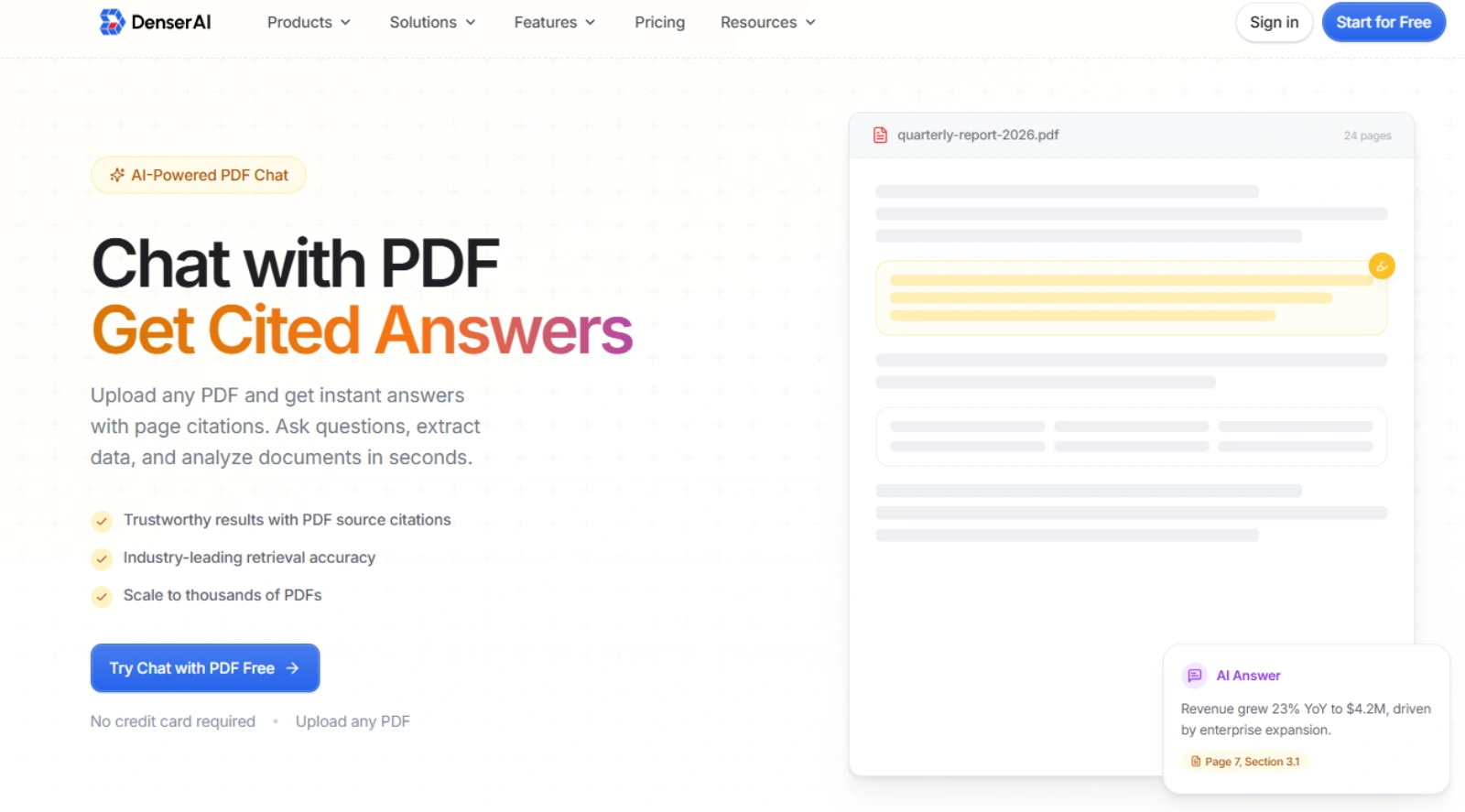
After you create your workspace, you can decide which documents to upload first. Contracts, policies, manuals, reports, SOPs, and training files are good starting points because they often hold answers people need more than once.
2. Upload Files and Build a Chatbot#
The first product step is to upload your documents and build a chatbot. Denser supports PDFs, DOCX, PPTX, links, website content, FAQs, and Google Drive imports, so you can work with multiple file types from one place.
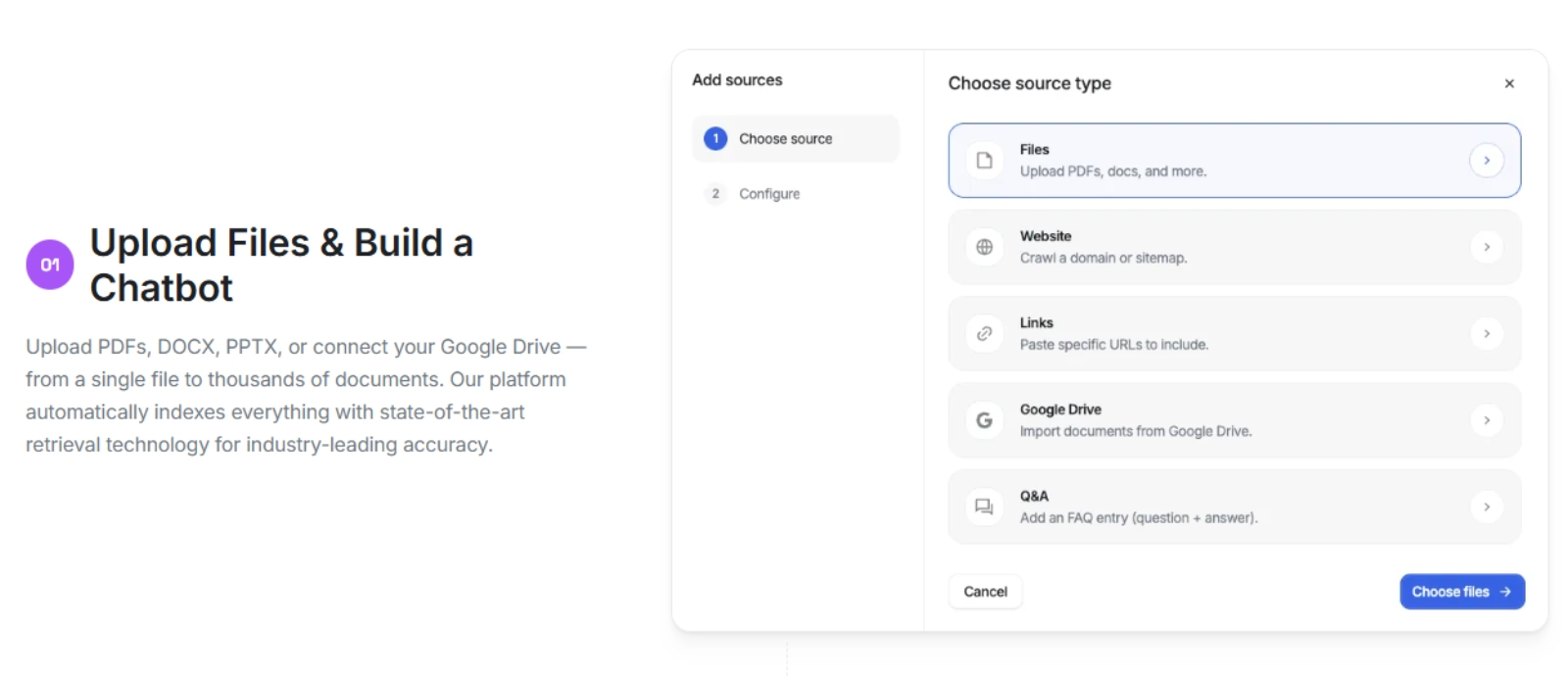
You can upload a single PDF or build a larger document collection with thousands of files. This helps you manage business PDFs, manuals, contracts, reports, and internal knowledge without creating a separate workflow for each document.
3. Let Denser Index the Content#
Once your files are uploaded, the chatbot uses retrieval technology to index the contents of the documents. The system organizes the text, pages, sections, and relevant passages so it can find the right source material when you ask a question.
This indexing step supports advanced document intelligence because the AI can understand more than isolated keywords. For scanned documents, optical character recognition converts image-based pages into searchable text when the PDF requires OCR before analysis.
4. Ask Questions in Natural Language#
The second product step is to chat with your PDF. You can ask questions in natural language instead of using exact keywords or searching page by page.
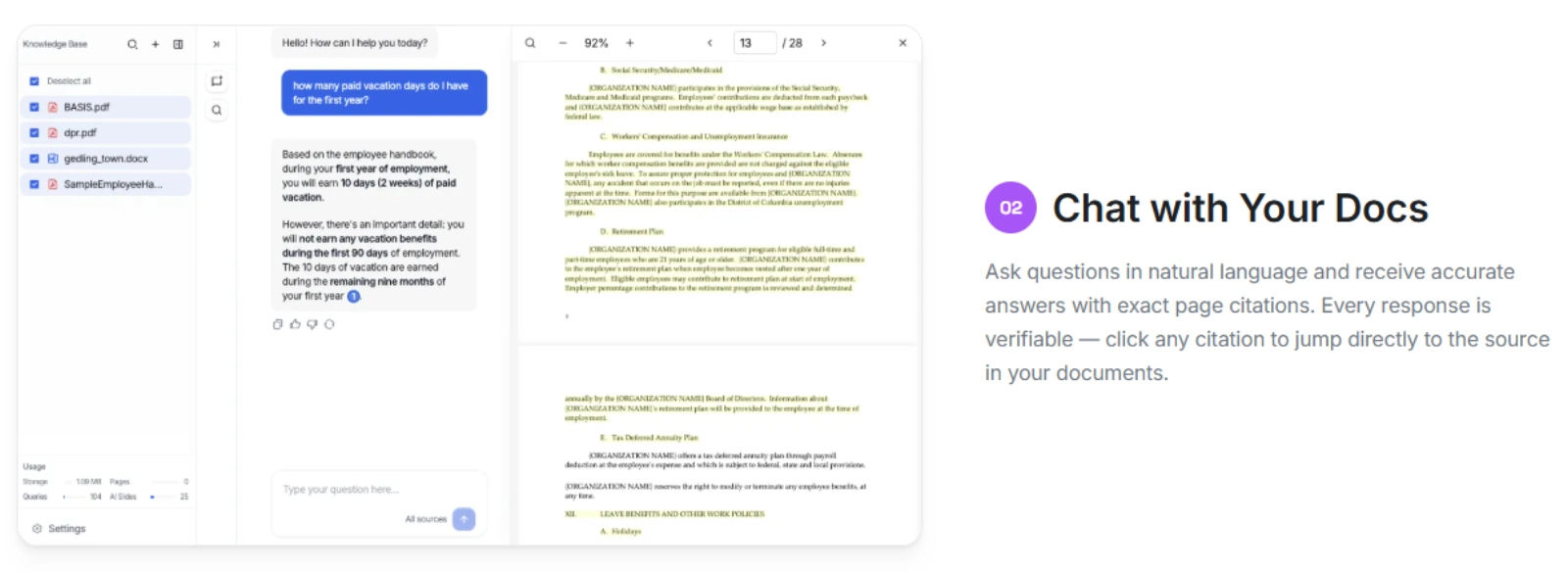
You might ask:
-
What are the renewal terms in this contract?
-
What does this policy say about expense approvals?
-
Summarize the risks in this financial report.
-
Which manual section explains the troubleshooting steps?
-
Pull the key terms from this agreement and list the missing details.
5. Review Answers With Exact Page Citations#
Denser returns accurate answers with exact page citations, so you can verify each response before you act. You can click a citation to jump directly to the source in your documents and review the original page.
This matters when your PDF includes legal clauses, compliance rules, balance sheets, customer commitments, or technical procedures. You can use AI-powered chat to save time, but still check the source before you use the answer in a business decision.
6. Ask Follow-Up Questions#
Secure PDF chat should support follow-up questions because one answer often leads to another. After you find a clause, metric, or policy rule, you can request additional details without restarting the review.
Denser keeps the chat tied to your document content, so follow-up answers stay grounded in the uploaded files. This helps you analyze complex PDF documents, compare sections, and extract key information from long business files.
7. Use Multi-Document Chat for Bigger Reviews#
Many business questions need more than one document. You may need to compare contract versions, review several quarterly reports, check multiple policies, or identify recurring risks across a group of files.
Denser supports multi-document analysis, so you can chat with multiple PDFs at once. These advanced capabilities help you find patterns, compare information, and synthesize insights from a full document collection.
8. Reuse the Knowledge in an Internal Knowledge Base#
PDF chat becomes more valuable when your team can reuse trusted answers later. Denser lets you turn PDFs, SOPs, handbooks, manuals, and training materials into an internal knowledge base that employees can search in plain English.
This helps your team answer recurring questions from business documents without having to ask the same person again. HR, operations, legal, finance, onboarding, and support teams can search approved files and retrieve cited answers from the same trusted source.
Business Use Cases for a Secure AI PDF Reader#
A secure AI PDF reader helps when important answers are buried in business files that take too long to review manually.
These use cases show where PDF chat and reusable knowledge base features are most helpful.
Legal and Compliance Documents#
Legal and compliance teams can analyze contracts, review clauses, compare policy versions, and check compliance obligations. PDF chat helps identify renewal dates, liability language, termination terms, approval rules, and missing clauses.
Citations are important here because legal and compliance decisions need source verification. AI analysis should support professional review, not replace it.
Finance and Business Reports#
Finance teams can review quarterly reports, board materials, risk notes, balance sheets, and financial summaries. A secure AI PDF reader can extract data, pull key metrics, and summarize trends from long reports.
This helps when the answer sits in tables, footnotes, management notes, or attached schedules. Users can ask follow-up questions and check each answer against the cited source.
HR Policies and Employee Handbooks#
HR teams can use AI PDF chat to answer questions about benefits, PTO, workplace rules, onboarding steps, and internal policies. Employees get instant answers without waiting for HR to manually search the handbook.
Access controls matter because some HR documents include sensitive information. Public policy documents and restricted employee records should not be treated the same way.
Technical Manuals and SOPs#
Operations and technical teams can search procedures, troubleshooting steps, product documentation, field manuals, and SOPs. This is useful when a manual contains hundreds of pages, and the user needs one exact step.
AI-powered chat can also translate text, explain complex topics, and summarize key details from technical sections. The original source should stay available so users can confirm steps before acting.
Customer Support Knowledge#
Support teams can use PDF chat for product guides, support docs, FAQs, manuals, and escalation notes. Agents can find accurate answers faster and use citations to confirm the answer before replying to a customer.
This is especially helpful when support knowledge is stored in multiple files. A knowledge base helps agents reuse approved answers instead of searching scattered PDFs every time.
Turn Business PDFs Into a Searchable Knowledge Base#
With Denser, you can upload PDFs, DOCX files, PPTX files, or connect to Google Drive, then ask questions in plain English. The system indexes your documents, retrieves the right passages, and gives you cited answers you can check against the original source.
For one-off document review, use the AI-powered PDF chat to analyze contracts, reports, manuals, research files, and business PDFs. You can ask about renewal terms, risk notes, financial figures, policy rules, or technical steps, then click the page citation to verify the answer.
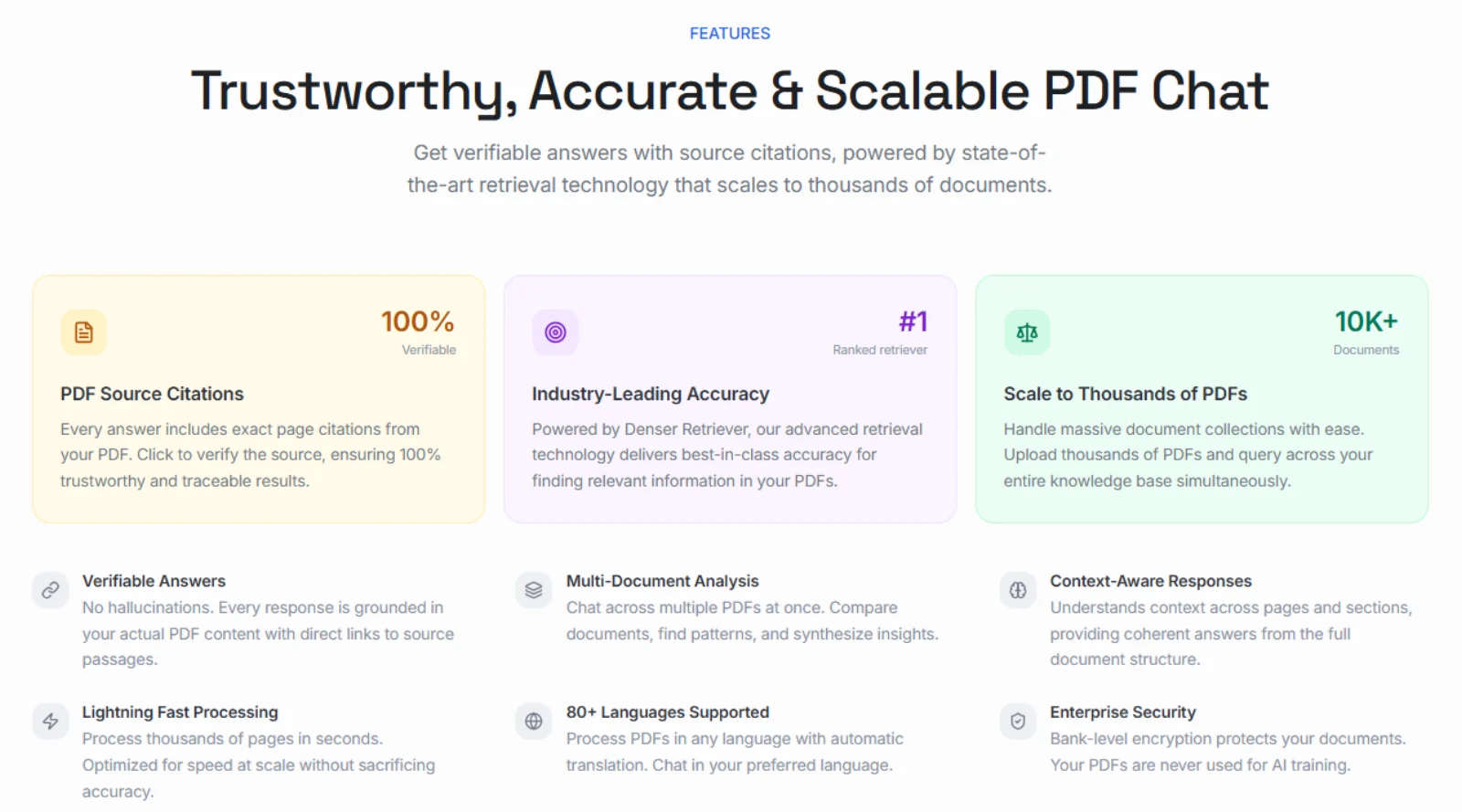
For team-wide knowledge access, use Denser as an internal knowledge base for SOPs, employee handbooks, training materials, policy docs, and support files. Your team can search for approved documents in plain English, get source-backed answers, and stop asking the same document questions over and over.
This gives your business two connected workflows.
-
Use PDF chat to review a single file or compare multiple business documents.
-
Use an AI knowledge base when your team needs to access trusted answers repeatedly.
-
Use source citations when legal, finance, HR, support, or compliance work needs verification.
-
Use private document collections when sensitive files should stay tied to your business workflow.
Denser also supports larger document collections, multi-document analysis, 80+ languages, exact-page citations, and bank-level encryption.
Start for free and turn business PDFs into cited answers your team can search, verify, and reuse!
Chat With Your PDFs Instead of Scrolling Them#
A PDF reader shows you the document. Denser answers questions about it. Upload a contract, a manual, or a folder of research papers, then ask in plain language. Every answer highlights the exact passage it came from, so you can verify it in one click rather than trusting it.
Try it on your own file with the free Chat with PDF tool, see how it works, or start a 7-day trial for larger document sets and team access.
FAQs About Secure AI PDF Readers for Business Documents#
Can AI PDF readers handle sensitive business documents?#
Yes, AI PDF readers can handle sensitive business documents when they include security features such as encryption, access controls, and clear data policies. You should check whether uploaded files are used for AI training before adding confidential documents.
What is the difference between a PDF chat and a PDF summarizer?#
A PDF chat lets you ask questions about a document and get specific answers from the source file. A PDF summarizer condenses the document into key points or instant summaries.
Should legal and compliance teams use AI PDF readers?#
Legal and compliance teams can use AI PDF readers for first-pass reviews, clause searches, version comparisons, and policy checks. They should verify every important answer against the cited source before making a decision.
How does an AI PDF reader support an internal knowledge base?#
An AI PDF reader supports an internal knowledge base by turning PDF documents into searchable answers. Instead of keeping knowledge inside separate files, your team can ask questions and get cited responses from approved documents.