

Decagon Alternatives in 2026: 6 AI Support Agents Compared, Including Sierra

Quick answer: Decagon AI and Sierra are built for large enterprises that want a vendor-led deployment, voice at scale, and custom contracts. If that's you, compare them with each other and with Ada and Forethought. If you want to start this week, see prices before a sales call, and write procedures yourself, look at Intercom Fin (if you already use Intercom), Zendesk AI agents (if you already use Zendesk), or Denser (flat published plans with a built-in helpdesk).
Decagon is one of the best-known names in AI customer service. Its agents work across chat, email, and voice, and its Agent Operating Procedures (AOPs) let teams describe workflows in natural language with code-level controls underneath. It's a serious product aimed at serious budgets.
That's also why people search for Decagon alternatives. Decagon doesn't publish prices or offer a self-serve start, and the same is true of Sierra, its closest rival. Support leaders at smaller companies, or at larger ones that want a pilot without a procurement cycle, need options they can evaluate on their own.
This guide compares six alternatives on pricing, how you write the agent's procedures, how you test them, and how fast you can start. Vendor details checked October 2026 on each vendor's own site.
Decagon Alternatives at a Glance#
| Tool | Pricing model | Public price? | Procedure feature | Self-serve start | Best for |
|---|---|---|---|---|---|
| Decagon | Per conversation or per resolution | No, contact sales | Agent Operating Procedures | No (demo) | Enterprises wanting chat, email, voice in one |
| Sierra | Outcome-based | No, contact sales | Journeys | No | Enterprise brands, voice, retention outcomes |
| Intercom Fin | $0.99 per outcome, plus Intercom seats if used | Yes | Procedures | Yes | Teams already on Intercom |
| Zendesk AI agents | Per agent, plus $1.50 to $2.00 per automated resolution | Yes | Generative procedures | Yes | Teams already on Zendesk |
| Ada | Not published | No, demo | Playbooks | No (demo) | Enterprises automating SOPs across channels |
| Forethought | Platform fee plus outcome-based | No, quote | Autoflows | No (proof of value) | Teams adding AI to an existing helpdesk |
| Denser | Flat monthly plans, $0 to $899 | Yes | Playbooks | Yes (free plan) | SMB and mid-market teams that want to start now |
What Decagon Does Well#
It's worth being clear about what you'd be replacing. Decagon's homepage describes "The AI concierge for every customer," with voice, chat, and email unified "within a single intelligence layer." AOPs let you "define agent workflows in natural language." Decagon pairs them with simulations at scale, an always-on QA tool called Watchtower, and live A/B experiments. Its Duet assistant analyzes conversations and helps generate and refine AOPs. The page says it powers experiences for "the world's leading enterprises," with industry pages for financial services, travel, retail, and telecom.
On pricing, Decagon's own post on pricing AI agents describes two models: a fixed rate per incoming conversation, or a higher fixed rate per fully resolved conversation with no charge for escalations. It says most of its customers choose per-conversation. There's no public rate card; you get a quote after a demo.
Where Decagon fits: large companies that want a dedicated deployment team, voice at high volume, deep integrations into their CRM and billing systems, and the engineering capacity to own code-level controls.
Why teams look elsewhere: they want to see a price before talking to sales, start without a deployment project, or run a smaller volume that doesn't justify an enterprise contract.
Naming Crosswalk: AOPs, Journeys, Procedures, and Playbooks#
Every vendor now has a way to make the AI follow a written, multi-step process instead of answering each message on its own. They all call it something different, which makes comparison harder than it should be. Here's the crosswalk.
| Vendor | Feature name | How you write it | How you test it |
|---|---|---|---|
| Decagon | Agent Operating Procedures (AOPs) | Natural language, with code-level controls engineers maintain | Simulations, Watchtower QA, A/B experiments |
| Sierra | Journeys | Plain English in Agent Studio, or code in the Agent SDK | Agent Traces of each decision and tool call; versioned simulations |
| Intercom Fin | Procedures | Document-style editor, AI draft from an outline, IF/ELSE steps, code snippets | Simulations graded pass or fail |
| Zendesk | Generative procedures | Free-text description turned into a procedure map (moving to text-only by Dec 2026) | See Zendesk's docs |
| Ada | Playbooks | Natural-language steps, generated from a prompt or an uploaded SOP | Adherence supervisor model checks each step |
| Denser | Playbooks | Say / ask, Do, and If blocks (up to 15 steps), or a draft from Ask AI | Step trace in a test chat, as a New visitor or Known lead |
Sources: Decagon AOPs, Sierra Agent Studio, Fin Procedures, Zendesk generative procedures, Ada Playbooks, Denser playbooks.
The useful questions are the same whatever the name: Can a support lead write and change it without an engineer? Can the AI take real actions inside it, and does it ask before changing anything? And can you watch a test run step by step, so you know why the agent said what it said?
1. Sierra: The Closest Like-for-Like#
If you're comparing Decagon, you're probably comparing Sierra too, and anyone searching for Sierra AI alternatives ends up with the same shortlist. Sierra's product page lists voice, chat, email, and WhatsApp. Teams define Journeys in plain English in Agent Studio, or have AI generate them from existing operating procedures; developers use the Agent SDK. Agent Traces show each decision, tool call, and response while you build.
Sierra's outcome-based pricing charges for results such as "a resolved support conversation, a saved cancellation, an upsell," and "if a case needs to be escalated, in most cases, there's no charge." No rates are published; criteria are agreed per customer.
Best for: large consumer brands that want the AI tied to business outcomes like retention and revenue, with voice.
Watch out for: an enterprise sales process, and outcome definitions you need to negotiate carefully.
2. Intercom Fin: Procedures in a Helpdesk You May Already Own#
Intercom's pricing page lists Fin "From $0.99 per Fin outcome," with Intercom seats from $29 to $132 per month (checked October 2026). Fin Procedures are natural-language instructions for multi-step tasks, with branching, data connectors, and code where you need an exact result. Simulations let an AI play the customer and grade the run. Intercom says Procedures also work with other helpdesks such as Zendesk and Salesforce.
Best for: teams already on Intercom, or teams that want a strong AI agent with a published price.
Watch out for: per-outcome billing means cost rises with volume. See our Intercom alternatives guide for the trade-offs.
3. Zendesk AI Agents: Procedures Inside a Mature Helpdesk#
Zendesk's pricing page (checked October 2026) lists Suite Team at $55 and Suite Professional at $115 per agent per month billed yearly, with 5 or 10 automated resolutions per agent included, then $1.50 committed or $2.00 pay-as-you-go. Generative procedures start from a free-text description and become a procedure map with steps for questions, API calls, knowledge search, and escalation. Zendesk announced a move from visual maps to text-based procedures, expected to complete by December 2026.
Best for: large teams that need Zendesk's routing, SLAs, and reporting, and want AI in the same place.
Watch out for: two meters (agents and resolutions), and a procedure editor in transition.
4. Ada: Playbooks for Enterprise SOPs#
Ada calls its feature Playbooks. You can generate one from a text prompt, upload an existing SOP or flowchart, or build from scratch, and an adherence supervisor model checks each proposed step. Ada's examples include returns and exchanges for ecommerce and card replacements for financial services, and its voice page says voice agents use Playbooks too. Ada's pricing page lists no prices and offers a demo.
Best for: enterprises that want to turn existing SOPs into automated flows across messaging, email, and voice.
Watch out for: no public pricing or self-serve start.
5. Forethought: AI Layered on Your Helpdesk#
Forethought's pricing is "a blend of platform access fees and an outcome-based pricing cost," with Team, Professional, and Enterprise plans that each say "Get a Quote." Instead of a free trial, it offers a proof of value. Channels include chat and mobile on Team, with email, voice, and Slack from Professional.
Best for: support teams that want to add AI agents to an existing helpdesk, with a structured evaluation.
Watch out for: quote-only pricing and a platform fee on top of outcomes.
6. Denser: Self-Serve AI Support Agent with Published Plans#
Denser is an AI support agent for website chat, a help page, email, phone, REST API, WhatsApp, and Shopify. It answers from your own content with source citations, takes actions, follows playbooks, and hands off to a built-in helpdesk. You can sign up and build on the free plan without a sales call.
Playbooks you can watch step by step#
A playbook is a step-by-step procedure for one situation, built from three blocks: Say / ask, Do (run an action), and If (branches side by side, plus Otherwise), up to 15 steps. You give it a name and a When to use with two or three example messages, and the agent starts it when a conversation matches. Six templates cover common cases: Troubleshoot, then hand off; Unhappy customer; Return request; Cancel an order; Billing questions; and Collect a lead and book a meeting.
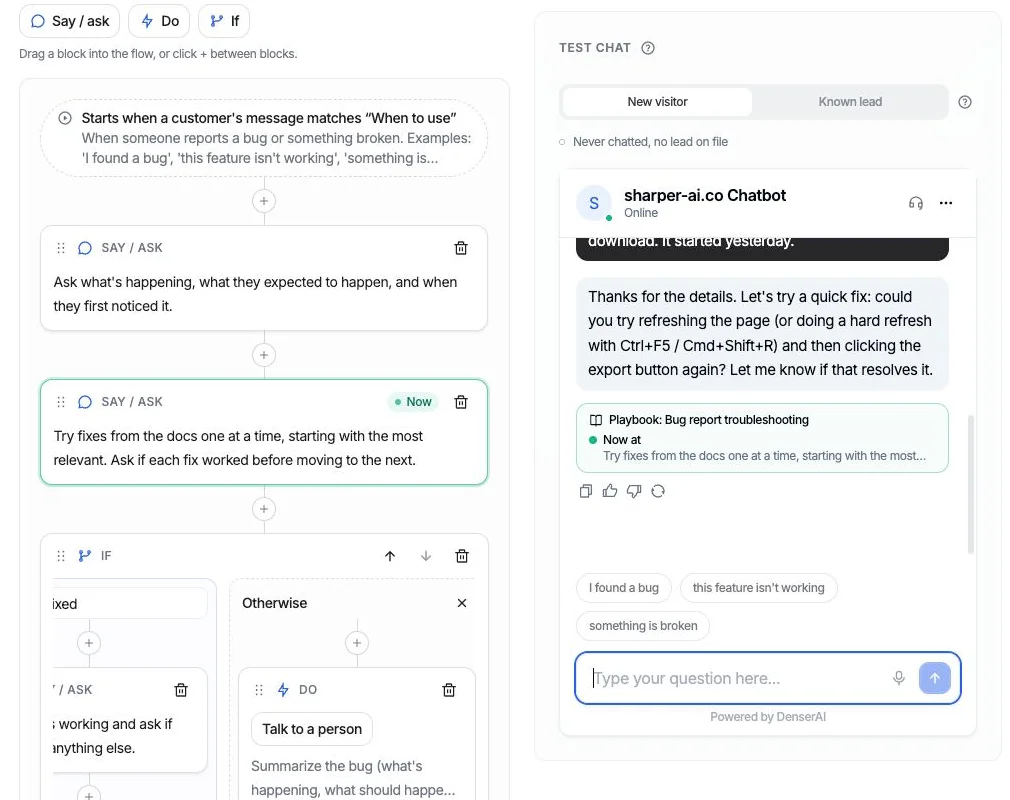
In the test chat, the trace under each reply names the step the agent is on, and the same step is marked Now in the flow.
The step trace is where Denser differs most in day-to-day use. In the test chat, under each reply, a trace names the playbook, the current step ("Now at: ..."), the path taken at each If, and the actions that ran. The same step is highlighted in the editor and moves as the conversation goes on. If a reply promises something that didn't happen, such as "I'll connect you with a teammate" with no hand-off, the trace says so. You can test as a New visitor or as a Known lead, so you see both versions of a flow that branches on who's asking.
Ask AI can draft a playbook, and any action it needs, from a sentence. Proposals are applied one by one, and new playbooks start switched off. Over 30 days you see how runs ended: completed, escalated, or left the playbook. A run counts as completed only when it got where it was going.
Actions that do real work, with guardrails#
Actions are what the agent can do, inside a playbook or on their own:
- Call your API in three steps: describe when to use it, connect it (paste a URL, a cURL command, or a JavaScript, Python, or PowerShell snippet, and Denser reads the method, headers, and body), then tick which response fields the agent may read. Nothing else reaches the agent. Keys go in headers marked secret, stored encrypted and never shown again. Requests that change something ask before a test sends them.
- Look up billing in Stripe with a restricted, read-only key. The customer gives their billing email and the number of any invoice, and both must match the same Stripe customer. It reads invoices, payment status, plan, price, and renewal. Refunds, cancellations, and plan changes go to a person.
- Book in chat from a Cal.com booking link, offering only open times and booking the one the customer picks.
- Post to Slack with a summary and a "View the chat" link, which customers never see.
- Shopify: 11 built-in actions for product search, cart, checkout, order status, and two-step cancel and return.
- Talk to a person: live takeover in the same chat when someone is available, or a ticket when nobody is.
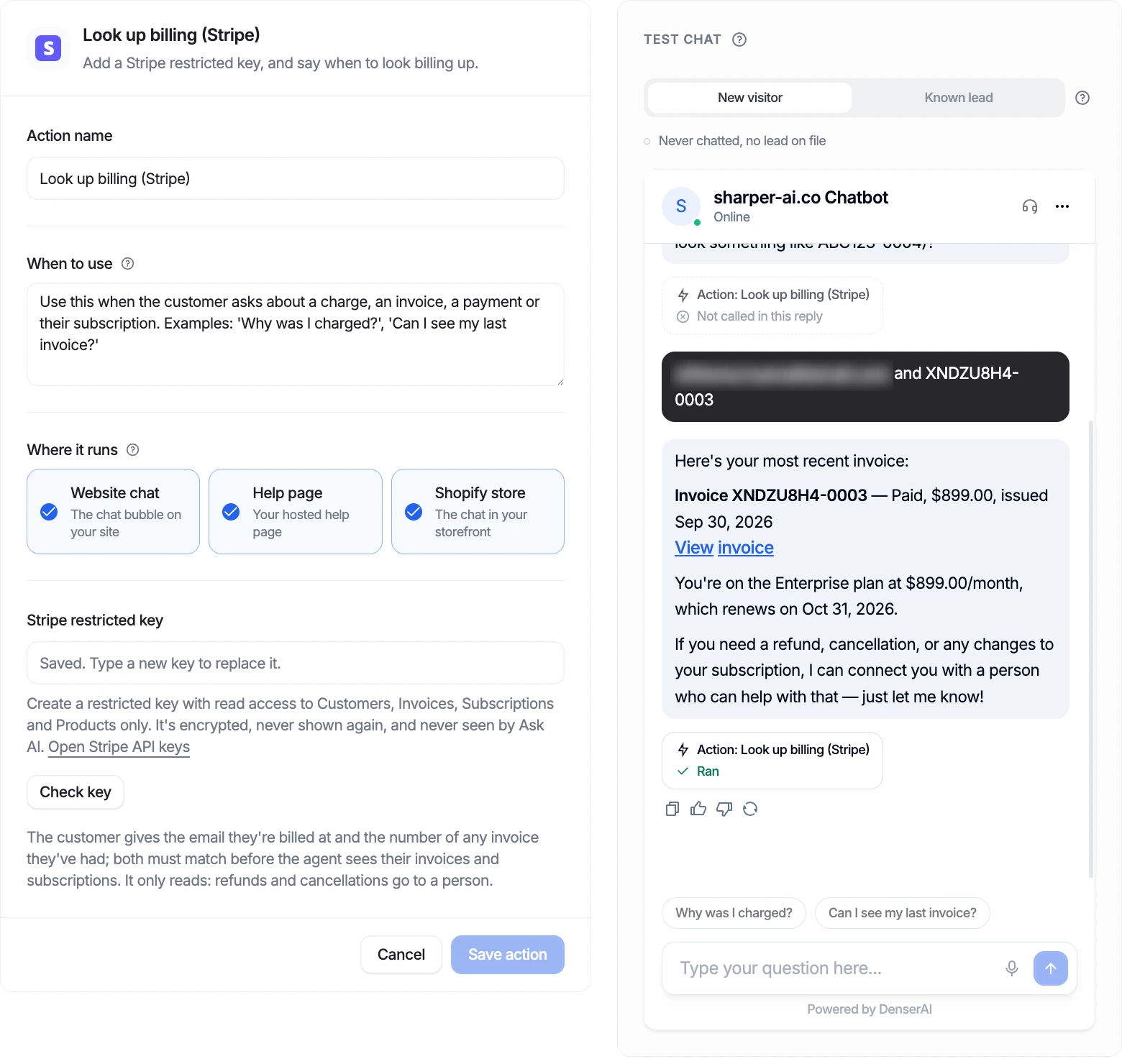
Stripe billing lookup: read-only, and only after the email and invoice number match the same customer. (Test data; email blurred.)
Every action has a test chat beside its settings. It's the real widget and runs actions for real, so a Slack test posts and a Cal.com test books.
Pricing#
Flat plans: Free $0, Starter $39/month, Standard $119/month, Business $399/month, Enterprise $899/month, with 20% off yearly. No per-resolution or per-conversation fee. Actions, cards, and playbooks share one allowance per chatbot (1 on Free, 5 on Starter, 10 on Standard, 20 on Business and Enterprise); lead collection and Shopify actions don't count. The helpdesk is on every plan. See pricing.
Best for: SMB and mid-market support teams that want an AI customer service agent with real actions and procedures, a predictable bill, and no deployment project.
Watch out for: Denser isn't an enterprise contact-center platform. If you need voice at very high volume, a vendor-run deployment team, deep custom CRM engineering, or outcome-based contracts, Decagon, Sierra, or Ada fit better. The Stripe action reads billing; it doesn't issue refunds. In-chat booking is Cal.com; Calendly is available as a booking-link button.
How to Choose a Decagon Alternative#
1. Decide whether you're buying a project or a product. Decagon, Sierra, Ada, and Forethought sell a deployment with a team behind it. Intercom, Zendesk, and Denser let you start yourself. Neither is better; they suit different budgets and timelines.
2. Model the bill at your volume. Per conversation, per resolution, per outcome, per seat, and flat plans give very different totals. Take last month's conversations and run each model. For outcome-based contracts, get the definition of a billable outcome in writing.
3. Write one real procedure in each tool. Pick a messy one: a refund request with an identity check, or a cancellation with a retention offer. See who on your team can write it, and whether it needs an engineer.
4. Check the guardrails on actions. Does the agent confirm before changing anything? Can it read only the fields you allow? How are API keys stored?
5. Watch a test run. You should be able to see which step the agent is on, why it branched, and which actions ran. If a reply claims something happened, you need to know whether it did.
6. Test the hand-off. The AI will meet questions it shouldn't answer. Check that a person can take over with the full context. For a wider view, see our guides to customer service AI agents and chatbot solutions.
FAQ#
What is Decagon AI?#
Decagon is an enterprise AI customer service platform with agents for chat, email, and voice. Teams define the agent's workflows as Agent Operating Procedures (AOPs) in natural language, with code-level controls, and test them with simulations and A/B experiments. Pricing is per conversation or per resolution, by quote.
What are agent operating procedures?#
Agent operating procedures (AOPs) are Decagon's name for written, multi-step instructions the AI agent follows for a specific situation, such as a subscription change. Other vendors use different names for the same idea: Sierra calls them Journeys, Intercom and Zendesk call them procedures, and Ada and Denser call them playbooks.
What are the best Sierra AI alternatives?#
Decagon is the closest match for large enterprises. Ada and Forethought are other enterprise options. For a published price and a self-serve start, look at Intercom Fin, Zendesk AI agents, or Denser.
Does Decagon publish its pricing?#
No. Decagon describes two models, per conversation and per resolution, but doesn't publish rates. You get a quote through a demo. Sierra, Ada, and Forethought also don't publish prices.
Is there a Decagon alternative for small businesses?#
Yes. Denser has a free plan and flat paid plans from $39/month, with actions, playbooks, cited answers, and a helpdesk included. Intercom Fin is another option with a published per-outcome price if you're comfortable with usage-based billing.
Can an AI support agent follow our SOPs exactly?#
It can follow them closely if each SOP is written as a procedure with clear steps, branches, and actions, and you test it before going live. In Denser, the step trace shows which step the agent is on and flags a reply that promised something that didn't happen. Start with one template on the AI support agent page.