

Customer Service Automation: How to Automate Customer Service

With customers reaching out across email, chat, social media, and often all at once, support teams are expected to respond faster, around the clock, and with complete accuracy.
But when agents are flooded with the same routine questions daily, even the best teams struggle to keep up. Long wait times and growing ticket queues can be costly.
That’s why more businesses are turning to automation as a practical solution. Automated tools powered by machine learning can handle repeat inquiries instantly.
But this doesn’t replace people. Rather, it gives them the support they need to deliver faster, more consistent service. And when done right, it also helps you meet rising customer expectations and build lasting customer loyalty.
In this article, we'll explore how to automate your customer service and how an AI chatbot platform makes it possible to deliver personalized support, provide timely proactive support, and serve customers globally. For a ready-to-deploy solution, check out our customer service chatbot designed to handle support tickets automatically.
Why You’re Struggling to Keep Up With Customer Requests#
Support teams often face growing pressure as customer requests increase across multiple channels. Support is no longer limited to phone calls. It now includes live chat, email, in-app messages, and platforms like WhatsApp, Instagram, and Facebook.
However, managing all these communication channels at once leads to stress and missed tickets.
Let’s look at a common issue. A business gets 1,000 customer inquiries in a week. About 700 of those are repeated questions: “Where’s my order?” “How do I reset my password?” “Can I cancel my plan?”
Without automated customer service software, a live agent must still read and respond to everyone. That’s hours of work spent on routine service tasks before handling the tougher issues.
This can result in long wait times, low customer satisfaction, and burned-out support agents. This is also where companies see rising costs by hiring more people to do the routine tasks again and again, which doesn’t scale.
A better approach is using customer service automation tools for the basic tasks. This could be setting up smart reply bots and automated ticketing tools that filter and sort incoming messages before they reach a human.
With tools like Denser.ai, you can answer most customer service tasks without needing a person to step in. The system looks at incoming requests, understands the message through natural language processing (NLP), and sends the right answer or routes it to the appropriate department.

Both your customers and your staff benefit from faster replies, less pressure, and a smoother experience all around. That’s one of the biggest benefits of automated customer support.
See how simple support can be. Try Denser for free or schedule a product demo today!
What Is Customer Service Automation?#
Customer service automation is the process of using software, AI, and other automation technology to handle routine customer service tasks without constant input from a human.
Rather than relying on live agents to answer every request, businesses use systems that can reply, sort, route, and resolve issues automatically.
Examples of automated customer support include:
- AI-powered chatbots that handle common customer inquiries
- Automated ticketing systems that sort and assign support requests
- Self-service options like knowledge bases and FAQ portals
- Automated notifications that confirm order status, send updates, or request feedback
The purpose of automation isn’t to remove people but to reduce repetitive tasks for your team.
When set up properly, automation improves customer service and the overall customer experience while allowing your customer service agents to focus on issues that truly require their time and attention.
It also helps companies manage support across time zones and handle a growing number of customer interactions without needing to expand the team.
Platforms like Denser.ai make it easy to get started by offering tools that plug into your current systems, learn from real conversations, and give your team the support they need to stay one step ahead.
How AI Is Changing the Way We Handle Customer Interactions#
Artificial intelligence is now used by small businesses, startups, and large companies alike to automate customer service in ways that are simple and smart.
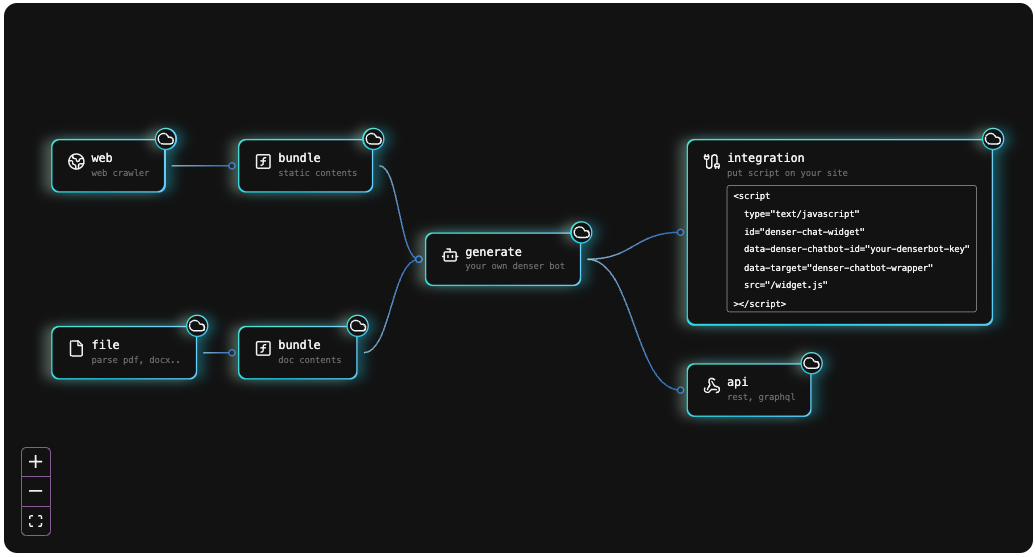
AI works by reading messages, spotting patterns, and sending replies in real time. This smart support lies in NLP, which helps machines understand what someone is asking, even if the message is broad.
For example, someone might type, “Hey, just wondering if my order shipped?” The system doesn’t just look for keywords; it understands intent. This allows tools like Denser.ai to respond with a tracking update, all without needing help from a human agent.
Here’s a simple view of how an AI customer support agent improves customer service interactions:
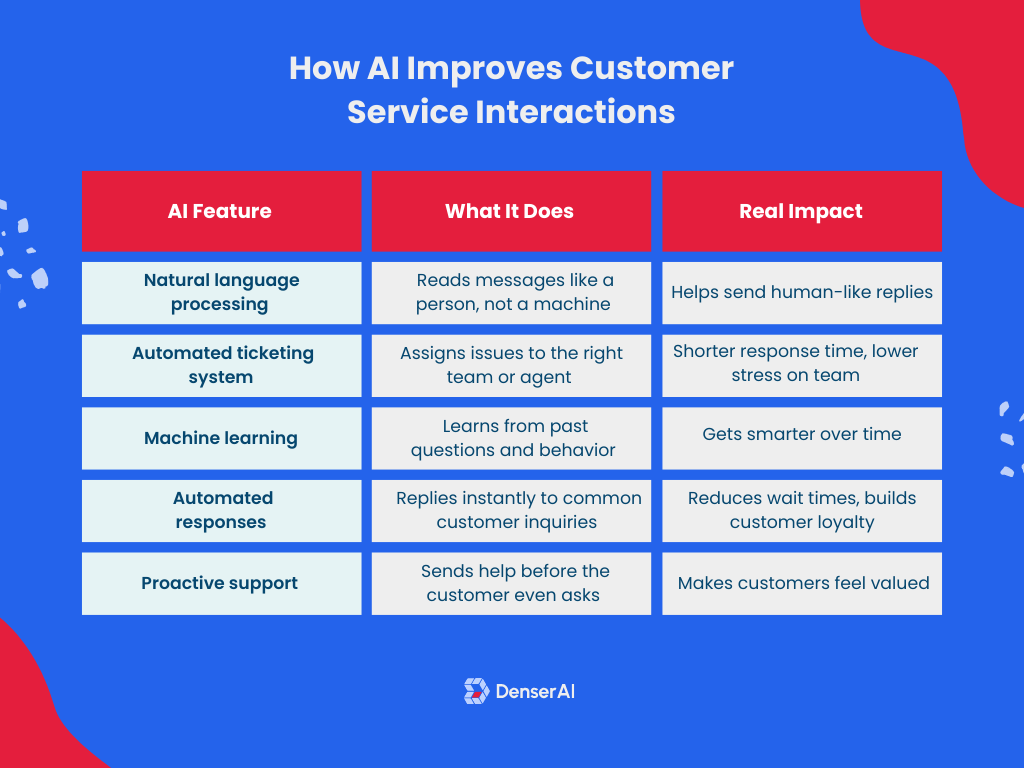
It also works well with your customer service software. When linked to tools like your CRM, the system can pull in order history, past chats, and preferences.
Combining these insights with chatbot automation can improve customer experience while making your customer service processes more manageable.
While AI may be changing how support is delivered, it doesn’t replace people but helps them do more with less. In fact, with the right tools, AI creates more space for real conversations while reducing the need for extra hires in customer service jobs.
8 Effective Ways to Automate Customer Service#
When used wisely, automated system tools help you cut down on repetitive tasks, reply faster, and give your support team room to focus on complex customer issues.
Below are eight simple yet powerful ways to automate customer service in a way that supports your customers and your team.
1. Deploy AI Chatbots and Voice Assistants#
If your team spends too much time answering the same questions, it’s time to introduce chatbots. These bots, powered by NLP, understand what customers mean, even if the question is written in different ways.
Using Denser.ai, you can train a chatbot with your brand tone and previous ticket history. It replies naturally, guides customers, sends forms, and connects to agents only when human intervention is needed.
Here’s a quick comparison of poor vs. good training data:
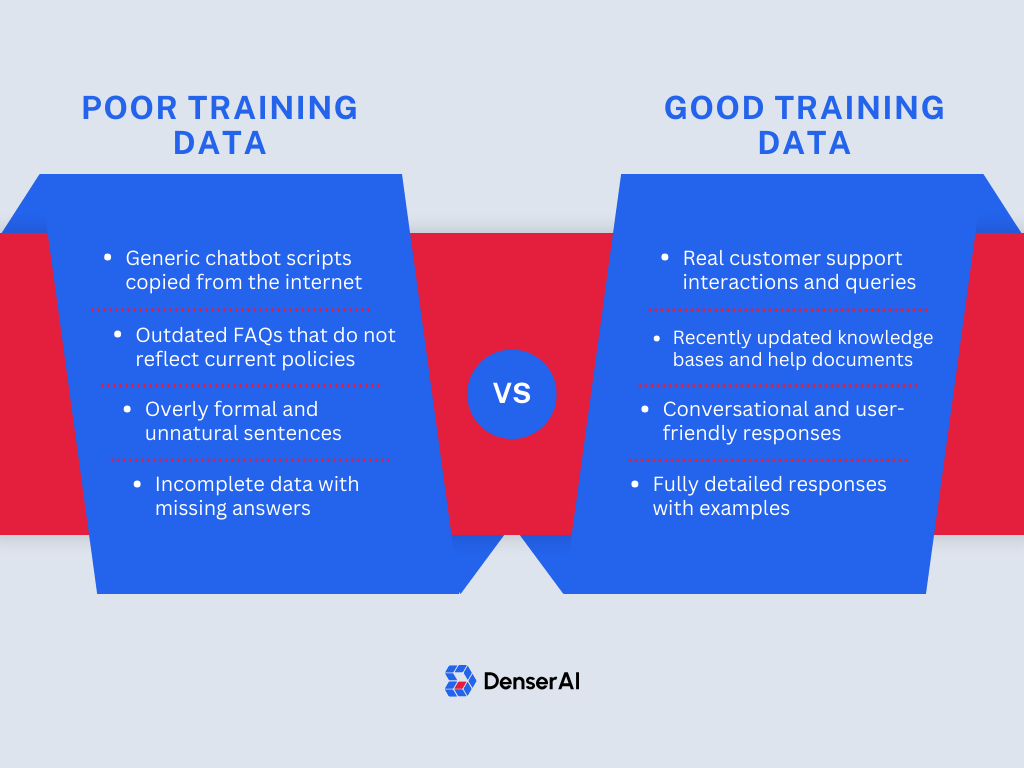
These bots guide people, show options, send forms, and transfer chats to human agents when needed.
Voice assistants work the same way by listening and replying over phone calls. Phone support can be covered by automated support options, which gives your customer service team more time to focus on harder issues.
Denser.ai stands out because it combines free-form AI replies grounded in your own content with step-by-step playbooks for the situations where the order of steps matters. That gives you control and flexibility as you scale (more on playbooks below).
2. Assist Agents in Real Time With AI#
Even the best customer service agents can only do so much on their own. They might forget a detail, search too long for the right reply, or miss a faster solution.
Instead of replacing your agents, AI-powered assist tools support them in real time, right inside their chat or email workspace.

With agent-assist tools, your agents don’t have to pause and dig through past tickets or ask teammates for help. As they read a customer inquiry, the AI scans the message, pulls in relevant customer data, and suggests what to say next.
These suggestions can include direct answers, links to articles in your knowledge base, or even pre-filled replies that match your brand voice.
Here’s what this looks like in action:
- An agent is replying to a refund request. The assist tool shows the last purchase and offers a refund script.
- A customer asks for shipping help. The AI brings up the tracking page, order details, and past support history.
- A new agent is still learning. Instead of guessing, they get guided replies that reduce errors and save time.
This type of customer support automation means your team doesn’t need to remember every policy or answer on their own. They get real-time help that makes their replies better and faster.
3. Auto-Assign and Track Support Tickets#
Manually sorting support messages is one of the biggest time drains for any customer service team.
Each time a message comes in, someone has to read it, figure out what it's about, tag it, and forward it to the right person. This process takes time, leads to mistakes, and delays your response.
But with an automated ticketing system, you don’t have to do any of that by hand.
When a support request is received, it can be automatically turned into a support ticket. From there, automation can step in to handle the rest.
With AI in the loop, this process becomes even smarter. It doesn’t rely on specific keywords alone but rather understands what the customer is actually asking. In Denser.ai, conversations the AI agent can't finish are handed to the built-in helpdesk, live in the same chat or as a ticket, or create tickets in Zendesk, Intercom, Freshdesk, or HubSpot.
For example, if someone writes, “I was charged twice,” the system can recognize this as a billing issue and flag the ticket for finance.
This type of workflow automation gives you better visibility and makes sure no request is left unanswered.
4. Automate Customer Follow-Ups#
After helping someone, you might want to ask how the experience went or check if the issue was solved or offer something extra.
However, doing this manually for every customer may not be realistic. That’s why automated customer service tools are key.
Most helpdesk and messaging tools can send follow-up messages after a chat closes or a ticket is marked complete. These messages might include a simple “Is everything okay now?” or a request to leave a review.
You can also send a quick survey to monitor customer feedback and learn what needs to be improved. This feedback gives you data to improve scripts, fix revolving issues, and find training gaps for your customer service agents.
5. Offer a Self-Service Knowledge Hub#
Many customers prefer to find answers on their own. That’s why building a self-service knowledge base is one of the most useful ways to automate customer service.
A knowledge base is a section of your website or app where users can search for help articles, guides, and common questions. These resources cover things like account setup, troubleshooting, delivery timelines, refunds, and more
Here’s what a strong knowledge base should include:
- Clear step-by-step guides for common customer service tasks
- Answers to frequently asked questions (FAQs)
- Troubleshooting instructions and error explanations
- Links to related articles or actions (like submitting a request)
Now, here’s where it gets smarter: with Denser.ai, your knowledge base can be more than just a search bar. Their system uses NLP to connect the chatbot with your articles.
So, when someone starts a chat and asks a question, the bot can read what they typed and recommend the right guide before your support team even sees the message.
This helps with deflecting common tickets before they’re submitted and keeping your support agents focused on complex requests.
6. Set Up Smart IVR Call Routing#
Setting up an interactive voice response (IVR) system is a common way businesses manage incoming calls.
With IVR, callers can press numbers or say phrases to be routed to the appropriate department. It's useful for answering quick questions like business hours or guiding someone to the right place without a live agent.
While IVR is mostly used in voice support systems, not every business has the tools or budget to manage complex call infrastructure. That’s where chat-based automation like Denser.ai becomes a helpful add-on or even a primary option.
With Denser.ai, you can guide customers away from phone calls when it makes sense. If someone visits your contact page or opens your app with a question, a chatbot can offer automated support options right away.
The system reads what they’re typing using AI capabilities and replies with helpful answers, or it offers a faster way to solve the issue without needing to call in.
This approach is useful if your goal is to reduce the number of basic questions your support agents handle by phone. While IVR helps organize calls, Denser.ai helps prevent unnecessary ones by offering faster help through chat.
7. Automate Call Queues and Wait Times#
When customers reach out, one of the most common complaints you’ll hear is about wait times. Long delays can lead to frustration, missed opportunities, and, in some cases, lost business.
You can’t always control how many customers contact you at once, but you can control how their requests are handled. Using smart automation tools, you can organize who’s next in line, provide updates while they wait, and even redirect them to faster support channels.
For phone systems, this might mean automated updates like, “Your wait time is 5 minutes,” or giving people the option to receive a callback.
In chat or email, automation can help by:
- Prioritizing support tickets based on keywords (urgent, refund, blocked)
- Sending automated notifications when replies are delayed
- Offering links to your knowledge base so customers can self-solve during downtime
- Detecting issues that can be solved with a bot and moving them away from the queue entirely
Denser.ai isn't a call-queue system, but it cuts down the number of people entering the phone queue.
If a customer starts to fill out a form or opens the support page, the chatbot can step in first. If the issue is a common one, like tracking an order or asking about return policies, the bot can reply right away.
8. Sync Your Support Tools With CRM#
Great service depends on context. When your support agents know who they’re talking to and how they’ve interacted with your brand in the past, they can provide much better help.
Therefore, syncing your customer service software with your customer relationship management (CRM) system is a key step in smart support.
Denser.ai supports this in two ways: it can create tickets in Zendesk, Intercom, Freshdesk, and HubSpot, and a Call your API action lets the agent read customer data from your own system mid-conversation, using only the fields you allow. That way, even automated replies can be based on real history.
If a VIP customer reaches out, the bot can respond accordingly. If someone has already submitted a ticket, the bot can avoid repeating the same steps.
This connection allows your team to leverage automation while keeping replies relevant and timely, which helps meet rising customer expectations across all channels.
Beyond FAQs: Automate Whole Procedures#
Most customer service automation stops at answers: the bot explains the return policy, and a person processes the return. The next step is automating the whole procedure, the way you'd brief a new team member, with checks at the points that matter.
That takes two pieces:
- Actions: things the AI agent can do, not just say. Look up an order in Shopify, read an invoice from Stripe (read only), book a meeting on Cal.com, post a call-back request to Slack, call your own API, or hand the conversation to a person.
- Playbooks: the procedure. A playbook names one situation, gives two or three example messages so the agent knows when to start it, and lists up to 15 steps made of three blocks: Say / ask, Do (run an action), and If (branch, with an Otherwise).
The agent follows the steps in its own words and runs the actions for real along the way.
Worked example: a return request#
Here's Denser's Return request playbook template for a Shopify store. It uses the store's own actions, so there's nothing else to build:
- Say / ask: Ask for the order number and the email used at checkout.
- Do: Look the order up and check when it was delivered.
- If it isn't found, ask them to check the number and email. If it was delivered more than 30 days ago, explain the return window. Otherwise, list what can be returned, ask which items and why, and request the return once the shopper confirms.
In the chat, that sounds like this:
Shopper: I'd like to return something from order 1002
Agent: Happy to help. What's the email you used at checkout?
Shopper: (gives the email)
Agent: Thanks. From order #1002 you can return the snowboard. Which would you like to send back, and why?
Shopper: The snowboard, I don't need it any more
Agent: (shows the return for the shopper to confirm)
Shopper: Yes, go ahead
Agent: Done: the return is requested. The store will review it and email you what happens next.
What makes this safe to automate:
- The order is shown only when the checkout email matches, and a wrong email gets the same answer as a wrong order number.
- The return is never requested in the same message it's shown. The shopper confirms first, and the store still approves it in Shopify.
- The policy is in the steps. Change "30 days" to your own window in the step's wording.
- You can watch it run. In the test chat, a trace under each reply names the step the agent is on, the path it took at each If, and the actions that ran, and the same step is highlighted in the flow. If a reply promises something that didn't happen, the trace says so.
- You can measure it. Each playbook shows how its conversations ended over the last 30 days: completed, escalated, or abandoned. A run counts as completed only when the return was actually requested.
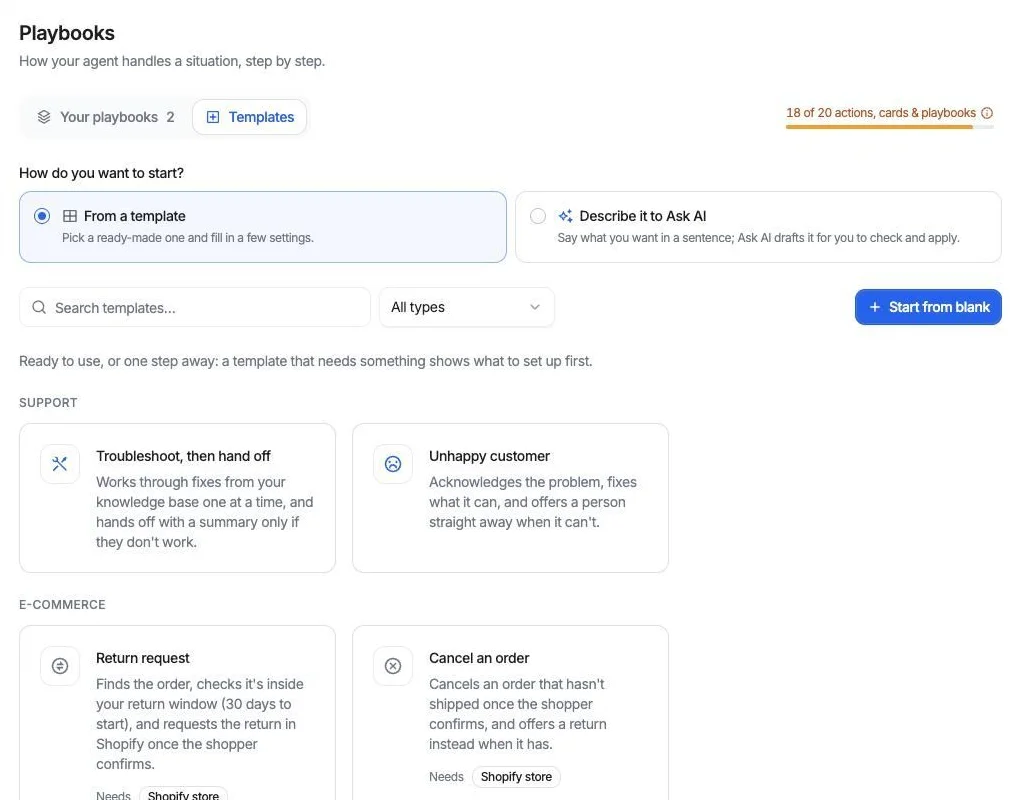
Denser's playbook templates: start from one, or describe the procedure to Ask AI and review what it drafts.
The same pattern covers other procedures: Troubleshoot, then hand off (try fixes from your docs one at a time, then pass a summary to a person), Billing questions (check identity, read Stripe, and write down refund or plan-change requests for the billing team without promising a refund), Cancel an order, Unhappy customer, and Collect a lead and book a meeting.
Start with one procedure your team repeats every day, test every branch in the test chat, then switch it on. A playbook starts switched off, so nothing reaches customers until you decide.
Automate Customer Service Without a Learning Curve - Try Denser.ai!#
Support doesn’t have to be slow or repetitive. If your team is spending too much time on routine questions or struggling to keep up with incoming requests, there’s a smarter way forward.
For where the line sits between what AI should handle and what belongs with a person, see our guide to helpdesk automation, and ticket deflection for how to measure the result honestly.
Denser.ai helps you automate customer service without losing the personal touch your customers expect. With AI-powered chat, helpful real-time suggestions, and automation that works behind the scenes, it lightens the load for your customer service agents.
It connects with your existing tools, learns from real conversations, and makes it easier to respond quickly while still handling the details that matter.
If you’re ready to ease the pressure on your support team and create a smoother experience for your customers, Denser.ai makes it simple to get started.
Try Denser for free or schedule a product demo today!
FAQs About Automate Customer Service#
Can you automate customer service?#
You can automate many areas of customer service using tools that provide automated responses, route messages smartly, and reduce the need for constant manual work.
Setting up systems that handle repeated tasks makes it easier for your team to respond faster and focus on higher-value interactions. This improves speed and helps build long-term customer loyalty by meeting expectations consistently.
What is an example of automated customer service?#
A good example of automated customer service is a chatbot that instantly replies to common questions like order status, shipping details, or refund policies.
Another example is ticket routing, where incoming messages are sorted and directed to the right department without manual input.
These features allow businesses to provide fast, helpful support even when handling high volumes or supporting customers globally.
Can AI automate whole processes like returns, not just answers?#
Yes, if it can run actions and follow a procedure. An AI agent with a return playbook can check the order, apply your return window, and request the return in your store, asking the customer to confirm before anything changes. Keep exceptions, refunds, and judgment calls with a person.
What does automated service mean?#
Automating service means using technology to handle support tasks automatically. Instead of having a human reply to every question, systems can send automated responses, sort tickets, and escalate when needed.
With the help of machine learning, some platforms can also improve replies over time and recognize intent more accurately. The result is faster help and more reliable support across different channels.
What is an automated customer relationship?#
An automated customer relationship is built using systems that manage communication and support without constant manual effort. This includes follow-up messages, status updates, and personalized support based on past behavior.
When customers contact support, these systems respond quickly and contextually, often using proactive support to anticipate needs before the customer even asks. It creates a smoother, more responsive experience for both the business and the user.