

What an AI Shopping Assistant Should Do (and What to Avoid)

Quick answer: An AI shopping assistant is a chat agent on your store that helps shoppers find products, decide, buy and get help after the order. A good one searches your live catalog instead of a stale copy, is honest about price and stock, uses your store's own cart, verifies the shopper before showing an order, and only cancels or returns something after the shopper says yes. It should also know when to pass the conversation to a person.
Most articles about AI shopping assistants describe a shopper asking a chatbot for gift ideas. That is the easy part. The harder part, and the part that decides whether shoppers trust it, is everything around the recommendation: whether the product is in stock, whether the price is right, whether "add it to my cart" puts it in the cart they actually check out with, and whether "cancel my order" does something sensible.
This guide is written for merchants. It covers what an AI shopping assistant should do, what it should never do, how it differs from the AI tools Shopify already gives you, and how to test one before you put it in front of shoppers. If you want the broader picture of how Shopify chatbots work, read our Shopify AI chatbot guide. If you are comparing vendors, see the best AI chatbots for ecommerce.
What Is an AI Shopping Assistant?#
An AI shopping assistant is a conversational agent on a storefront that understands requests in plain language ("a waterproof jacket under $150 for hiking in the rain") and responds with real products, answers and actions from that store.
It differs from a classic FAQ chatbot in two ways:
- It reads live store data. Products, variants, prices, stock and orders come from the store at the moment the shopper asks.
- It can act. It adds items to the cart, starts checkout, looks up an order, and in some cases cancels an order or starts a return.
That second point is why the term overlaps with "AI agents for ecommerce." An agent is software that can take steps on someone's behalf, not just talk. On a storefront, those steps touch money and orders, which is why the rules in this guide matter more than the model behind it.
Why shoppers already expect it#
Shoppers are getting used to asking AI for help before they buy. In an Adobe survey of more than 5,000 US consumers published in March 2025, 39 percent said they had used generative AI for online shopping. The most common uses were research (55 percent), product recommendations (47 percent) and finding deals (43 percent).
When those shoppers reach your site, they bring the same habit: they want to ask, not browse ten filter menus. An assistant on your storefront answers with your own catalog, prices and policies.
Shopify's Own AI Tools vs a Storefront Shopping Assistant#
If you sell on Shopify, you already have AI built in. It helps to know what each tool is for before adding another one (checked October 2026).
| Tool | Who uses it | What it does |
|---|---|---|
| Sidekick (Shopify's AI in the admin) | You and your staff | Answers questions about your store, analyzes data, edits products, drafts content, and handles admin tasks for you to review |
| Shopify Inbox | Shoppers and you | Free storefront chat app. Its listing describes an AI sales associate for product questions, plus live chat and automated replies |
| A storefront AI shopping assistant | Shoppers | Searches the catalog, uses the store's cart, verifies and looks up orders, and takes order actions with the shopper's confirmation |
Sidekick is a merchant tool. Shopify's help center describes it as an "AI-enabled commerce assistant in your Shopify admin" that can analyze data, manage orders, edit products and create content (Shopify Help Center: Sidekick). Shoppers never see it. Shopify's AI page, which used to present Shopify Magic, now leads with Sidekick (shopify.com/magic).
Shopify Inbox is the native, shopper-facing option. The Shopify Inbox app listing calls it "An AI sales associate for your online store" and lists automated responses for discounts, FAQs, greetings, product recommendations, quick replies and order updates. It is free, which makes it a sensible starting point for a small store.
A dedicated AI shopping assistant is worth it when you need more than Inbox gives you: answers grounded in your own help content and PDFs with sources, verified order lookups, cancellations and return requests in chat, step-by-step procedures for your policies, and a helpdesk that takes over when the assistant should stop. Our Shopify AI tools roundup covers the wider set of apps.
What a Good AI Shopping Assistant Should Do#
Here is the checklist we use. Each item is something a shopper notices within a conversation or two.
1. Search the live catalog, not a copy#
The most common failure is a bot trained on a product export from three weeks ago. It recommends a jacket that sold out, quotes last month's price, or misses the new collection. A good AI product finder queries the store at the moment the shopper asks, so new products, price changes and stock levels show up immediately.
It should also handle the way people actually ask: a budget, a use, a size, a material, a color, a comparison between two items. And when the catalog has nothing that matches, it should say so instead of stretching to the nearest product.
2. Be honest about price and stock#
If an item is sold out, the shopper should see that before they fall in love with it. If a variant comes in only two colors, the assistant should not suggest a third. Price, availability and variant options must come from the store's data, never from the model's guess.
3. Use the store's own cart and checkout#
"Add the blue one in medium" should put that exact variant into the cart the shopper already has, so it is still there when they open the cart page or go to checkout. A separate chat-only basket confuses shoppers and breaks discounts and shipping rules. Checkout should stay an explicit step the shopper chooses.
4. Check orders only after verifying the shopper#
"Where is my order?" is one of the most common questions any store gets. The assistant should show an order only when the shopper proves it is theirs, for example with the order number and the email used at checkout. A signed-in customer can see their own recent orders without retyping anything.
One detail that is easy to miss: a wrong email should get the same answer as a wrong order number. If the bot says "that email doesn't match," it confirms the order exists, and a stranger can use the chat to probe who your customers are. For more on this, see our guide to AI chatbot order tracking.
5. Change orders only after the shopper confirms#
Canceling an order or starting a return changes real money and real stock. A safe assistant does this in two steps:
- Show exactly what would happen: which order, which items, how the refund works.
- Act only after the shopper says yes, in a later message.
This protects shoppers from a misread request ("cancel" when they meant "change") and protects you from cancellations nobody intended.
6. Answer policy questions from your own sources#
Shipping times, return windows, warranty terms, sizing and care instructions belong in your help content, not in the model's general knowledge. The assistant should answer from the pages and documents you connect and cite them, so the shopper (and you, when you review conversations) can see where the answer came from.
7. Offer a path to a person#
Some conversations should end with a human: an angry customer, a damaged delivery, a wholesale inquiry, a question the assistant can't answer. The handoff should keep the conversation in the same chat when someone is available, and turn into a ticket with the transcript when nobody is, so the shopper does not have to repeat themselves. Our guide to chatbot human handoff covers the triggers and context in detail.
What to Avoid#
The same features that make an assistant useful can make it harmful if they are built carelessly. Watch for these in demos and trials.
| Avoid | What it looks like | Why it hurts |
|---|---|---|
| Invented attributes | "Yes, it's machine washable" when the product page never says so | Returns, complaints and lost trust when the claim turns out wrong |
| Pushy upsells | Adding accessories to every answer, or recommending before asking | Shoppers stop asking questions and leave the chat |
| Acting without a yes | Canceling an order the moment a shopper types "cancel" | Unintended cancellations, refunds and support tickets |
| Answering from stale data | Prices and stock from an old export or a cached crawl | Sold-out recommendations and price disputes at checkout |
| Leaking order details | Showing an order to anyone with the number, or saying "wrong email" | Privacy exposure for your customers |
| Hiding the human option | No way to reach a person, or a hand-off that drops the conversation | Frustrated shoppers who escalate somewhere more public |
Invented attributes deserve a special note. If a product's material, dimensions or compatibility aren't in your data, the right answer is "I don't see that listed; here's what the product page says," not a confident guess. When you test an assistant, ask about attributes you know are missing.
Pushy upsells are a judgment call, but a simple rule helps: recommend after you understand the need, and suggest an add-on only when it solves a problem the shopper mentioned. For more on tuning recommendations after launch, see our Shopify AI chatbot best practices.
How Denser Works as an AI Shopping Assistant for Shopify#
Denser is an AI support agent that runs on your website, help page, email and other channels, and as an AI shopping assistant for Shopify once you connect your store. When you connect Shopify, it adds 11 built-in actions: Search products, Order status, Order lookup form, My orders, View cart, Add to cart, Checkout, Cancel order, Confirm cancel, Request a return and Confirm return. These Shopify actions don't count toward your plan's action allowance.
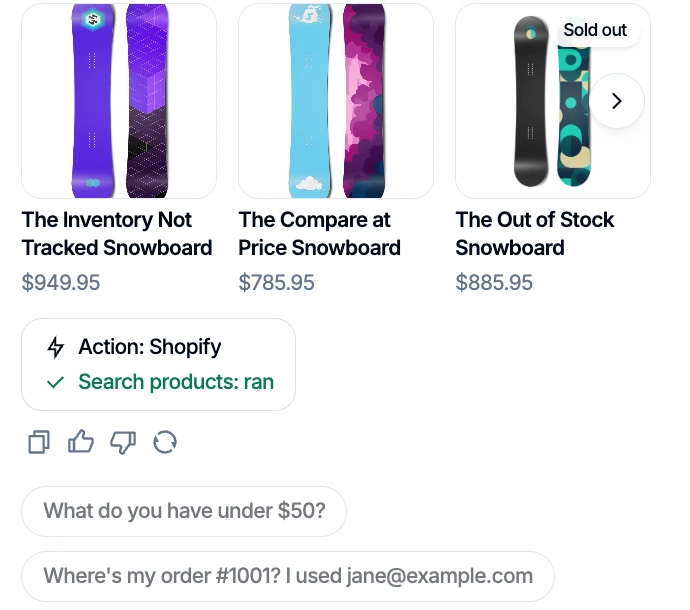
Search products reads the live catalog: each product shows its current price, a sold-out item is marked, and the trace below the reply shows which action ran.
Here is how those actions map to the checklist above:
- Live catalog: Search products queries Shopify when the shopper asks and returns products, prices and stock as product cards that link to the store.
- Store's own cart: View cart, Add to cart and Checkout work with the shopper's real storefront cart, in your store's chat.
- Verified orders: Order status shows an order only when the order number and checkout email match. A wrong email gets the same answer as a wrong number. Order lookup form asks for both with a short form, and My orders lists a signed-in shopper's recent orders.
- Confirm first: Cancel order and Request a return show what would happen, and Confirm cancel and Confirm return run only after the shopper says yes in a later message. Cancellations are refunded to how the shopper paid. Return requests go to Shopify for you to approve. Cancel order and Request a return ship switched off, so you decide when to turn them on.
- Sourced answers: Policy and product-support questions are answered from the content you connect, with source citations.
- A person when needed: The Talk to a person action hands the conversation to Denser's built-in helpdesk. A teammate takes over the same chat live when available, and it becomes a ticket when nobody is.
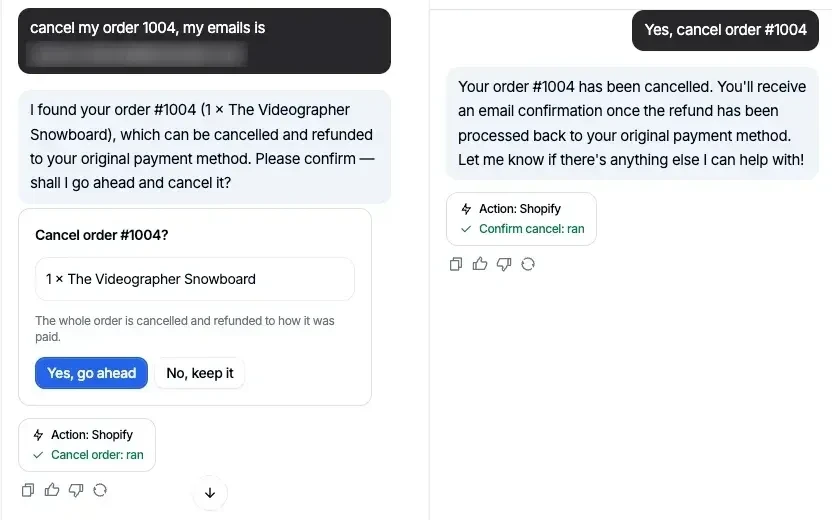
Cancel order shows what would be canceled; Confirm cancel runs only after the shopper says yes.
For situations that need your rules, not just an answer, playbooks let you write a step-by-step procedure: for a return, find the order, check it is inside your return window, then request the return once the shopper confirms. You can see every built-in and custom action on the actions page.
What Denser does not do#
To keep expectations honest: Denser does not approve returns for you (requests land in Shopify for your decision), and it does not run Shopify order actions on voice calls. It also does not invent product data; when an attribute isn't in your catalog or content, it should say so.
How to Test an AI Shopping Assistant Before Launch#
Whatever tool you choose, run these conversations yourself before shoppers do. Denser gives every action a test chat beside its settings (the real widget), with a trace under each reply showing which actions ran. Note that the test chat runs actions for real, so test cancellations on a test order.
- Vague search: "Something warm for a ski trip under $200." Check that every result is real, in budget and in stock, or clearly marked.
- Missing attribute: Ask about a property you know isn't listed. The assistant should say it doesn't know.
- Sold-out item: Ask for a product you've marked out of stock.
- Cart: Add a specific variant, change the quantity, then open your normal cart page and confirm it matches.
- Order lookup with the wrong email: The answer should not reveal whether the order exists.
- Cancel, then change your mind: Ask to cancel, see the confirmation, then say no. Nothing should change.
- Shipped order: Ask to cancel an order that has shipped. The assistant should explain and offer a return instead.
- Policy question: Ask about your return window and check the cited source.
- Ask for a person: Confirm the handoff reaches your team with the transcript.
If a tool fails items 2, 5 or 6, don't launch it on a live store.
Frequently Asked Questions#
What is an AI shopping assistant?#
An AI shopping assistant is a chat agent on an online store that helps shoppers find products in plain language, answers questions from the store's content, manages the cart, and helps with orders after purchase. The good ones read live store data and act only with the shopper's confirmation.
Does Shopify have a built-in AI shopping assistant?#
Shopify Inbox, Shopify's free chat app, now describes itself as an AI sales associate for your storefront (checked October 2026). Sidekick is Shopify's AI assistant for merchants inside the admin and is not shopper-facing. Stores that need verified order actions, cancellations, return requests in chat or sourced policy answers often add a dedicated assistant.
What is the difference between an AI product finder and an AI shopping assistant?#
An AI product finder focuses on discovery: turning a description into matching products. An AI shopping assistant includes product finding and also handles the cart, checkout, order status, cancellations, returns, policy questions and handoff to a person.
Can an AI shopping assistant cancel orders?#
It can if the store allows it. A safe assistant verifies the shopper, checks the order hasn't shipped, shows what would be canceled, and cancels only after the shopper confirms. In Denser, Cancel order ships switched off, and cancellations are refunded to how the shopper paid. See how to cancel an order on Shopify for the admin side.
Will an AI shopping assistant make up product details?#
It can if it isn't grounded in your data. Choose one that searches your live catalog and answers from your own content with sources, and test it by asking about attributes you know are missing.
How do I add an AI shopping assistant to Shopify?#
With Denser, connect your store under Deploy, approve the product and order permissions, enable the Denser app embed in your Shopify theme, and test product, cart, policy and order questions before publishing. The Shopify AI chatbot page walks through the setup.