

How to Cancel an Order on Shopify: Steps, Refunds and Customer Cancellations

Quick answer: To cancel an order on Shopify, go to Orders in your Shopify admin, open the order, click More actions > Cancel order, choose how to refund the payment (original payment method, store credit, or later), pick a reason, decide whether to restock the items and notify the customer, then click Cancel order. You can't cancel an order once it has been partially fulfilled; refund it or handle it as a return instead.
Those steps come from Shopify's help center article on canceling orders (checked October 2026). Below, we go through each option, what happens to the payment and inventory, which orders Shopify won't let you cancel, the mistakes that cause duplicate refunds, and how to let customers cancel their own orders without opening a ticket.
How to Cancel an Order in Shopify Admin#
Shopify's process for a single order, from the help center:
- From your Shopify admin, go to Orders.
- Click the order you want to cancel.
- Click More actions, then Cancel order.
- Under Refund payment, choose one option:
- Original payment method: a full refund to the card or method the customer paid with. This is the default.
- Store credit: a full refund as store credit, with an expiry you choose. Staff need the Orders permission for refunding to store credit.
- Later: no refund at cancellation. Use this when you want to refund part of the order, split the refund between methods, or investigate first.
- Select a Reason for cancellation.
- Optional: add a Staff note for your team. Customers don't see it.
- Optional: uncheck Restock inventory if the items shouldn't go back into stock. It is checked by default.
- Optional: uncheck Send a notification to the customer. It is checked by default.
- Click Cancel order.
The restock and refund details are recorded in the order's timeline, so you can see later what was done and by whom.
Cancel several orders at once#
Shopify also lets you cancel orders in bulk: on the Orders page, select the orders with the checkboxes, open the more actions menu, choose Cancel orders, set the same options, and confirm. The help center lists a limit of 250 orders at a time.
Read the bulk warning before you use it. Shopify notes that the Refund payment prompt might not appear for a bulk cancel, in which case all the selected orders are refunded immediately, including orders that were already refunded. That can create duplicate refunds. If you need the Later option, or any order in the batch was already refunded, cancel those orders one by one.
What Each Option Does#
| Option | Default | What it controls | When to change it |
|---|---|---|---|
| Refund payment | Original method | Whether and how the customer gets their money back | Choose Later for partial refunds, split refunds or a disputed charge |
| Reason for cancellation | None | The reason recorded on the order | Always pick the accurate one; it feeds your reporting |
| Staff note | Empty | An internal note on the order | Add context for teammates, such as "customer asked in chat" |
| Restock inventory | On | Whether the items return to available stock | Turn off for damaged, custom-made or already-shipped goods |
| Send a notification | On | Whether Shopify emails the customer about the cancel | Turn off only if you've already told the customer another way |
What happens to the payment#
According to Shopify's help center, the payment status after a cancellation depends on the payment:
- If the payment was only authorized and not yet captured, it is voided.
- If you refunded the full amount, the status shows Refunded.
- If you chose Later and then refund part of it, the status shows Partially refunded.
One cost to know about: Shopify states that credit card transaction fees aren't returned to you when you issue a refund. Canceling early, before payment is captured, is the cheapest kind of cancellation.
What happens to inventory#
With Restock inventory checked, the canceled items go back into your available stock. If you uncheck it, stock stays where it is. Check that box carefully for limited-stock items, because a wrong restock can make a sold-out product look available.
Cancellation reasons#
The Shopify admin asks for a reason from a drop-down. Shopify's Admin API defines six reasons (OrderCancelReason): the customer wanted to cancel, payment was declined, the order was fraudulent, there was insufficient inventory, staff made an error, and other. Picking the accurate reason costs a second and makes it much easier to see later why orders are being canceled.
Orders You Can't Cancel (and What to Do Instead)#
The help center lists several situations where Cancel order won't work or isn't the right tool:
| Situation | What Shopify says | What to do instead |
|---|---|---|
| The order has been partially fulfilled | "After an order is partially fulfilled, you can't cancel it." | Cancel the fulfillment first, or issue a refund and manage a return |
| Fulfilled by a third-party fulfillment service | Cancel in the fulfillment service's system first | Contact your fulfillment partner |
| Created by a third-party app | Cancellation may be restricted | Contact the app developer |
| Already canceled or deleted | Can't be canceled again | Nothing to do |
| Pending payment with scheduled payments | Cancellation may not be possible | Check the payment terms on the order |
| You don't see Cancel order | Your account lacks the Orders permission | Ask the store owner for access |
The most common case is the first one: the customer asks to cancel after the package has shipped. At that point you can't cancel it in Shopify. Refund the order when the items come back, or accept a return. Shopify's self-serve returns let customers request a return for delivered items from their order status page.
Fulfilled but unpaid orders#
Shopify also warns about orders that were fulfilled but never paid: canceling one prevents you from collecting the payment. Use the returns process to get the items back instead.
After a lost chargeback#
If the disputed amount was already taken from your payout, cancel the order on its own and choose Later for the refund, so the customer isn't refunded a second time. The help center notes that a message about refunding the original payment method may appear, but it doesn't send another payment.
Can You Cancel Part of an Order?#
Not with Cancel order: it cancels the whole order. If the customer wants to keep some items and drop others, you have two options:
- Edit the order if it hasn't been fulfilled. Shopify's order editing lets you remove products and reduce quantities, and if the order total goes down, you can issue a refund for the difference.
- Refund the items instead. Refund the line items the customer doesn't want, and ship the rest.
If you need to cancel the whole order but refund only part of it (for example, keeping a non-refundable fee as your policy allows), cancel with Later selected and then issue the partial refund from the order.
Common Mistakes When Canceling Shopify Orders#
- Canceling instead of editing. If the customer only wants a different size or one item removed, an edit keeps the order and avoids a new checkout.
- Leaving restock on for items that won't come back. If the package already left, restocking creates phantom inventory.
- Bulk canceling orders that were already refunded. As above, the bulk flow can refund again.
- Turning off the customer notification and then forgetting to tell them. Customers who aren't told keep waiting for a delivery and then open a ticket.
- Skipping the reason. "Other" on every order makes your cancellation data useless.
- Canceling a shipped order in your head, not in the system. If you promise a cancellation in chat or email for an order that has shipped, the customer expects a refund that Shopify can't create through Cancel order. Offer a return instead.
Letting Customers Cancel Their Own Orders#
Most cancellation requests are simple: the customer ordered the wrong size, changed their mind, or placed a duplicate order. Handling each one by hand means reading an email, finding the order, checking it hasn't shipped and canceling it, often after the warehouse has already picked it.
You have three ways to let customers cancel orders on Shopify without a back-and-forth:
| Option | How it works | Good for |
|---|---|---|
| Shopify self-serve requests | Customers request to cancel items that haven't shipped from the order status page; you review and resolve the request | Stores happy to approve each request in the admin |
| A cancellation app | Adds a cancel button to the customer account with your own rules | Stores that want a button and fixed time windows |
| Cancellation in chat | An AI agent verifies the customer, checks the order, and cancels it once the customer confirms | Stores that already answer order questions in chat |
Shopify's self-serve returns and cancellations are requests: Shopify notifies you, and you resolve each one by removing the items through the standard refund flow or by declining it. That keeps you in control, but someone on your team still has to act on each request.
Let customers cancel in chat with Denser#
Denser's Shopify AI chatbot can cancel an order in the conversation where the customer asks, without a teammate, and only after the customer says yes. It uses two Shopify actions:
- Cancel order checks the order: the order number must match the email used at checkout, and the order must not have shipped. It then shows the customer exactly what would be canceled.
- Confirm cancel cancels the order only after the customer confirms in a later message. The cancellation is refunded to how the customer paid.
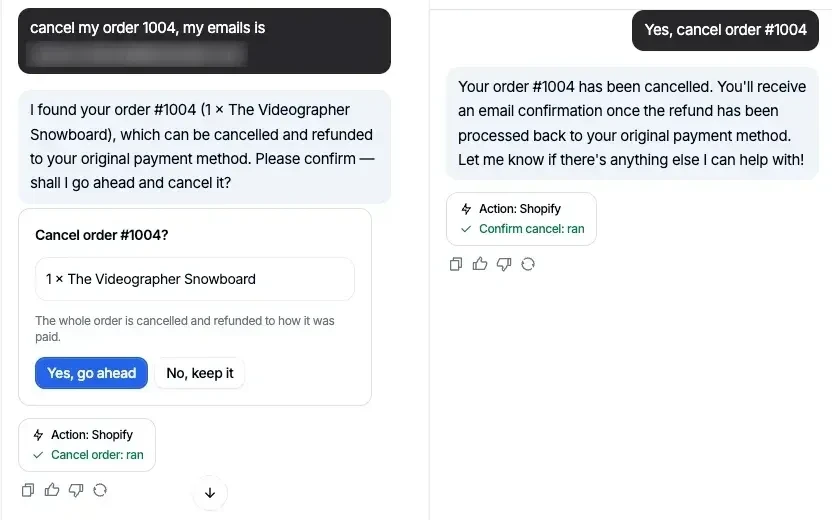
The customer asks, the agent shows what would be canceled, and the order is canceled only after the customer says yes. The trace under each reply shows which action ran.
A few details that matter for a store owner:
- It ships switched off. Cancel order changes real orders, so it is off until you turn it on under Actions > Shopify.
- Wrong details reveal nothing. A wrong email gets the same answer as a wrong order number, so nobody can use the chat to check whether an order exists.
- Shipped orders get a return, not a cancel. The Cancel an order playbook asks for the order number and checkout email, runs Cancel order, cancels it if the customer confirms, and if the order has already shipped, explains that it can't be canceled and offers to start a return once it arrives. Return requests go to Shopify for you to approve.
- You can adjust the steps. Playbooks are step-by-step procedures you edit in plain words. Start from the Cancel an order template and add your own rules, such as handing custom orders to a person with the Talk to a person action.
- Test it before you turn it on. Each action and playbook has a test chat beside its settings, with a trace under each reply that names the step the agent is on and the actions that ran. The test chat is the real widget and runs actions for real, so use a test order.
- Shopify actions don't count toward your plan. Search products, order lookups, cart, cancel and return actions are all included.
After launch, review canceled-in-chat conversations alongside your other order questions. Our Shopify AI chatbot best practices guide covers how to review conversations and keep order actions predictable.
Frequently Asked Questions#
How do I cancel an order on Shopify?#
In your Shopify admin, go to Orders, open the order, click More actions > Cancel order, choose a refund option, pick a reason, decide on restocking and the customer notification, and click Cancel order.
Does canceling a Shopify order refund the customer automatically?#
It does if you choose Original payment method or Store credit, which give a full refund. If you choose Later, no refund is issued at cancellation and you refund manually afterward. An authorized payment that hasn't been captured is voided.
Can I cancel a Shopify order that has already shipped?#
No. Shopify doesn't let you cancel an order after it has been partially fulfilled. Refund the order or handle it as a return once the items come back. You can also cancel the fulfillment first if the package hasn't actually left.
Does Shopify email the customer when I cancel an order?#
Yes, by default. The Send a notification to the customer box is checked when you cancel. Uncheck it only if you've already told the customer.
Can customers cancel their own orders on Shopify?#
Customers can request to cancel items that haven't shipped from their order status page, through Shopify's self-serve returns and cancellations, and you review each request. To let them cancel without waiting for you, use a cancellation app or an AI agent such as Denser, which cancels an unshipped order in chat after verifying the customer and getting their confirmation.
Can I undo a canceled order in Shopify?#
Shopify's help center doesn't describe a way to restore a canceled order. If a customer changes their mind after you cancel, the usual fix is a new order, for example a draft order you send them to pay.