

How to Improve AI Chatbot Accuracy: RAG, Source Citations, and Better Training Data

Your AI chatbot is live — but it keeps giving wrong answers, hallucinating information, or missing content that's clearly in your docs.
This guide breaks down the root causes of chatbot inaccuracy and walks through a complete improvement framework: building a solid knowledge base, optimizing retrieval, and setting up an evaluation loop that actually drives improvement.

Why Is Your AI Chatbot Giving Wrong Answers?#
Most people assume chatbot inaccuracy comes down to a weak model. In reality, the vast majority of accuracy problems originate outside the model itself — in the knowledge source, the retrieval layer, the data quality, and the feedback loop.
These are the four areas that most commonly cause chatbots to fail.
Poor or Outdated Knowledge Sources#
A chatbot can only be as good as the knowledge it's built on. If your source documents contain errors, are out of date, or don't cover the topics users actually ask about, no model will produce accurate answers.
Feed your chatbot a two-year-old product manual, and it will confidently answer questions about your latest release using stale information.
Weak Retrieval — Can't Find the Right Content#
Even when your knowledge base is accurate, a retrieval system that relies purely on keyword matching will struggle whenever a user phrases a question differently than your documents do.
The result: the chatbot either returns an "I don't know" or, worse, fabricates an answer rather than admitting it couldn't find the relevant content.
Insufficient Context Window#
Users often ask multi-part questions or follow up on something they mentioned earlier in a conversation.
If the chatbot processes each message in isolation — without any awareness of prior turns — it will frequently miss the point or give partial, off-target answers.
No Source Citations — Users Can't Verify Answers#
When a chatbot doesn't show where its answers come from, users have no way to judge reliability or trace information back to its origin.
This "black box" dynamic erodes trust and also obscures whether the answer is actually correct in the first place.
No Feedback Loop — No Way to Improve#
Without a mechanism to track which questions were answered wrong or which responses users flagged as unhelpful, a chatbot can't learn from its mistakes. Many teams ship a chatbot and move on, then wonder why the same errors keep repeating and accuracy stays flat.
Here's a quick summary of the most common accuracy issues:
| Root Cause | How It Shows Up | Impact |
|---|---|---|
| Poor / outdated knowledge | Answers based on old data or wrong information | ★★★★★ |
| Weak retrieval | Can't locate the right document passage — guesses or fabricates | ★★★★★ |
| Insufficient context | Multi-turn conversations get misunderstood | ★★★★ |
| No source citations | Users distrust answers; can't verify accuracy | ★★★ |
| No feedback loop | Errors recur; no path to improvement | ★★★★ |
How to Build a High-Quality Knowledge Base#
The single most important step toward better chatbot accuracy is getting your knowledge in order. Even the most sophisticated retrieval and reasoning capabilities need a clean, accurate, well-structured knowledge source to work from.
1. Define the Scope of Your Knowledge Base#
Start by answering two questions: What do users ask about most often? And what topics does the chatbot absolutely need to cover?
Map out your high-frequency FAQs, core product documentation, policy documents, and standard workflows — these form the backbone of your knowledge base. Don't import everything indiscriminately. Irrelevant content dilutes retrieval precision.
2. Clean and Format Your Documents#
Raw documents often have inconsistent formatting, duplicate content, and unclear phrasing. Before importing anything, standardize your document format (Markdown or structured HTML works well), remove redundant content, and make sure each section expresses a single, coherent idea.
3. Keep Your Knowledge Base Up to Date#
Your knowledge base isn't a one-time project. Product changes, policy updates, and workflow revisions all need to be reflected in your chatbot's knowledge source on an ongoing basis. Set up a regular review cadence, tag each document with an expiration date, and build a process for syncing changes before users encounter stale answers.
4. Support Multiple Content Formats#
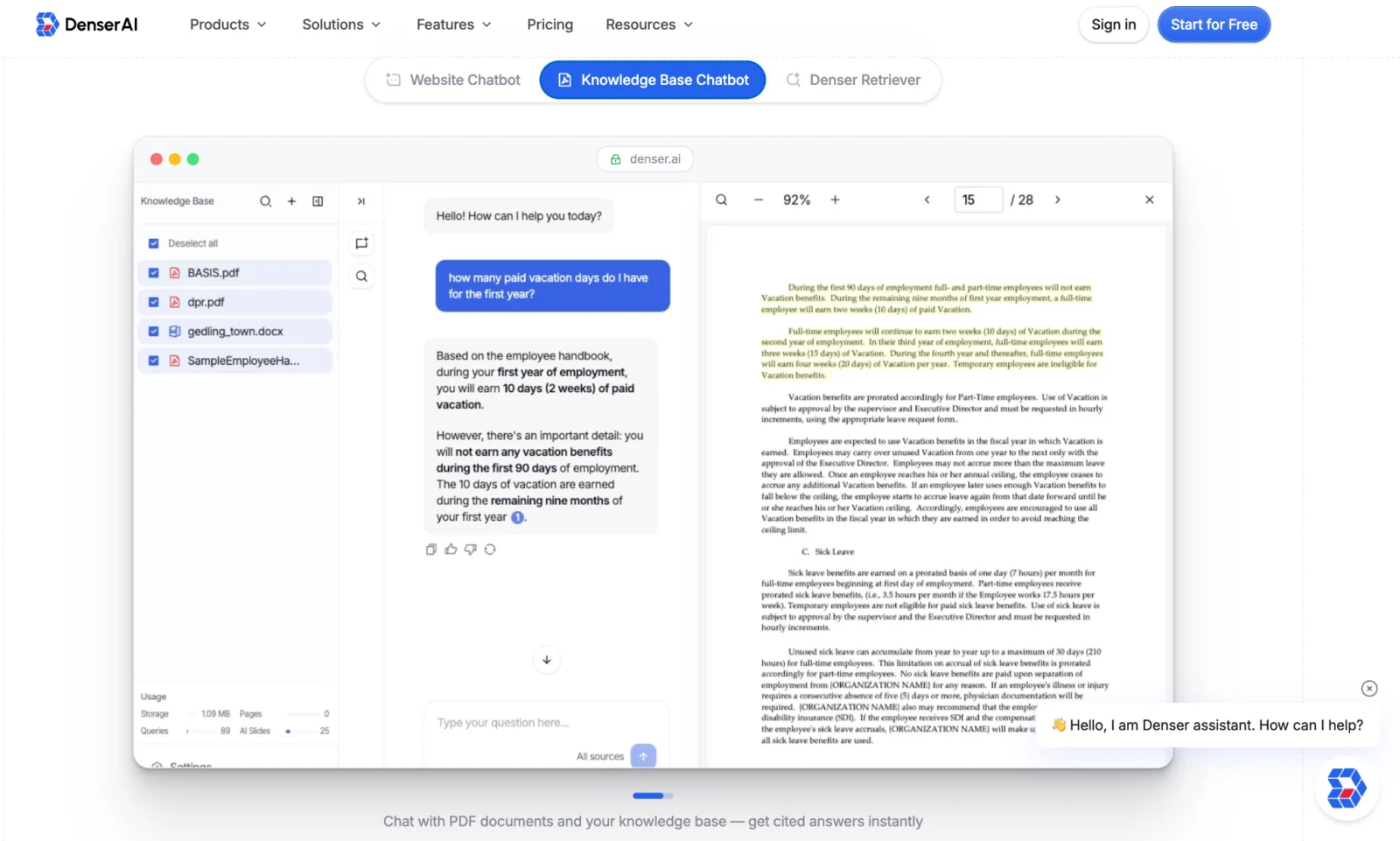
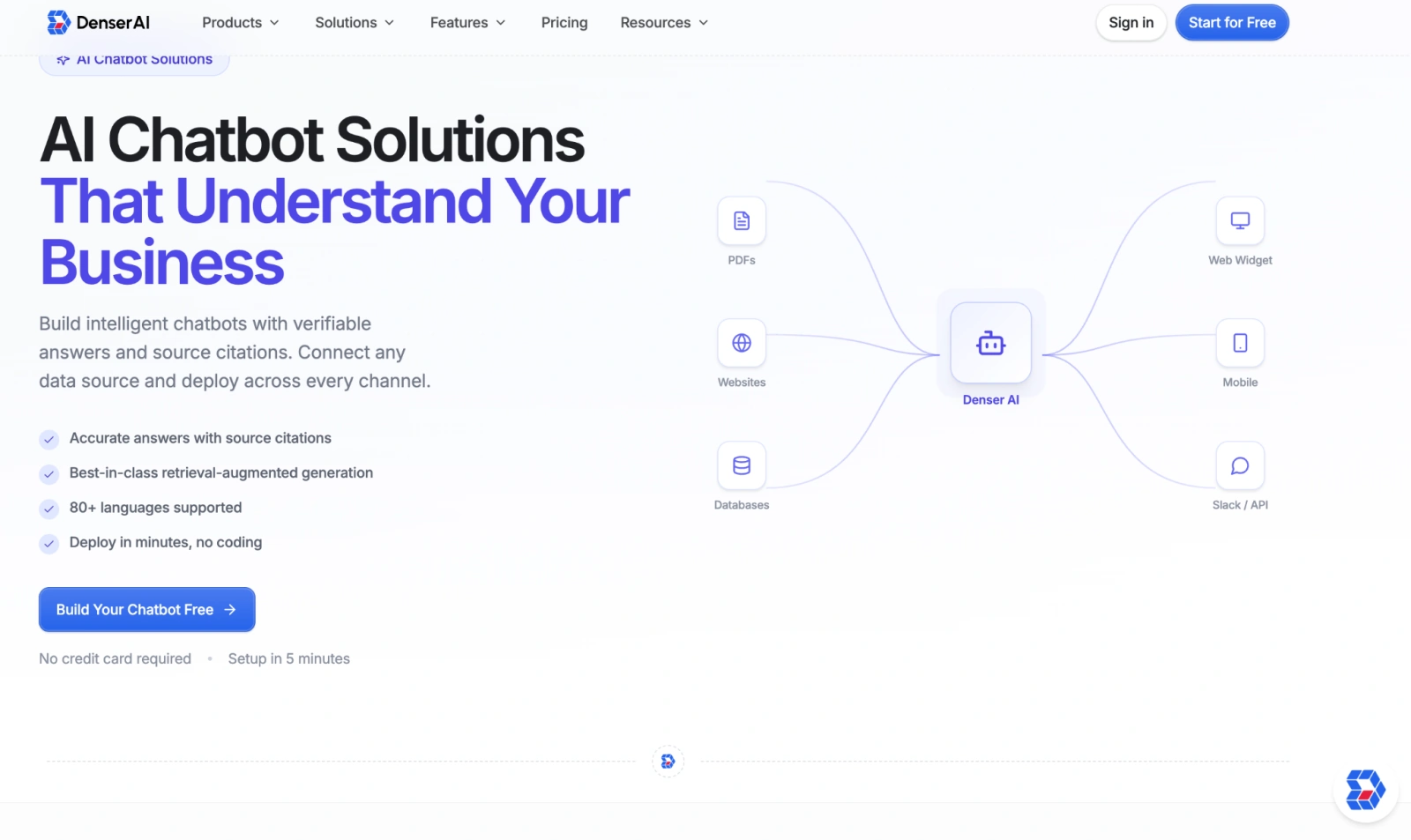
Enterprise knowledge is scattered across websites, PDFs, internal wikis, help centers, and more. Choosing a platform like Denser AI that supports multi-format ingestion lets you consolidate all of these sources in one place, without the information loss and formatting headaches that come with manual migration.
Using RAG and Semantic Search to Improve Answer Relevance#
Once your knowledge base is solid, the next bottleneck is how well the system can find the right information. Traditional keyword matching falls well short of what modern use cases demand.
RAG (Retrieval-Augmented Generation) and semantic search are the most effective technical approaches available for improving accuracy at the retrieval layer.
1. What Is RAG?#
RAG — Retrieval-Augmented Generation — is an architecture that combines external knowledge retrieval with a large language model's generation capability.
In practice: before the chatbot generates a response, it first retrieves the most relevant passages from your knowledge base, then uses that content to ground its answer. The result is a response backed by actual documentation, not the model's internal "imagination."
2. Why Semantic Search Outperforms Keyword Matching#
Keyword matching only finds content that uses the exact same words as the query.
Semantic search, powered by vector embeddings, understands the meaning behind a question — so it can surface relevant content even when the user's phrasing doesn't match your documents verbatim.
Ask about a "refund process," and semantic search can also pull up "return policy" and "order cancellation" content, dramatically improving recall and match precision.
3. How Denser AI Solves the Retrieval Precision Problem#
Denser AI includes a purpose-built Denser Retriever designed for enterprise knowledge retrieval. Unlike conventional RAG pipelines that rely on a single embedding model, it deploys three heterogeneous retrieval strategies in parallel — keyword matching, vector search, and ML-based reranking (XGBoost) — then fuses their signals through a neural re-ranking layer to surface the most contextually relevant content from websites, PDFs, and knowledge bases.
This architecture isn't just conceptually sound — it's empirically validated. On the MTEB Retrieval benchmark, Denser Retriever achieves state-of-the-art results; on MS MARCO, it outperforms top-tier vector search baselines by +13.07% NDCG@10. That gap represents a meaningful reduction in the "model is capable, but can't find the right content" failure mode — the most common reason enterprise AI assistants return confidently wrong or irrelevant answers.
By combining hybrid retrieval with learned reranking, Denser AI ensures the language model receives genuinely relevant context, not just semantically adjacent noise — directly translating retrieval precision into answer quality.
4. How RAG Works — Step by Step#
| Step | What Happens |
|---|---|
| ① User asks a question | The chatbot receives the user's natural language query |
| ② Semantic retrieval | Denser Retriever searches the knowledge base for semantically relevant content |
| ③ Content recall | The most relevant document passages are returned (with source info) |
| ④ Answer generation | The LLM generates a grounded answer based on the retrieved content |
| ⑤ Source display | The answer is presented with citations the user can verify |
Using Source Citations to Build User Trust#
A chatbot gives an answer — but why should the user believe it? Source citations are the most straightforward solution: every response should come with a traceable origin.
1. How Citations Improve Credibility#
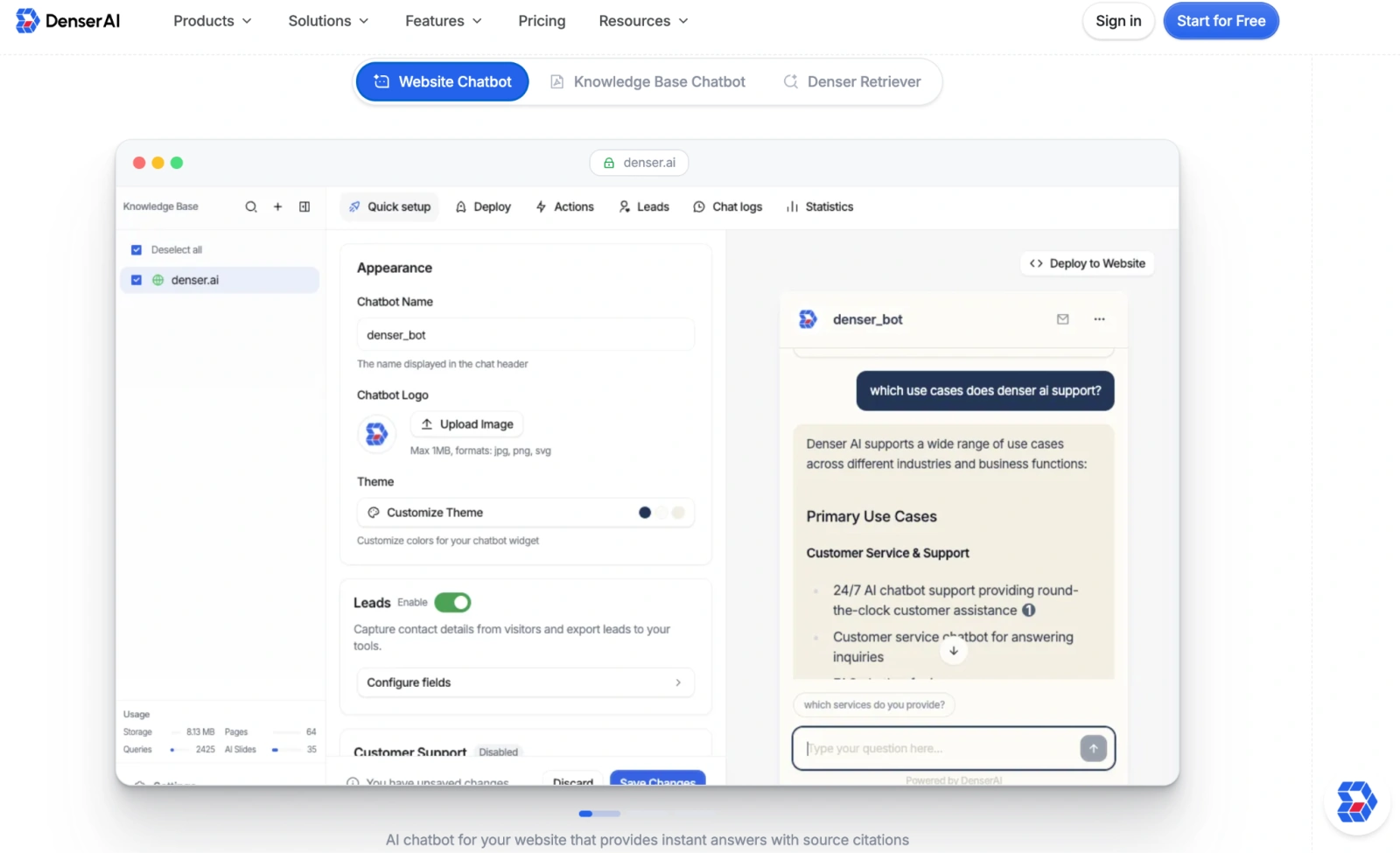
When a chatbot appends "Source: [document name] / [page link]" to its response, users can click through to review the original content and verify the answer themselves. This transparency reduces skepticism and, when an answer is wrong, makes it much faster to identify which document is the culprit and fix it.
2. The Real-World Impact of Source Citations#
Users are more likely to trust answers when they can see and click through to the source — especially for high-stakes content like refund policies, contract terms, and technical specifications. In these contexts, citations aren't just nice to have; they're essential.
3. Source Citations in Denser AI#
Denser AI's Source Citations feature automatically tags every chatbot response with the specific webpage or document section it drew from, and lets users jump directly to the source.
Beyond building user trust, it gives knowledge base administrators a clear quality-tracking path — making it easy to spot and address inaccurate or incomplete content.
How to Systematically Measure Chatbot Accuracy#
Improving accuracy isn't something you can do by feel — you need a quantifiable evaluation framework. Here are the key metrics and how to act on them.
1. Answer Accuracy Rate#
Pull a sample from your actual conversation logs and assess whether responses were correct — manually or semi-automatically. Aim to review at least 50–100 conversations per week, covering a range of question types: FAQs, process questions, policy questions, and so on.
2. Retrieval Recall#
Test whether the chatbot can surface the right document passages for a given set of questions. Low recall means your retrieval layer needs tuning — whether that's expanding your keyword coverage, adjusting semantic search configuration, or rethinking how documents are chunked.
3. User Satisfaction Score#
Add a simple "Was this helpful?" thumbs-up/thumbs-down to chatbot responses. Aggregate that feedback regularly and look for patterns: which question types consistently get low scores? Use that data to prioritize knowledge base updates and retrieval improvements.
4. Fallback Rate#
Track how often your chatbot responds with "I don't know" or escalates to a human agent. A persistently high fallback rate on certain topics is a clear signal that your knowledge base has a gap in that area.
5. Close the Feedback Loop#
Measurement is only useful if it drives action. Each week, roll up your accuracy data, user feedback, and low-scoring conversations into a concrete list of knowledge base updates.
This iteration loop — review, update, measure again — is what separates chatbots that keep improving from ones that stagnate.
We recommend teams set internal benchmarks based on their own starting points:
| Metric | How to Measure |
|---|---|
| Answer accuracy rate | Manual sampling + labeling |
| Retrieval recall | Test set + automated evaluation |
| User satisfaction | In-conversation feedback (thumbs-up rate) |
| Fallback rate | System log analysis |
| Knowledge base coverage | FAQ hit-rate analysis |
Denser AI: End-to-End Accuracy Improvement, Out of the Box#
Every approach covered in this guide — high-quality knowledge bases, RAG retrieval, semantic search, source citations, and performance evaluation — is supported natively in Denser AI. No additional development required.
Specifically, Denser AI provides:
- Website, PDF, and knowledge base training in one place: automatically crawl your website, or import PDFs and documents directly to build a company-specific knowledge base fast.
- Denser Retriever + semantic search: a hybrid retrieval strategy that precisely locates the most relevant content and significantly improves recall accuracy.
- RAG architecture: responses are grounded in your actual knowledge base content, significantly reducing hallucination by anchoring the model to retrieved evidence.
- Source Citations: automatically tags every response with its source document and paragraph, with direct links users can follow.
If you're looking for a solution that can meaningfully improve chatbot accuracy without a lengthy setup process, see Denser AI's customer service chatbot for a full overview of features and use cases.
Conclusion#
Chatbot accuracy isn't a problem you solve by swapping in a more powerful model.
The root causes live in four places: knowledge source quality, retrieval capability, context handling, and the feedback loop.
The path to better accuracy follows a clear sequence: build a high-quality knowledge base → add RAG and semantic search → implement source citations → establish an ongoing evaluation and improvement cycle.
Denser AI packages this entire methodology into a ready-to-deploy product, helping businesses get their chatbots to a genuinely useful level of accuracy without months of custom development.
To learn how Denser AI applies to your specific use case, visit denser.ai.
FAQ About AI Chatbot Accuracy#
Why does my AI chatbot keep making things up?#
It's hallucination — the model fills gaps with its own guesses when retrieval fails. RAG architectures like Denser Retriever ground responses in your actual content, significantly reducing this.
Will improving my knowledge base be enough to fix accuracy?#
Knowledge quality is the foundation, but retrieval capability matters just as much. Even accurate documents won't help if the retrieval layer can't surface the right passages.
Do source citations actually reduce user distrust?#
They're the most direct lever for it. Clickable sources let users verify answers themselves rather than taking the chatbot's word for it.
How do I know if my chatbot's accuracy is good enough?#
Set internal benchmarks based on your starting point, then review conversation logs and user feedback regularly to close gaps over time.
How is Denser AI different from a standard chatbot in terms of accuracy?#
It combines keyword search, vector semantic search, and ML reranking in a single retrieval pipeline, with source citations and a feedback loop built in.