

LLM Retriever: Semantic Search vs Keyword Search

Traditional keyword search fails when users don't know the exact terms stored in your documents. An LLM retriever solves this by using semantic search — finding information by meaning, not just matching words.
Search for "paid time off" and a semantic search system finds your "vacation policy" document. Search for "how to handle returns" and it surfaces your "refund procedures" guide. This is the core advantage of combining large language models with document retrieval.
In 2026, LLM retrievers power everything from customer support chatbots to internal knowledge bases. The global RAG (Retrieval Augmented Generation) market is growing rapidly as businesses realize that LLMs alone hallucinate — but LLMs grounded in your actual documents deliver accurate, cited answers.
In this guide, we'll explain how LLM retrievers work, why semantic search outperforms keyword search, and how to set one up for your business using Denser Retriever.
What Is an LLM Retriever?#
An LLM retriever is a system that combines large language models with document retrieval to answer questions using your own data. Instead of generating responses from training data alone (which can hallucinate), it first retrieves relevant passages from your documents, then generates answers grounded in those sources.
This approach is called Retrieval Augmented Generation (RAG) — and it's how modern AI applications deliver accurate, verifiable answers.
There are two key components:
The retriever finds relevant documents from a knowledge base using semantic search. Unlike keyword search that matches exact terms, semantic search converts text into vector embeddings — numerical representations that capture meaning. Documents about "employee vacation policy" and queries about "paid time off" end up with similar embeddings, so the retriever finds matches even when the words differ.
The generator (typically an LLM like GPT-4 or Claude) reads the retrieved documents and produces a natural language answer. Because the answer is grounded in your actual content, it includes source citations and avoids hallucination.
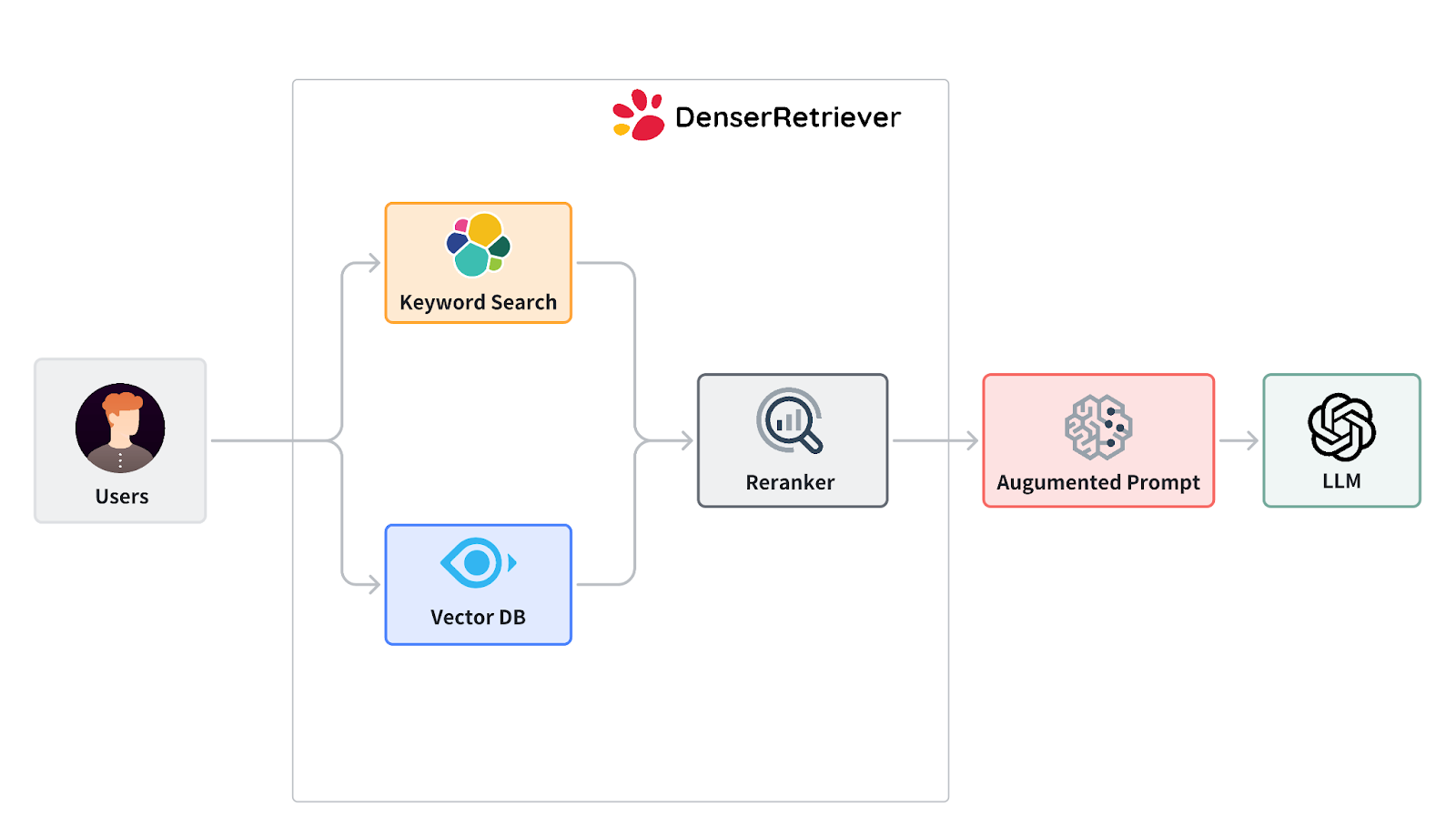
How Semantic Search Works in an LLM Retriever#
Semantic search is the engine that makes LLM retrievers accurate. Here's the step-by-step process:
1. Document Ingestion#
You upload your documents — PDFs, DOCX, PPTX, spreadsheets, web pages, or plain text. The system automatically parses, chunks, and indexes the content. Each chunk is converted into a vector embedding that captures its semantic meaning.
2. Query Processing#
When a user asks a question in natural language, the system converts that query into the same vector space. This allows it to find documents that are semantically similar to the question, even if the exact words don't match.
3. Vector Search#
The retriever compares the query embedding against all document embeddings to find the most relevant passages. This is semantic search in action — it understands that "how do I request PTO?" matches a document about "vacation request procedures."
4. Neural Re-ranking#
After the initial vector search returns candidate results, a cross-encoder neural model re-ranks them for precision. This second pass catches nuances that vector similarity alone might miss, pushing the most relevant results to the top.
5. Response Generation (RAG)#
The top-ranked passages are fed to an LLM, which generates a coherent answer citing the specific source documents. The user gets both the answer and the evidence behind it.
This multi-stage pipeline — vector search, neural re-ranking, then LLM generation — is what separates modern LLM retrievers from basic keyword search or naive LLM chat.
Semantic Search vs. Keyword Search#
Understanding why semantic search outperforms keyword search is key to choosing the right retrieval approach:
| Capability | Keyword Search | Semantic Search |
|---|---|---|
| Exact term matching | Yes | Yes |
| Synonym understanding | No | Yes |
| Context awareness | No | Yes |
| Natural language queries | Poor | Excellent |
| Multilingual queries | Limited | Built-in |
| Handling typos/variations | Poor | Good |
| Setup complexity | Low | Medium (or managed) |
When keyword search fails: A customer asks "Can I get my money back?" but your docs only contain "refund policy." Keyword search returns nothing. Semantic search finds the refund policy immediately because it understands the intent.
When you need both: Modern LLM retrievers like Denser Retriever combine keyword and semantic search, then apply neural re-ranking. This hybrid approach ensures you catch both exact matches and meaning-based matches.
Applications of LLM Retrievers Across Industries#
LLM retrievers with semantic search are transforming how organizations find and use information:
Customer Support#
Companies deploy LLM retrievers as AI chatbots that answer customer questions using product documentation, help articles, and support guides. Every answer includes source citations, building customer trust. Semantic search ensures customers get answers even when they phrase questions differently from the docs.
Legal#
Law firms use semantic search to query case law, contracts, and legal precedents. A lawyer searching for "breach of fiduciary duty" finds relevant cases even when the opinions use different legal terminology. This accelerates research that previously took hours.
Healthcare#
Medical professionals search clinical literature, drug databases, and treatment protocols. Semantic search understands medical terminology and finds relevant research across different naming conventions for conditions and treatments.
Education & Research#
Researchers build knowledge bases from academic papers and search them with natural language questions. Turn any PDF into a searchable knowledge base in minutes — no manual tagging or classification needed.
Finance#
Financial analysts query earnings reports, SEC filings, and market research. Semantic search surfaces relevant insights across thousands of documents, identifying trends and connections that keyword search would miss.
Internal Knowledge Management#
HR teams search policy handbooks, engineering teams query technical documentation, and sales teams find competitive intelligence. An LLM retriever becomes the single search interface for all organizational knowledge.
How to Build an LLM Retriever with Denser Retriever#
Denser Retriever is a semantic search and document retrieval platform that handles the entire RAG pipeline — document ingestion, vector embeddings, neural re-ranking, and response generation. You don't need to manage vector databases, embedding models, or chunking strategies yourself.
Getting Started in 3 Steps#
Step 1: Import your data. Upload PDFs, DOCX, PPTX, spreadsheets, or paste raw text. The platform automatically parses, chunks, and indexes your documents using vector embeddings.
Step 2: Query with natural language. Ask questions in plain English. The system uses semantic search with neural re-ranking to find the most relevant passages across all your documents.
Step 3: Get cited answers. Receive AI-generated responses backed by source documents. Every answer is grounded in your actual content — no hallucinations.
Multiple Integration Options#
Denser Retriever offers four ways to integrate:
- REST API — 13 production-ready endpoints for knowledge base management, document ingestion, and semantic search
- TypeScript SDK — Full-featured SDK for Node.js and TypeScript applications
- Python SDK — Native SDK for data science and backend applications
- Claude Code Skill — No-code integration that lets you build and query knowledge bases using natural language in Claude Code
Key Features#
- Semantic search with neural re-ranking — Goes beyond basic vector similarity with cross-encoder models for precision
- Multi-format support — PDF, DOCX, PPTX, XLSX, HTML, CSV, TXT, XML, and Markdown (up to 512MB per document)
- Knowledge base management — Create, organize, and manage multiple document collections
- Sub-second queries — Enterprise-ready performance that scales to hundreds of thousands of documents
- Source citations — Every result includes relevance scores and source references
- 80+ language support — Semantic search works across languages automatically
Pricing#
| Plan | Price | Storage | Knowledge Bases | Credits |
|---|---|---|---|---|
| Free | $0/mo | 200 MB | 1 | 1,000 free |
| VIP | $19/mo | 5 GB | 5 | Included |
| SVIP | $29/mo | 10 GB | 10 | Included |
Semantic search queries cost 1 credit each. Document uploads and knowledge base management are free. Additional credits are available at $10 for 10,000 credits.
Get started free — no credit card required.
Best Practices for LLM Retriever Accuracy#
Building an effective LLM retriever requires attention to how you prepare and structure your data:
Chunk Size Matters#
Documents are split into chunks before indexing. Chunks that are too small lose context; chunks that are too large dilute relevance. Most semantic search systems (including Denser Retriever) handle chunking automatically, but understanding the tradeoff helps you organize source documents effectively.
Keep Documents Up to Date#
Semantic search is only as good as the documents it indexes. Regularly update your knowledge base when policies change, products launch, or documentation evolves. Denser Retriever lets you add, replace, and delete documents without rebuilding the entire index.
Use Descriptive Titles and Headers#
While semantic search understands meaning, well-structured documents with clear headings improve retrieval accuracy. A document titled "2026 Employee Benefits Guide" retrieves better than one titled "HR Doc v3 final (2)."
Test with Real User Queries#
Before deploying, test your LLM retriever with the actual questions your users ask. This reveals gaps in your document coverage and helps you fine-tune the system.
LLM Retriever vs. Traditional RAG Approaches#
Not all retrieval systems are equal. Here's how different approaches compare:
| Approach | Accuracy | Setup Time | Maintenance | Cost |
|---|---|---|---|---|
| Keyword search only | Low | Minutes | Low | Low |
| Basic vector search | Medium | Hours-days | Medium | Medium |
| Vector + re-ranking (LLM retriever) | High | Minutes | Low | Low-Medium |
| Custom fine-tuned model | Highest | Weeks-months | High | High |
An LLM retriever with neural re-ranking — the approach Denser Retriever uses — hits the sweet spot: high accuracy with minimal setup and maintenance. You get near-custom-model performance without the engineering overhead.
Get Started with Semantic Search Today#
Ready to move beyond keyword search? Denser Retriever gives you production-ready semantic search in minutes:
- Sign up free — 1,000 free search credits, no credit card required
- Upload your documents — PDF, DOCX, PPTX, and 6 more formats supported
- Search by meaning — Natural language queries with neural re-ranking and source citations
For developers, explore the documentation, TypeScript SDK, or Python SDK. For a no-code approach, try the Claude Code skill to build and query knowledge bases using natural language.
FAQs About LLM Retrievers and Semantic Search#
What is an LLM retriever?#
An LLM retriever is a system that combines large language models with document retrieval to answer questions from your own data. It uses semantic search to find relevant documents, then feeds them to an LLM to generate accurate, cited responses. This approach — called Retrieval Augmented Generation (RAG) — eliminates hallucinations by grounding every answer in your actual content.
What is semantic search?#
Semantic search is a search method that understands the meaning behind a query, not just the keywords. It converts text into vector embeddings — numerical representations of meaning — and finds documents with similar meaning. For example, searching "how to request time off" matches a document titled "vacation policy" because the system understands they refer to the same concept.
How is semantic search different from keyword search?#
Keyword search only finds documents containing the exact words in your query. Semantic search understands meaning, so it finds relevant results even when different words are used. Searching "company car policy" with keyword search misses a document titled "vehicle fleet guidelines" — semantic search finds it.
What is a vector store?#
A vector store is a database that stores vector embeddings — numerical representations of text that capture semantic meaning. When you search, your query is converted to a vector and compared against stored vectors to find the most similar documents. Vector stores enable the semantic search capability in LLM retrievers.
How does neural re-ranking improve search accuracy?#
After an initial vector search returns candidate results, a neural re-ranking model (typically a cross-encoder) evaluates each result against the original query with much higher precision. This second pass catches nuances that vector similarity alone might miss, pushing the most relevant documents to the top of results.
How quickly can an LLM retriever process a query?#
Modern LLM retrievers deliver sub-second semantic search results. Denser Retriever is optimized for production workloads and scales to hundreds of thousands of documents while maintaining fast query response times.
What file types can I use with Denser Retriever?#
Denser Retriever supports PDF, DOCX, PPTX, XLSX, HTML, CSV, TXT, XML, and Markdown files. Each document can be up to 512MB. The platform automatically parses, chunks, and indexes all content.
Do I need to manage a vector database myself?#
No. Managed platforms like Denser Retriever handle vector storage, embedding generation, chunking, and indexing automatically. You upload documents and run queries — the infrastructure is managed for you.
What is Retrieval Augmented Generation (RAG)?#
RAG is a technique that improves LLM accuracy by retrieving relevant documents before generating a response. Instead of relying solely on training data (which may be outdated or incorrect), the LLM reads your actual documents and generates answers based on that content. This produces accurate, cited, hallucination-free responses.