
Product and policy questions
Answer setup, shipping, returns, billing, and feature questions from approved documentation.
AI Agent for Customer Support
Denser is an AI support agent that resolves customer questions from your website, help center, and documentation. It delivers cited answers, takes approved actions, and hands complex requests to a human with the conversation context attached.
For online stores, the Shopify AI chatbot also connects product discovery, cart actions, and order lookup.
Free to start. No credit card. Live in minutes.

Denser AI
Online
Powered by DenserAI
Customer proof
2k+
active teams
24/7
support coverage
50%
fewer tickets
 City of San José
 Onondaga County
 EOS Australia
 Portfoliobox
 Upsiide
 Valk WeldingCity of San JoséOnondaga CountyEOS AustraliaPortfolioboxUpsiideValk Welding
How it works
An AI agent for customer support understands a customer's request, finds an answer in approved company knowledge, and decides whether to answer, take an action, or involve a person. Unlike a scripted chatbot, it can handle natural follow-up questions without requiring a branch for every phrasing.
The agent identifies the customer's intent and keeps the conversation context across follow-up questions.
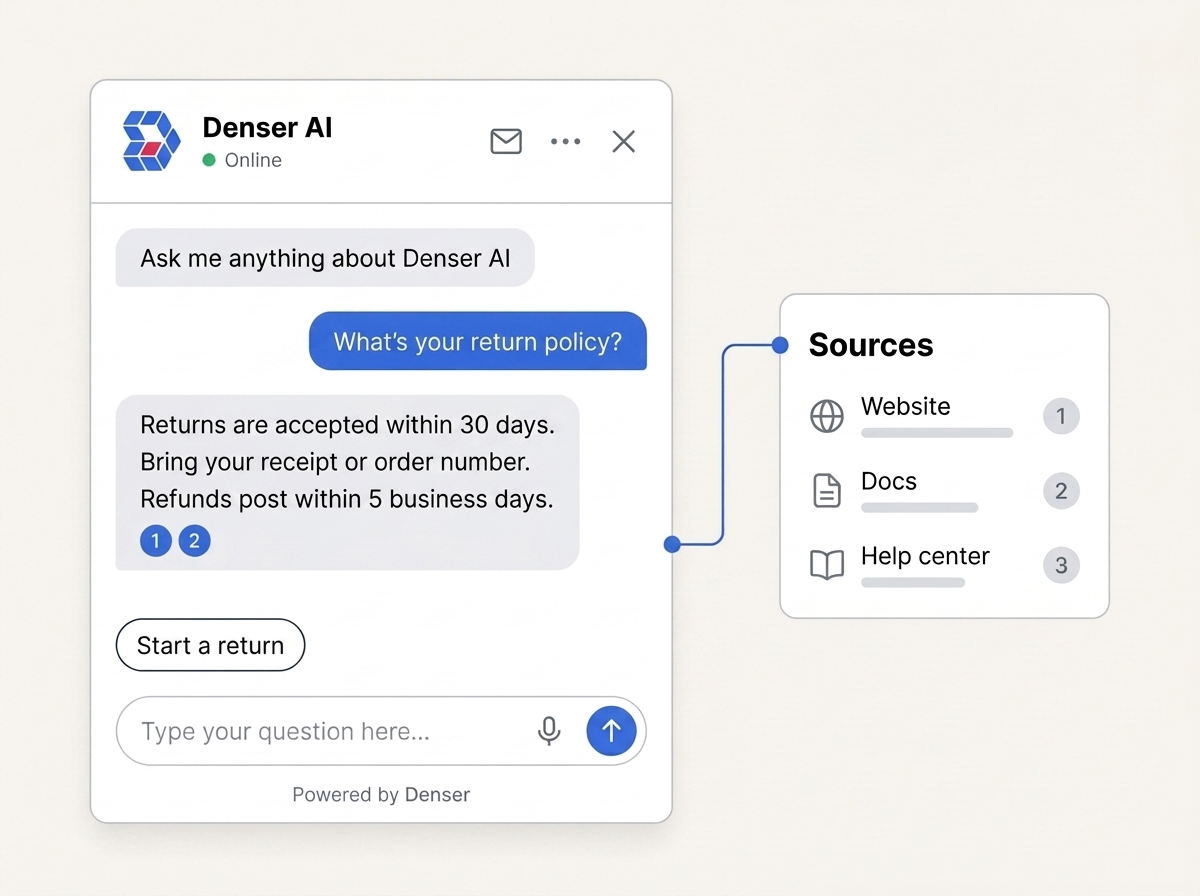
It retrieves the most relevant passage from your website, help center, or documents and cites the source.
It answers routine questions, runs an approved action, or sends the full conversation to a person.
Pick a channel
Choose where customers should interact with your AI support agent. Turn on the channels you need from the same dashboard, and each one uses the same knowledge base.
A floating bubble on any page, or an inline frame that sits inside your layout.
Every channel writes into the same chat logs, and any conversation the AI cannot finish hands off to your team. See how Helpdesk works
AI support agent
Point Denser at your website, PDFs, and docs. It answers with citations, scales to your whole knowledge base, and tells you exactly where it still needs help.
Customer support use cases
Start with requests that have an approved answer or a bounded action. Keep exceptions, sensitive cases, and judgment calls with your team.
Answer setup, shipping, returns, billing, and feature questions from approved documentation.
Guide customers through documented fixes and escalate when the issue needs account access or engineering judgment.
Check who the customer is, then look up the order in Shopify, the invoice in Stripe, or the record in your own API. Protected changes go to your team.
Recommend the right resource, capture qualified details, and book a meeting on your calendar without leaving the conversation.
Actions
Describe when each action should run, in plain words with a few example messages. The agent runs it for real, then answers from what came back: an order's status from your API, an invoice from Stripe, a meeting on your calendar.
Every action has its own test chat, so you can try it before customers see it. Anything that changes something, like cancelling an order, waits for the customer to say yes.
Start with Talk to a person, so every customer has a clear path from AI to your team.
See every action and templateActions
Choose what the agent can do
When a customer asks for a human, start live chat if a teammate is available. If nobody is free, create a ticket with the conversation attached.
Paste a URL, cURL command, or code snippet from your API docs, test it, and choose the fields the agent may read.
Offer open times from your Cal.com calendar and book the one the customer taps.
Answer invoice and subscription questions from Stripe after an identity check. Read only.
Post a call-back or other request to the channel you choose, with a link to the chat.
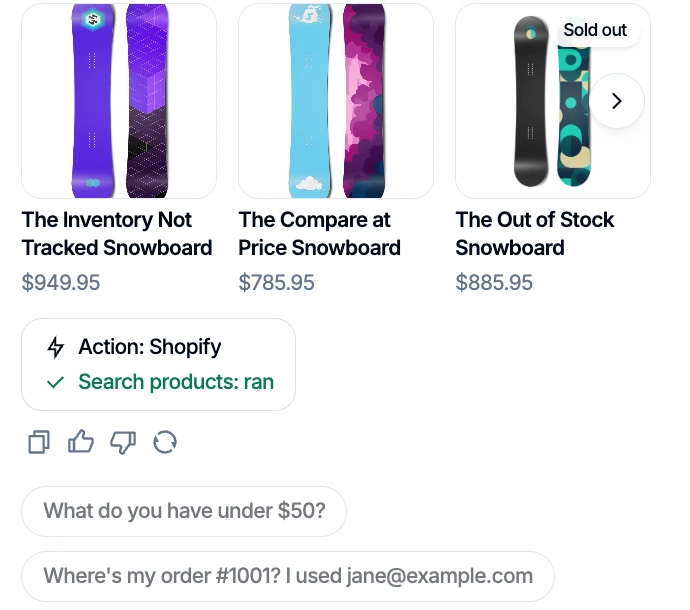
Search products, check orders, and cancel or start a return once the shopper confirms.
Collect details, open the right page, or file a ticket in Zendesk, Freshdesk, Intercom, or HubSpot.
Cards
When the answer is a list of products, an order, or a set of plans, the agent shows it as a card: a small layout your team designs once and your actions fill in.
Playbooks
A playbook tells your AI support agent how to handle one situation, step by step, the way you would brief a new teammate: what to ask, which action to run, and what to do when the conversation goes one way or the other. Build it from Say, Do and If blocks, or describe it in a sentence and let Ask AI draft it.
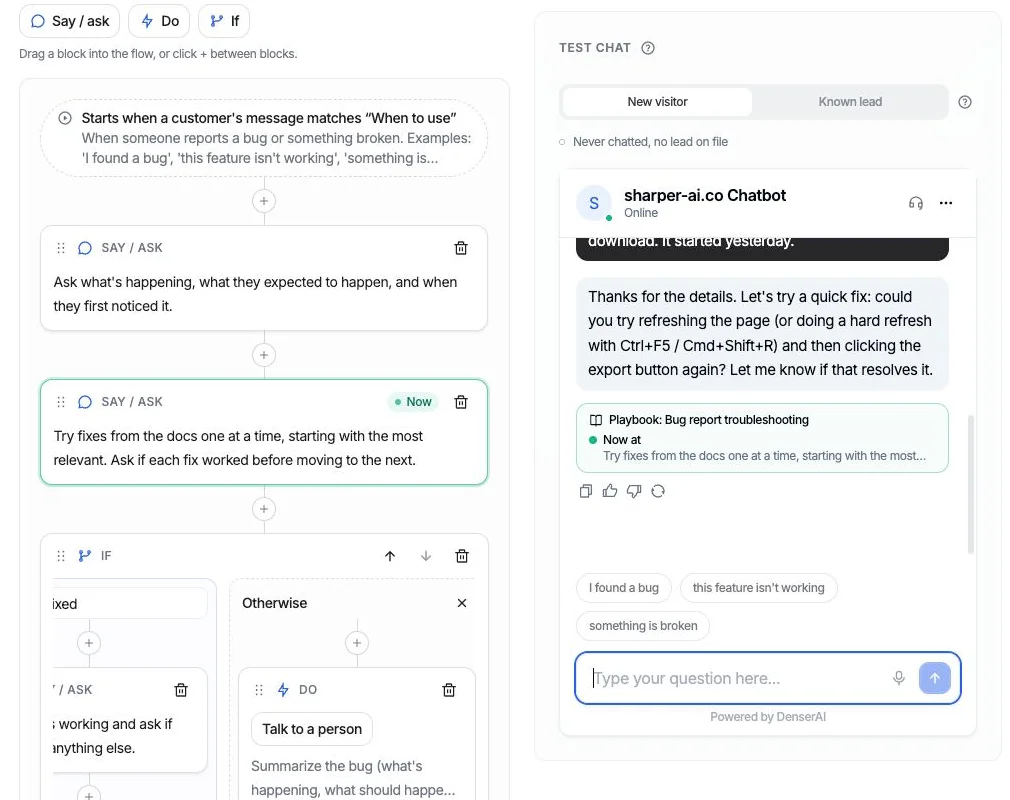
Under each reply in the test chat, a trace shows the playbook, the step the agent is on, the path it took at each decision, and the actions that ran.
The same step is highlighted in the editor and marked Now, so you can see which block produced each answer, and change that block when an answer is wrong.
If a reply says “I’ll connect you with a teammate” and no hand-off ran, the trace says so, before a customer ever sees it.
Start from a template



Embed Denser on your website, or deploy it to WordPress, Slack, WhatsApp, Telegram, and Shopify, so every cited answer reaches customers wherever they already are. No code required.
The handoff
A ticket opens the moment a conversation needs a person.
The visitor asks to speak with a person.
The AI fails repeatedly and stops guessing.
The AI detects frustration and escalates early.
The transcript comes with it. Nobody re-types anything.
The helpdesk
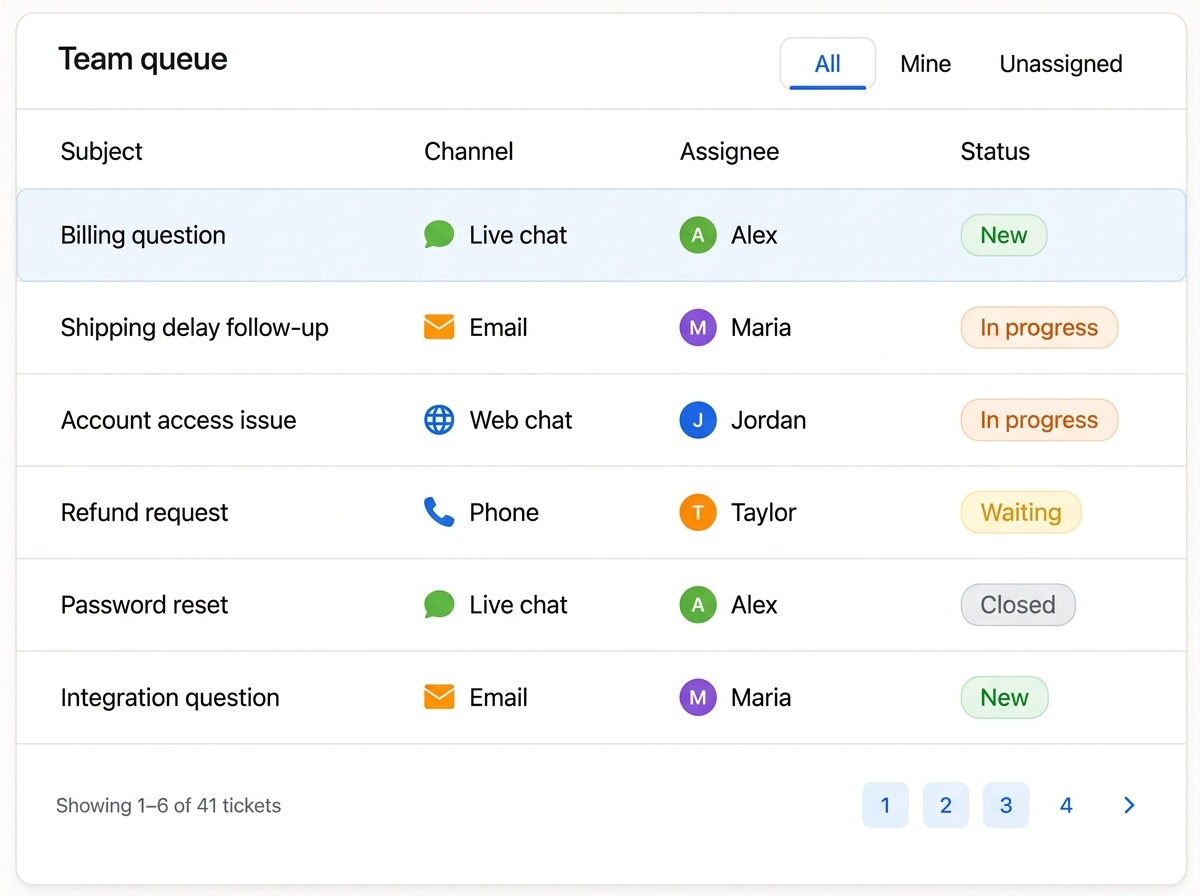
Escalated conversations become tickets in one queue, whatever channel they started in. Assign an owner, track status, close it.
Transcript and context arrive attached.
Step into an active chat where the bot left off.
Filter by All, Mine, or Unassigned.
Customers hear back before a teammate picks it up.
What to automate
Automate approved answers. Hand off anything that needs account access, judgment, or an exception.
Answer
Use approved content and show the source behind the answer.
Connect
Use an authorized integration, or create a ticket without guessing.
Hand off
Send the transcript and context to an owner without making customers repeat themselves.
Improve
Stop, record the knowledge gap, and route the question for follow-up.
Compare approaches
The important difference is not whether a product can chat. It is how it grounds answers, handles uncertainty, and transfers work when automation should stop.
Criterion
Denser AI support agent
Rule-based chatbot
Helpdesk AI add-on
Denser
Retrieved from approved content with source citations
Rule-based
Selected from manually written branches
Helpdesk AI
Generated inside a separate helpdesk ecosystem
Denser
Records the knowledge gap and hands off
Rule-based
Falls back when no branch matches
Helpdesk AI
Behavior depends on helpdesk configuration
Denser
Calls your API, books meetings, reads Stripe billing, posts to Slack, and runs Shopify orders, with confirmation before changes
Rule-based
Buttons and forms that hand the work to someone else
Helpdesk AI
Actions within the host helpdesk's own apps
Denser
Playbooks the agent follows in its own words, with a step-by-step trace of every test run
Rule-based
Decision trees that break when customers go off-script
Helpdesk AI
Varies by vendor; often a separate workflow builder
Denser
Built-in live takeover and ticket queue with transcript
Rule-based
Usually requires another tool or integration
Helpdesk AI
Native to the host helpdesk
Denser
Teams that need cited answers plus an integrated helpdesk
Rule-based
Fixed forms and tightly controlled decision trees
Helpdesk AI
Teams committed to an existing helpdesk suite
Comparing vendors rather than approaches? See the best AI agents for customer support, with pricing, pros, and cons. Building the business case? Estimate your current cost per ticket and potential savings with our customer support cost calculator.
Denser Chat has been a game changer for us. It intelligently handles many of our customers' frequently asked questions, reducing customer support tickets by approximately 50%. This has freed up our marketing team to focus on more meaningful, high-value work.
Questions
An AI agent for customer support understands customer requests, retrieves answers from your approved help center and documentation, and decides whether to answer, take an action, or hand the conversation to a person. Denser cites the source behind every answer and opens a helpdesk ticket with the full context when the agent should not resolve the request on its own.
A rule-based chatbot follows a decision tree someone wrote by hand, so it only handles the paths that were anticipated. An AI support agent retrieves the relevant passage from your content and composes an answer, which means it handles phrasings nobody scripted and improves as you add documentation instead of as you add branches.
No. Denser combines an AI support agent with an integrated helpdesk. Escalated conversations become tickets your team can assign, track, and close in the same product, so nothing is exported to a second vendor and no context is lost in the move. Helpdesk is included on every plan.
Yes. Denser's actions let the agent call your own API, book a meeting on your Cal.com calendar, look up invoices and subscriptions in Stripe, post a request to a Slack channel, and search products, check orders, cancel orders, or request returns in Shopify. You describe when each action should run, test it in a real test chat, and switch it on. Actions that change something, such as cancelling an order, run only after the customer confirms.
Write a playbook: a step-by-step procedure for one situation, such as a return request or a billing question, built from Say, Do and If blocks. The agent follows the steps in its own words and runs the actions you chose. Billing lookups are read only, API keys are stored encrypted, and changes to an order wait for the customer's yes.
Every action and playbook has a test chat that works like the real widget. For playbooks, a trace under each reply names the step the agent is on, the path it took, and the actions that ran, and the same step lights up in the flow editor. You can test as a new visitor or as a known lead. Note that the test chat runs actions for real, so test bookings and Slack posts happen.
It depends on where your support already runs. Denser is best for grounded answers with citations and flat monthly pricing. Intercom Fin suits teams already working in Intercom, Zendesk AI agents suit mature ticket operations, Ada and Sierra suit large enterprise programs, Gorgias suits Shopify stores, and Tidio Lyro suits small teams. Our comparison of the 10 best AI agents for customer support covers pricing, pros, and cons for each.
Denser has a free plan, and paid plans are flat monthly tiers from $39 (Starter) to $899 (Enterprise), with 20% off yearly. You are not charged per resolution. Actions, cards, and playbooks share one allowance per chatbot: 1 on Free, 5 on Starter, 10 on Standard, and 20 on Business and Enterprise. Collect leads and the Shopify actions don't count toward it. See the pricing page for current prices.
It opens a ticket in Denser Helpdesk with the full transcript attached, and tells the customer a person will follow up. Escalation happens when the visitor asks for a human, when the AI has failed repeatedly, or when it detects frustration - so a stuck conversation reaches your team before the customer gives up.
Yes. When a customer asks for a person, an agent can step into the live chat instantly, with full context from everything the AI already discussed.
Website chat, your help page, email, the REST API, phone, and WhatsApp all feed the same ticket queue.
Websites, PDFs, Word and PowerPoint files, and plain text. Combine as many sources as you need into one knowledge base.
Denser uses retrieval-augmented generation (RAG): it finds the relevant passage in your own content first, then answers from it and links the citation. If the answer is not in your sources, it says so and hands off to a person instead of guessing.
Yes. A single Denser AI support agent can search hundreds of thousands of pages and up to 50GB of documents, with three-layer retrieval that stays accurate at that scale. See the comparison page for the full breakdown.
Most teams are live in under 30 minutes. Paste your site URL or upload your docs, test the answers, then copy one snippet onto your site.
The helpdesk is there from the start.
No code. Free to start. Cancel anytime.