AI Chatbot for Website: How to Add One to Your Site (2026)

An AI chatbot for website is one of the most impactful tools you can add to your site in 2026. Whether you run an e-commerce store, a SaaS platform, or a content-driven business, an AI chatbot handles customer inquiries around the clock, reduces support tickets, and drives engagement without adding headcount.
The global chatbot market size was valued at USD 7.76 billion in 2024 and is projected to reach USD 27.29 billion by 2030. Businesses across every industry are adopting AI chatbots because they deliver real, measurable results: 30-50% fewer support tickets, 45% faster resolution times, and up to $4.13 in savings per interaction compared to human agents.
In this guide, we will walk you through everything you need to know about adding an AI chatbot for website, including the different types available, how to choose the right platform, and a step-by-step tutorial to get one live on your site in under 30 minutes.
What Is an AI Chatbot for Website?#
An AI chatbot for website is an intelligent virtual assistant that lives on your site and interacts with visitors in real time. Unlike traditional rule-based chatbots that follow rigid scripts, AI chatbots use natural language processing (NLP) and machine learning to understand user questions and provide accurate, contextual responses.
Modern AI chatbots can:
- Understand natural language: Users type questions in their own words, and the chatbot interprets the intent behind them
- Learn from your content: Train the chatbot on your website pages, documents, and FAQs to give business-specific answers
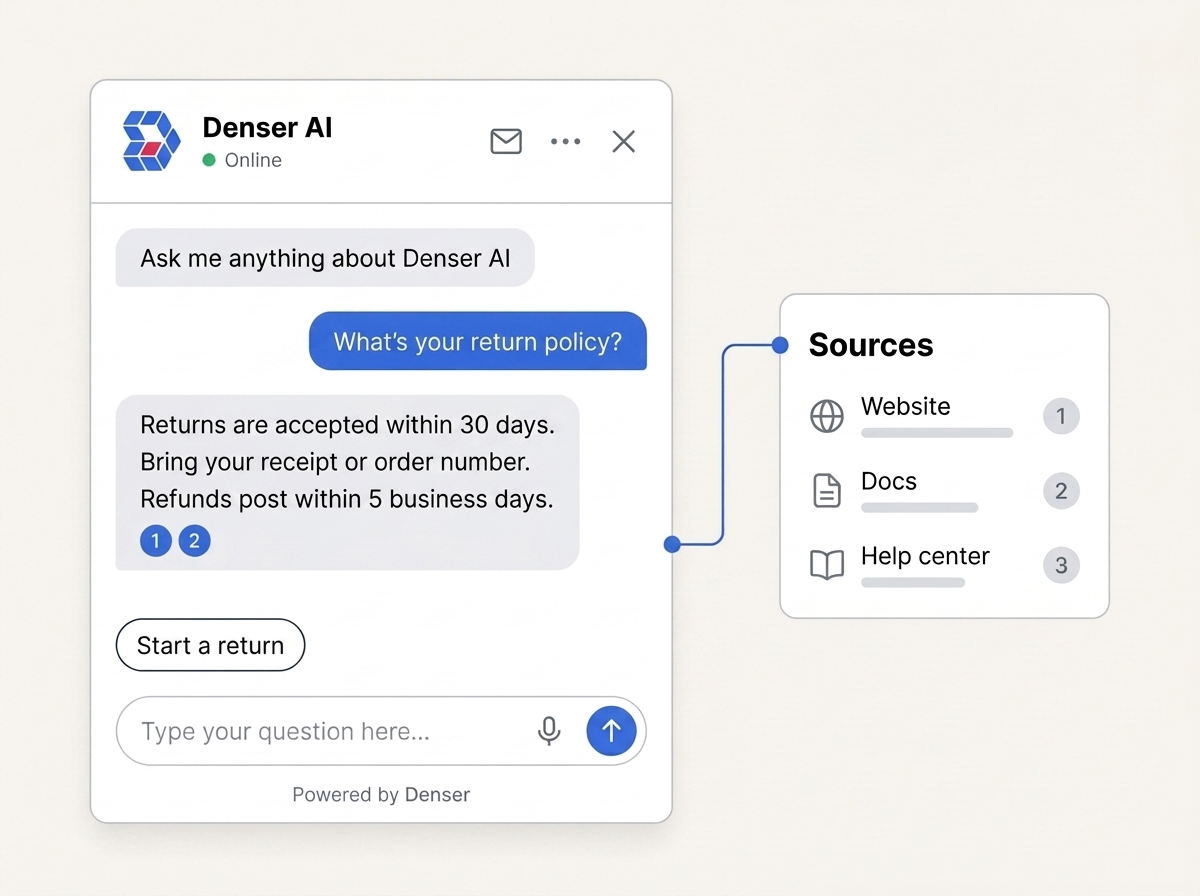
- Provide cited responses: Return answers drawn directly from your knowledge base, complete with source links
- Handle complex conversations: Maintain context across multiple messages in a single session
- Improve over time: Learn from interactions to deliver better responses with each conversation
Types of AI Chatbots for Websites#
Not all chatbots are created equal. Before you choose a platform, it helps to understand the three main types and how they differ. For a broader overview of chatbot categories, see our guide on types of chatbots.
Rule-Based Chatbots#
Rule-based chatbots follow predefined decision trees. They work well for simple FAQ scenarios where questions are predictable (for example, "What are your business hours?" or "How do I reset my password?").
Pros: Simple to set up, predictable responses, low cost Cons: Cannot handle open-ended questions, requires manual scripting for every scenario, breaks down with unexpected queries
NLP-Powered Chatbots#
These chatbots use natural language processing to understand user intent rather than matching exact keywords. As a result, they can handle a wider range of questions and phrasing variations.
Pros: Handles varied phrasing, supports multi-turn conversations, more natural interactions Cons: Requires training data, can produce generic responses, accuracy depends on model quality
RAG-Based Chatbots#
RAG (Retrieval-Augmented Generation) chatbots represent the latest advancement. They combine a large language model with a retrieval system that pulls relevant information from your actual documents and web pages at query time. To learn more about this technology, read our explainer on retrieval-augmented generation.
Pros: Highly accurate responses grounded in your data, source citations reduce hallucinations, no custom model training needed Cons: Requires quality source content, slightly higher latency than simple bots
Bottom line: For most businesses, a RAG-based chatbot delivers the best balance of accuracy, setup speed, and ongoing maintenance. This is the approach that platforms like Denser.ai use.
Benefits of Adding an AI Chatbot to Your Website#
Why are businesses adopting AI chatbots at such a rapid pace? Here are the key benefits that drive ROI.
1. 24/7 Customer Support#
Your chatbot never sleeps. It provides instant answers to customer questions at any hour, including weekends and holidays. This is especially valuable for:
- E-commerce sites with international customers across time zones
- SaaS companies with users needing immediate technical help
- Service businesses where customers research outside business hours
2. Reduced Support Ticket Volume#
By automating responses to frequently asked questions, AI chatbots can reduce support ticket volume by 30-50%. Consequently, your human support team can focus on complex issues that truly require personal attention.
3. Faster Response Times#
Research shows that websites with AI chatbots achieve resolution times that are 45% faster compared to form-based or email-only support. Instead of waiting hours or days for a response, customers get instant answers.
4. Improved Customer Experience#
An AI chatbot provides consistent, accurate responses every time. As a result, customers do not have to navigate through confusing help documentation or wait on hold. They simply ask their question and get an immediate answer.
5. Cost Savings#
Handling customer inquiries manually is expensive. AI chatbots can handle thousands of conversations simultaneously at a fraction of the cost of human agents. In fact, chatbot interactions cost $0.50-$0.70 compared to $6-$15 for human agents.
6. Lead Generation#
AI chatbots can qualify leads, collect contact information, and route hot prospects to your sales team. They engage visitors who might otherwise leave without converting. Learn more about building a lead generation chatbot for your business.
7. Valuable Customer Insights#
Every conversation with your chatbot provides data about what customers are asking. In turn, this helps you identify knowledge gaps, product issues, and opportunities for improvement.
Top AI Chatbot Platforms Compared#
Before diving into the setup process, here is a quick comparison of leading AI chatbot platforms for websites. For a more detailed breakdown, see our full guide to the best website chatbot platforms.
| Platform | Best For | AI Type | Starting Price | No-Code Setup |
|---|---|---|---|---|
| Denser.ai | RAG-based answers with citations | RAG + LLM | $29/mo (free tier available) | Yes |
| ChatBot.com | Visual workflow building | Custom AI | $65/mo | Yes |
| Chatling | Simple no-code bots | NLP | Free tier available | Yes |
| HubSpot | CRM-integrated support | Rule-based + AI | $9/user/mo | Yes |
| Intercom Fin | Enterprise support | LLM | $0.99/resolution | Yes |
| Botsonic | GPT-powered assistants | GPT-4 | $16/mo | Yes |
Why Denser.ai stands out: Unlike most platforms that rely on generic LLM responses, Denser.ai uses retrieval-augmented generation to pull answers directly from your website content and documents. Every response includes source citations, which significantly reduces hallucinations. It also crawls up to 100K+ pages and supports multiple LLM backends (GPT-4o, Claude, Gemini).
How to Add an AI Chatbot to Your Website with Denser AI#
Denser AI makes it straightforward to create and deploy an AI chatbot for your website without any coding. If you prefer a fully no-code chatbot approach, this is one of the simplest options available. Here is the step-by-step process:
Step 1: Create Your Chatbot#
- Visit denser.ai and click "Get Started Free"
- Sign up with your email or Google account
- From the dashboard, click "New chatbot"
- Enter a name for your chatbot (for example, "Customer Support Bot")
- Select Website Chatbot for a public-facing chatbot that you can embed on your site

Step 2: Add Your Website as a Data Source#
This is the most important step. Your AI chatbot for website will only be as good as the knowledge you provide. The easiest way to train your chatbot is to crawl your existing website:
- Select the Website tab
- Enter your website URL (for example, https://yourcompany.com)
- Choose a crawl type: Domain (crawl entire site up to 5 levels deep) or Sitemap (use your XML sitemap)
- Optionally expand Advanced settings to set include/exclude path patterns for more control over which pages get indexed
- Click Start crawling and Denser AI will automatically discover and index your pages (up to 100K+ pages)
Denser AI also supports uploading documents (PDF, DOCX, XLSX, and more), connecting Google Drive, and adding Q&A pairs as additional data sources.

Step 3: Create and Train Your Chatbot#
Once you have added your data sources:
- Make sure all website crawls have finished (the status will show "Ready for Indexing")
- Click the Create Chatbot button
- Denser AI will process, chunk, embed, and index all your content automatically
The training process typically takes a few minutes depending on the amount of content. You will be redirected to the chat interface when it is ready.
Step 4: Test Your Chatbot#
After creation, you land on the main chat interface where you can immediately start testing:
- Ask questions that your customers would typically ask
- Verify the responses are accurate and include proper source citations
- Click any citation to jump to the original source and confirm the answer
- If needed, go back to the data sources page to add more content and retrain

Step 5: Customize the Appearance#
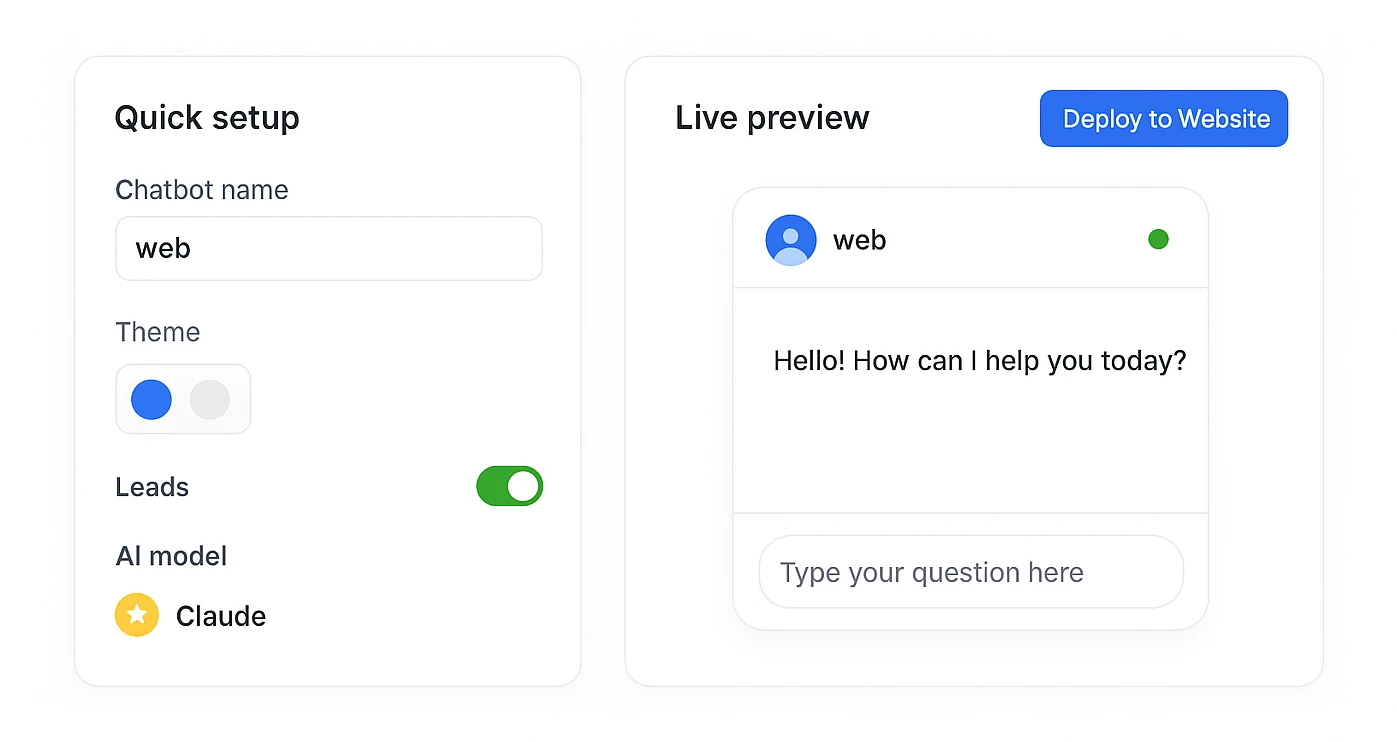
Make your chatbot match your brand. From the chat interface, open the Appearance panel on the left side:
- Chatbot Name: Set the name displayed in the chat header
- Chatbot Logo: Upload a custom icon or avatar (max 1MB, supports JPG, PNG, and SVG)
- Theme: Toggle between Light and Dark mode, or enable Customize Theme to set individual colors for background, borders, fonts, bot messages, and chat actions
- Leads: Enable lead capture to collect contact details from visitors
- Customer Support: Add support email addresses so users can escalate to a human agent
- AI Settings: Select your preferred LLM model (GPT-4o, Claude, Gemini) and toggle source citations on or off

Step 6: Deploy the Chatbot on Your Website#
Go to the Deploy tab from the chat interface. Denser AI provides two embed methods:
Widget Code (Recommended):
A floating chat button that appears in the bottom-right corner of your site:
<script type="module">
import Chatbot from "https://cdn.jsdelivr.net/npm/@denserai/embed-chat@1/dist/web.min.js";
Chatbot.init({
chatbotId: "chatbot_wv9umdd4470ehghsc1gi4",
});
</script>
Paste this code before the closing </body> tag on your website. The chat widget will appear automatically.
iFrame Embed:
If you want to embed the full chat interface inline on a specific page:
<iframe
width="100%"
height="800px"
frameborder="0"
src="https://denser.ai/u/embed/chatbot_wv9umdd4470ehghsc1gi4">
</iframe>
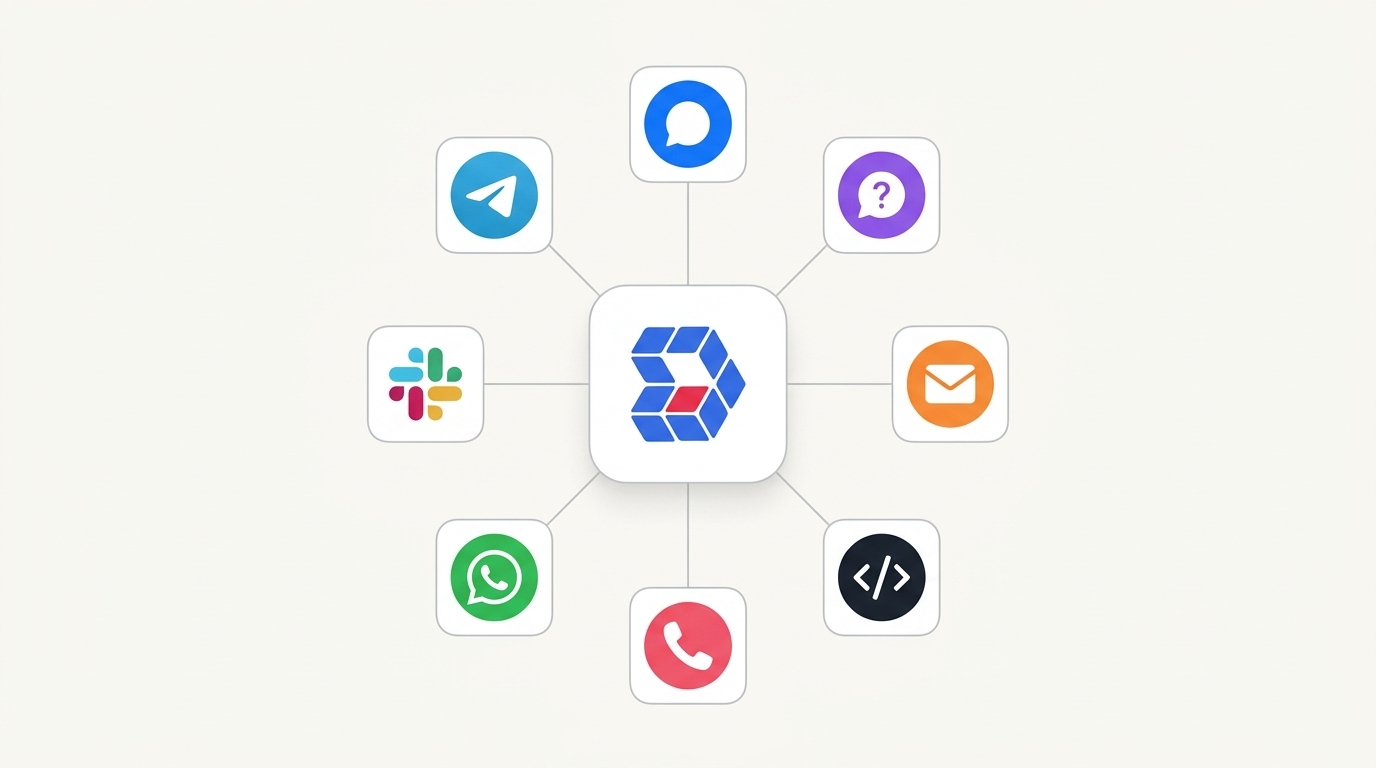
Denser AI also offers native integrations with Slack, WhatsApp, Telegram, Shopify, WordPress, Zendesk, and Zapier from the same Deploy tab.

Step 7: Monitor and Improve#
After deployment, use Denser AI's built-in analytics to improve your chatbot over time:
- Chat Logs: Review real conversations to see what users are asking and how the chatbot responds. You can revise answers directly in the chat logs, and the chatbot will use your corrected answer for similar queries going forward.
- Statistics: Track usage metrics including total chats, user counts, and tool usage
- Leads: View collected leads if you have enabled the lead capture form
- Data Sources: Add new documents, re-crawl your website, or update Q&A pairs at any time without rebuilding the chatbot from scratch
AI Chatbot Use Cases by Industry#
AI chatbots are not one-size-fits-all. Here is how different industries put them to work:
- E-commerce: Product recommendations, order tracking, cart abandonment recovery, and size/fit guidance. Consider a dedicated e-commerce chatbot for maximum impact.
- SaaS: Onboarding assistance, feature walkthroughs, billing questions, and technical support escalation
- Healthcare: Appointment scheduling, symptom triage, insurance verification, and patient FAQ handling
- Education: Course enrollment questions, assignment help, campus navigation, and financial aid inquiries
- Real estate: Property search assistance, scheduling viewings, mortgage calculator support, and neighborhood information
- Professional services: Intake forms, consultation scheduling, document collection, and case status updates
Additional Deployment Options#
Denser AI supports deploying your chatbot to multiple platforms beyond your website:
Messaging Platforms#
- Slack: Add the chatbot to your Slack workspace for internal support
- Telegram: Deploy to Telegram channels and groups
E-commerce Platforms#
- Shopify: Install directly to your Shopify store with the Shopify chatbot integration
- WordPress: Use the WordPress chatbot plugin for easy installation
API Access#
For developers, Denser AI provides a full API to:
- Integrate the chatbot into custom applications
- Build mobile apps with chatbot functionality
- Create custom workflows and automations
Best Practices for Website Chatbots#
1. Start with Quality Content#
Your AI chatbot for website is only as good as its training data. Make sure your website content, documentation, and FAQs are accurate and comprehensive before deployment. If you are still evaluating options, check out our guide to the best website chatbot platforms to find the right fit.
2. Set Clear Expectations#
Let users know they are chatting with an AI. Set appropriate initial messages that explain what the chatbot can help with and where its limitations are.
3. Provide Escalation Paths#
Not every question can be answered by AI. Therefore, make it easy for users to reach a human agent when needed. Include a customer support email or live chat handoff option.
4. Keep It Updated#
Regularly add new content and retrain your chatbot when you update your website, product documentation, or pricing. Outdated information erodes trust quickly.
5. Review Chat Logs Regularly#
Periodically review conversations to identify common questions you have not addressed and areas where the chatbot could improve. With Denser AI, you can revise answers directly in the chat logs, and the chatbot will use your revised answer for similar queries going forward.
6. Enable Citations#
Turn on source citations so users can verify answers and access more detailed information from your original content. This transparency builds trust and reduces the risk of AI hallucinations.
Frequently Asked Questions#
How much does an AI chatbot for website cost?#
Pricing varies by platform. Denser AI offers a free tier to get started, with paid plans starting at $29/month. Enterprise solutions from other providers can range from $500 to $2,500/month. For a detailed cost comparison, read our guide on how much a chatbot costs.
Do I need coding skills to add a chatbot to my website?#
No. Platforms like Denser AI are fully no-code. You simply copy and paste an embed code to add the chatbot widget to your site. The entire setup takes under 30 minutes.
How long does it take to set up a website chatbot?#
You can have a working AI chatbot deployed in under 30 minutes. The time depends mainly on how much content you want to train it on. Website crawling for a large site (1,000+ pages) may take a bit longer.
Can I use the chatbot on multiple websites?#
Yes. Each chatbot can be embedded on multiple pages and domains. Enterprise plans support multiple chatbots for different use cases or brands.
Will the chatbot work on mobile devices?#
Yes. The chat widget is fully responsive and works on all devices, including smartphones and tablets.
Can I customize how the chatbot looks?#
Yes. You can customize colors, themes, avatars, initial messages, and more to match your brand identity. Most platforms, including Denser AI, offer full visual customization options.
Does the chatbot support multiple languages?#
Yes. Denser AI chatbots support 80+ languages and can respond in the same language as the user's question. This is essential for businesses serving international audiences.
How accurate are the chatbot responses?#
Accuracy depends on your training data. However, because Denser AI uses retrieval-augmented generation (RAG), responses are grounded in your actual content with source citations. As a result, this approach significantly reduces hallucinations compared to generic AI chatbots.
What is the difference between a chatbot widget and an embedded chatbot?#
A chatbot widget appears as a floating button (usually in the bottom-right corner) that opens a chat window when clicked. An embedded chatbot is placed directly within a specific page as an inline element. Widgets are better for site-wide availability, while embeds work well for dedicated support or FAQ pages.
Can an AI chatbot replace my entire support team?#
Not entirely. AI chatbots excel at handling 60-80% of routine questions instantly. That said, complex issues, sensitive situations, and high-value customer interactions still benefit from human agents. The best approach is a hybrid model where the chatbot handles common queries and escalates complex ones to your team.
Conclusion#
Adding an AI chatbot to your website is no longer a luxury. It is a competitive necessity. With 58% of B2B companies and 42% of B2C companies already using chatbots, businesses that do not adopt this technology risk falling behind.
Ultimately, the key is choosing the right type of chatbot for your needs. For most businesses, a RAG-based AI chatbot for website provides the best combination of accuracy, ease of setup, and ongoing value.
Denser AI makes it simple to create, customize, and deploy an AI chatbot without any coding. In less than 30 minutes, you can have an intelligent assistant answering customer questions 24/7, reducing support costs, and improving customer satisfaction.
Ready to add an AI chatbot to your website?