Upload any PDF and get instant, cited answers. Ask questions, extract data, and analyze documents in seconds.
Trusted by 1,000+ businesses worldwide
 Parliament of Australia
 Onondaga County
 EOS
EOS
 Portfoliobox

 Upsiide
 Valk WeldingParliament of AustraliaOnondaga CountyEOSPortfolioboxUpsiideValk Welding
Upload your documents and start chatting — get accurate, cited answers from your entire document collection in minutes.
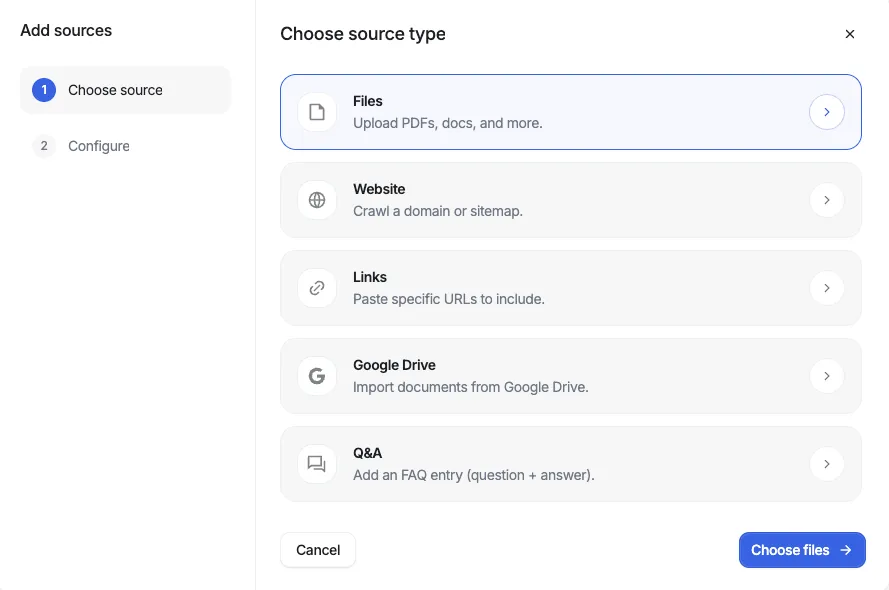
Upload PDFs, DOCX, PPTX, or connect your Google Drive — from a single file to thousands of documents. Our platform automatically indexes everything with state-of-the-art retrieval technology for industry-leading accuracy.
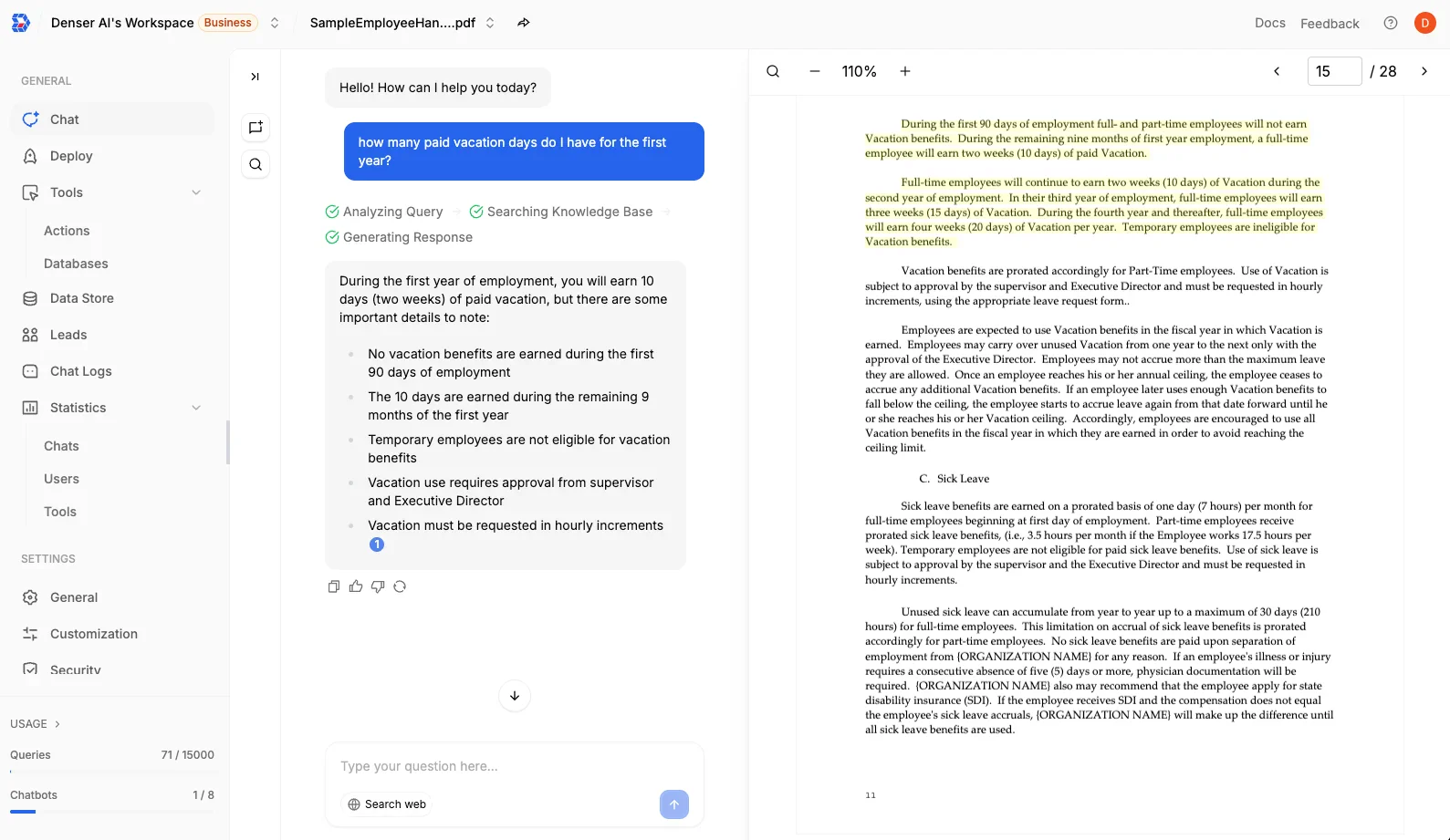
Ask questions in natural language and receive accurate answers with exact page citations. Every response is verifiable — click any citation to jump directly to the source in your documents.
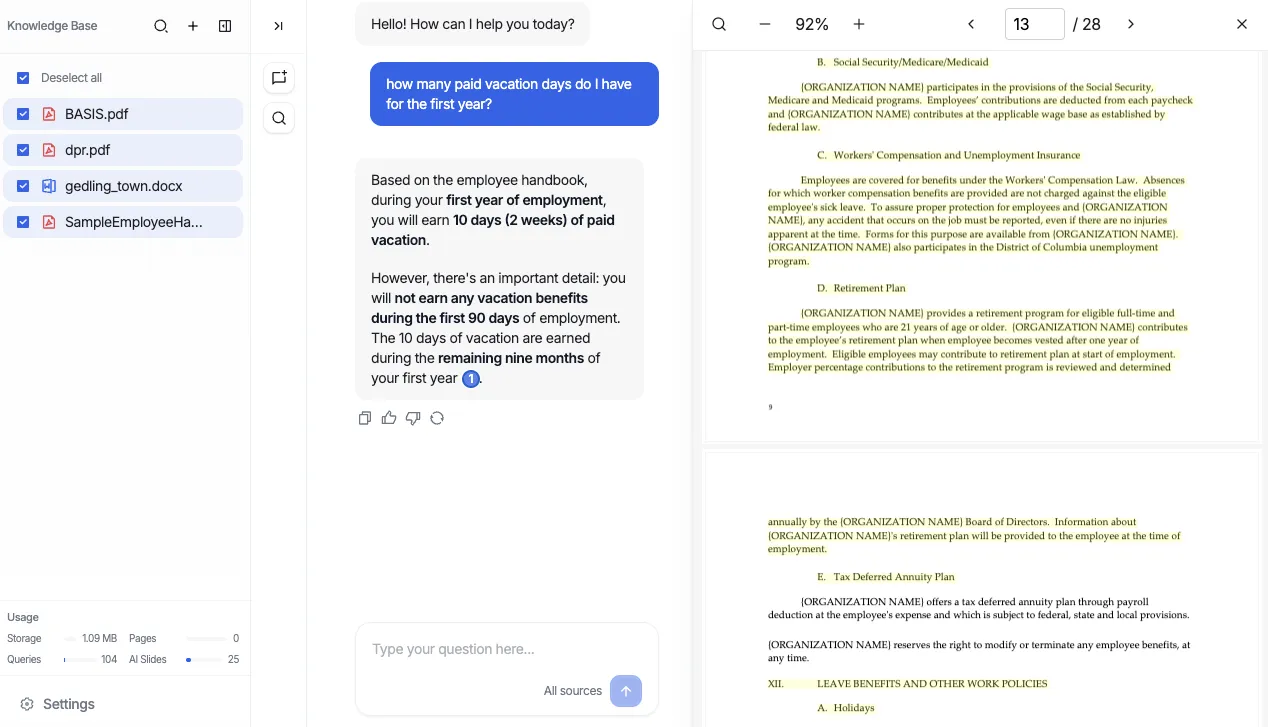
Get verifiable answers with source citations, powered by state-of-the-art retrieval technology that scales to thousands of documents.
Every answer includes exact page citations from your PDF. Click to verify the source, ensuring 100% trustworthy and traceable results.
Powered by Denser Retriever, our state-of-the-art retrieval technology delivers industry-leading accuracy for finding relevant information in your PDFs.
Handle massive document collections with ease. Upload thousands of PDFs and query across your entire knowledge base simultaneously.
No more hallucinations. Every response is grounded in your actual PDF content with direct links to the source passages.
Chat across multiple PDFs at once. Compare documents, find patterns, and synthesize insights from your entire document collection.
Our PDF AI understands context across pages and sections, providing coherent answers that consider the full document structure.
Process thousands of pages in seconds. Our retrieval engine is optimized for speed at scale without sacrificing accuracy.
Process PDFs in any language with automatic translation. Chat with documents in your preferred language regardless of the source.
Bank-level encryption protects your documents. Your PDFs are never used for AI training, ensuring complete privacy and compliance.
From legal contracts to research papers, our AI PDF assistant helps professionals across industries extract insights faster.
Analyze financial reports, contracts, and business documents. Chat with PDF to extract key metrics, compare quarterly reports, and identify trends across documents.
Review contracts, legal briefs, and compliance documents. Our PDF AI helps identify clauses, compare versions, and ensure nothing is missed in lengthy legal documents.
Chat with research papers, textbooks, and academic journals. Extract citations, summarize methodologies, and quickly find relevant information across multiple papers.
Analyze medical literature, clinical studies, and patient documentation. Chat with PDF AI to extract findings, compare treatment protocols, and stay updated on research.
Navigate technical manuals, specifications, and product documentation. Ask questions about complex procedures and get instant, accurate answers with page references.
Create study materials from textbooks, training manuals, and course content. Chat with PDF to generate summaries, practice questions, and learning guides.
Need a chatbot on your website? Try our AI Website Chatbot to answer visitor questions 24/7. You can also generate AI presentations from documents, or browse all AI chatbot solutions.
Discover how Denser AI is transforming businesses through intelligent automation, database connectivity, and exceptional customer service
Denser is an outstanding AI chatbot with zero-effort setup. I was amazed at how much it knew about our company and answered support questions in depth, with no training needed. Highly effective for lead generation.
Feb 15, 2024 @ Rankify
Working with Denser.ai has been a game-changer. Their chatbot provides seamless integration and perfectly tailored solutions. The expertise in AI and customer interaction is evident in every interaction.
Apr 20, 2024 @ Relearnit
Denser AI impressed us with its simplicity and power. It provided enterprise-grade RAG implementation without the complexity of building it ourselves. The AI's contextual understanding has significantly improved our customer engagement.
Jul 18, 2024 @ Crafting
Everything you need to know about our AI PDF assistant and chat with PDF technology.
