

Creating Advanced Search UX With Artificial Intelligence

A functional and efficient search feature on a website is essential for your business's success. Search User Experience (Search UX) shapes how users interact with your site, impacting everything from their overall satisfaction to how long they stay engaged. Following best practices in advanced search UX leads to higher user satisfaction and overall user satisfaction, making your site more engaging and effective.
A seamless search experience enables users to quickly find what they're looking for, which keeps them satisfied and leads to better retention rates and higher conversions. Good search UX is a key driver of business success, as it directly influences user satisfaction, engagement, and measurable business outcomes.
In this article, we will look into why a solid search UX with the help of AI improves a single aspect of your site and sets up your business for lasting growth. Let's get started!
What is Search UX, and How Does it Work?#
Search UX (Search User Experience) is how user-friendly and efficient the search function is on your website or app. It makes the whole process of finding something—from typing a query to sifting through results—feel smooth and natural.

When users type something into a search bar, the system processes the input, often suggesting terms or correcting errors as they go. The initial input is typically a search term, and the design should make it easy for users to start searching immediately. Users can also enter specific search criteria or search parameters to refine their results, allowing for more precise and relevant outcomes. Then, displaying search results that are relevant to the query. The goal is for this whole process to be seamless and intuitive.
Why Improved Search UX Matters#
Effective search UX is essential across various platforms where quick and easy access to specific information is necessary. Customers get the quick answers they need, and businesses get to simplify operations and invest more in growing their business.
Here's a quick look at key areas where great search functionality makes a big difference:
- E-commerce platforms.
- Digital libraries and encyclopedias
- Streaming services (movies, shows, or songs)
- Real estate websites (location, price, or type searches)
- Job portals
- Travel and hospitality sites (trips and bookings)
- Healthcare resources
- Educational sites
- Government websites
- News and media outlets
Understanding user intents is crucial for delivering relevant and comprehensive results across these platforms. Businesses should implement advanced search features to meet diverse user needs and improve the overall search experience.
Search UX can also directly influence conversion rates. Users who can easily navigate search are more likely to complete purchases, sign up for services, or take other desired actions.
Understanding User Behavior#
Understanding user behavior is at the heart of designing an effective advanced search UI. By closely analyzing how users interact with the search function—what keywords they use, how they phrase their queries, and which advanced search features they gravitate toward—designers can uncover valuable patterns that inform smarter design decisions. For example, some users may consistently use faceted search to narrow down search results, while others rely on natural language queries to express their needs.
Leveraging natural language processing and machine learning, modern search UIs can adapt to these behaviors in real time, offering personalized suggestions and dynamically adjusting filter options to match user preferences. This not only streamlines the search experience but also helps users find what they're looking for faster and with less effort. By understanding user behavior, designers can ensure that advanced search features and filter options are relevant, intuitive, and truly enhance the way users interact with the search function—ultimately leading to a more satisfying and efficient search experience.
Benefits of Effective Search UX Function#
Here's how a well-optimized search feature can boost a business's performance:
A thoughtfully designed user interface is essential for maximizing these benefits, as it directly impacts usability and the overall search experience.
Improved User Experience#
Improving the search function on your website helps visitors navigate your site effortlessly. Users can quickly find exactly what they're looking for, whether it's a product, an article, or specific information.
Increased Engagement#
Since users can easily find what they're searching for, they're more likely to explore your content, products, or services further. This keeps them on your site longer and provides an opportunity to discover all that you have to offer.
Higher Conversion Rates#
When users find what they're looking for without hassle, they will likely purchase, sign up for a newsletter, or fill out a contact form. A good search experience simplifies conversion by removing frustrations and helps users get from point A to point B.
Cost Efficiency in Customer Support#
Giving your website's search feature a boost can lighten the load for your customer support team. When your search tool works well, visitors can easily find what they need without asking for help.
This means fewer questions for your support team to answer and cuts down on hiring additional human agents to attend to inquiries. Therefore, you can funnel those savings into other parts of your business or even upgrade your services.
Competitive Advantage#
A user is scrolling through your site and finds exactly what they need in just a few clicks, thanks to your smooth and intuitive search feature. Meanwhile, they're getting lost on another site, clicking around in frustration. It's easy to see which experience they will prefer, right?
Ensure your search function is smooth and easy to navigate. It creates memorable, positive customer experiences and sets you apart in a crowded marketplace.
How to Craft the Perfect Search Box#
Creating the perfect search bar on your website is key to improving user experience and boosting your site's functionality. Incorporating features like a drop-down menu for filtering and allowing users to select multiple options can further enhance the search box's usability. Here's a step-by-step guide to ensure your search box is both effective and user-friendly:
Placement and Visibility#
The search box should be easy to find at a glance. A common practice is to place it in your website's header, typically in the center or top corner, as these are the areas where users expect to find search functions.
Positioning the search bar in the center led to a 15.86% usage rate, whereas placing it at the top resulted in a slightly lower usage rate of 13.43%. Interestingly, positioning the search input field at the top left corner was the least effective, with only a 7.72% usage rate.
Size Matters#
Ensure the search box is large enough to comfortably enter a query. A rule of thumb is to accommodate at least 27 characters, as this can handle the majority of search terms without the user having to scroll within the text box.
Simplicity in Design#
Keep the search box's design simple and functional. Use a minimalist design with a clear, distinguishable search icon, such as a magnifying glass. Adding a "submit" button next to the search box can make it even clearer for users how to initiate their search.
Placeholder Text#
Use placeholder text effectively in the search box to guide users. Phrases like "Search here," "Enter a keyword," or specific instructions related to the site's content (like "Search for books, authors, or ISBN") can prompt users on how to start their search.
Keep a Search Box on Every Page#
Include a search box on every website page so visitors can easily start a new search without navigating to the homepage or a specific search results page. Displaying search results on the same page can streamline the user experience by allowing results to refresh dynamically, but in cases where there are many results or advanced options, opening a separate page can help manage large datasets and improve navigation.
Auto-Complete and Suggestions#
Implementing auto-complete functionality can drastically improve the search experience. It helps users find the right terms and reduces the chance of errors, which makes the search process quicker and more efficient.
Mobile-Friendly#
With the increasing use of mobile devices to access the web, ensure your search box is optimized for mobile interfaces. It should be easily clickable, with responsive design elements that adjust to different screen sizes and orientations.
Advanced Search Option#
Sometimes, your users need to dig a little deeper. That's where an advanced search functionality option can come in handy. This feature is particularly useful in industries like academic research, real estate, and e-commerce, where users often have specific needs.
Advanced search filters and filtering options, such as search facets, allow users to refine search results based on categories and subcategories. Advanced features, like AI-powered analytics and generative answering, can further enhance the advanced search experience. Allowing users to interact with multiple advanced search filters empowers them to control and fine-tune their search results.
For instance, researchers might need to filter results by publication date, journal, or study type. In online shopping, customers might look for products based on size, color, brand, or price. A faceted search gives these users the power to fine-tune their queries, which leads them quickly to the exact results they're after.
Handle Poor Connectivity with a Creative Touch#
Poor connection can be a real pain for users accessing your content. Instead of leaving them staring at a frustrating white screen while things load, why not try something a bit more creative?
Skeleton screens provide a sense of activity and progress, reducing the wait and keeping users engaged. It's a smart way to maintain user interest and patience, even when the internet speed isn't quite up to par.
Implementing Filter Options#
Implementing filter options is a cornerstone of any advanced search UI, especially for platforms like ecommerce sites where users often need to sift through large volumes of content. By offering multiple filters—such as price, brand, category, or customer ratings—designers empower users to refine their search queries and quickly zero in on the most relevant results. Well-designed filter options, presented through user-friendly elements like dropdown menus and radio buttons, make it easy for users to select specific criteria without feeling overwhelmed.
It's important to strike the right balance: too many filter options can confuse or overwhelm users, while too few may not provide enough control to fine-tune results. A good practice is to prioritize the most commonly used filters and allow users to access additional filters as needed. This approach ensures the search UI remains clean and accessible, while still offering the advanced search power users expect. By thoughtfully implementing filter options, designers help users find exactly what they're looking for, making the search process more efficient and enjoyable.
Common Pitfalls in Search UX#
Creating an effective search UX is essential for a positive user experience on your website, but several common pitfalls can hinder its success. Relying solely on basic search, which uses a single parameter, can limit user experience compared to advanced search that allows users to refine queries with multiple filters and criteria. Here's a look at some typical issues to avoid:
Overly Complex Interfaces#
It's easy to get carried away and immediately add many filters or advanced search options. But this can make things more confusing for your users. When the search area is cluttered with too many choices, it can feel overwhelming rather than helpful.
A cleaner, simple search interface invites users in and makes the search process intuitive and user-friendly. Stick to the essentials; you can always offer more advanced options through a separate feature for those who need it.
Inadequate Search Algorithms#
If your search function can't accurately interpret and respond to user queries, users might miss out on what they're looking for—even if it's right there on your site. It's important to ensure your search algorithm is sophisticated enough to handle the complexities of human language.
Poor Mobile Responsiveness#
Nowadays, many people browse websites on their smartphones and tablets. If your search feature doesn't work well on these devices, it can lead to frustration. Ensure that your search box and results are easy to navigate on a small screen, with buttons and text fields that are adequately sized for tapping.
Hidden Search Bars#
A hidden search bar on your website can be a real obstacle to finding specific information quickly. This can lead to frustration and even cause visitors to leave your site and search for a more user-friendly experience elsewhere.
To keep things smooth and welcoming, ensure your search bar is prominently placed—ideally in the header or at a consistent location on every page. This way, it's immediately visible and accessible.
Lack of Auto-Complete or Search Suggestions#
Not including auto-complete or search query suggestions in your search functionality can make the process feel tedious for users. When a search doesn't give users great results the first time, later search attempts rarely succeed.
Adding auto-complete helps by predicting what users are typing and offering quick suggestions to complete their queries. This speeds up the search process while also reducing errors.
Not Providing Useful No-Results Responses#
When no results are found, it can be a missed opportunity to assist your users further. It's important to offer alternative suggestions or alternative suggestions to help users find related content, broaden their search, or discover intelligent recommendations when no results are found. When they search for something only to be met with a blank "No results found" message, it feels like they've hit a dead end.
Instead, guiding users by suggesting alternative keywords, offering options to refine their search, or even providing links to customer support or a FAQ page is more helpful. This approach turns a potentially frustrating experience into an opportunity for further engagement.
Refining Search Results#
Refining search results is a vital part of the search process, enabling users to move from a broad set of results to the most relevant content with ease. Once a search query is entered and initial filters are applied, users often need additional tools to further narrow down their options. Features like sorting (by relevance, price, or rating), pagination, and clear results stats (such as the total number of results or average review scores) give users the control they need to fine-tune their search experience.
Displaying these options prominently on the search results page helps users quickly assess the scope and quality of the results, guiding them toward the content that best matches their needs. By empowering users to refine their search results, designers create a more interactive and satisfying search experience—one where users can confidently and efficiently find the most relevant content for their search query.
Search Results Optimization#
Search results optimization is all about ensuring that the results page delivers the most relevant and engaging content to users. This involves leveraging predictive search, autocomplete suggestions, and machine learning to analyze user behavior and tailor search results to individual preferences. By incorporating features like trending searches, popular searches, and user-generated content, designers can inspire users with new ideas and help them discover content they might not have found otherwise.
Visual cues—such as highlighting matching keywords or using bold text—can draw attention to important results or features, making the results page more intuitive and user-friendly. Additionally, providing autocomplete suggestions as users type helps guide their search queries, reducing errors and speeding up the search process. By continuously analyzing search analytics and user feedback, designers can identify opportunities to further optimize the search UI, ensuring that the search experience remains efficient, relevant, and engaging as user needs evolve.
Why Should Businesses Use AI for Improved Search UX#
Now that we understand the importance of having a great search UX, let's explore how AI can make searching on your site a more innovative and user-friendly experience. AI can utilize a unified index to aggregate content from multiple sources, improving the relevance and comprehensiveness of search results.
Personalized Search Experiences#
AI can tailor relevant search results to fit users' previous interactions, preferences, and subtlest behaviors. It creates familiarity and ease, which turns first-time visitors into regulars.
Natural Language Processing (NLP)#
With NLP, AI can understand and process human language in a way that allows it to handle more complex queries. This means that even if a user types a query in a conversational tone, the AI can interpret it correctly and deliver relevant results.
Semantic Search Capabilities#
Unlike traditional search methods that rely on keywords, semantic search understands a query's context and intent. AI-powered semantic search can assess the meaning of the words and phrases, providing more accurate and contextually relevant results.
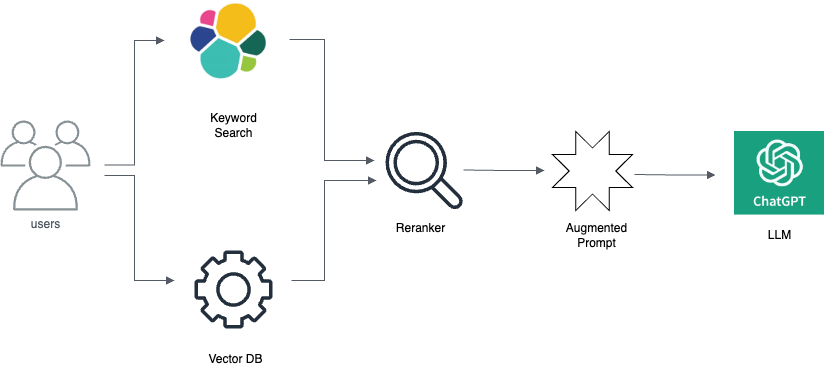
Semantic search is great for businesses with different content. They're especially useful in e-commerce sites, customer service portals, and content-heavy platforms where users are likely to phrase their queries just like they're talking to a human.
Improved Error Tolerance#
AI improves a search engine's ability to handle errors in queries, such as typos or misspellings, by understanding user intent and returning relevant results. This improves user experience by making the search function less frustrating.
Automated Insights from Search Data#
AI can automatically analyze data from search queries to uncover trends and patterns in user behavior. These insights can guide content creation, marketing strategies, and inventory management.
Switch to Smarter, More Intuitive Search Solutions with Denser.ai#
Looking for a smarter way to help your website visitors find exactly what they need?
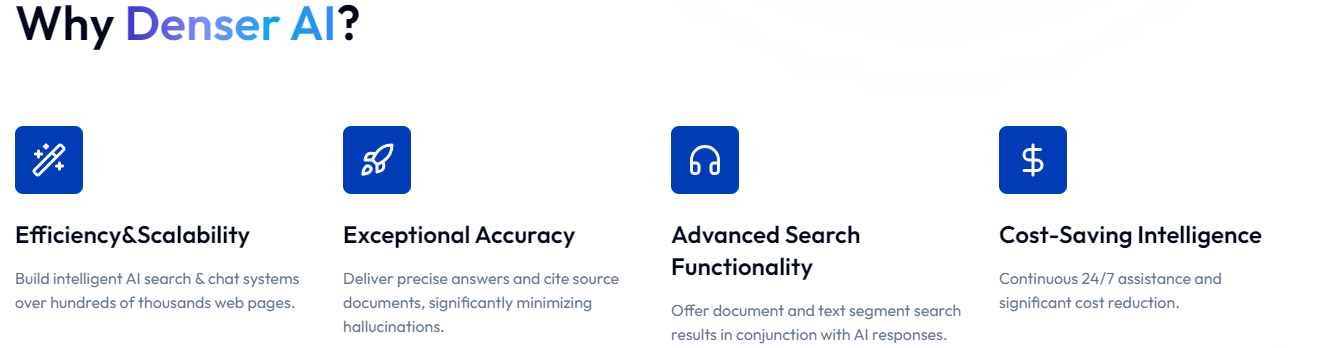
Denser.ai goes beyond traditional keyword searches by using advanced AI and natural language processing to understand user queries truly. It understands the intent behind every search, making it a powerful tool for anyone navigating your website.
Denser.ai uses Retrieval-Augmented Generation (RAG) to keep tabs on and organize web pages, which ensure that information is easy to find and ready when users need it. This intuitive tool can handle huge amounts of data and gets even smarter about fetching and refreshing content automatically. Denser.ai displays filters and saved searches in a left panel, allowing users to easily refine and manage their search experience.
Want to see how it can transform your website's search experience? Request a product demo, or sign up for a free trial today!
Frequently Asked Questions About Search UX#
Can search UX impact SEO?#
Yes, search UX can impact SEO indirectly by affecting user engagement metrics such as time on site and bounce rates, which search engines consider when ranking sites.
How do I handle zero results in search UX?#
Instead of leaving them stranded, guide them with helpful suggestions. Offer alternatives or tweaks to their original search terms, link to customer support, or direct them to popular pages. This way, you turn a potentially frustrating dead end into an opportunity for further exploration.
How does voice search influence search UX?#
Voice search opens up your website to a broader audience, including those who might find typing difficult or those who are on the go and need quick answers. This adds a layer of user-friendliness that can improve how people experience your site.