
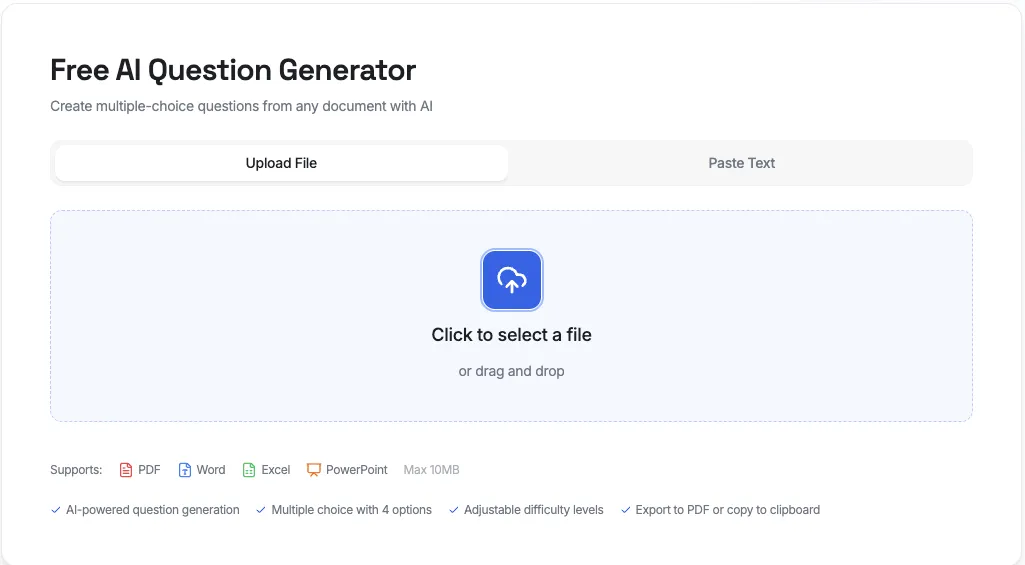
AI Question Generator: Create Quiz Questions from Any Document Instantly

Creating quiz questions manually is one of the most time-consuming tasks for educators, trainers, and content creators. Whether you're a teacher preparing exam materials, a corporate trainer designing assessments, or an online course creator building knowledge checks, you've probably spent hours crafting questions from your content.
AI question generators have revolutionized this process. Instead of reading through documents and manually creating questions, you can now upload any file and generate relevant, well-structured quiz questions in seconds.
In this comprehensive guide, we'll explore what AI question generators are, their benefits, and how you can use Denser AI's free question generator to create quiz questions from any document - without signing up.
What Is an AI Question Generator?#
An AI question generator is an intelligent tool that uses natural language processing (NLP) and large language models (LLMs) to analyze text content and automatically generate relevant questions. Unlike simple keyword-matching tools, AI-powered question generators understand context, identify key concepts, and create meaningful questions that test comprehension.
Modern AI question generators can:
- Generate multiple-choice questions with plausible answer options
- Create questions at different difficulty levels (easy, medium, hard)
- Provide explanations for correct answers
- Work with various file formats including PDF, Word, Excel, and PowerPoint
- Process text input directly without requiring file uploads
Why Use an AI Powered Question Generator?#
1. Save Hours of Preparation Time#
Research shows that creating a single high-quality quiz question can take 15-30 minutes when done manually. An AI question generator can produce 10 questions in under a minute - that's a potential time savings of 5+ hours per quiz.
2. Ensure Comprehensive Coverage#
When creating questions manually, it's easy to focus on certain topics while overlooking others. AI analyzes the entire document and generates questions that cover all key concepts, ensuring balanced assessment coverage.
3. Maintain Consistent Quality#
Human-created questions can vary in quality depending on fatigue, time pressure, or familiarity with the material. AI generates consistently structured questions with well-crafted distractors (wrong answer choices) every time.
4. Support Different Learning Objectives#
AI question generators can create questions at various cognitive levels - from basic recall to analysis and evaluation - helping you align assessments with specific learning objectives.
5. No Technical Skills Required#
Modern AI question generators are designed for everyone. You don't need any technical knowledge - just upload your document and let the AI do the work.
How Does Denser AI Question Generator Work?#
Denser AI offers a free, powerful question generator that makes creating quizzes effortless. Here's how to use it:
Step 1: Choose Your Input Method#
Denser AI offers two ways to input your content:
Option A: Upload a Document Upload any PDF, Word (.docx), Excel (.xlsx), PowerPoint (.pptx), or text file up to 10MB. The AI will extract and analyze the content automatically.
Option B: Paste Text Directly If you have text content ready, simply paste it into the text input area. This is perfect for quick question generation from articles, notes, or any text content (minimum 100 characters).
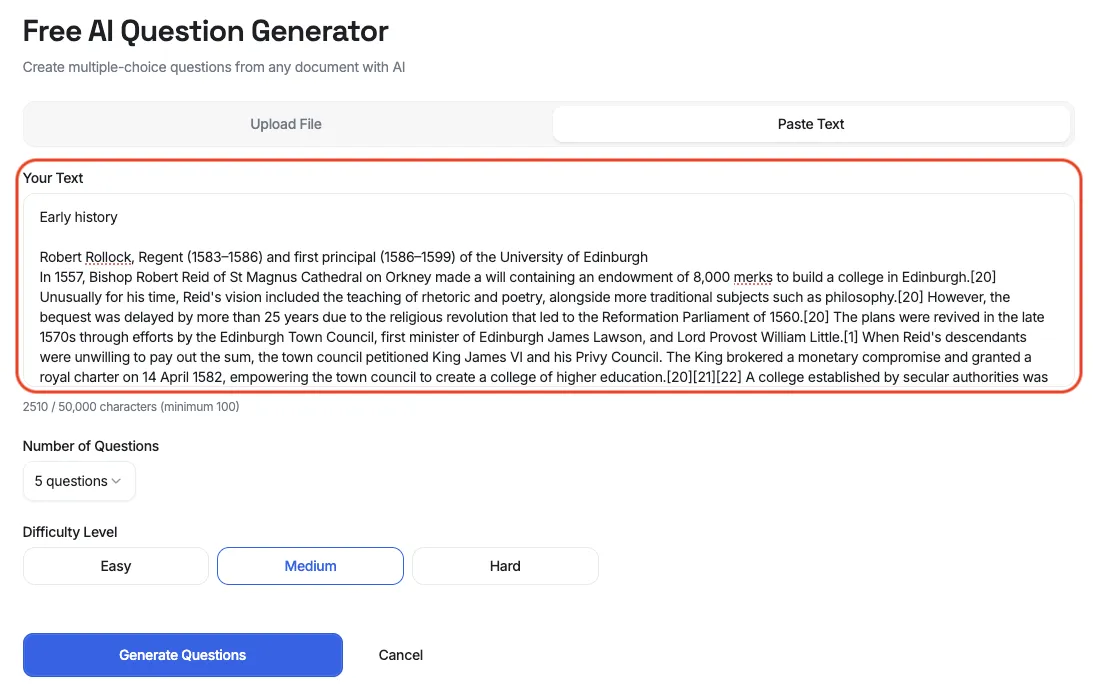
Step 2: Configure Your Settings#
Before generating questions, customize your quiz:
Number of Questions Choose between 5 or 10 questions per generation. This helps you create quizzes of the right length for your needs.
Difficulty Level Select from three difficulty levels:
- Easy: Basic comprehension and recall questions
- Medium: Application and analysis questions
- Hard: Synthesis and evaluation questions
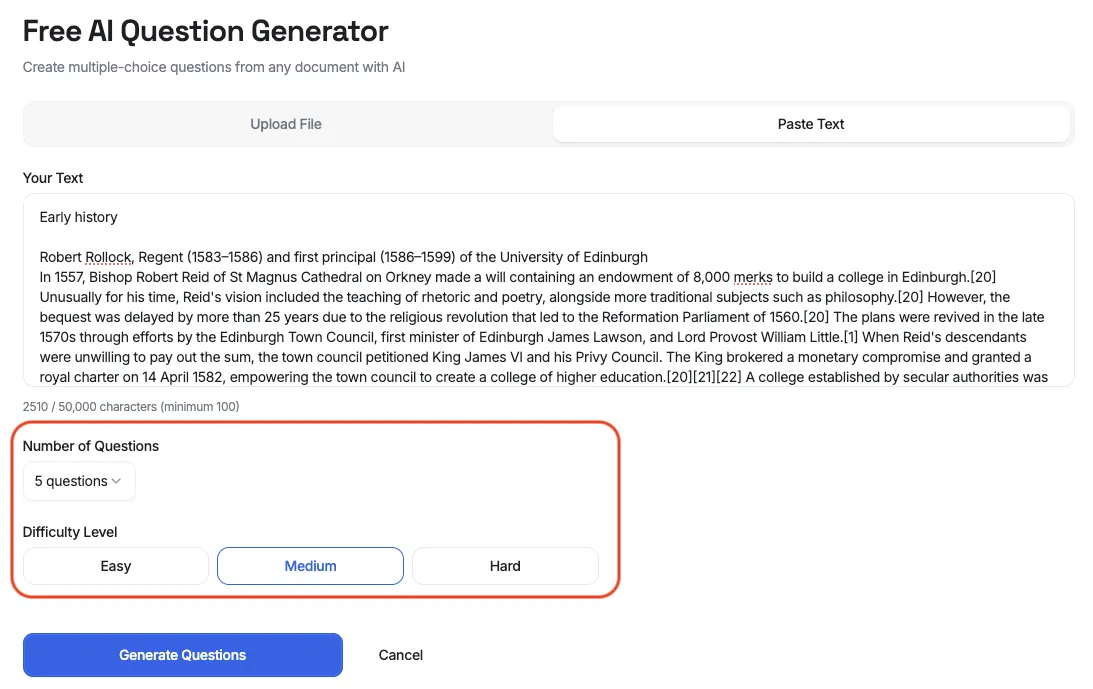
Step 3: Generate Questions#
Click the "Generate Questions" button and wait a few seconds. The AI will:
- Analyze your document content
- Identify key concepts and information
- Create relevant multiple-choice questions
- Generate plausible answer options
- Provide explanations for correct answers
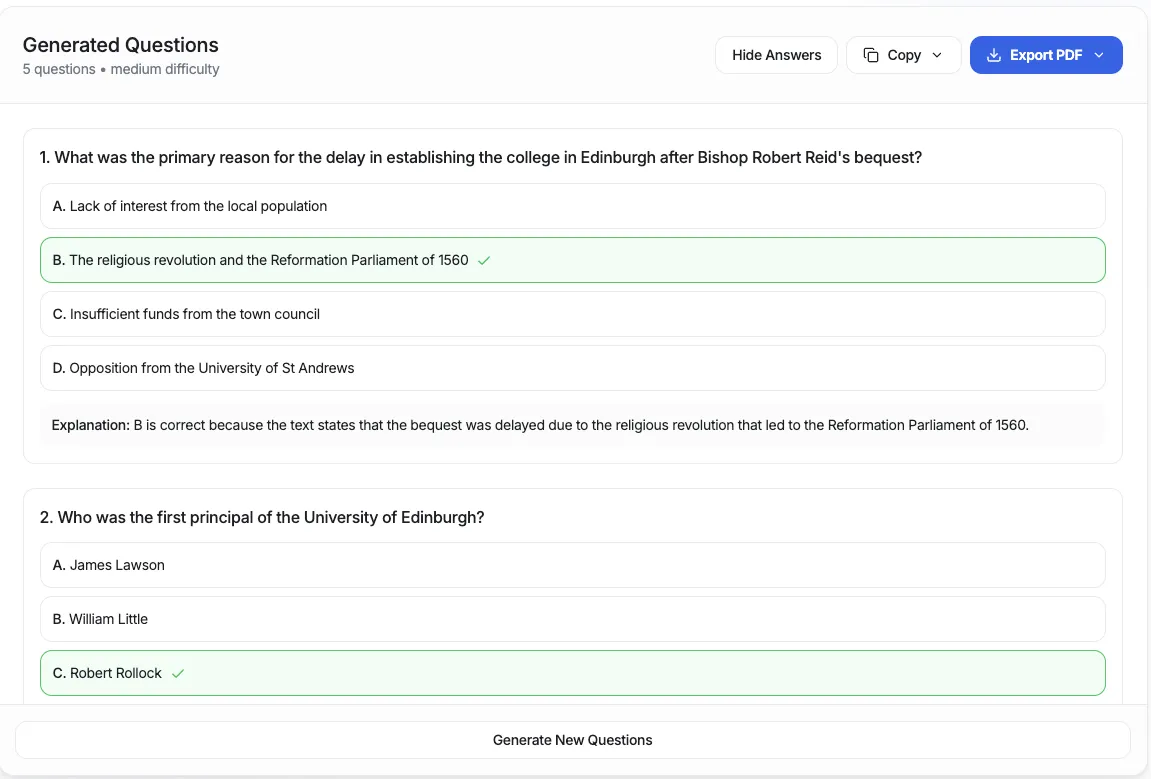
Step 4: Review and Export#
Once generated, you can:
- Preview all questions with or without answers visible
- Toggle answer visibility to create student and teacher versions
- Copy to clipboard - with or without answer keys
- Export to PDF - professionally formatted for printing
Key Features of Denser AI Question Generator#
No Signup Required#
Unlike most AI tools, Denser's question generator is completely free to use without creating an account. Simply visit the page, upload your document, and start generating questions immediately.
Multiple Choice Format#
All questions are generated in multiple-choice format with four options (A, B, C, D). This format is:
- Easy to grade automatically
- Familiar to students
- Suitable for both formative and summative assessments
Detailed Explanations#
Every question includes an explanation of why the correct answer is right. This turns your quiz into a learning tool, helping students understand concepts even when they answer incorrectly.
Support for Multiple File Types#
The AI question generator works with:
- PDF - Research papers, textbooks, reports
- Word (.docx) - Lecture notes, study guides
- Excel (.xlsx, .xls) - Data-based content
- PowerPoint (.pptx) - Presentation slides
- Text files (.txt) - Plain text content
- HTML - Web content
Adjustable Difficulty#
Whether you're creating a quick knowledge check or a challenging final exam, the difficulty setting lets you generate appropriate questions for any assessment purpose.
Who Benefits from AI Question Generators?#
Teachers and Educators#
Create quizzes, tests, and exam questions from textbooks, lecture notes, and study materials. Save hours of preparation time and focus on teaching instead of question writing.
Use cases:
- Mid-term and final exams
- Weekly quizzes
- Homework assignments
- Study guides with self-assessment questions
Corporate Trainers#
Transform training materials, policy documents, and onboarding guides into effective assessments.
Use cases:
- Compliance training assessments
- Product knowledge quizzes
- Employee certification exams
- Skills verification tests
Students#
Generate practice questions from study materials to prepare for exams. Test your understanding before the real exam.
Use cases:
- Self-assessment before tests
- Study group quiz sessions
- Exam preparation
- Concept review
Online Course Creators#
Build engaging quizzes for e-learning platforms without spending hours on question creation.
Use cases:
- Module completion quizzes
- Course assessments
- Knowledge checkpoints
- Certification exams
Content Creators#
Create interactive quizzes to engage your audience and increase content interaction.
Use cases:
- Blog post quizzes
- Newsletter engagement
- Social media content
- Lead magnets
Best Practices for Using AI Question Generators#
1. Use High-Quality Source Material#
The quality of generated questions depends on your input. Use well-written, comprehensive documents for best results.
2. Review and Edit Generated Questions#
While AI generates high-quality questions, always review them before use. You may want to:
- Adjust wording for your audience
- Modify difficulty levels
- Add context-specific details
3. Mix AI-Generated and Manual Questions#
For important assessments, combine AI-generated questions with manually created ones to ensure comprehensive coverage and personal touch.
4. Use Appropriate Difficulty Levels#
Match the difficulty setting to your assessment purpose:
- Easy: Quick knowledge checks, study guides
- Medium: Regular quizzes, homework
- Hard: Final exams, certification tests
5. Leverage Explanations for Learning#
Share the explanations with students after assessments. This transforms tests from pure evaluation into learning opportunities.
Getting Started with Denser AI Question Generator#
Ready to save hours of quiz creation time? Here's how to get started:
- Visit denser.ai/question-generator
- Upload your document or paste your text
- Select the number of questions and difficulty level
- Click "Generate Questions"
- Review your questions and export as needed
No account creation, no credit card, no hassle. Just instant quiz questions from any document.
Advanced Tips for Power Users#
Generate Multiple Sets#
Create multiple question sets from the same document by running the generator several times. Each generation produces different questions, giving you a larger question bank.
Combine with Other Denser AI Tools#
Denser AI offers other free tools that complement the question generator:
- PDF Summarizer - Get summaries before generating questions
- AI Chatbot - Create interactive Q&A experiences
Create Answer Keys Separately#
Use the export feature twice - once without answers for students, and once with answers for your grading reference.
Frequently Asked Questions#
Is the AI Question Generator free to use?#
Yes, Denser AI's question generator is completely free to use. There's no signup required, no credit card needed, and no hidden fees. Simply upload your document and generate questions.
What file formats are supported?#
The AI question generator supports PDF, DOCX (Word), XLSX and XLS (Excel), PPTX (PowerPoint), TXT (plain text), HTML, and CSV files. Maximum file size is 10MB.
How many questions can I generate?#
You can generate between 5 and 10 questions per document. To create more questions, simply run the generator multiple times - each generation produces different questions.
Are the questions accurate?#
The AI analyzes your document content and generates contextually relevant questions. However, we recommend reviewing all questions before use, especially for high-stakes assessments. The AI provides explanations for each answer to help you verify accuracy.
Can I edit the generated questions?#
Yes, you can copy the questions and edit them as needed. The copy-to-clipboard feature makes it easy to paste questions into your preferred document editor for modifications.
Is my document data secure?#
Yes, uploaded documents are processed securely and automatically deleted after 7 days. We do not use your documents to train AI models or share them with third parties.
Can I use this for commercial purposes?#
Absolutely. The generated questions can be used for educational, training, or commercial purposes. There are no restrictions on how you use the output.
Does it work in languages other than English?#
The AI primarily works best with English content, but it can process documents in other languages. Question quality may vary depending on the language.
Conclusion#
AI question generators have transformed how educators, trainers, and content creators approach assessment creation. Instead of spending hours crafting questions manually, you can now generate high-quality, contextually relevant quiz questions in seconds.
Denser AI's question generator stands out by offering this powerful capability completely free, with no signup required. Whether you're a teacher preparing weekly quizzes, a corporate trainer building assessments, or a student creating practice tests, this tool can save you significant time while maintaining question quality.
Ready to transform how you create quizzes? Try Denser AI Question Generator now - upload your first document and see the results in seconds.