
Agent Skills: The Complete Guide to Extending AI Coding Agents

AI coding agents like Claude Code, GitHub Copilot, and OpenAI Codex are powerful out of the box. But every team has unique workflows, internal tools, and domain knowledge that a general-purpose agent doesn't know about. Agent skills solve this by packaging reusable instructions and tools into modular components that any compatible agent can discover and load automatically.
This guide covers what agent skills are, how the ecosystem evolved, the top skills to install, and how to build your own — with a real-world example from how we use skills at Denser.
What Are Agent Skills?#
An agent skill is a directory containing a SKILL.md file with YAML frontmatter and Markdown instructions. When an AI coding agent encounters a task, it checks installed skills to see if any are relevant, then loads the matching skill's instructions into its context.
Here's a minimal example:
---
name: deploy-to-vercel
description: Deploy Next.js apps to Vercel with zero-downtime
---

# Deploy to Vercel

When the user asks to deploy, follow these steps:
1. Run `vercel --prod` in the project root
2. Verify the deployment URL is accessible
3. Report the URL back to the user
The key design principle is progressive disclosure:
- Metadata (~100 tokens): Skill name and description are always loaded so the agent can decide relevance without consuming context
- Instructions (under 5,000 tokens): The full SKILL.md body loads only when the agent determines the skill applies
- Resources (as needed): Supporting files in scripts/, references/, and assets/ directories load on demand
This architecture means you can have hundreds of skills installed without bloating the agent's context window. Only the relevant skill activates for each task.
A Brief History#
The concept of extending AI agents with domain-specific knowledge evolved rapidly:
| Date | Milestone |
|---|---|
| Oct 2025 | Anthropic introduces Skills for Claude |
| Dec 2025 | Open standard published at agentskills.io |
| Late Dec 2025 | OpenAI and Microsoft adopt SKILL.md |
| Jan 2026 | Google Gemini CLI support; skills.sh launches |
| Feb 2026 | GitHub Agent HQ; ecosystem surpasses 280K skills |
The strategy mirrors what Anthropic did with MCP (Model Context Protocol): build something useful internally, open-source it as a standard, and watch the industry adopt it. Within weeks, every major AI coding agent supported the same SKILL.md format.
Why Skills Matter for Agentic AI#
Without skills, developers repeat the same complex instructions every session. "Always use our internal component library." "Follow our Git branching convention." "Deploy to staging first, then production." Skills capture these patterns once and apply them automatically.
For individuals, skills eliminate repetitive prompting. Install a skill for your preferred testing framework, deployment pipeline, or code review process, and the agent follows it every time.
For teams, skills encode organizational knowledge. Your team's coding standards, architecture decisions, and deployment workflows become reusable packages that every team member's agent can use consistently.
For the ecosystem, the standardized format means a skill written for Claude Code works unchanged in Codex, Copilot, Cursor, Gemini CLI, and 20+ other agents. Write once, use everywhere.
The SKILL.md Specification#
The official specification defines the standard format:
my-skill/
├── SKILL.md              # Required - frontmatter + instructions
├── scripts/              # Optional - executable code (Python, Bash, JS)
├── references/           # Optional - additional docs loaded on demand
└── assets/               # Optional - templates, schemas, images
Required frontmatter fields:
- name: 1-64 characters, lowercase with hyphens
- description: 1-1024 characters explaining what the skill does and when to use it
Optional fields include license, compatibility (environment requirements), metadata (author, version), and allowed-tools (pre-approved tool list).
Three Essential Resources#
1. Anthropic Skills Repository#
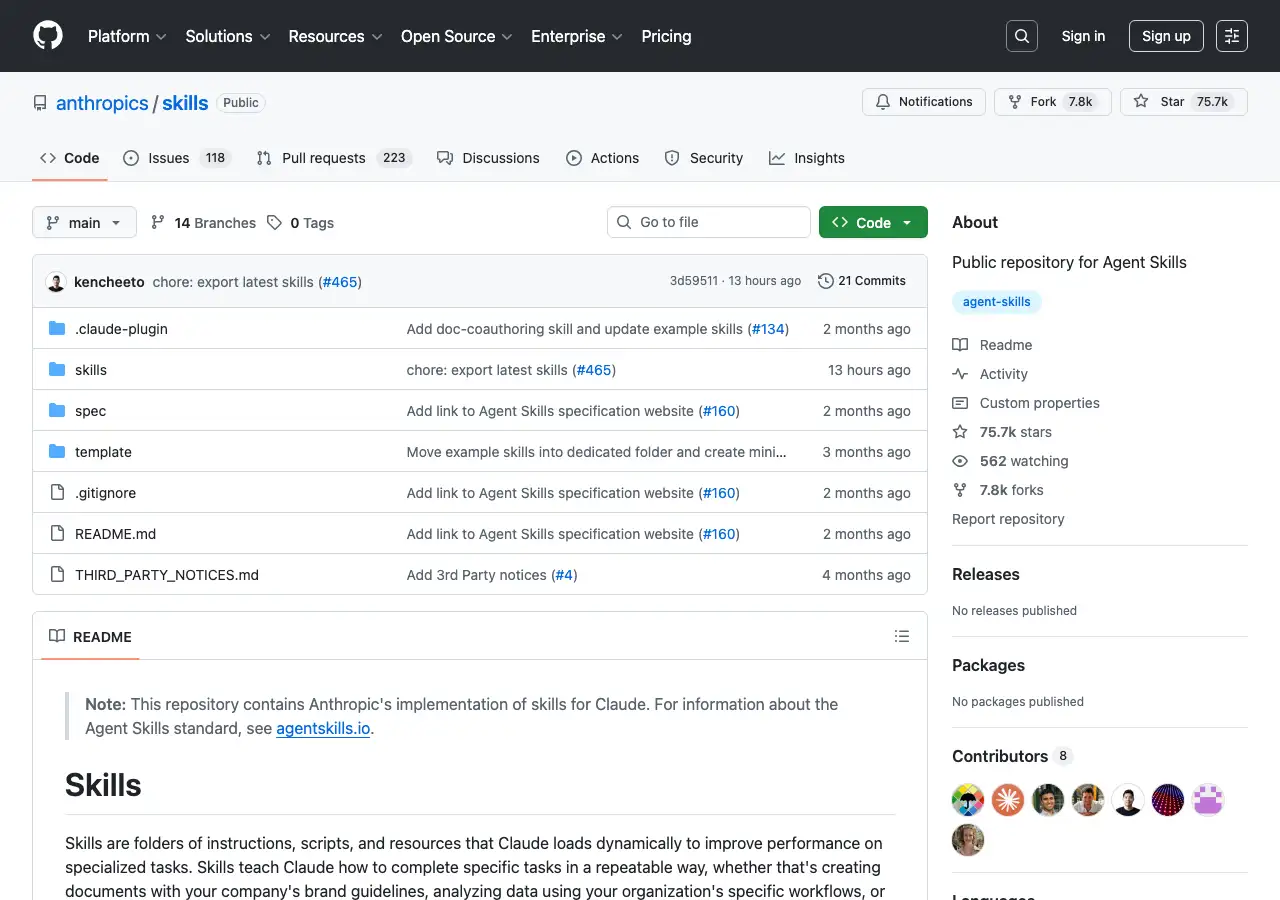
The official repository at github.com/anthropics/skills is the reference implementation and starting point for the ecosystem. With over 75,000 stars, it contains:
- Example skills across categories: Creative/Design, Development/Technical, Enterprise/Communication, and Document skills
- The Agent Skills specification defining the SKILL.md format
- A skill template for bootstrapping new skills
- Production reference implementations for document handling (PDF, DOCX, PPTX, XLSX)
The document skills are particularly instructive. The PDF skill, for example, bundles a Python script that extracts form fields deterministically. Instead of having the agent parse PDFs in its context window, the skill delegates to executable code — a pattern that demonstrates how skills combine instructions with tools.
To install a skill from this repository:
npx skills add anthropics/skills
2. skills.sh#
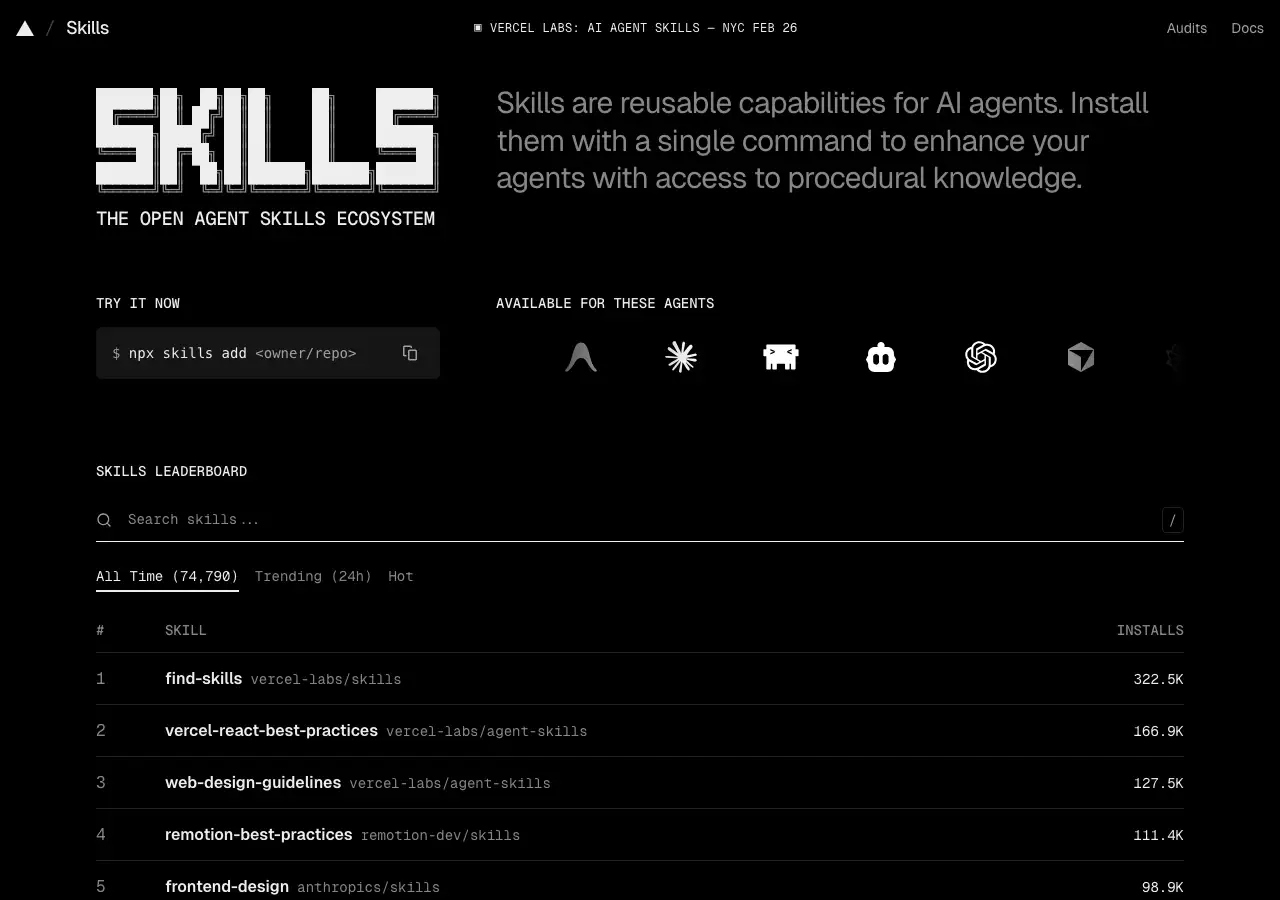
skills.sh is the package manager and discovery platform for the agent skills ecosystem, built by Vercel Labs. Think of it as npm for agent skills.
The registry indexes over 74,000 skills with leaderboard rankings by total installs, trending (24-hour), and "hot" scores. Top skills include:
- find-skills (322K+ installs) — Meta-skill that helps discover other skills
- vercel-react-best-practices (167K+ installs) — React and Next.js patterns from Vercel Engineering
- web-design-guidelines (127K+ installs) — UI/UX best practices
The CLI tool makes installation trivial:
# Search for skills
npx skills find react performance

# Install a skill
npx skills add vercel-labs/agent-skills@vercel-react-best-practices

# List installed skills
npx skills list

# Create a new skill
npx skills init my-custom-skill
The CLI auto-detects which coding agents you have installed (Claude Code, Codex, Cursor, etc.) and places skills in the correct directories with no manual configuration.
3. SkillsMP#
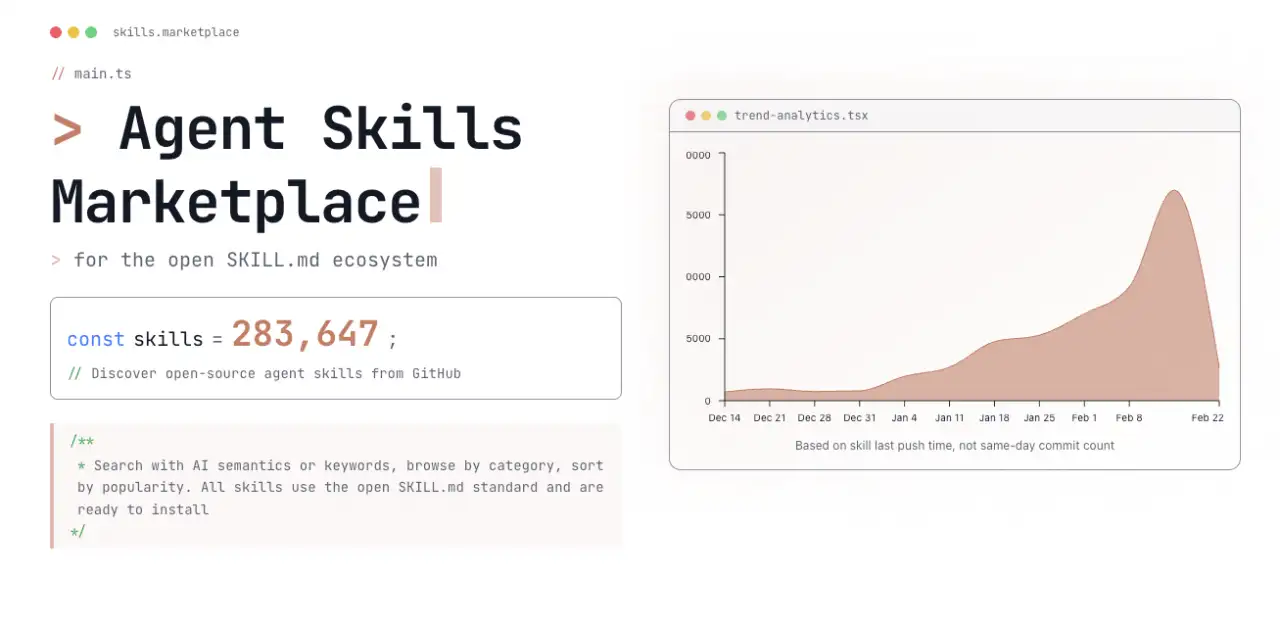
SkillsMP is an independent marketplace for the open SKILL.md ecosystem that discovers and indexes open-source agent skills from GitHub. As of February 2026, it tracks over 283,000 skills — up from near zero in mid-December 2025, reflecting the explosive adoption of the standard.
The site lets you search with AI semantics or keywords, browse by category, and sort by popularity. All indexed skills use the open SKILL.md standard and are ready to install. A trend chart on the homepage shows the growth curve: a sharp spike in early January 2026, followed by sustained high activity as thousands of new skills are published weekly.
SkillsMP complements skills.sh by offering a browsable web catalog with richer discovery features, while skills.sh focuses on the CLI installation workflow.
Top 10 Skills to Install Right Now#
These are the most-installed skills across the ecosystem as of February 2026. Each one is a single command away:
| # | Skill | Installs | What It Does |
|---|---|---|---|
| 1 | find-skills | 322K | Helps your agent discover and install other skills |
| 2 | vercel-react-best-practices | 167K | React and Next.js patterns from Vercel Engineering |
| 3 | web-design-guidelines | 127K | UI/UX best practices for layout, typography, accessibility |
| 4 | remotion-best-practices | 111K | Programmatic video creation with Remotion |
| 5 | frontend-design | 99K | Anthropic's reference skill for polished frontend interfaces |
| 6 | agent-browser | 59K | Browse websites, extract content, take screenshots |
| 7 | vercel-composition-patterns | 57K | React Server Component patterns — streaming, Suspense |
| 8 | azure-observability | 53K | Monitor and diagnose Azure resources |
| 9 | azure-ai | 53K | Deploy and manage Azure AI services |
| 10 | azure-cost-optimization | 53K | Analyze and reduce Azure cloud spend |
Install any skill with:
npx skills add <owner/repo@skill-name>
Start with find-skills — it teaches your agent how to search and install other skills, so you can discover new capabilities conversationally.
Getting Started#
Here's how to go from zero to your first skill in under two minutes. We'll install web-design-guidelines — a skill that teaches your agent UI/UX best practices so every component it builds follows modern design patterns.
Step 1: Install the skill
npx skills add vercel-labs/agent-skills@web-design-guidelines
The CLI detects your installed agents and places the skill in the right directory automatically.
Step 2: Use it
Open your coding agent and ask it to build something:
"Create a pricing page with three tiers: Free, Pro, and Enterprise"
Without the skill, your agent produces functional but generic HTML. With the skill installed, it automatically applies accessible color contrast, consistent spacing, responsive breakpoints, and clear visual hierarchy — without you having to mention any of these in your prompt.
Step 3: Explore more
npx skills find testing        # Find testing skills
npx skills find deployment     # Find CI/CD skills
npx skills find react          # Find React-specific skills
Or browse the full catalog at skills.sh and skillsmp.com.
Agent skills represent a shift from "prompt engineering" to "skill engineering." Instead of crafting the perfect prompt each time, you package your knowledge once and let every compatible agent use it. The ecosystem is growing rapidly — and the barrier to contributing is as low as writing a Markdown file.
Build Your First Skill#
Creating a skill takes less than five minutes. Here's a complete walkthrough:
Step 1: Scaffold the skill
npx skills init my-deploy-checklist
This creates a directory with a SKILL.md template.
Step 2: Write your SKILL.md
Replace the template content with your instructions:
---
name: my-deploy-checklist
description: Run pre-deployment checks for our Next.js app before pushing to production
---

# Deploy Checklist

Before deploying, run these checks in order:

1. Run `pnpm typecheck` and fix any TypeScript errors
2. Run `pnpm lint:fix` to auto-fix linting issues
3. Run `pnpm test` and ensure all tests pass
4. Check for uncommitted changes with `git status`
5. Build the project with `pnpm build` to catch build errors
6. If all checks pass, confirm with the user before running `git push origin main`

## Rules
- NEVER skip the typecheck step
- If any step fails, stop and report the error — do not continue to the next step
- Always show the user the output of each command
Step 3: Test it locally
Your skill is already active — it lives in .claude/skills/my-deploy-checklist/SKILL.md (or the equivalent directory for your agent). Try asking your agent: "run the deploy checklist."
Step 4: Share it
Push your skill to GitHub and anyone can install it:
# From inside the skill directory
git init && git add . && git commit -m "Initial skill"
gh repo create my-deploy-checklist --public --push
Others install it with:
npx skills add your-username/my-deploy-checklist
That's it. No build step, no package registry, no configuration files. A Markdown file in a Git repo is all you need.
How Denser Uses Skills#
At Denser, we use agent skills in production to extend our AI chatbot platform. Our most impactful skill is a browser automation skill that gives Denser Chat the ability to browse websites in real time.
When a user asks "summarize the denser.ai website," the chatbot doesn't search a pre-indexed database — it actually visits the site, reads the content, and synthesizes a response. This is powered by a browser skill that:
- Teaches the agent how to use headless Chromium via the agent-browser CLI
- Manages multi-turn browser sessions (open page, extract content, navigate, repeat)
- Pre-fetches Google results via API to avoid CAPTCHA blocks on search engines
- Isolates each browser session so concurrent users don't interfere
The skill reduced our browser automation from 10 turns/100 seconds to 4 turns/80 seconds by encoding strict performance rules directly in the SKILL.md — rules like "never wait for network idle" and "combine metadata extraction into a single eval call."
We wrote a detailed technical deep dive on this implementation: How We Built a Browser Skill to Power Real-Time Web Search in Denser Chat.
FAQ#
What is an agent skill?#
An agent skill is a modular package of instructions (written in Markdown with YAML frontmatter) that teaches an AI coding agent how to perform a specific task. Skills are loaded automatically when relevant, so the agent activates the right knowledge without the user needing to repeat instructions.
Which AI agents support skills?#
Over 27 agents support the SKILL.md standard, including Claude Code, GitHub Copilot, OpenAI Codex, Google Gemini CLI, Cursor, Windsurf, Goose, Amp, and many more. Skills are cross-platform — a skill written for one agent works in all compatible agents.
How do I install a skill?#
Use the npx skills CLI: npx skills add <owner/repo> to install from GitHub, or npx skills find <query> to search the ecosystem. The CLI auto-detects your installed agents and places skills in the correct directories.
Are agent skills safe to use?#
Most skills are open source and can be reviewed before installation. However, research shows about 26% of skills contain at least one vulnerability. Always review a skill's source code, especially if it uses allowed-tools to request elevated permissions. Prefer skills from trusted publishers with high install counts.
What's the difference between skills and MCP?#
MCP (Model Context Protocol) handles tool integration — giving agents access to external APIs, databases, and services. Skills codify higher-level procedural knowledge — teaching agents how and when to use those tools in complex workflows. They complement each other: a skill might reference MCP tools while providing the procedural "how-to" layer.